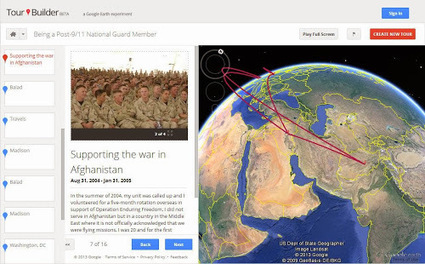
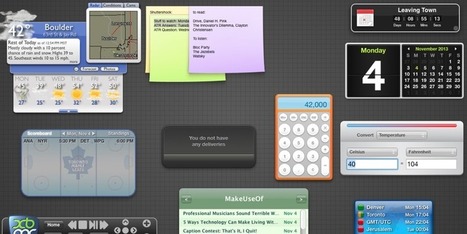
Apple has changed things in 10.9, but making a recovery drive is still possible.
Via Kathleen Cercone

 Your new post is loading...
 Scoop.it! Apple has changed things in 10.9, but making a recovery drive is still possible. Via Kathleen Cercone 
No comment yet.
Sign up to comment
Scoop.it!
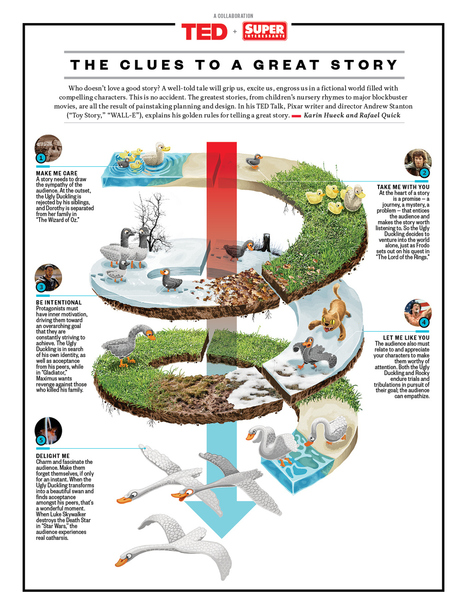
A good story does have to abide by certain rules and these rules are learned through practice. Andrew Stanton, the Pixar writer and director behind both Toy Story and WALL-E, talks some of these rules in his popular TED Talk, The clues to a great story. Via Andrea Zeitz
Scoop.it!
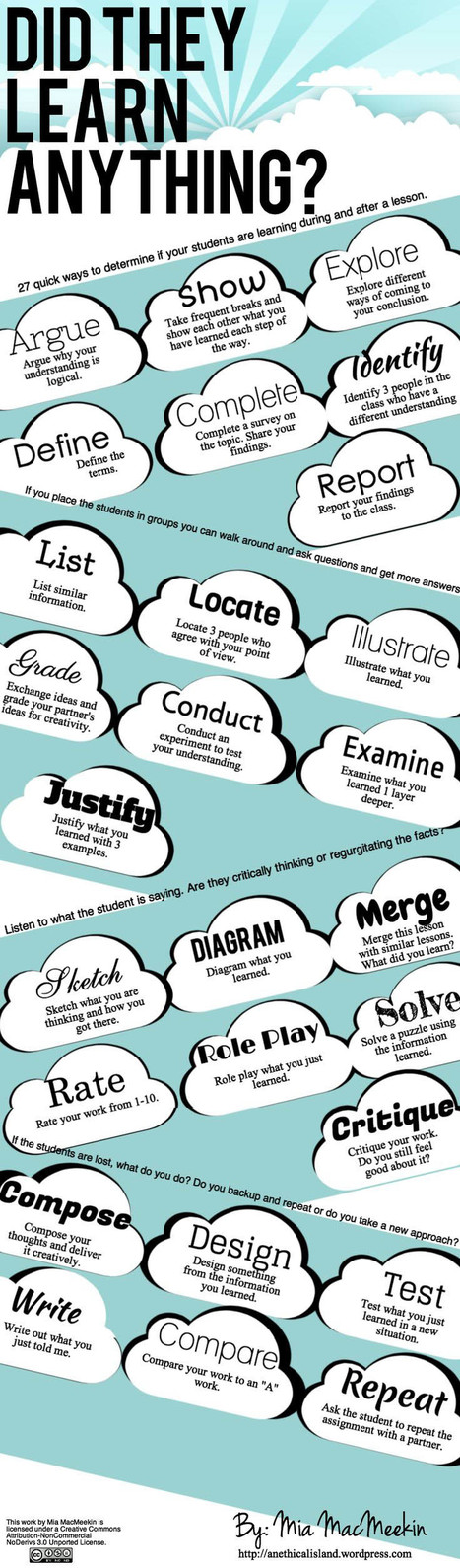
"Checking for understanding is the foundation of teaching.Whether you’re using formative assessment for data to personalize learning within a unit, or more summative data to refine a curriculum map, the ability to quickly and easily check for understanding is a critical part of what you do. (Which was the idea behind our post last March, “10 Assessments You Can Perform In 90 Seconds Or Less.”) "The following infographic Mia MacMeekin offers up 27 additional ways to check for understanding. Some aren’t necessarily quick–”Test what you learned in a new situation”–but there are a dozen or more other ideas that are worth adding to your teacher toolbox, many of which aren’t content-related, but rather cognitively-related (Locate 3 people who agree with your point of view.)" Via Margarita Parra

Mary Reilley Clark's curator insight,
November 15, 2013 9:32 AM
Several of these would be easy to use with library lessons.
Scoop.it!
How to make the most of your creative mind Tony Buzan, Author, educationalist and the creator of Mind Mapping (R) Very few people can claim to have invented ... Dennis T OConnor's insight: I used to teach Tony Buzan's techniques to my 8th graders (way back before the turn of the century). Great ideas for idea generation during the writing process, and for researching and notetaking. Via Elizabeth E Charles
Scoop.it!
“ Timelines have become an indispensable part of the learning experience as they enable students to participate more actively in learning and acquire knowledge the easy way.” Via Gust MEES, John Purificati, Andrea Zeitz
Scoop.it!

A 6-Step Process For Adding Gamification To Your Classroom Gamification is the integration of game-like mechanics into non-game “stuff.” For years, schools have been gamified. Points for performance. Points accrue to earn “badges” (e.g., letter... Via Nancy Jones, Lynnette Van Dyke

Nancy Jones's curator insight,
November 10, 2013 9:57 AM
This topic fascinates me and it puzzles me why teacher are reluctant to get on board with it.
Scoop.it!

by A. Walsh and E. Coonan, published August 2013. Jim Lerman's insight: A comprehensive collection of papers by leading practitioners of information literacy guidance, support, and instruction; including practical suggestions and case-study type descriptions -- along with some philsophical musings. Quite a useful volume on several levels. From the introduction: "Information literacy is not a fixed set of skills. Information literacy cannot be measured as a percentage or grade. Information literacy is not independent of context. "Information literacy is completely contextual. What it means to be information literate depends on how we are, what we are doing, where we are doing it. The “information literate” thing to do when “searching”; “organising”; “using”; or “communicating” information is different for a school child looking for information on the English civil war compared to a postgraduate researcher. Even within the same person, looking for information on booking a holiday, finding a builder to do some renovation work on their house, or writing a peer reviewed article will display very different ways of being information literate."
Scoop.it!
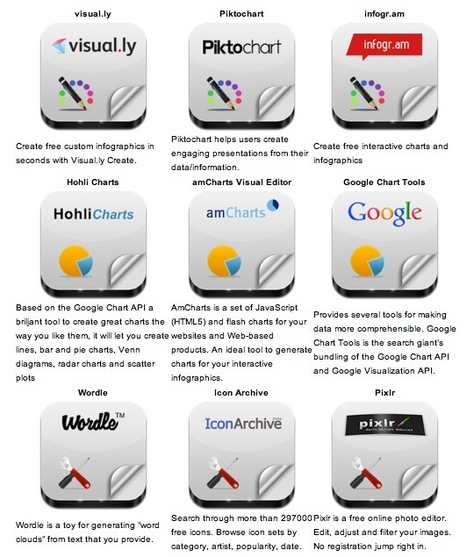
Robin Good: Here is a handy short guide to nine free infographic creation tools that can be utilized to create enticing visuals, word charts and data-based infographics without having special technical skills.
Useful. 8/10
Check them all out: http://www.infographicsarchive.com/create-infographics-and-data-visualization/ ;
(Unearted by Andres Taborga) Via Robin Good, NikolaosKourakos

Sahana Chattopadhyay's curator insight,
May 4, 2015 11:59 PM
Infographics are great tools to present curated and focused content from a specific perspective.
Scoop.it!

"Just as students are no longer tethered to textbooks (in most formal education settings), apps that are strictly didactic–designed to promote academic proficiency and foundational fluency–are often the first that parents and teachers reach for when looking for something “constructive.” But the reality is, the 21st century is as much about finding, evaluating, managing, sharing, and curating information as it is reading texts, answering questions, and applying memorized formulas to neatly scaffolded problems. "So, critical thinking and transfer over accuracy and recall. In that context, what are often thought of as “productivity apps” are not only “educational,” but are often the real marrow of 21st century learning. Instapaper, Pocket, FlipBoard, Next!, iMockups, and Taskpaper are all as handy for project-based learning, mobile learning, and challenge-based learning as they are your average start-up CEO trying to juggle a thousand priorities."
Scoop.it!

Created by teachers and PBL specialists, Curriki Geometry is a completely free course that provides teachers with the resources and support they need to incorporate PBL into their geometry classrooms. Via Dr. Tom D'Amico (@TDOttawa)

Mr. Jordan DHS math's curator insight,
June 11, 2015 8:35 AM
Many uses of PBL in a Geometry Classroom
Scoop.it!

Carolyn Fox shares free and open source education materials for children and teens. Via Alastair Creelman
Scoop.it!
A series of tutorials on how to use the photo editing software: Pixlr. This is a free web site at http://pixlr.com. See my website for worksheets: http://technologyfueled.com/ Via Kathleen Cercone
|
Scoop.it!
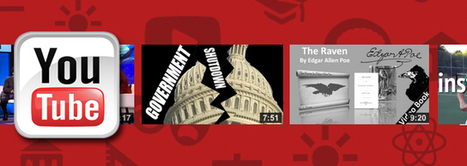
Beth Dichter's insight: YouTube is a great resource...but there are times when you wish you had a list of great channels based on your discipline. InformEd states "we can now sift through thousands of resources while navigating a single repository, the potential for inspiration and growth in the field of education has reached a new height." The criteria that was used to select the channels were "based on views, subscriptions and quality of content." Channels are divided into the following catgories: * General * Physical Science * Engineering & Technology * Mathematics * Politics, History & Current Events * The Arts * Learning a Foreign Language * University Channels Via Beth Dichter

Armando's curator insight,
November 17, 2013 6:49 AM
197 Educational YouTube Channels You Should Know About

Judy Brown's curator insight,
May 29, 2014 7:32 PM
Autistic kids need to be shown lots of love and need a teacher who will treat them right.
Scoop.it!
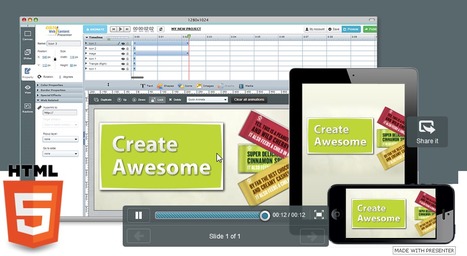
Use Presenter to create free professional interactive HTML5 Presentations, animations, banners, Splash pages and more. Beth Dichter's insight: Are you looking for a tool that will allow you to create interactive presentations, animations, infographics, and more? If so check out EWC Presenter. This is a cloud based tool that is easy to use. When you go to the website you will see a number of presentations that others have created. You can also access a number of videos that discuss the various features of Presenter athttps://vimeo.com/user15791939/videos Because this tool uses HTML5 any presentations you create should also run on mobile devices. Students could use this tool to animate presentations and infographics and work on them from a computer in any location. Via Beth Dichter

Beth Dichter's curator insight,
November 10, 2013 10:06 PM
Are you looking for a tool that will allow you to create interactive presentations, animations, infographics, and more? If so check out EWC Presenter. This is a cloud based tool that is easy to use. When you go to the website you will see a number of presentations that others have created. You can also access a number of videos that discuss the various features of Presenter at https://vimeo.com/user15791939/videos Because this tool uses HTML5 any presentations you create should also run on mobile devices. Students could use this tool to animate presentations and infographics and work on them from a computer in any location.
Scoop.it!
A short tutorial to show how quick and easy it is to use the slide master feature to update the look of your presentation. Google Presentation is part of the... Via Dr. Tom D'Amico (@TDOttawa)
Scoop.it!

review by Michael Karlin...rated Outstanding And that's the app! Yes, it's incredibly simple, but I think that's perfect for this application because it can be used at all ages without much difficulty. It takes less than 30 seconds to figure out how the application works and it can be integrated in a huge variety of subjects. Via Dr. Tom D'Amico (@TDOttawa)

Chrystine Cooper Mitchell's curator insight,
February 14, 2016 8:48 PM
It is an easy tool to help students create quick digital stories or informational videos to illustrate concepts and topics.
Scoop.it!

Jim Lerman's insight: PowerPoint file and workshop handout from presentation made by Andrew Walsh on this topic in Oct. 2013. The handout, particularly, contains numerous valuable links and resources regarding the most current developments in this field. Very useful From the session abstract: "Games are ideally suited to the development of skills, often requiring players to problem- solve, plan, and critically consider strategies to win the game. These are core information literacy skills underlining their suitability for use in the development of information literacy skills we try to help our library users develop. Game based learning can be used in several aspects of information literacy instruction. These include introducing elements of play to encourage reflection on students’ learning; using digital and tabletop games to teach information literacy topics within more traditional information literacy instruction (such as the game SEEK!); and more in depth digital games that students interact with outside library teaching sessions. "This session will cover some key ideas of game based learning and gamification and describe how these ideas may be used in information literacy instruction. It will include a range of examples, including those the presenter has implemented. These include an online library gamification project, Lemontree (http://library.hud.ac.uk/lemontree); and a range of non-digital information literacy games including SEEK!, a card game for improving search skills (http://eprints.hud.ac.uk/15377/). It will draw on experiences from workshops the presenter has facilitated, where librarians design and prototype their own information literacy games. "The session attendees will learn how they may use games in information literacy instruction in their own institution and how they can create games either by themselves or in partnership with others."

Sandra Carswell's curator insight,
November 10, 2013 2:51 PM
I'm going to try out the SEEK game in my library. Planning to play with classes and follow up with discussion. Then, I'll have it as a free play choice available in our game area, along with chess and checkers. 
Peggy Milam Creighton's curator insight,
November 11, 2013 6:47 AM
Draw them in with gaming apps like these and then show them how to use these skills for inquiry!
Scoop.it!

"SAMR, a model designed to help educators integrate technology into teaching and learning, was developed by Dr. Ruben Puentedura, Ph.D.. The model aims to enable teachers to design, develop, and integrate digital learning experiences that utilize technology to transform learning experiences to lead to high levels of achievement for students."
Scoop.it!
"I am a firm believer that a key benefit of flipped instruction is that it frees up some time to enable Active Learning in the classroom. Yong explains in the aforementioned commentary that many faculty at Harvey Mudd are already engaging in active learning methods, and that, “there are lots of studies that show that active learning, formative assessment, group work, project-based learning, just-in-time learning are all measurably good things for students.” Researchers in this particular study are considering questions like, “are flipped classrooms good for students because they create more time for these demonstrably good things, or are there other benefits that we haven’t yet characterized?” Well, those “demonstrably good things” are precisely some of the key deliverables of flipped instruction, so even if these were the only benefits (and I don’t believe they are), we would be ahead of the game." Via Kim Flintoff

Magdalena Martinez's curator insight,
September 15, 2019 1:23 PM
"No study can deny this – freeing up class time enables teachers and students to pursue Active Learning." The flipped classroom facilitates active learning to students. But for teachers to go through this path, they need to instruct themselves first, they need to plan lessons carefully, and put their best effort forward to create the best course content.
Scoop.it!

Download our free resources and begin using the arts to inspire your teaching. Via Ana Cristina Pratas

Beth Kanter's curator insight,
November 9, 2013 8:51 PM
some good ideas to adapt for teaching adults
Scoop.it!
Slidebean is a new presentation tool that lets you focus on the content, and does everything else automatically. We just launched our beta today. Baiba Svenca's insight: Slidebean, launched today, is a new presentation tool which lets you create your slideshow presentations easily. Just upload your content, choose a template and prepare your slides, then present anywhere, on all devices, from any web browser. Via Baiba Svenca

Luís Cálix's curator insight,
November 23, 2013 5:03 PM
Entre no site, carregue o conteúdo que desejar, escolha um template...e já está! Pronto a usar e partilhar. 
Louise Robinson-Lay's curator insight,
December 1, 2013 12:44 AM
Newly launched, Slidebean seems to be trying to do what haiku deck does. Login is with Facebook, not my favorite way of doing things, but there are some nice effects here and it produces clean slide shows.
Scoop.it!

Personalize Learning is launching a free webinar series. Join in the coversation and ask questions from educators and learners in personalized learning environments. Kathleen McClaskey's insight: We are excited to announce the Personalize Learning Webinar Series. We frequently receive questions on "Where is Personalize Learning Happening?" and "What Does it Look Like?". This webinar series offers an opportunity for you to talk directly with educators, learners and thought leaders around the world who create and learn in personalized learning environments.
> Nov 12th, 5pm ET - Mount Abraham Union M/HS, VT, featuring Personalized Learning Coaching Staff and Robin Kuhns, HS Learner
> Dec 7th, 5pmET - The Inquiry Hub, British Columbia featuring David Truss and The Inquiry Hub learners
> Jan 21st - The Motivation Equation presented by Kathleen Cushman Via Kathleen McClaskey

Kathleen McClaskey's curator insight,
November 8, 2013 4:42 PM
We are excited to announce the Personalize Learning Webinar Series. We frequently receive questions on "Where is Personalize Learning Happening?" and "What Does it Look Like?". This webinar series offers an opportunity for you to talk directly with educators, learners and thought leaders around the world who create and learn in personalized learning environments.
> Nov 12th, 5pm ET - Mount Abraham Union M/HS, VT, featuring Personalized Learning Coaching Staff and Robin Kuhns, HS Learner
> Dec 7th, 5pmET - The Inquiry Hub, British Columbia featuring David Truss and The Inquiry Hub learners
> Jan 21st - The Motivation Equation presented by Kathleen Cushman
|