This website helps college teachers develop, deliver, and assess assignments incorporating images, video, and sound.
Beth Dichter's insight:
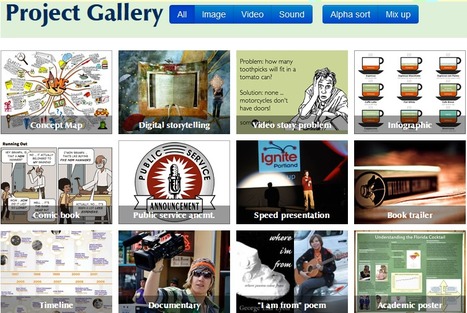
This website from the University Notre Dame provides great resources to help you embrace media-rich experiences for your students. The site currently has 24 projects which you may explore. Each project includes:
* A brief explanation
* Samples of projects
* Resources to help you learn how to make the projects
* Rubrics
The projects listed include: video story project, infographics, academic poster, book trailer, geographic map and many more.
Although this website was designed for college teachers the resources and ideas are useful for any teacher whom would to incorporate more media-based assignment in their classroom.
Fantastic website from Notre Dame helps instructors (and students) design effective media-based assignments. Great examples and how-tos for inspiration.
"Explore 13.7 billion years of shared history and consider the big questions about our Universe, our planet, life, and humanity. From the big bang to modern day to where we are going in the future, big history covers it all
"The Big History Project is a free, online course that tells the story of our Universe and humanity.
"Developing a framework to help people learn about anything and everything. It's inherently interdisciplinary – combining the best of social studies, humanities, and science.
It will take about 6-8 hours to complete the core material and quizzes
The content mixes great editorial with videos, infographics, and imagery
Features leading academics and experts in a range of fields
Optional quizzes test your knowledge along the way"
Jim Lerman's insight
This is a free, interdisciplinary short course supported by Bill Gates. It is available for use by individuals or for teachers to use with classes. Course completers earn badges along the way. School version is intended primarily for Social Studies classes.
The paragraph below is from the school version website:
"The Big History Project is built from the ground up to help teachers and students succeed
100% open, online curriculum and content; easy to download, print, and share
Ready-made lesson plans, inline teaching guidance, and support
Custom-designed content including videos, texts, comics, and animations
Easily tailored state standards and instructional approaches
"How is it that some students have so much to say when talking out loud, but when a pencil is put into their hand they suddenly hesitate, struggle and have nothing to say? How can you help those hesitant writers eliminate the "handicap" or barrier that suddenly appears when asked to write?
"The answer is to simply have them produce "writing" without technically "writing" at all. That's right, the way to get hesitant writers to produce as much "writing" as they do "talking" is to have them do exactly that -- talk."
"Google+ recently launched its Connected Classrooms, an initiative through which schools can embark on "virtual field trips" with institutions including the Seattle Aquarium and the Philadelphia Museum of Art. Teachers can check out Google's trip calendar here, or join the Google+ Community page to collaborate on future trips. Sign up here for more information and to get updates from the Connected Classrooms team."
"Understanding how to connect your iPad to a projector or computer is an integral part of using your iPad in the classroom.
"Once connected, you may also have the ability control your computer like a virtual mouse. Teachers love this because it frees them from standing at the front of their room in order to touch their interactive whiteboard or operate their computer.
"GitHub is so often touted as a tool for coding projects that it’s easy to forget just how useful a resource it is for everything else.
"At the heart of GitHub are two collaborative functions—forking and branching—that aren’t exclusive to coding. Forking means to create a clone of somebody else’s work for remixing. Branching is a way for each person in a group to create a temporary clone for tandem editing, and then push those updates back to the group project again.
"While many of GitHub’s capabilities require knowledge of Git, its underlying and complicated version control language, forking and branching can both be done with nothing more than a GitHub account and a few clicks. GitHub has the additional benefit of a liberal use policy, so you are in complete control of anything you upload there. (See Section F of theGitHub Terms of Service.)
"Forking and branching both have invaluable uses for synergetic projects, and it’s not just coders who have taken advantage of them.
"Here are seven ways people are harnessing GitHub to work together on projects of all stripes."
"The Harvard University Library has worked closely with a vast array of information technology specialists and others to craft this fine collection of research guides. From African Studies to Zoology, each guide contains information culled from both print resources at Harvard's libraries to a plethora of digital resources from around the Internet. There are a number of particularly rich guides here, including those for Data and Biological Sciences. Visitors can learn about each resource in detail, including when they were last updated and other salient details. One can imagine that given the breadth of these guides, they might be used in a variety of educational settings from high school to post-graduate studies"
"Here's how MakerSwarm works. By downloading the official app to your Android device, MakerSwarm allows you to peer into the Wi-Fi-connected gadgets around you for functionality that you can hijack for your own uses. It will then allow you to create a simple app that you can use to trigger that function remotely.
"For example, if you have a Wi-Fi-connected coffee maker, you could create your own "Morning Joe" app that would set your java brewing when you woke up in the morning, just by tapping a button. But that's just the beginning. Using MakerSwarm, you could also link together multiple gadgets, each with different abilities, and trigger them simultaneously. In the case of the Morning Joe app, that might mean your single morning tap not only starts brewing your coffee, but it also tunes the kitchen radio to NPR, turns the heat-up of a Nest thermostat and adjusts the lighting of your Philips Hue lightbulbs."
"A Saskatchewan man who has developed an affordable 3D printer has attracted worldwide attention and more than $700,000 in crowdsourced funding.
"Rylan Grayston, 28, from Yorkton, said curiosity fuelled his quest to create a 3D copier that sells for just $100. Other high-tech 3D printers sell for several thousand dollars or more.
"I didn't have enough money for a 3D printer that I wanted, so I just started thinking about how can I do this myself?" Grayston told CBC News in an interview at a shop in Saskatoon where he is working with his brother on the project."
"The Acer C720 is likely to be this year's cheapest Chromebook at $249, and while it might not be as stylish as the HP Chromebook 11, it does include a Haswell-based processor and SSD storage, making it much faster than Acer's previous model. Join Dan Seifert for a hands-on review of the Acer C720, and be sure to read the full review at the link below:"
"I spent a couple days throwing keywords into OER (open education resources are digital materials freely available through open licenses) search engines to assess the quality of secondary and higher education writing curricula.
"About 10% of the lessons and/or courses met my criteria, which meant the writing courses and lessons had to:
Be free, permanent and public
Support the writing process and involve students in the application of multiple literacies: reading, writing, speaking listening and visualizing
Be take-and-bake, with activities intuitive and/or simple enough to teach next period
Encourage student inquiry, autonomy and high expectations
Prompt me to wonder, "Why didn't I think of that?"
"The Digital Public Library of America brings together the riches of America’s libraries, archives, and museums, and makes them freely available to the world. It strives to contain the full breadth of human expression, from the written word, to works of art and culture, to records of America’s heritage, to the efforts and data of science. The DPLA aims to expand this crucial realm of openly available materials, and make those riches more easily discovered and more widely usable and used, through its three main elements:
"1. A portal that delivers students, teachers, scholars, and the public to incredible resources, wherever they may be in America. Far more than a search engine, the portal provides innovative ways to search and scan through the united collection of millions of items, including by timeline, map, format, and topic.
"2. A platform that enables new and transformative uses of our digitized cultural heritage. With an application programming interface (API) and maximally open data, the DPLA can be used by software developers, researchers, and others to create novel environments for learning, tools for discovery, and engaging apps."
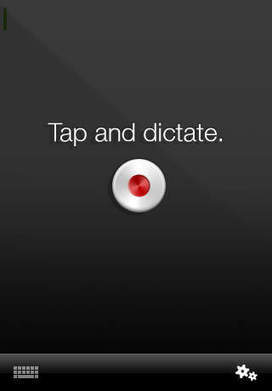
Wondering about speech to text iPad apps? That's a bit different than text to speech or OCR to speech solutions previously featured in this blog.
For now, these are the options I've seen that are focused on speech to text:
Dragon Dictation (Free) - "Dragon Dictation is an easy-to-use voice recognition application powered by Dragon® NaturallySpeaking® that allows you to easily speak and instantly see your text or email messages"
Voice Texting Pro (Free) - "...Speak into the microphone and convert your speech into text. Then directly send your message to e-mail, sms, Twitter or Facebook. You can also send it to your clipboard (copy) and paste the dictated text in any other application."
Speech Notes (Free) - "Speech Notes is a note taking app that can convert speech with the help of internet connection. Just tap on mic button and once done hit again to start converting voice to text."
Voice Assistant ($1.99) - "Voice Assistant Translates Your Voice into Text and Sends It to Virtually Any Other iPhone/iPad App" via LifeHacker
Jim Lerman's insight:
I think this is just such a powerful technology. I'm constantly amazed at how few people use it. I wrote most of my last book using speech-to text-software. It is such a timesaver!
Dragon Dictation (Free) - "Dragon Dictation is an easy-to-use voice recognition application powered by Dragon® NaturallySpeaking® that allows you to easily speak and instantly see your text or email messages"Voice Texting Pro (Free) - "...Speak into the microphone and convert your speech into text. Then directly send your message to e-mail, sms, Twitter or Facebook. You can also send it to your clipboard (copy) and paste the dictated text in any other application."Speech Notes (Free) - "Speech Notes is a note taking app that can convert speech with the help of internet connection. Just tap on mic button and once done hit again to start converting voice to text." Voice Assistant ($1.99) - "Voice Assistant Translates Your Voice into Text and Sends It to Virtually Any Other iPhone/iPad App" via LifeHackerAn interesting note: Evernote on Android allows for speech/voice to text using Google's text transcription service. Read more about it here." http://www.mobileburn.com/21397/news/how-to-automatically-transcribe-voice-notes-for-evernote-catch-and-other-apps-on-android";
"Quandary, an award- winning ethics game, has launched an app for iOS and Android tablets. Quandary promotes critical thinking, perspective-taking and ethical decision-making. The game was produced by Boston-based media and learning company, FableVision Studios."
"GeoGebra is a free, multi-platform online tool that allows students to visualize mathematical concepts. Now you can integrate GeoGebraTube materials directly into your wiki! GeoGebraTube is a repository of dynamic mathematics teaching and learning materials created and shared by GeoGebra users. Teachers and students search this database to view, download, revise, create and share worksheets with others.
"To embed one of these resources in your wiki, go to “Edit” and “Widget” on any of your wiki pages and choose “Education” the “Geogebra” to find pages and pages of interactive student “worksheets” that embed beautifully on your wiki. Amazingly, GeoGebraTube averages 100 new pieces of material every day and has had 22 million visitors since its launch 18 months ago, with some applets receiving more than 100,000 views, exemplified by a Hong Kong based user with 129,000+ views for a worksheet on area of circles."
Jim Lerman's insight:
This functionality requires that Wikispaces be used as the wiki host. Wikispaces has added numerous apps as directly embeddable in users' wikis...a very useful development.
"The adoption of Mind Maps in teaching has grown recently due to the benefits of using Mind Maps to learn and the availability of free online mind mapping software.
"Teachers have recognized the value of using Mind Maps to engage students, encourage creativity and, most importantly, teaching how to learn rather simply memorizing content. Mind Maps have even been integrated into emerging teaching techniques such as the Flipped Classroom and Design Thinking as outlined in the Mind Map on the right.
"How do teachers harness the full power of Mind Mapping? Below are some ideas on how teachers and student can use Mind Maps both in and out of the classroom."
"As I reflect on the process, I see lots of applications for the physics classroom:
The obvious connection is, of course, the circuitry. Rather than using a pre-bought kit or drawing schematic diagrams, kids can learn through a short lesson, designing a plan, and then through trial and error. This makes the learning more "sticky."
More advanced users can add more components and thereby have the opportunity to show their understanding of more complex concepts. This is an easy way to differentiate the classroom.
Students can take their creations home with them to use in their everyday life. This is the perfect way to show that physics is not just a subject in school -- it's all around us.
By adding a creative edge to circuitry and asking students to create circuits in a new way, all students are put on a fairly level playing field, allowing for them to learn from each other and providing opportunities for new "experts" to emerge."
"BYOD classrooms can address a number of issues. It can solve the problem of not having enough (or any) devices for your classroom. It can enable students to do web-based work when they might not have otherwise been able to. It can allow them to do work on the same device at home and at school. But it doesn’t come without issue.
"One of the issues that we’ve heard about from many teachers is that since students come in with different devices that run on different platforms, finding apps and tools that work across a wide array of devices is a necessary evil. The handy symbaloo below takes a look at a bunch of different apps that work across a variety of devices – perfect for the BYOD classroom. A listing of the apps is below, or you can click on the link above to use the interactive Symbaloo to reach each site."
"Keyboard shortcuts are an easy way to save yourself some time and typing if you spend a lot of time click-clacking away at your keyboard like I do. The most common ones are somewhat universal (to many applications, at least). Control + P to print, Control + C to copy, Control + V to paste. Saves a ton of time, especially if you’re editing documents (or blog posts).
"Did you know that social media platforms all have their own shortcuts to speed up your social media experience? The handy infographic below takes a look at keyboard shortcuts for Facebook, Twitter, Youtube, and Google +. So the next time you need to quickly favorite a tweet, retweet it, and reply to it, you’ll know that F R and T are your friends. Less mousing, clicking, drop down menus – bypassing the whole interface can speed up your whole user experience. Give it a try!"
"Boston Museum of Science's Engineering is Elementary (EIE) has created this remarkable set of resources designed for young children with an interest in engineering and technological literacy. The focus of this work is to reach young people who are underserved or underrepresented in STEM fields while also improving educators' ability to teach engineering and technology. On this site, visitors can look over sections that include Educator Resources, The EIE Curriculum, and About Us. Within Educator Resources visitors will find dozens of videos, such as "Inclined Plane Station," "Solar Oven Box," and "Designing Model Membranes." Moving on, the Engineering Adventures subset of EiE Curriculum features a range of free modules designed for after-school progress. The modules here include "Engineering Aid Drop Packages" and "Safe Removal of an Invasive Species." There is also a place where visitors can sign up to receive the EiE newsletter, a delightful source full of updates, tips, and more."
"These 3-D printer things sound pretty cool, right? Prototypes printed right on your desktop! All you need is a CAD file (your own or one of thousands from an online database like the Etsy-esqueShapeways) to turn digital dreams to plastic reality. But as 3-D printing becomes more popular, the number of consumer devices available for purchase is exploding. Which one should you buy? Here’s a breakdown, by cost, of the best consumer 3-D printers on the market today."
"PARCC has released additional sample test questions for its upcoming assessments of Common Core Tate Standards. With this release, the group has now made sample questions available across all grade levels.
"PARCC, the Partnership for Assessment of Readiness for College and Careers, is one of the two state coalitions tasked with developing assessments for Common Core State Standards that will be administered nationwide in the 2014–2015 school year. Eighteen states and the District of Columbia currently make up the coalition, representing about 22 million K-12 students enrolled in public schools.
"According to PARCC, "The sample items have gone through a rigorous review process to ensure they are of high quality and reflect the range of items that will be on the operational tests."
"The sample items can be freely accessed on PARCC's site. Additionally, PARCC is planning to make the sample items available on its own technology platform later this year, "providing an opportunity for students and teachers to try out the assessment system in the manner in which it will be administered."
"Over the past two years, I've been working with my district to transition from the popular textbook towards Open Educational Resources, or OER. One of the leading benefits of OER options is that they are free and open to educators. That in itself is a reason to inquire. The information has been vetted for credibility and some of it is derived from some of the world's top colleges and universities.
"Recently at Burlington Public Schools, we have moved toward opening up our course content and started organizing our faculty-created resources -- presentations, assignment sheets, etc. -- along with OER options. What we are doing is giving our faculty and our students more ways to connect and share dynamic, developing content. Plus, a digital resource created by teachers in conjunction with OER does not require edition upgrades. What's more, teachers can change and update content when they need to. This option gives them full autonomy over their classroom content.
"To manage this transition, we started using Net Texts as our content management and distribution application. Net Texts is a free application that has many similarities to iTunesU. It allows our teachers to post content -- PDFs, videos, photos, audio, etc. -- from their web-based management system directly to the students. Teachers can frontload courses for the year and update at any time. When there is an update, students will receive a red badge on their Net Texts app. Once they sync with the wi-fi, they can update the course. The other advantage of Net Texts is that students can use it offline (if no updates are pending) and open posted resources such as PDFs in third party applications (like Notability)."
The traditional authority of textbooks in education has been unchallenged for years, but now, its dominance is wavering as new alternatives emerge. While credible information still exists in printed books, educators are increasingly turning to Open Educational Resources (OER) for their flexibility and accessibility. In my district, we've been actively transitioning from textbooks to OER over the past two years. One of the primary advantages of OER is their cost-effectiveness, as they are freely available to educators. Additionally, the credibility of OER is assured, with content often sourced from reputable institutions worldwide, making them a compelling option for modern educators.
"Many teachers this year are updating existing curriculum for the Common Core. And it's going to be a long process for everyone. Here, I've collected some open resources that might help in that process, with links to lessons that can serve as building blocks for Common Core-aligned units. The emphasis this time is on English language arts in middle school.
"For those looking for more information, the Foundation for Excellence in Education has produced an overview of examples, and it's a great starting point. To start this blog, here are some open and free resources for close reading in middle school classrooms."
"I'd like to find a way to scan text, then have that text read to the student." Isn't it great to have these kinds of questions that just wander in?
"While there are a variety of computer programs available for optical character recognition (OCR), I had only encountered this on the PaperPort Notes app. That process, while fine for me, wouldn't work well for the intended use.
"Voxdox is a new free text-to-speech app, available now foriphone, android and tablet that will read out any form of text for you in your choice of human voice.
"With Voxdox you can convert files, papers, articles, contracts and even full-length books to quality speech in over 20 languages, and then share them with your friends, class-mates and colleagues using Voxbox, the app’s integrated social database.
"Voxbox has already become the first choice solution for thousands of people around the world for sharing information in the fields of business and academia. By using Voxbox, your networks can find you in seconds and download high quality audio files generated from your text as well as the text itself. After downloading the text they have chosen, all that is left to do is press "play" and it will be read to them in one of a range of human voices."
Jim Lerman's insight:
This is fantastic! You can have your computer read back to you, out loud, any printed document -- even a pdf. For free! Outstanding.
To get content containing either thought or leadership enter:
To get content containing both thought and leadership enter:
To get content containing the expression thought leadership enter:
You can enter several keywords and you can refine them whenever you want. Our suggestion engine uses more signals but entering a few keywords here will rapidly give you great content to curate.


 Your new post is loading...














Fantastic website from Notre Dame helps instructors (and students) design effective media-based assignments. Great examples and how-tos for inspiration.
Wow denna sida var sååå bra. Jag förlorade mig själv på denna sidan idag! :)))
Awesome collection of ideas and exemplars...