"It seems likely that adaptive learning technology will continue to be the focus for educators and entrepreneurs. Adapt Courseware has research to back up its methodology, with data from recent studies showing that students using adaptive learning technology showed significant improvement compared to those who didn't.
In new learning environments where educators seek personalized solutions to optimize individual student learning, this Rochester, NY-based company has produced a comprehensive and seemingly polished product that appears poised for success."
"This collection of blog posts highlights lesson plans, ideas, and other useful resources to help you bring Common Core-aligned lessons into your classroom. We're actively building this repository of ideas every week, so make sure to bookmark this page. You can also follow #CCSS or #CCSSChaton Twitter for the latest updates."
"Available online at the Curriki site, Curriki Geometry is designed to meet the needs of students raised in a global, interactive, digitally-connected world through the use of real-world examples, engaging projects, interactive technologies, videos and targeted feedback. Developed with funding from AT&T, the Curriki Geometry course is modular, so can be used as the foundation for students’ Geometry 1 curriculum, as a supplementary resource, in an after-school program, or in a homeschool environment.
"The course units have been designed with carefully selected Curriki instructional materials, interactive content, videos and other materials that students can explore and use as they solve the series of challenges in each unit. The course structure is based on the six Common Core High School Geometry topics, organized in six projects:"
"Today we’re launching tablets with Google Play for Education for K-12 schools in the U.S. For the past five months, thousands of students and more than 50 schools have used Google Play for Education and shared their experiences as part of our beta program. What’s been clear from their feedback is that teachers and IT administrators need time-saving solutions to help their students learn in the classroom and smooth the transition to new curriculum standards. They’ve asked for something easy to set up and manage, that helps them find educational content they can trust, and that doesn’t break the bank.
"Google Play for Education is an extension of Google Play designed for schools. Here educators can discover apps approved by teachers for teachers, as well as educational videos and a collection of classic books for their classroom. Teachers can search for approved apps by grade, subject and standard, including Common Core, pay using a purchase order, and deploy the content to students instantly. We’ve been working with top developers to bring the best educational apps to Google Play for Education, including ClassDojo, Socrative, Explain Everything,NearPod, and many more."
Google Play is a place for teachers to discover apps that are beneficial for the classroom and a library of videos and book. Nearpod is mentioned as one of the best, teacher-approved, educational apps.
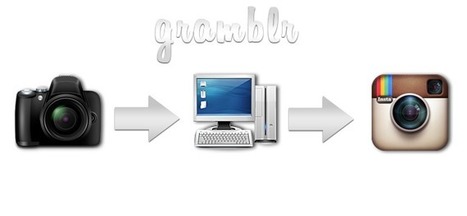
If you are looking for a way to publish your preferred photos that you have on your Mac or PC straight to Instagram, without having to first transfer or copy them to your iOS or Android smartphone, here is a free tool that does exactly this.
Gramblr is available for both Mac and PC and it allows you to upload any picture you have sitting on your hard disk to your Instagram account. You can add your comment and hashtags, but you cannot take advantage of the filters you normally available in Instagram.
"Not too long ago, Pearson (the ginormous education company – yes it’s a technical term) put out a few really interesting videos about teachers who are shaking up online learning. They’re talking about innovation in online learning – and not the innovation that has driven new technologies. They’re talking about the type of innovation that changes how teachers teach, how learners learn, and how information is delivered and processed."
"3D printing and education have been courting for quite a while. From how-to maker books for kids to installing “Maker Labs” into public libraries, the idea of using additive construction to educate kids from kindergarten to high school has been an ambitious one, especially considering the cost of machines.
"But Makerbot is attempting to jump the cost barrier by partnering with educational non-profit company Donors Choose to launch MakerBot Academy put a MakerBot Replicator 2 3D printer in every classroom.
“"Makerbot has education in its DNA,” Bre Pettis, CEO of MakerBot said at the company’s shop in Manhattan. “Years ago, I was a teacher, and I’m looking forward to working with classrooms again.”
"To qualify for the program, a teacher just has to sign up for the printer through Donors Choose. Then, someone must make a base donation of $22.54. From there, the classroom can crowdfund to access the printer at a discounted price of $98 — that price includes the MakerBot Replicator 2, plus three filament rolls (in red, white and blue), a yearlong warranty and a curriculum plan. While crowdfunding is a large part of the endeavor, businesses like Autodesk and America Makes are joining in among private donors like Bill and Melinda Gates and Pettis himself to help “match” funds to proliferate machines. Pettis hopes that this will help accelerate the process to put 5,000 machines in class."
Swipe is a new web app which allows you to easily create multimedia web presentations by simply uploading images and PDF files or linking to specific video clips.
Once uploaded, slides can be easily re-titled and can be sorted intuitively in any order you want.
Your final Swipe presentation can be shared with anyone and you can show slides in-sync to anyone viewing. You can even stop or pause video clips that are part of your Swipe presentation as they are being viewed and re-start them when you like.
Swipe-based presentations can be created, edited, delivered and viewed across all kind of screen sizes and devices from desktop computers to smartphones.
Cool features include the ability to preview the next upcoming slide without viewers seeing, private and public settings, and a custom timer that measures your presentation time.
My comment: Excellent presentation tool for delivering in-sync slideshows. For delivering presentations to an audience you need to factor in a teleconference or audio conferencing tool for the audio part. As it is Swipe it's great for one-to-one or small group conferencing via Skype in which you want to show a presentation in sync with everyone (screen-sharing for groups on Skype is a pro option, it's paid, requires lots of bandwidth and it isn't that great if you don't a lot bandwidth).
The approach used by Swipe to show slides in sync with everyone is very bandwidth effective and makes it possible to use this tool effectively in situations where participants have little bandwidth and use smartphones and tablets, in place of using screen-sharing apps which are bandwidth-hungry solutions.
"More video games are coming to the classroom thanks to SimCityEDU, a new generation of the seminal simulator built to help aid students in developing "real-world problem-solving skills." This news comes on the heels of the announcement of KerbalEdu, a classroom version of the wildly addictive Kerbal Space Program.
"GlassLab, the team behind this new initiative, explains a bit about the new program. "SimCityEDU: Pollution Challenge! acts as a powerful teaching tool for educators, integrating learning and assessment aligned to Next Generation Science and Common Core Standards in the same experience. Designed for middle school students, the game encourages students to think critically about the challenges facing modern cities and the world around them. In the game, students play the role of “mayor,” addressing issues of environmental impact in a virtual city while maintaining employment levels and citizen happiness."
Create, share, and buy your own customized motivational posters. Armed with a digital camera and that non-stop wit of yours, you now have the power to turn a simple photograph into a humorous or inspirational message.
"An educator's guide to websites, organizations, articles, and other resources looking at the new system of standards and how they will be assessed. (Updated 11/2013)"
"Augmented reality (AR) is a live, direct or indirect, view of a physical, real-world environment whose elements are augmented (or supplemented) by computer-generated sensory input such as sound, video, graphics or GPS data. (Wikipedia) AR has been around for awhile but is really starting to garner interest in the educational community/sector. Using augmented reality is a great way to incorporate 21st century technology into the classroom using different types of apps, sites, and equipment."
The Western Union Foundation, Discovery Education and the Association of Educational Publishers (AEP) announced today the launch of Open Doors: Unlock Your Future, a new online destination providing high school students, educators and families with high-quality tools and resources to help students prepare for their future through in-depth career exploration. The program represents the shared vision of its partners, who attribute the future success of America's youthto a solid educational foundation.
Designed to encourage high school students to explore and prepare for their future, the program encourages career-readiness through an expansive offering including:
"The rise of technology used in classrooms has made learning much more interactive. The emergence of iPads to browser-based tools in project-based learning, take teaching to a new level in the 21st century."
"For many teachers, online games are the scourge of the classroom – a drain on students’ attention, time and potential. Any educator who has ever tried to teach a lesson using online resources or taken a class in the computer lab has probably experienced the frustration of finding a student on a gaming site instead of sticking to the intended lesson plan. But online games don’t always have to be a distraction (see last week’s post 5 Reasons to Embrace Gaming in the Classroom).
"In fact, there are many brilliant educational games out there that can actually engage and inspire students and equip them with the tools and ambition to approach a whole host of exciting careers and academic paths…"
- See more at: http://www.fractuslearning.com/2013/10/29/students-online-games/#sthash.TwpsJT2T.dpuf
This PDF provides examples of essential questions, defines the specific features of essential questions, and has excellent resources for further exploration!
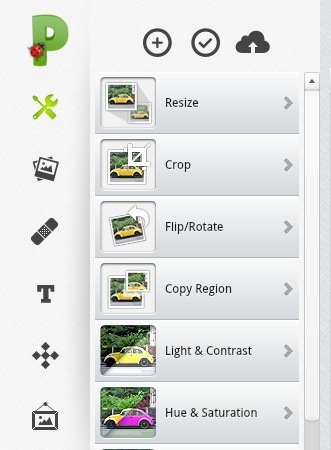
Picadilo è un editor di immagini web based, si tratta di un web eare che possiede finzionalità complete per il trattamento delle imamgini e non richeide lunghi tempi di apprendimento per poter essere utilizzato. La versione libera non consente di usare gli strumenti di selezione più evoluti e di lavorare con i livelli, per il resto offre tutte el altre funzioni: cropping, resizing, rotate, flip, regolazione luminosità, contrasto, saturazione,esposizione, temperatura colore, selezione, ecc.
E' possibile salvare il lavoro finito e condividerlo.
Playing educational video games either competitively or collaboratively with another player can enhance students' motivation to learn, a new study has found.
"While playing a math video game collaboratively - as compared to playing alone - students adopted a mastery mindset that is highly conducive to learning, researchers said.
"Moreover, students' interest and enjoyment in playing the math video game increased when they played with another student.
"The findings point to new ways in which computer, console, or mobile educational games may yield learning benefits.
"We found support for claims that well-designed games can motivate students to learn less popular subjects, such as math, and that game-
based learning can actually get students interested in the subject matter and can broaden their focus beyond just collecting stars or points," said Jan Plass, a professor in New York University's Steinhardt School of Culture, Education, and Human Development and one of the study's lead authors."
Welcome to Rubrica, the iPad app designed to assist you to create and manage your own Rubrics and then to use them to assess your students against their assessment tasks.
To get content containing either thought or leadership enter:
To get content containing both thought and leadership enter:
To get content containing the expression thought leadership enter:
You can enter several keywords and you can refine them whenever you want. Our suggestion engine uses more signals but entering a few keywords here will rapidly give you great content to curate.


 Your new post is loading...