 Your new post is loading...

|
Rescooped by
Bhushan Thapliyal
from Nik Peachey
February 18, 2017 4:18 AM
|
In this webinar, we invite Nik Peachey, winner of the 2016 British Council ELTon award for innovation in teacher resources to talk about using digital video.
Video is one of the most powerful mediums for language instruction and learning and your students' access to the tools to view, create and communicate with video through mobile devices has never been better. Are you making the most of this opportunity for your students? Come along to this webinar, share your ideas and get some new ideas for how to exploit digital video with your students.
Via Nik Peachey
|
|
Rescooped by
Bhushan Thapliyal
from Edumorfosis.it
February 13, 2017 2:30 AM
|
The next time you need to evaluate what students have learned about a subject, ask them to create an infographic. When students take the information they have learned and compile it into a visual format, it demonstrates mastery of the content. Infographics stimulate visual learning. Encouraging students to create and share their infographics in the classroom takes their learning to the next level. Teachers need to provide students with infographic creation tools that provide students with a way to create infographics easily, to allow them to focus on the content rather than mastering a new technology.
When evaluating infographic tools teachers should look for tools that are easy to use but are also rich with functionality. These tools should also make it easy to print and share the infographics that students create. Infographic tools that allow students to compile their data into visually interesting charts and graphs are also a plus. Here are a few tools that we have evaluated that offer these important features.
Via Edumorfosis
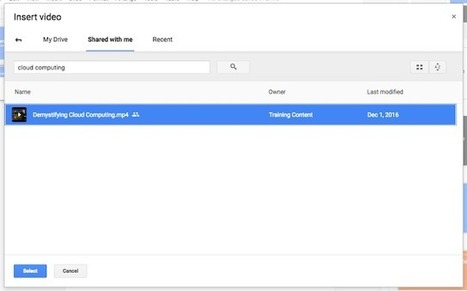
Starting today, you can insert and play your Google Drive videos in Google Slides, in addition to videos from YouTube. Once you’v
Via Dr. Tom D'Amico (@TDOttawa)
|
|
Rescooped by
Bhushan Thapliyal
from Education 2.0 & 3.0
February 10, 2017 2:01 PM
|
What do you want to learn more about this year? Nanotechnology? Virtual reality? Bitcoin? How to protect democracy?
According to neuroscience professor Ken Kosik, adult education, or specifically engaging in challenging new learning experiences, encourages brain plasticity. And plasticity is associated with flexibility, innovation, and joy.
Equally as compelling, continued learning has been shown to protect your brain from developing diseases like Alzheimer's.
Finally, in today's charged political climate, it's worth noting that an educated populace has always been shown to withstand challenging times more effectively.
Here are a few ways to get educated this year, quickly and powerfully:
Via Edumorfosis, Yashy Tohsaku
|
|
Rescooped by
Bhushan Thapliyal
from Teaching in Higher Education
February 10, 2017 1:53 PM
|
|
|
Scooped by
Bhushan Thapliyal
February 8, 2017 3:38 AM
|
Windows/macOS/Linux: If you’re on the lookout for a digital painting tool and Photoshop is too expensive, Krita is a fast, free, and open source art tool that was developed by artists looking for something that met their needs without a ton of bloat or overhead. Plus, it’s completely cross-platform.
|
|
Rescooped by
Bhushan Thapliyal
from Apps
February 8, 2017 3:07 AM
|
hyperPad (formerly GamePress) is an iPad app that brings programming for kids to create their own interactive apps like mobile games, then export and publish them..
Via EDTECH@UTRGV, Mark E. Deschaine, PhD, Suvi Salo
So BETT is over and done with now. It was a pretty tough week for me. I was starting to come down with the flu and it actually meant I missed one of the days. Thank you to Greg Hughes who covered m…
Via Guido Knaus, Juergen Wagner
Starting young has great benefits. Coding at an early age can empower kids in more ways than one. Read on to learn more.
Via John Evans
|
|
Rescooped by
Bhushan Thapliyal
from Rapid eLearning
February 5, 2017 11:37 AM
|
CoSpaces is a free online platform that allows you to build your own 3D spaces and even experience them in virtual reality. Choose from a library of objects and characters to fill the stage and edit them to create your very own fantasy worlds.
CoSpaces makes VR creation super easy, accessible and fun – so that anyone can dive into their own virtual reality experiences.
Via Nik Peachey, Carla Arena, michel verstrepen
|
|
Scooped by
Bhushan Thapliyal
February 4, 2017 5:33 AM
|
Apple is introducing a new education bundle for its professional creative apps that significantly discounts the entire collection. Final Cut Pro X, Logic Pro X, and their companion apps can be purc…
|
|
Rescooped by
Bhushan Thapliyal
from Keeping up with Ed Tech
February 4, 2017 3:46 AM
|
Free resource of educational web tools, 21st century skills, tips and tutorials on how teachers and students integrate technology into education
Via WebTeachers
|
|
Rescooped by
Bhushan Thapliyal
from E-learning
February 4, 2017 3:25 AM
|
First things first. It’s never just about the apps. End of. That said being guided around tried and tested apps from the classroom can be really helpful. With that in mind, back in 2014 I created my first periodic table of iPad apps. Little did I realise how popular it would be with more than 7 million downloads in those two years.
Via paul rayner
|
|
|
Rescooped by
Bhushan Thapliyal
from Keeping up with Ed Tech
February 14, 2017 3:51 AM
|
5 things about Google Slides that you did not know. New features in Google Slides make an amazing product even better! Try out these tips.
Via WebTeachers
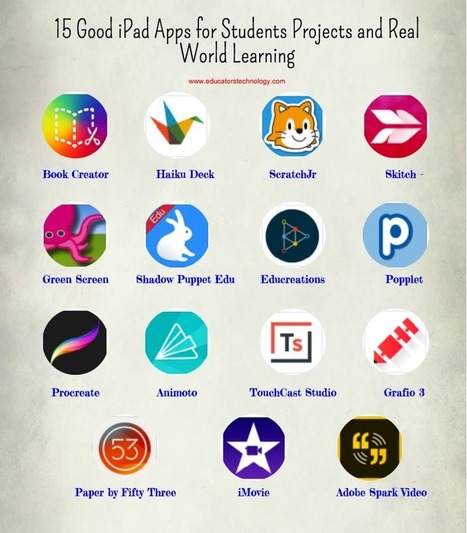
"Here is a collection of some very good iPad apps students can use in their classroom projects. The apps, which are curated from Apple's Real World Learning collection, are geared towards enhancing a number of key skills that include: creative thinking, design skills, literacy skills, coding, and many more ..."
Via Leona Ungerer, Juergen Wagner
|
|
Rescooped by
Bhushan Thapliyal
from eLearning Industry
February 13, 2017 2:20 AM
|
|
|
Scooped by
Bhushan Thapliyal
February 10, 2017 1:57 PM
|
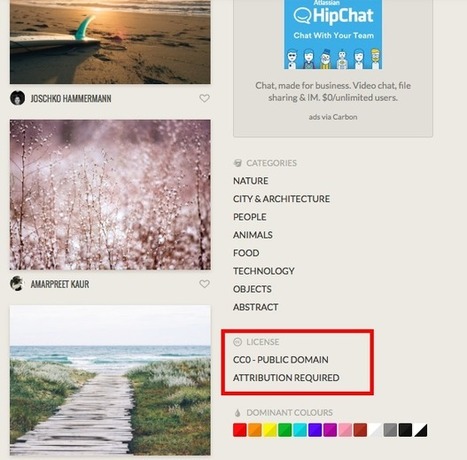
MOOCs and Open Educational Resources: A Handbook for Educators is being made available for university faculty, educators, and educational producers involved in producing online courses. The guide is a step-by-step manual to how to produce and distribute educational video content under the freest of licenses, with an emphasis on Creative Commons. The Handbook situates educational video production in the context of more than 100 years of moving-image work at universities and beyond.
|
|
Rescooped by
Bhushan Thapliyal
from Wiki_Universe
February 8, 2017 3:39 AM
|
Video. Audio. Images. Text. Interactive questions. Great student-centered learning can happen at their intersection. Here are some ideas.
Via Elizabeth E Charles
|
|
Rescooped by
Bhushan Thapliyal
from E-learning
February 8, 2017 3:01 AM
|
Students can use Google Sheets to create databases of information they are learning and then sort and filter to answer questions.
Via paul rayner
|
|
Rescooped by
Bhushan Thapliyal
from Keeping up with Ed Tech
February 6, 2017 2:32 AM
|
Free resource of educational web tools, 21st century skills, tips and tutorials on how teachers and students integrate technology into education
Via WebTeachers
A list of handy resources for making your blog or Twitter feed look great, at absolutely no cost.
Via Elizabeth E Charles
|
|
Scooped by
Bhushan Thapliyal
February 4, 2017 1:03 PM
|
Free resource of educational web tools, 21st century skills, tips and tutorials on how teachers and students integrate technology into education
Via John Evans
|
|
Rescooped by
Bhushan Thapliyal
from Edumorfosis.it
February 4, 2017 3:44 AM
|
Over the past few months, I’ve written a series of posts over on the Flipped Learning Network web site that offer a wealth of different tools and techniques that can be used to create digital learning content for flipped or blended teaching and learning. I want to be sure that EmergingEdTech subscribers get a chance to check these out. While there may be some pretty obvious and standard tools and techniques here, there are also some fun and unique approaches.
Via Edumorfosis
|


















The recording of my webinar for the British Council on exploiting digital video.