


Technology and interactive tools can help support students as they develop expand their collaboration skills.
Via Grant Montgomery, Dean J. Fusto

 Your new post is loading...
 Scoop.it! Technology and interactive tools can help support students as they develop expand their collaboration skills. Via Grant Montgomery, Dean J. Fusto 
Scoop.it!

Free resource of educational web tools, 21st century skills, tips and tutorials on how teachers and students integrate technology into education Via WebTeachers
Scoop.it!

“ TED talks are great, but there’s a point where they all seem too similar, or are just taxing to muddle through. If you’d still like to enjoy a smart, engaging talk now and again but you’ve had enough of TED, here are some alternative to boost your brain.”
Via paul rayner

paul rayner's curator insight,
January 11, 2017 11:06 PM
I like #8 Ignite - seems a great way to encourage brevity/focus in kids presentations.
Some innovation variations to a popular medium.
Scoop.it!

Hone your drawing skills with these brilliant apps for sketching, digital art and animation.
Via Yashy Tohsaku

Oskar Almazan's curator insight,
January 10, 2017 11:46 PM
Best-app lists are everywhere (we even have some of our own here on Creative Bloq), but this list is more interested in the latest and greatest. So below you’ll find our favourite 10 apps for sketching and digital art that first appeared over the last 12 months, or that received significant updates that made them worth another look.
Scoop.it!

Using search engines effectively is now a key skill for researchers, but could more be done to equip young researchers with the tools they need. Here, Dr Neil Jacobs and Rachel Bruce from Jisc’s digital infrastructure team share their top ten resources for researchers from across the web. Via Ana Cristina Pratas, Ken Morrison

David Baker's curator insight,
January 9, 2017 10:31 PM
I needed an academic search engine for a presentation. Here are 10.
Scoop.it!
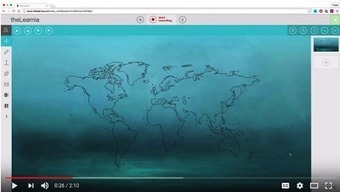
Free resource of educational web tools, 21st century skills, tips and tutorials on how teachers and students integrate technology into education Via Dr. Tom D'Amico (@TDOttawa)
Scoop.it!
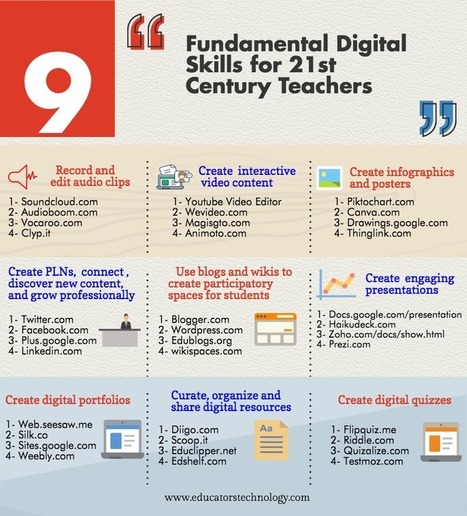
“' in a digitally focused world, education is getting more and more digitized pushing us, teachers and educators, to re-conceptualize what it really means to be a teacher in the 21st century.”

Rocío Oliver López's curator insight,
May 27, 2017 9:27 AM
Aplicaciones digitales para docentes del siglo XXI

Ella Barresi's curator insight,
May 27, 2017 7:17 PM
This info graphic lists many great resources that could influence ICT use in a classroom. Many of these we have explored through ICT Design, however many are new resources. This could be a great starting block for an ICT and student centered unit plan. EDIT: Upon reading this article, I agreed that these skills are necessary for 21st century teachers. I have re-read this article however, and now I see that these skills are just as important for 21st century students. Imagine sending students out into the workforce after school, with all of these skills. This Infographic has provided me with the inspiration for creating a learning sequence within a unit. Within the drama classroom there is room for most of these skills. Within my unit plan, students have to prepare a performance but in addition to that, they have to market their performance. This will require posters, a promotion video, creating a website for the performance. Working collaboratively to decide what needs to be done, students then work independently on their task (decided within the group). This will give students the opportunity to excel in skills from outside of the drama classroom. 
Jeff At CQU's curator insight,
June 17, 2017 10:06 AM
This resource is excellent. Highly organised, focused and very easy to read. I think this would be a wonderful resource printed on a poster and displayed in the classroom.
Website addresses are given under nine headings that fit so well with the Australian Curriculum General Standards, the pedagogy I have chosen in my pedagogy map, and the Australian Professional Standards for Teachers..
Examples of such links are as follows:
1. Category on Chart: Create infographics and posters (4 websites listed) LINKS TO: (a) Australian Curriculum General Standards - Literacy - communicate concepts, ideas and detailed proposals LINKS TO: (b) High end pedagogy - Provide students opportunities to communicate ideas and detailed proposals through various self-selected ICT technologies LINKS TO: (c) Links to Pedagogy - Student direction: Students self-select methods to communicate their proposals, reports, drawings and specifications using media channels appropriate to the intended audience. To an extent directing, setting the pace and determining outcomes of learning (problem based learning). LINKS TO: (d) ICT Connections - Students should understand and develop the ability to utilise different presentation software – such as Prezzi and PowerPoint.
2. Category on Chart: Create PLNs, connect, discover new content and grow professionally (4 websites listed) LINKS TO: (a) Australian Professional Standards for Teachers. 6.2 Engage in professional learning and improve practice
3. Category on Chart: Create, organize adn share digital resources LINKS TO: (a) Australian Professional Standards for Teachers. 6.3 Engage with colleagues and improve practice __________________________________________________________
In relation to SAMR, this allows for transformation learning in the following ways:
1. Modification: many tasks in the classroom can be re-designed with this poster being used to locate safe and appropriate resources on the internet.
An example is using a a resource under "Create Digital Portfolios" such as Weebly.com in place of a portfolio in book form.
2. Redefinition: new tasks, previously inconceivable are possible, such as displaying a student's portfolio on a mobile device as opposed to book form. __________________________________________________________
In summary, this is brilliantly designed and I see it as a highly valuable resource for my teaching.
Scoop.it!

Free resource of educational web tools, 21st century skills, tips and tutorials on how teachers and students integrate technology into education
Via Becky Roehrs
Scoop.it!

GwynethJones's curator insight,
December 31, 2016 9:27 AM
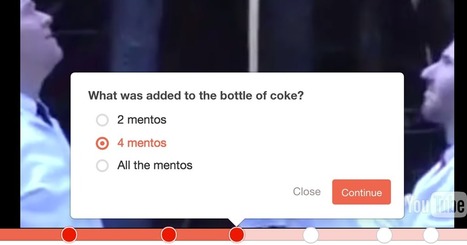
Interesting! You could also achieve this by embedding a YouTube video within a Lesson Path or Kahoot Quiz!
Scoop.it!

Free resource of educational web tools, 21st century skills, tips and tutorials on how teachers and students integrate technology into education Via Yuly Asencion
Scoop.it!

“ Throughout the year I offer webinars on a variety of educational technology topics. But I also publish a tutorial or two on my YouTub”
Via WebTeachers, Dean J. Fusto
Scoop.it!

“ “Why can’t I use this picture?” This is a question my students often ask whenever they are looking for images on the Internet for projects they create in my”
Via Dean J. Fusto
Scoop.it!

“by Lee Watanabe-Crockett”
Via Dr. Tom D'Amico (@TDOttawa)
|
Scoop.it!

New study examines who’s learning, and how | A new study examines who’s learning from MOOCs, and how. Via Vladimir Kukharenko
Scoop.it!

“Quick and easy steps for teachers and students who want to annotate images on your iPad. Follow along with the pictures to get started today.”
Via Dr. Tom D'Amico (@TDOttawa)

Claudia Estrada's curator insight,
January 12, 2017 9:38 AM
Useful for teachers to use in the classroom.
Scoop.it!

“ Pixiclip is a free tool for creating simple instructional videos. I featured it in the Practical Ed Tech newsletter a couple of week”
Via WebTeachers
Scoop.it!

“ This year's new buzzword in computer design circles is without question "bots." As with anything we build, we give bots names. A name can be a way of..”
Via michel verstrepen
Scoop.it!

Animaker is an online do-it-yourself (#DIY) animation video maker that brings studio quality presentations within everyone's reach. Animated Videos, Done Right! Via Nik Peachey

Nik Peachey's curator insight,
January 6, 2017 1:19 AM
This looks like a great easy to use tool. You can make videos up to 2 mins long on the free version. 
Rosemary Tyrrell, Ed.D.'s curator insight,
January 9, 2017 11:23 AM
Looks like a great program and worth checking out.
Scoop.it!

Darlene Garza's curator insight,
May 13, 2019 11:42 PM
These are great tips for using online videos as a resource.
Scoop.it!


Kathy Lynch's curator insight,
January 17, 2017 6:23 PM
Thx Jim. Lots of gret possibilities to explore for exploring!
Scoop.it!

Augmented reality made its debut in my science classroom in September. My anatomy and physiology students came face to face with a skeleton without having to Via Mariano Fernandez S., Javier Sánchez Bolado, Juhani Pihkala
Scoop.it!

10 Google Apps Tricks to learn for 2017. Increase your digital literacy with these Google Apps tricks: Docs, Sheets, Slides, Drive
Via Dr. Tom D'Amico (@TDOttawa) , Dean J. Fusto

Viljenka Savli (http://www2.arnes.si/~sopvsavl/)'s curator insight,
December 30, 2016 3:20 AM
always good to know there are so many options to discover...
Scoop.it!

“ Learn something new and get smarter with these awesome sites and courses.”
Via Oliver Durrer swissleap.com, Mark E. Deschaine, PhD, Evdokia Roka
Scoop.it!

Oskar Almazan's curator insight,
February 8, 2017 8:42 AM
Niche-specific content is usually not readily available through regular generic search engines. One example is the academic and scholarly content. While running a search query about an academic topic through a generic search engine such as Google would probably render fairly decent results, it, however, usually takes digging into so much fluff before finally landing on relevant results. This is where having access to topic-specific search engines comes in handy. Such search engines do not only provide specific content tailored to the topic under study but their content is more likely to be reliable and authoritative. To this end, we have compiled this list of excellent academic search engines that teachers, student researchers and academics can use to quickly locate and access scholarly works and publications. We have only included what we believe are the most relevant and popular titles out there.
Scoop.it!

“ In this week's series of New EdTech Tools for Teachers, we are sharing with you this collection comprising seven interesting web tools and apps to use for a variety of educational purposes. Some of the things you can do with these tools include: teach kids about drawing and colouring using a multitouch whiteboard, enhance the look of Google Calendar by using an intuitive interface, create and share customizable forms, learn and improve your music knowledge at your own pace, provide your website visitors with the ability to hold realtime chat and discussion with you, learn how to code on iPad, and effectively manage your tasks and organize your workflow.”
Via Elizabeth E Charles
|






Looking for a way to quickly and cheaply collaborate? Google has you covered. Here are seven builing tools to help you collaborate in the classroom.
Google: Between Google Drive and Google+ Hangouts, students can work together on documents and presentations, or meet up online to discuss homework assignments or group projects.