Your new post is loading...

|
Scooped by
David Anders
November 26, 2012 6:52 PM
|
|
|
Scooped by
David Anders
November 26, 2012 2:36 PM
|
Here’s a free set of 10 basic agreements for a variety of common business situations that creative professionals face.
|
|
Scooped by
David Anders
November 26, 2012 1:37 PM
|
|
|
Scooped by
David Anders
November 23, 2012 1:35 PM
|
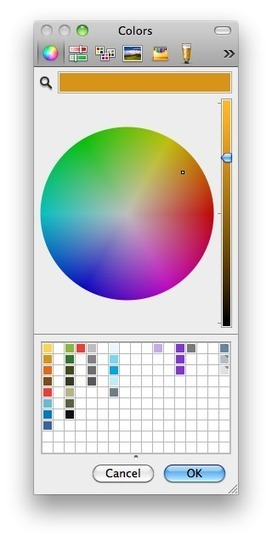
Unleashing Mac OS X's Color Picker in FileMaker Posted by donovan 06/17/2011 at 05:29PM Color is one of the most important tools available to you when designing user interfaces. Using a little color can turn a drab wall of text into something attractive and readable. The human eye is tuned to perceive color. This makes it a key tool for helping users quickly sort through complex information. This isn't to say that your layout should be a tacky rainbow of hues. All it takes is a little deliberate and tasteful formatting here and there to increase usability for your users. This post presents a technique that allows users on Mac OS (sorry Windows users!) to harness the power of color by unleashing the Color Picker in their solution. It's pretty simple really; all you need is a global field and one custom function!
|
|
Scooped by
David Anders
November 18, 2012 1:53 PM
|
Answer ID: 10045 Last Updated: Apr 09, 2012 You can convert your copy of the trial version of FileMaker Pro 12 to the full version without uninstalling the trial version. All of your settings, recent files list, and Favorites are preserved, so you can continue working with your FileMaker Pro data uninterrupted. You can also upgrade your retail copy of FileMaker Pro version 9, 10, or 11 to the full version of FileMaker Pro 12 by entering an upgrade license key during the trial conversion process.
|
|
Scooped by
David Anders
November 12, 2012 10:16 PM
|
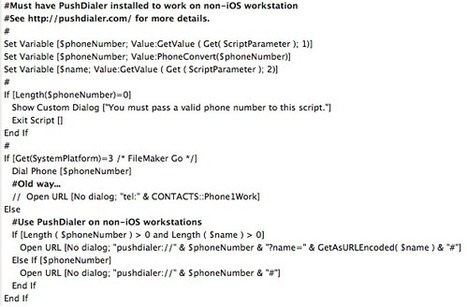
Dialing Your Phone From FileMaker November 12, 2012 By Tim Cimbura I’ve been searching for a solution so that I can EASILY link FileMaker and the phone for a long time. The built-in “Dial” command only works from an application running on the iPhone with FileMaker Go…not from a desktop or laptop running FileMaker. Day in and day out I’m using FileMaker via fmIgnite to manage contacts. I look people up in the database and call them all the time. I consider this to be somewhat tedious (relatively). See the number, pick up the phone, tap it into the phone and connect. I do have AppleScripts set up to export the contacts with phone numbers to the Mac OS Address Book…but I don’t want everyone I call to be in the Address Book…and it takes a while to do that and wait for iCloud to sync it to my iPhone. Even then, it takes several taps on the phone to find that contact on the iPhone and connect. Last week along came the perfect solution. It’s almost magical. It uses Apple’s push notification service to dial the number. So no matter how your iPhone is connected, 3G, EDGE, 4G, LTE, or Wi-Fi, it just works. To dial a number now, I simply click on a little phone icon in my FileMaker database next to the phone number and in a split second my iPhone prompts me to dial it. One tap and I’m connected. The little miracle working application is called PushDialer. http://pushdialer.com/ Here’s the setup procedure: Download and install the PushDialer app on your iPhone ($2.99).Download the Mac OS app from http://pushdialer.com and install it on your Mac. (It’s implemented as preference pane.)Open your System Preferences… and click on the PushDialier icon.Follow the steps to pair your iPhone with your Mac. There’s even a PushDialer integration guide for FileMaker with a sample database. I modified the scripts to create a general Dial script with 2 parameters: phone# and name. I also have a small custom function called “PhoneConvert” that cleans up the phone number when necessary. The phone button on the FileMaker layout just calls this script, and works its magic to dial. I can see this as saving me several minutes every day. Besides, it’s kind of fun in a geeky kind of way. Right now there is no solution like this for Windows…but there is an opportunity for someone to develop this.
|
|
Scooped by
David Anders
November 11, 2012 4:09 PM
|
|
|
Scooped by
David Anders
November 10, 2012 9:59 AM
|
Conditional Value lists may be the most asked about piece of functionality on the FileMaker Cafe. To try and provide a thorough and easy to follow explanation of what they are and how they work, I decided to write an article on the subject and build a small example file to help illustrate the technique. What is a conditional value list? A conditional value list is any value list whose contents can dynamically change. The most common method to change a value lists values is to change the contents of another field. In this case, the values that are displayed in the value list are dependent upon the value in the field. Indeed, the terms conditional and dependent can be interchangeable. Why are they used? Conditional value lists are a great way to narrow down the size of large value lists by breaking them down into smaller manageable lists. They also help when you need to select values for 2 or more fields. The easiest way to show this is to jump straight in with a straightforward example.
|
|
Scooped by
David Anders
November 8, 2012 11:14 AM
|
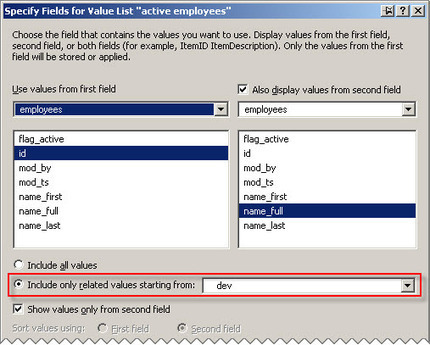
Thinking About Value Lists, part 2 Posted on November 7, 2012 by Kevin Frank In part 1 we explored a particular type of value list: the field-based two-column variety, based on all values, and set to show values from the second column only… …and today’s article assumes familiarity with that material. This time around we’re going to look at some challenges and issues that can arise when using filtered (a.k.a. “conditional”) field-based value lists, and propose some solutions to those challenges. I don’t claim that any of the following is particularly original or brilliant, but I do a fair amount of team programming, and these issues come up over and over again. The value list (a.k.a. VL) issues we’re going to examine are: Active vs. AllPortabilityFind mode vs. Browse mode vs. “Edit mode” …and it seems to me that these issues overlap in messy ways, as opposed to being clear cut and discrete, but sometimes life is like that. At any rate, in all of today’s imaginatively titled demo files… Thinking About Value Lists, part 2 demo 1 http://www.filemakerhacks.com/wp-content/uploads/2012/11/Thinking-About-Value-Lists-part-2-demo-1.zip Thinking About Value Lists, part 2 demo 2 http://www.filemakerhacks.com/wp-content/uploads/2012/11/Thinking-About-Value-Lists-part-2-demo-2.zip Thinking About Value Lists, part 2 demo 3 http://www.filemakerhacks.com/wp-content/uploads/2012/11/Thinking-About-Value-Lists-part-2-demo-3.zip …we have a table of employees, some of whom are active, and some of whom are not: Here’s how the above layout looks under the hood: During data entry, we need to access a popup menu of currently active employees from three table contexts: purchase orders, invoices and employee evaluations, like so: A minute ago I mentioned the concept of “portability”. Within a given file, a VL may be considered “portable” if it works everywhere, i.e., from any layout/table context. It almost goes without saying that VLs based on “all values” are by their very nature accessible everywhere. So if we want a 2-column VL of all employees, the most natural thing in the world would be to define it like so. And along the same lines, there’s nothing to stop us from defining two new fields in the employees table… …which gives us this… …and then creating a value list for active employees based on those two fields: And you can see that approach in demo #1. I don’t find the idea of defining two new fields every time I need a conditional value list to be particularly appealing, but a) that’s how we used to have to do it circa 1995, and b) sometimes quick and dirty gets the job done. Another reason I don’t like this method is that it may not scale well if your conditional filtering requirements are more complex. At any rate, I include this method for the sake of completeness and as a nostalgic reminder of simpler times. One final point perhaps worth making: there are no relationships in demo #1. Each table occurrence on the graph is an island unto itself. The 2-column VL takes care of “the magic” of showing the correct employee name on the P.O., Invoice and Evaluation layouts, although we’re only storing the foreign key (id_employee).
|
|
Scooped by
David Anders
November 6, 2012 5:25 PM
|
Title: Populating email address fields with multiple addresses Post: I am trying to figure out how I can populate the To:, Cc:, or Bcc: fields with multiple emails based on a criteria. The basic design is like this. 3 tables: Discipline - Basic table with a discipline (Nuclear Engineering, Mechanical Engineering, Materials Science etc.) each with a unique id. Contacts - Obviously contains the email address and other information for each person along with a unique id. In this table you select a discipline for each person from a pop-up menu using a value list populated by the Discipline table. Email - This table contains your basic email information. I already have everything set up so that if I manually enter addresses and messages I can click a button that says Send Mail and FileMaker exports the information to the appropriate fields in my email client. This works perfectly. What I would like to do is create a button for the To:, Cc:, and Bcc: fields that will automatically populate these fields with email addresses related to the selected discipline (this is also populated by the Discipline table). In theory, if you have Materials Science selected as below and you press the Bcc: button, I want FileMaker to automatically insert all of the email addresses associated to Materials Science in the Bcc:. The same thing would happen with To: and Cc:. Sending with email client, SMTP server, webmail, or plugin?? #Perform a find to find all the records that contain an email address to which you plan to send the email
Go To Record [First]
Loop
#In the next step change ; to , if you need to use that delimitter for your email software
Set Variable [$EmailList; Value: $EmailList & "; " & YourTable::YourEmailField]
Go To Record [next; exit after last]
End Loop
Set Field [YourTable::YourGlobalSendField; Right($EmailList; Length($EmailList) - 2 /* strip off the leading "; " */]
#Now you can use YourTable::YourGlobalSendField as your specified field to send out your email "Conventional Wisdom" However, to send one email using the recipients represented by all records in the found set, you would have to have your script loop through all records and store the list of emails to a local variable or to a global field, and then send the email using the 'one email' option and using that variable or global as your recipient. http://www.filemaker.com/11help/html/import_export.16.7.html Home > Sharing data > Saving, importing, and exporting data > Sending email messages based on record data > Sending one email message http://www.filemaker.com/11help/html/import_export.16.9.html#1038462 Home > Sharing data > Saving, importing, and exporting data > Sending email messages based on record data >
Entering or editing SMTP options http://dwaynewright.squarespace.com/filemaker-thoughts/2012/2/17/the-filemaker-send-mail-script-step.html The FileMaker Send Mail Script Step February 17, 2012 http://buzz.beezwax.net/2012/11/02/sending-html-email-from-filemaker Sending HTML Email from FileMaker Posted by donovan 11/02/2012 Demo databases available http://filemaker-plugins.com/compare/email-plugins/
2010 Filemaker Email Plugins Compared http://www.campaignmonitor.com/resources/will-it-work/email-clients/ Email Client Popularity • 35.6% iOS Devices • 20.14% Outlook • 13.57% Hotmail
• 11% Apple Mail • 9.85% Yahoo! Mail • 8.43% Gmail
• 4.74% Android • 2.34% Windows Live Desktop • 1.03% Thunderbird
• 0.79% AOL Mail
|
|
Scooped by
David Anders
November 6, 2012 12:49 PM
|
Mobile users can carry an offline copy of their database with them on their iPhones and iPads, or home/remote users can use bidirectional sync with their laptop and desktop computers to work offline on a fast local copy, which caches their data and solves WAN performance and connectivity problems. To keep all the data in sync, simply run the MirrorSync script and all changes will be transferred between the offline copy and FileMaker Server to bring them up to date. MirrorSync has been designed to be very simple to configure. There are no plug-ins required, and no scripts to write - the MirrorSync configuration utility writes them for you! Setup typically takes less than 30 minutes, and requires no advanced FileMaker knowledge. 360Works' MirrorSync works with both FileMaker 11 and 12, and can run on an iPad, iPhone, or computer running Mac OS X or Windows since there are no plugins required. After installing MirrorSync on your FileMaker Server and running the simple cross-platform configuration utility, MirrorSync dynamically generates a synchronization script that users run whenever they're ready to sync. Users can delete, add, or modify records and simply run the sync script whenever they want to update their offline copy of the database with FileMaker server. It even works with related data, and does not require you to change anything about how you generate unique IDs. | No plugins required - sync is done with native FileMaker scripting. Just send a copy of the database to anybody with FileMaker Pro and they are ready to sync. | Automatic conflict resolution, if multiple users change the same recordGuided setup utility that requires no advanced FileMaker knowledge | No scripting required - MirrorSync dynamically writes all the scripts for you | Fast, incremental sync operations take just a few seconds. Users click a button whenever they want to sync. | Create, modify, delete, and work with related records - MirrorSync handles it all | No need to work across a slow internet connection - just sync your data whenever you choose | Automatic deletion tracking - MirrorSync detects when records are deleted on one device and deletes them on the server and other devices, without any work on your part. | Bidirectional or one-way synchronization
|
|
Scooped by
David Anders
November 3, 2012 11:21 PM
|
Sending HTML Email from FileMaker Posted by donovan 11/02/2012 at 09:36PM It comes up time and again: "How can I send a formatted email from FileMaker?" You see, FileMaker natively supports only plain text emails; you're on your own if you want rich text or HTML. But it is possible! Here's a list of options for (nearly) painlessly sending HTML emails from FileMaker. Apple Mail In this scenario, FileMaker uses AppleScript to send an HTML email through the Apple Mail client on OS X. Pretty much the only requirement is that the person sending the email has an email account configured in Mail. Of course, this isn't something you can often depend on. It's also exploiting an undocumented behavior, so I would be skeptical of its dependability with future versions of Mail. Still, it's handy for its ease of implementation. http://buzz.beezwax.net/files/Email_with_Apple_Mail_2012-09-07.zip ScriptMaster Plug-In In this scenario, FileMaker uses an external function from the ScriptMaster plug-in to send an email. ScriptMaster provides an example function, but our demo provides an enhanced version that allows for pretty much every combination of features. You might even use it to send a plain text email with multiple attachments. (FileMaker natively support only a single attachment.) This approach gives you maximum features for relative ease of deployment. Oh, and it's free! The catch is that Java is increasingly going out of fashion these days (speaking as an OS X user), so the plug-in may run into issues on some users' machines. http://buzz.beezwax.net/files/Email_with_ScriptMaster_2012-09-07.zip Web Service In this scenario, FileMaker posts parameters to a web service that then sends the email for you. All the client needs to do is post the parameters to a web server, which is good for compatibility across various client configurations. This will also work in FileMaker Go If you're using a GET request (basically just opening a normal URL). The trouble with GET requests is that they have an inherent character limit and are not as commonly supported as POST requests. So let us know if you've figured out how to send POST requests from FileMaker Go! The web service can be in any language capable of providing an API accepting GET or POST requests. We've done it using PHP and Ruby. You can also post to someone else's web service, such as JangoMail. This approach can yield more advanced features like campaign management and analytics. It also supports GET requests, so you can run the demo on your iPhone or iPad if you wish. (The following demo requires a free JangoMail account to function.) http://buzz.beezwax.net/files/Email_with_Web_Service_2012-11-02.zip Other Plug-Ins If you don't mind spending a few dollars, consider purchasing a plug-in built specifically for email handling. It might be worth the features and time saved. I have very little experience with these plug-ins, but I've added a few to our comparison table based on their marketing materials. (My apologies for the formatting.) Caveats Mail clients will have varying support for HTML and CSS features. See Campaign Monitor's handy reference for more detail on what many of the popular clients support. http://www.campaignmonitor.com/css/
|
|
Scooped by
David Anders
November 3, 2012 6:22 PM
|
A new version of the free glyph set for personal and commercial Web design projects, available in EPS, PDF, PSD, as Typeface and as Web font. After endless suplications from the design community Daniel Bruce finally finished his update of the Entypo Glyph Set — a free set of universal 284 carefully crafted pictograms for regular design projects. The icons are available as EPS, PDF and Photoshop PSD files as well as desktop typefaces (TrueType, OpenType) and Web fonts. Download The Set For Free! This set contains a large collection of glyphs for all occasions and uses — common pictograms that shouldn’t be missing in anybody’s arsenal. Each glyph was drawn and optimized to make sure that it fits the overall style of the suite. Overall, the set contains 284 pictograms. You can use this glyph set freely for commercial and personal projects. The freebie is licensed under the Creative Commons Attribution-ShareAlike 3.0 Unported license. You are free to distribute, transform, fiddle with and build them into your work, even commercially. However, please always credit the original designer of the set (in this case, Daniel Bruce). The Social Extension glyphs are subject to the trademark and copyright laws of their respective companies.
http://media.smashingmagazine.com/wp-content/uploads/2012/10/Entypo-All-Glyphs.png large preview (.jpg).
http://media.smashingmagazine.com/wp-content/uploads/2012/10/Entypo-All-Glyphs.png large preview of social glyphs (.jpg).
http://media.smashingmagazine.com/wp-content/uploads/2012/10/Entypo-All-Glyphs.png download the whole set for free (.zip, 10.3 Mb).
http://provide.smashingmagazine.com/Freebies/entypo-glyph-set.zip download the whole set from the designer’s site (the archive is a .dmg-file)
http://www.entypo.com/
|
|
|
Scooped by
David Anders
November 26, 2012 2:37 PM
|
Today, it is our pleasure to present to you a gorgeous free set of icons related to education and academia—commissioned by PixelsDaily exclusively for Smashing Magazine and the design community.
|
|
Scooped by
David Anders
November 26, 2012 2:28 PM
|
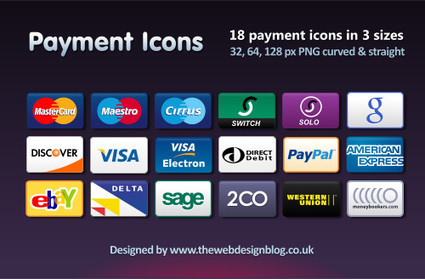
Today we are glad to release a Payment Icon Set, a set with 18 payment icons in PNG format, in the resolutions 32×32px — 128×128px. This set was designed by Phil Matthews and released especially for Smashing Magazine and its readers.
|
|
Scooped by
David Anders
November 25, 2012 12:31 PM
|
User-Friendly Excel Exports, part 1 Posted on February 20, 2012 by Kevin Frank Many end users appreciate FileMaker’s ability to export a found set of records in Excel format — it’s fast, straight-forward and empowering. One request that I have received from clients multiple times over the years is: make the exported field names in the top row of the spreadsheet “human-friendly”… (In subequent articles we’ll look at extending and/or streamlining the approach, but today we’re going to start out simple.) To recap, clients have requested three things: 1] User-friendly column headings 2] Calculated fields or the virtual equivalent (I call these pseudo-fields) 3] An interface to make it easy Well, with regard to number 1, I have no intention of changing my geeky field names, e.g, “name_first”, to something as warm and fuzzy as “First Name”; and, with regard to number 2, I would prefer not to define a bunch of new fields in the database just so they can, for example, have City, State and Zip in a single spreadsheet column. http://www.filemakerhacks.com/wp-content/uploads/2012/02/excel-exports-part-1.zip
|
|
Scooped by
David Anders
November 20, 2012 10:04 AM
|
FileMaker Go 12 lets you and your team access databases created by FileMaker Pro 12 on your iPad. DO MORE ON THE GO Tackle any task on your iPad with FileMaker Go. Negotiate sales deals on the road, collaborate on projects while traveling, capture and send research data back to the lab, or confirm inventory levels from the warehouse – all while you’re on the go. Use FileMaker Pro 12, the leading easy-to-use database software, to create custom business apps. Then use FileMaker Go 12 to remotely access these database apps on your iPad. Databases that run on FileMaker Go are full-featured apps with powerful capabilities. Now you and your team can easily view, edit, and search for information, then securely share with each other. Capture signatures, view reports and charts, save information as PDF and Excel, email or print your data, and so much more! FileMaker Go 12 is also available separately for iPhone. WHAT’S NEW IN FILEMAKER GO 12 - Multitasking support — When you return to your database app from other apps, FileMaker Go picks up right where you left off. - Improved media integration — Record video or audio from your iPad and add it directly to a container field. Play back media directly from FileMaker Go. - Export data in multiple formats — Export your data from FileMaker Go in several new formats including Excel, CSV, TAB, or HTML files. - Enhanced container fields — When hosting databases on FileMaker Server 12, instantly stream movies and music from your device without any data storage limit concerns. USING YOUR DATABASES ON THE GO Use one of these three convenient ways to access apps on your iPad: -Connect to databases hosted on FileMaker Server 12 or FileMaker Pro 12 via a local wireless network or over Wi-Fi or 3G. All changes are automatically updated in the hosted file. -Copy your databases between your desktop or laptop and FileMaker Go using File Sharing in iTunes. -Download databases sent via email and open in FileMaker Go. IMPORTANT NOTES: -Requires FileMaker Pro 12 or FileMaker Pro 12 Advanced to create or modify databases. -FileMaker Go 12 only opens FileMaker Pro 12 and FileMaker Pro 12 Advanced databases. Get more information on converting older databases: http://www.filemaker.com/r/convert -Sync is not natively supported but can be implemented with custom development. However, database files can be copied or emailed between the device and the desktop. -Get a complete list of features supported in FileMaker Go: http://help.filemaker.com/app/answers/detail/a_id/10087/
|
|
Scooped by
David Anders
November 17, 2012 1:09 PM
|
Title: Save Records as PDF to a Shared Folder Post: I have a networked FMP solution using the built in peer to peer model on a Mac network. I have a script that Saves Record as a PDF, and then emails said PDF as an attachment. Is it possible to designate an output file path on the computer hosting the database that the client machines also can access? At the moment I use: $$EMAILRECORDPATH & $fileName where $$EMAILRECORDPATH = Get ( DocumentsPath ) & "/Emailed Records/" Which is fine if the PDFs are saved to each local machine, but I would like the documents when emailed to be saved to a shared folder on the host machine. I have been reading around but cannot seem to find the correct format. All help appreciated! REPLY Imagine not using FileMaker to put a file in that shared folder. You drag and drop or copy and paste to put a file from the client computer into that shared folder. There's a file path to that folder and you can use the OS to determine the exact path. In windows, you can right click the folder and select properties to see it. If you mount/map the shared folder to all your client machines so that they all use the same file path, or at least a path that can be predicted (Mac and windows systems would have different paths to the same folder.), you can put that path into your variable. And just like manually copying the file, the user must have "write" privileges on that shared folder. ANSWER Thank you for your reply and help. My understanding is now improved but unfortunately I have not had much success. The client computer can connect to the shared folder on the host with read write privileges and the address is: afp://My MacBook Pro._afpovertcp._tcp.local/PDFSave So the path now in the variable to save the PDF to is: afp://My MacBook Pro._afpovertcp._tcp.local/PDFSave/ The save however is not working and I am not sure where I am going wrong with this process. I have mapped the networked drive to the client machine. Perhaps I have the incorrect path? In Get Info the drive is located @ /Volumes/PDFSave Resolution OK, I have worked it out. The path is: filemac:/PDFSave/ This works on the client machine, the next step is to get it working on the host... REPLY Why do you need it working on the host? This can be done, but the path will be different so your script will need to identify whether or not it is being run on the host computer. Get ( MultiUserState ) will return a 1 from the host comuter and a 2 from the client computers. ANSWER It should work for the host as this is a small office peer to peer network and the host machine will be used as a 'work terminal' as well as hosting the database, mainly a space issue. I have found that in the scipt step to save a record as a PDF and send an email you can define multiple file-paths such as: $filePathRemote $filePathLocal The first points to the mounted volume, the second to the local HD. If the mounted volume cannot be found the scipt tries the local HD, and this seems to work when the host computer is firing the scipt. I like your suggestion however as it offers a level of control.
|
|
Scooped by
David Anders
November 11, 2012 7:25 PM
|
FileMaker Pro Tips N Tricks The collective talent pool here at Excelisys have spent years working with Filemaker Pro and various other technologies. Having learned our fair share of tricks of the trade, we sometimes enjoy giving back to the world at large by sharing some of these quaint little tidbit collections of 1's and 0's. So here's an assortment of various stuff that you can put to use right now as is, or tweak and use in your own solutions. Many of these free downloadable demos contain embedded PDF white papers explaining their specific technique and usage. Have fun & enjoy! Drag and Drop using the Separation Model 3/24/2012 WHITE PAPER / FILEMAKER DEMO By Andy Persons Due to popular demand, we've overhauled the Drag and Drop Demo and White Paper for use with the separation model. The demo includes consolidation of several of the 'Move' scripts and removal of extraneous ones. We've also included a new approach for the 'Sort' technique that removes the need for two adjunct TOs. There have also been various smaller enhancements/cleanups. http://www.excelisys.com/demos/Drag-and-Drop-Separation-Model-12.zip http://www.excelisys.com/demos/Drag-and-Drop-Separation-Model.zip Drag-and-Drop in FileMaker Pro 10 10/7/2011 WHITE PAPER / FILEMAKER DEMO By Andrew Persons With this amazing demonstration file and accompanying white paper, you’ll learn a technique on how to provide familiar and elegant drag–and–drop functionality to your FileMaker Pro solutions! (Requires FileMaker Pro 10) http://www.excelisys.com/demos/Drag-and-Drop.zip
|
|
Scooped by
David Anders
November 10, 2012 12:12 PM
|
Unsupported FileMaker 12 features Even with the Classic theme, the following FileMaker Pro 12 features are not supported for Instant Web Publishing: 1] Object states: Instant Web Publishing supports style attributes for the Normal display state only. Instant Web Publishing ignores style attributes associated with the In-Focus, Hover, and Pressed display states. 2] Opacity: Instant Web Publishing does not support the opacity value selected using the Opacity slider. Any fill or line color that you specify is rendered as 100% opaque (solid), regardless of the opacity setting’s value. Even if you specify the opacity to be 0%, the color is rendered as 100% opaque. 3] Gradient fill: Instant Web Publishing does not support gradient fills. If you specify a gradient fill for an object on an Instant Web Publishing layout, the object is treated as if the fill were set to None (transparent) instead. 4] Image fill: Instant Web Publishing does not support image fills. If you specify an image fill for an object on an Instant Web Publishing layout, the object is treated as if the fill were set to None (transparent) instead. The only exception is for converted layout objects that contained pattern fills. These converted layout objects show the solid fill colors used in FileMaker 11 instead of displaying as transparent. 5] Chart fill colors: FileMaker Pro 12 supports fill colors for charts, but Instant Web Publishing does not support fill colors for charts. 6] Dotted and dashed lines: Instant Web Publishing does not support dotted and dashed lines. If you specify dotted or dashed lines on an Instant Web Publishing layout with FileMaker 12, they are displayed as solid lines, just as patterned lines were displayed as solid lines for Instant Web Publishing with FileMaker 11. 7] Corner radius: Instant Web Publishing does not support the Corner radius feature for layout objects. In Instant Web Publishing, object corners continue to render square, just as they did for Instant Web Publishing with FileMaker 11.
|
|
Scooped by
David Anders
November 8, 2012 11:17 AM
|
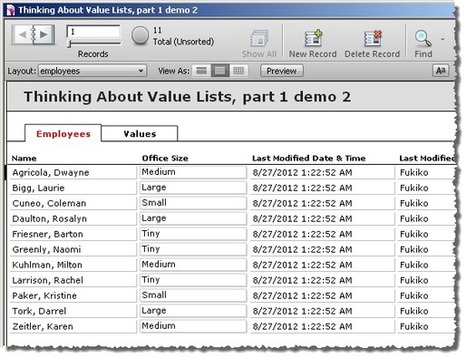
Thinking About Value Lists, part 1 Posted on September 9, 2012 by Kevin Frank In July and August we explored several esoteric value list techniques. This time around, and over the next few postings, we’re going to step back from the cutting edge, identify some common value list challenges, and propose some solutions to those challenges. A few thoughts before we begin: Some of the material in this series will be beginner-level; some will be intermediateValue lists are subtle and multifaceted; to get them to do what we want, we sometimes have to move beyond the obviousAs often happens in FileMaker, there are many ways to skin the catI plan to explore only a few of these waysBut will do so in microscopic detail Now on to our first demo (Thinking About Value Lists, part 1 demo 1), which contains a table of employees with office sizes. Here it is in layout mode… http://www.filemakerhacks.com/wp-content/uploads/2012/09/Thinking-About-Value-Lists-part-1-demo-1.zip
|
|
Scooped by
David Anders
November 6, 2012 11:16 PM
|
Title: Accessing ODBC using IWP Post: I've got a Windows 2008 R2 server running Filemaker Server 12 Advanced. I have an ODBC DSN set up to access an Oracle 10G server. I connected to the Oracle tables using External Data Sources and can do the normal functions like INSERT, UPDATE, DELETE, etc. using Filemaker Pro. When I try to do this with Instant Web Publishing, it will only allow me to access the Oracle data if I have the Username and Password hard coded into the External Data Source AND login to IWP with those same credentials. This breaks my whole security model. I haven't found a way around it. Using IWP I either need to access the Oracle data using the hard coded credentials in the External Data Source regardless of IWP login, or I need to pass the IWP credentials to Oracle. FOLLOWUP
Nevermind! If the credentials you use in the External Data Sources are set up as a user in Filemaker Security, the ODBC access will work regardless of the IWP login. I think I tested this, but apparently had not been logged out of IWP long enough for the credentials to reset. from fm12_instant_web_publish_en.pdf: Using external ODBC data sources in Instant Web Publishing To support authentication with an external ODBC data source in Instant Web Publishing, you must store the user name and password for the external data source in the FileMaker database. Note ODBC data source single sign-on is not supported in Instant Web Publishing.
1. Open the database.
2. Choose File menu > Manage > External Data Sources.
3. The Manage External Data Sources dialog box appears.
4. Select the ODBC data source in the list and click Edit.
Chapter 3 | Working with FileMaker databases on the web 25
5. For Authentication, select Specify user name and password (applies to all users) and enter the user name and password for the external ODBC data source. (Make sure this username and password set is also in Security)
6. Click OK.
|
|
Scooped by
David Anders
November 6, 2012 3:07 PM
|
Email mail.it MMEmail MondoMail Outlook Manipulator SMTPit Pro Single License - $59 $35 $89 $75 $65
Developer License $195 $239 $358 - - $664 Mac OS X
Mac Intel Native
Windows 9x/XP
Windows Vista FileMaker 7
FileMaker 8
FileMaker 8.5
FileMaker 9
FileMaker 10 Server Compatible
IWP Compatible SSL
HTML Format
CC, Bcc
Receive Mail
Multiple Attachments
Set Reply to Function
Verify Email Syntax
|
|
Scooped by
David Anders
November 4, 2012 10:11 AM
|
|
|
Scooped by
David Anders
November 3, 2012 9:59 PM
|
|