Distance Learning, mLearning, Digital Education, Technology
16.5K views | +2 today
Distance Learning, mLearning, Digital Education, Technology
Your new post is loading...
Rescooped by Dennis Swender from iPads, MakerEd and More in Education
May 2, 2014 3:13 PM
Scoop.it!

12 Ways To Share Almost Any File With Your Students - te@chthought

12 Ways To Share Almost Any File With Your Students - te@chthought | Distance Learning, mLearning, Digital Education, Technology | Scoop.it

"As a 21st century teacher, you probably need to share stuff, and have stuff shared with. “Stuff” like pdfs, various word processing documents, video files, and other digital fare. The traditional way to do this has been email, but limits here–including speed, file size, and the relative clunkiness of sharing with large groups–make sharing files through email less than “best practice.”


We started to create a chart that listed the nuance details of each platform, from storage and sharing limits, FTPing ability, the need to sign up to use, and password-protecting to flexible expiration dates for rights to files–but then we found that Wikipedia had already done this (and then some). So we instead picked our favorite dozen, and then ranked them in terms of their flexibility and integration that education technology demands.


Though most of the tools below can share most files (mp3s, .movs, .mp4s, exe, .zip, .doc and .docx files, .pdfs, etc.), we focused more on documents, images, folders and software integration than incredibly detailed features that may make it overkill for your classrooms."


Via John Evans
No comment yet.
Rescooped by Dennis Swender from Digital Lifestyle Technologies
May 2, 2014 3:08 PM
Scoop.it!

Can UltimEyes iPad app improve your vision?

Can UltimEyes iPad app improve your vision? | Distance Learning, mLearning, Digital Education, Technology | Scoop.it

Can playing a game on your iPad for 30 minutes really help you see better? Studies have shown the UltimEyes app improves even 20/20 vision. We put it to the test.


Via François-Xavier Schaeffer
François-Xavier Schaeffer's curator insight, May 2, 2014 1:50 PM

Sadly, my vision is not as good as it was... Hopefully this eye workout will boost my vision a little bit. I'm going to give this iPad app a try.

Rescooped by Dennis Swender from iPads, MakerEd and More in Education
May 2, 2014 3:07 PM
Scoop.it!

Grab Math Tools iPad App While It's Free ~ Educational Technology and Mobile Learning

Grab Math Tools iPad App While It's Free  ~ Educational Technology and Mobile Learning | Distance Learning, mLearning, Digital Education, Technology | Scoop.it

"I just learned from Tony Vincent that Math Tools iPad app is now free for a limited time. It used to cost $4.99. Math Tools is a great Math app that is designed specifically to cater to the math needs of kids and preschoolers. Math Tools comprises a collection of familiar math learning tools that allow young learners to:


Learn to count Practice addition, subtraction, multiplication, division and times tables Develop an understanding of number ideas and number values Create number bonds Learn to use and practice multibase and number bond theories Challenge themselves through setting numbers and operations to create complex equations"


Via John Evans
Francois Adoue for Guimel 's curator insight, May 2, 2014 11:08 AM

Les maths par mobile learning ! 

Rescooped by Dennis Swender from Educational Technology News
April 25, 2014 2:46 AM
Scoop.it!

Ed Tech Experts Share BYOD Challenges and Triumphs

Ed Tech Experts Share BYOD Challenges and Triumphs | Distance Learning, mLearning, Digital Education, Technology | Scoop.it
Discover what works — and what doesn’t —when it comes to implementing K–12 BYOD.

Via EDTECH@UTRGV
No comment yet.
Rescooped by Dennis Swender from Tools for Teachers & Learners
April 24, 2014 10:10 AM
Scoop.it!

Pixiclip

Pixiclip | Distance Learning, mLearning, Digital Education, Technology | Scoop.it

Pixiclip is an online canvas that lets you communicate using a webcam or a mic. Just click record and you’re ready to go. Pixiclip is your message in motion!


Via Nik Peachey
Nik Peachey's curator insight, April 23, 2014 3:36 PM

This looks like a simple to use online sketch pad which you can add audio and webcam messages to. Nice collaborative online workspace.

Ricard Garcia's curator insight, June 19, 2014 1:55 AM

Use it to express ideas and projects on line in real time

Rescooped by Dennis Swender from Technology Advances
April 24, 2014 10:08 AM
Scoop.it!

3 Must-Know Tips For Anyone Nervous About EdTech - Edudemic

3 Must-Know Tips For Anyone Nervous About EdTech - Edudemic | Distance Learning, mLearning, Digital Education, Technology | Scoop.it
Dear “Nervous To Try Something New With EdTech”: You know when you spoke with me the other day and told me that that introducing more tech into my class was fine for me because I was ‘into it’ and ‘understood’ it? That you were not going to try a new way of doing things (edtech-wise) …

Via Lynnette Van Dyke
Rocio Watkins's curator insight, April 24, 2014 3:39 AM

Great article - supports the SAMR theoretical framework for gradual introduction to technology integration in the classroom.

Scooped by Dennis Swender
April 19, 2014 2:19 PM
Scoop.it!

Mobile Learning 101: Everything an Instructional Designer Needs To Know

Mobile Learning 101: Everything an Instructional Designer Needs To Know | Distance Learning, mLearning, Digital Education, Technology | Scoop.it
We've gleaned some links to great mLearning resources specifically to help instructional designers get a holistic view about the subject.
No comment yet.
Scooped by Dennis Swender
April 19, 2014 2:15 PM
Scoop.it!

VoiceThread: Tech Tips from UW-Stout

VoiceThread: Tech Tips from UW-Stout | Distance Learning, mLearning, Digital Education, Technology | Scoop.it

Creating Collaborative Learning Experiences with VoiceThread
Discover the multiple uses of VoiceThread in flipped and traditional classrooms, and explore how this versatile tool can increase motivation and assess learning.

No comment yet.
Rescooped by Dennis Swender from iPads in Education Daily
April 14, 2014 10:43 PM
Scoop.it!

Split - The Anti Social App

Split - The Anti Social App | Distance Learning, mLearning, Digital Education, Technology | Scoop.it
Get Split - The Anti Social App on the App Store. See screenshots and ratings, and read customer reviews.

Via Jon Samuelson
No comment yet.
Scooped by Dennis Swender
April 14, 2014 10:40 PM
Scoop.it!

10 Fun Tools To Easily Make Your Own Infographics - Edudemic

10 Fun Tools To Easily Make Your Own Infographics - Edudemic | Distance Learning, mLearning, Digital Education, Technology | Scoop.it
People love to learn by examining visual representations of data. That's been proven time and time again by the popularity of both infographics and Pinterest. So what if you could make your own infographics?
No comment yet.
Rescooped by Dennis Swender from ED 262 Research, Reference & Resource Skills
April 9, 2014 3:54 AM
Scoop.it!

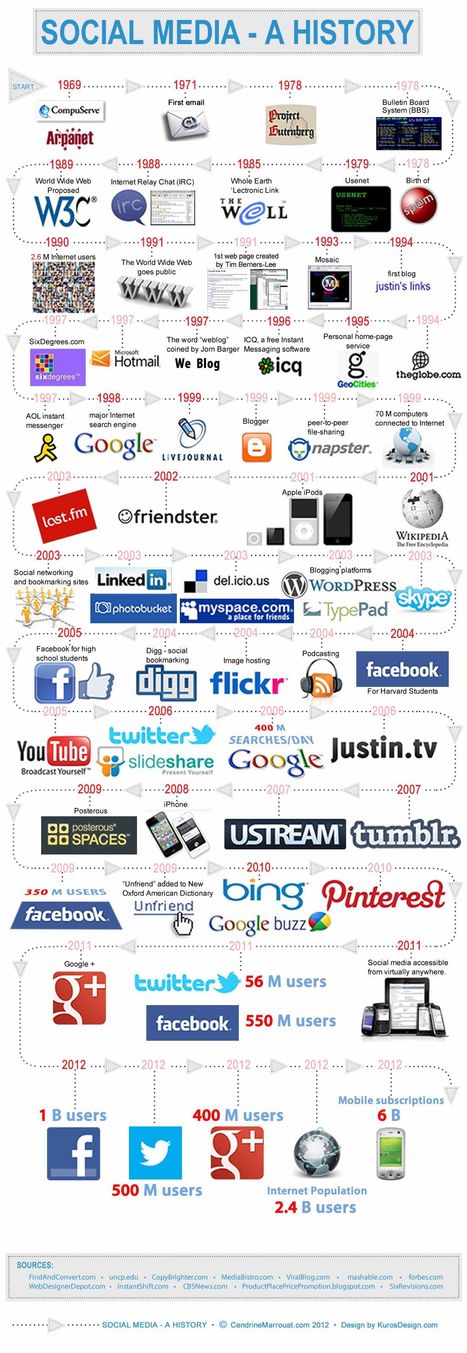
A brief History of Social Media (1969-2012)

A brief History of Social Media (1969-2012) | Distance Learning, mLearning, Digital Education, Technology | Scoop.it

Here’s the thing: the history of social media actually goes back a lot further, and its roots can be found in blogging, Google, AOL, ICQ, the beginnings of the world wide web and, perhaps surprisingly, CompuServe.


Via Newsdeck, François-Xavier Schaeffer, Dennis Swender
James Douglass's curator insight, August 8, 2015 4:54 PM

Can anyone predict the next 33 years of Social Media? We don’t know it but the History of Social Media belongs to our digital culture. Let’s meet  the pioneers of digital life. 

Ellen Dougherty's curator insight, August 8, 2015 8:49 PM

Can anyone predict the next 33 years of Social Media? We don’t know it but the History of Social Media belongs to our digital culture. Let’s meet  the pioneers of digital life. 

Margaret LibStudies's curator insight, October 22, 2015 12:33 AM

I remember geocities and ICQ, and my first blog was a Livejournal. Interesting to see how long some things have really been around for.

Rescooped by Dennis Swender from Into the Driver's Seat
April 9, 2014 3:49 AM
Scoop.it!

Oppia - Interactive learning creator

"It's hard to learn to play the piano just by watching a video of a great pianist. Interactive learning is much more effective! oppia.org helps you make embeddable interactive educational "explorations" that let people learn by doing."


Nik Peachey's insight:

Interesting tool created by Google. Anyone can use it to create interactive learning experiences.


Via Nik Peachey, Jim Lerman
Nik Peachey's curator insight, March 3, 2014 8:18 AM

Interesting tool created by Google. Anyone can use it to create interactive learning experiences.

Rescooped by Dennis Swender from Tools for Teachers & Learners
April 9, 2014 3:46 AM
Scoop.it!

Turning documents into conversations

Turning documents into conversations | Distance Learning, mLearning, Digital Education, Technology | Scoop.it

NowComment is fast, powerful, and feature-rich: you can sort comments, skim summaries, create assignments, hide comments, reply privately, and much more.


Via Nik Peachey
Mary Reilley Clark's curator insight, April 11, 2014 2:02 PM

While much of this can be done in Google docs, there are several features which can extend the conversation.  Teachers do need to share documents via email.  

CECI Jean-François's curator insight, February 16, 2015 2:20 AM

Intéressant outil pour faire du commentaire social (débat électronique) sur un document, avec des possibilités de tri et de tracking ... Parfait pour l'hybridation de cours

Murielle Godement's curator insight, February 16, 2015 2:52 AM

Le pendant de VoiceThread à l'écrit. NowComment permet de commenter / débattre par écrit sur des documents du web en mode privé ou public. Le mode public ne propose pas de filtre de langue, difficile donc pour le moment de proposer des activités FLE de contributions à des débtas ouverts essentiellement en anglais. 

Rescooped by Dennis Swender from Digital Presentations in Education
May 2, 2014 3:09 PM
Scoop.it!

Cool PowerPoint Tricks: Write on Your Slides During your Presentation

Cool PowerPoint Tricks: Write on Your Slides During your Presentation | Distance Learning, mLearning, Digital Education, Technology | Scoop.it
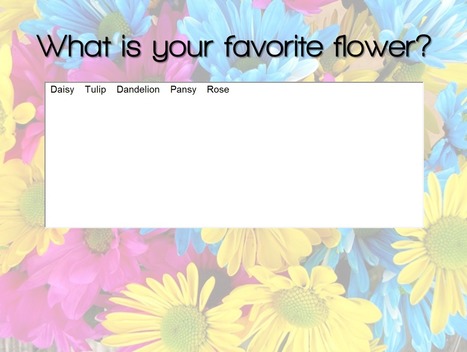
Sometimes you want to capture the audience’s responses in writing for all to see, but using flipchart just isn’t practical. Like in a room of 200 people. Or on a webinar. Or when you're presenting ...

Via Baiba Svenca
Elizabeth Lewis's curator insight, May 3, 2014 10:49 AM

Student responses

Character Minutes's curator insight, May 3, 2014 8:28 PM

Great way to make a  PowerPoint interactive

Mrs T Grade 3's curator insight, May 4, 2014 12:42 PM

Must try this today!

Scooped by Dennis Swender
May 2, 2014 3:07 PM
Scoop.it!

Will digital humanities disrupt the university?

Will digital humanities disrupt the university? | Distance Learning, mLearning, Digital Education, Technology | Scoop.it
Some 10 percent of humanities scholars currently self-identify as digital humanists. As such, digital humanities is the consummate academic hot-button topic and everyone has vehement opinions. The post Will digital humanities disrupt the university?
No comment yet.
Rescooped by Dennis Swender from Tools for Teachers & Learners
April 25, 2014 2:48 AM
Scoop.it!

The Answer Pad | The Graphically-Based Student Response and Assessment System

The Answer Pad | The Graphically-Based Student Response and Assessment System | Distance Learning, mLearning, Digital Education, Technology | Scoop.it

The Answer Pad is a student response system, so of course we have the typical select response question types that can be pushed out to the students. M/C, T/F, Yes/No, Fill in are a given. What makes us unique is the graphical nature of the tool, the templated backgrounds that come with The Answer Pad and the built in digital portfolio.


Via Nik Peachey
Nik Peachey's curator insight, April 24, 2014 1:17 PM

This looks like an interesting tool for student classroom response.

Mirta Liliana Filgueira's curator insight, April 26, 2014 12:49 AM

Evaluation. Herramientas Pad Log in using

Dean Mantz's curator insight, May 20, 2014 9:20 AM

I appreciate this share from Nik Peachey via his Tools for Learners page on Scoop.it.  Nik is one educator I would highly recommend folks follow on Scoop.it.  I truly appreciate his philosophical and pedagogical posts. 


As Nik points out in his summary, the feature that allows The Answer Pad to stand out from resources like Socrative and Infinite Learning is the graphing tool.  I see this feature being big in the math, science, and CAD classrooms. 

Rescooped by Dennis Swender from Digital Presentations in Education
April 25, 2014 2:45 AM
Scoop.it!

Parade - Create your own scrolling album for free

Parade - Create your own scrolling album for free | Distance Learning, mLearning, Digital Education, Technology | Scoop.it
Visit www.myparade.com to create your own free scrolling album to share with your friends.

Via Baiba Svenca
Baiba Svenca's curator insight, April 25, 2014 12:27 AM

A super easy way to create a photo presentation with the new service Parade. You do not even need to register.

Just upload your photos from Dropbox, Box or your computer and share your album with anyone! You may choose if it is public or private.

Ali Anani's curator insight, April 26, 2014 12:12 AM

Easily make your "scrolling memories"

Scooped by Dennis Swender
April 24, 2014 10:09 AM
Scoop.it!

Top 5 Creative Styles to Make Your E-learning Courses Stand Out

Top 5 Creative Styles to Make Your E-learning Courses Stand Out | Distance Learning, mLearning, Digital Education, Technology | Scoop.it
This blog post discuss the top five ways on how to add an excellent creative touch to your eLearning courses.Read more ›
No comment yet.
Rescooped by Dennis Swender from Educational Technology News
April 24, 2014 10:07 AM
Scoop.it!

Why Should I Attend An EdTech Conference?

Why Should I Attend An EdTech Conference? | Distance Learning, mLearning, Digital Education, Technology | Scoop.it

"The handy infographic below takes a look at 5 things to expect from a great edtech conference."


Via EDTECH@UTRGV
No comment yet.
Rescooped by Dennis Swender from Digital Presentations in Education
April 19, 2014 2:16 PM
Scoop.it!

Breaking News! #Slides by PowToon

Breaking News! #Slides by PowToon | Distance Learning, mLearning, Digital Education, Technology | Scoop.it

Via Baiba Svenca
Jörgen Daniel's curator insight, April 19, 2014 4:39 AM

Makers animatietool PowToon vragen gebruikers naar hun wensen.

Rosemary Tyrrell, Ed.D.'s curator insight, April 19, 2014 4:30 PM

You will have to receive an invitation, but worth checking out. 

Alfredo Corell's curator insight, May 5, 2014 5:22 AM

Now PowToon also offers a slides tool for presentations. You have to enter your email and asking for an invitation to this new application.

Rescooped by Dennis Swender from Learning & Technology News
April 14, 2014 10:44 PM
Scoop.it!

Reading is different online than off, experts say

Reading is different online than off, experts say | Distance Learning, mLearning, Digital Education, Technology | Scoop.it

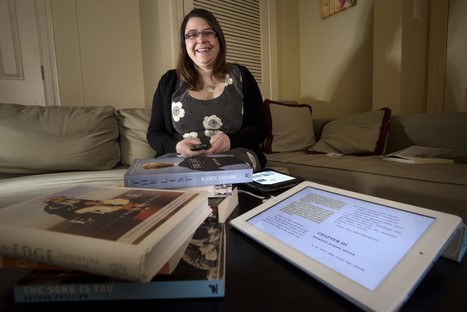
“We can’t turn back,” Wolf said. “We should be simultaneously reading to children from books, giving them print, helping them learn this slower mode, and at the same time steadily increasing their immersion into the technological, digital age. It’s both. We have to ask the question: What do we want to preserve?”


Via Nik Peachey
Nik Peachey's curator insight, April 10, 2014 4:10 AM

Interesting article about digital reading.

Carmenne Kalyaniwala's curator insight, April 11, 2014 2:01 AM

Very interesting

Eric de Beauvoir's curator insight, April 11, 2014 2:34 AM

Humans seem to be developing digital brains with new circuits for skimming through the torrent of information online. 
Rescooped by Dennis Swender from Digital Presentations in Education
April 14, 2014 10:41 PM
Scoop.it!

Synchrious - present your slides with webcam comments

Synchrious - present your slides with webcam comments | Distance Learning, mLearning, Digital Education, Technology | Scoop.it

Create highly engaging and measurable online lessons by synchronizing your presentation with your webcam and/or microphone. Develop assessments through interactive polls and analytics.


Via Baiba Svenca
Christina Ekholm's curator insight, April 16, 2014 4:56 PM
Ett till verktyg
Minerva Bueno's curator insight, April 21, 2014 6:40 PM

añada su visión ...

Two Pens's curator insight, April 22, 2014 1:37 PM

I'm going to try this.

Rescooped by Dennis Swender from Into the Driver's Seat
April 14, 2014 10:39 PM
Scoop.it!

How to convert a PDF to ePUB

How to convert a PDF to ePUB | Distance Learning, mLearning, Digital Education, Technology | Scoop.it

ePUB files offer a number of advantages over PDFs. Here's how to convert the latter into the former.


Via Marianela Camacho Alfaro, Jim Lerman
No comment yet.
Rescooped by Dennis Swender from Digital Presentations in Education
April 9, 2014 3:50 AM
Scoop.it!

7 Online Tools for Creating Charts & Diagrams

7 Online Tools for Creating Charts & Diagrams | Distance Learning, mLearning, Digital Education, Technology | Scoop.it

"Through the Free Technology for Teachers Facebook page I recently received a request for some suggested online chart creation tools..."


Via Baiba Svenca
Gust MEES's curator insight, February 11, 2015 11:13 AM

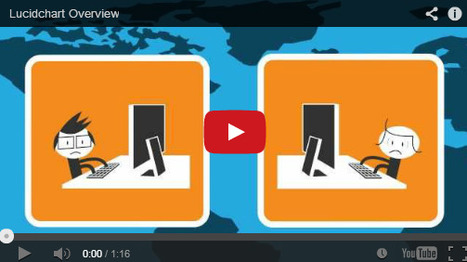
Lucidchart is an easy tool to use to create flowcharts, mindmaps, and graphic organizers. Lucidchart offers a simple drag and drop interface for creating flow charts, organizational charts, mind maps, and other types of diagrams. To create with Lucidchart just select elements from the menus and drag them to the canvas. You can re-size any element and type text within elements on your chart. Arrows and connecting lines can be re-sized, repositioned, and labeled to bring clarity to your diagrams.


Find out more tools by visiting the article...


Locke Chastaine's curator insight, February 13, 2015 3:08 PM

I always struggle with graphics. 

Saberes Sin Fronteras OVS's curator insight, February 15, 2015 10:10 AM

#tecnicas

Scooped by Dennis Swender
April 9, 2014 3:48 AM
Scoop.it!

University of Wisconsin-Stout - The First Wisconsin University to be Certified for Excellence by the United States Distance Learning Association

University of Wisconsin-Stout - The First Wisconsin University to be Certified for Excellence by the United States Distance Learning Association | Distance Learning, mLearning, Digital Education, Technology | Scoop.it

University of Wisconsin-Stout - The First Wisconsin University to be Certified for Excellence by the United States Distance Learning Association
The University of Wisconsin-Stout has received Quality Standards (QS) certification for excellence from the United States Distance Learning Association (USDLA). University of Wisconsin-Stout is the only university in the UW System to receive this certification. Institutions that receive USDLA/QS certification have been evaluated using 124 standards that focus on the areas of administration, leadership and management, student affairs, and teaching and learning.  Certification is awarded for a five-year period, subject to performance and annual renewal. "UW-Stout has been a leader in providing online and distance education for decades," said Chancellor Charles W. Sorensen. "This announcement tells the world that the programs we provide across the country and the world meet the highest standards for academic rigor and quality." Doug Stevens, director of Stout Online, added, "Going through the process of the USDLA Quality Standards Certification not only validates the quality services that UW-Stout provides, but also identifies areas that we can improve in providing online programs to our students."

No comment yet.