 Your new post is loading...
"Most iPhone and iPad users know that you can tap and hold onto any text within iOS to select it, then by using the little draggable bars, you can adjust the size of the text selection rather easily too. While this is great for selecting a single word, a sentence, and even a small block of text, it’s not so great for choosing to highlight large groups of words like a lengthy paragraph, or just a generally large block of text. But not to worry, it turns out that iOS has a much better way of selecting large text blocks in one fell swoop, and it uses an easy to remember tap gesture that seems to be so little known that it’d almost qualify as a secret."
Via John Evans
With the thousands of educational apps vying for the attention of busy teachers, it can be hard to sift for the gold. Michelle Luhtala, a savvy librarian from New Canaan High School in Connecticut has crowd-sourced the best, most extensive list of appsvoted on by educators around the country. “I wanted to make sure we had some flexibility because there’s no one app that’s better than all the others,” Luhtala said. Some apps are best for younger students, others are more complicated, better suited for high school students. Many apps do one thing really well, but aren’t great at everything. Still others are bought, redesigned or just disappear — so it’s always good to know about an array of tools to suit the need at hand.
Via Edumorfosis, John Evans

|
Scooped by
Dennis Swender
June 12, 2014 10:54 PM
|
We know students do not take it upon themselves to read the syllabus. Yet syllabus indifference still bewilders me after teaching for 25 years, given that my syllabi are conveniently available online and in hard copy, and are replete with information virtually assuring success with my courses.
|
|
Scooped by
Dennis Swender
June 12, 2014 10:51 PM
|
Here're some ways in which you can use color when designing eLearning courses by taking physiological and psychological effects into consideration.
The easiest way to upload, share, to search for a presentation or slide by slide is only using SlideJar.com, the social slide sharing service for professionals, conferences and events.
Via Baiba Svenca
|
|
Rescooped by
Dennis Swender
from Educational Technology News
June 11, 2014 1:30 PM
|
|
|
Scooped by
Dennis Swender
June 11, 2014 1:28 PM
|
Social media tricks to improve your results and help your business stand out on Facebook, Twitter, Pinterest, LinkedIn, Instagram, and Google+.
With the thousands of educational apps vying for the attention of busy teachers, it can be hard to sift for the gold. Michelle Luhtala, a savvy librarian from New Canaan High School in Connecticut has crowd-sourced the best, most extensive list of appsvoted on by educators around the country. “I wanted to make sure we had some flexibility because there’s no one app that’s better than all the others,” Luhtala said. Some apps are best for younger students, others are more complicated, better suited for high school students. Many apps do one thing really well, but aren’t great at everything. Still others are bought, redesigned or just disappear — so it’s always good to know about an array of tools to suit the need at hand.
Via Edumorfosis, John Evans
|
|
Rescooped by
Dennis Swender
from Into the Driver's Seat
June 9, 2014 4:36 PM
|
Jim Lerman's insight: Nice use of ThingLink to provide useful links for classroom teachers. How many of these apps do you know about and use?
Via Jim Lerman
|
|
Scooped by
Dennis Swender
June 9, 2014 4:32 PM
|
I am a very picky Facebook user. I only share and like content that will be useful to those who follow me and / or will entertain them. Many interesting things pop up in my newsfeed. Unfortunately, I don't always have time to read them until later. So, before taking any action, I use a Chrome extension called "Facebook Favorite."
|
|
Rescooped by
Dennis Swender
from Into the Driver's Seat
June 9, 2014 1:04 PM
|
by Allie Gross "Like many competitors in the ed-tech sector, Google Play for Education appears to be trying to carve a niche for itself in the largely Apple-dominated marketplace. Allowing schools to split the costs of tablets by dividing the number they need by five will make a huge difference for those wanting to integrate tech into classrooms on a tight budget."
Via Jim Lerman
|
|
Scooped by
Dennis Swender
June 9, 2014 12:59 PM
|
|
|
Scooped by
Dennis Swender
June 9, 2014 12:42 PM
|
How much do you know about everyone's favorite search engine?
|
|
|
Scooped by
Dennis Swender
June 20, 2014 12:38 PM
|
Make it relevant. Not to you, not to your organisation, but to your learner. I have a friend who passed their driving theory test recently using a free online course. She showed me the course and it was just text on a web page. No bells, no whistles. But then she didn’t need them. …
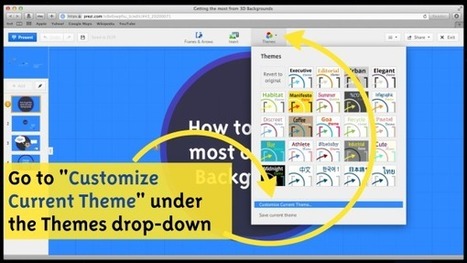
Meaghan Hendricks is a presentation designer at Prezi. She has designed prezis for a wide variety of purposes, from TED talks to Prezi tutorials to reinterpretations of classic fairy tales. You can find some of the prezis she’s made on her public Prezi profile.
Via Baiba Svenca
|
|
Rescooped by
Dennis Swender
from Into the Driver's Seat
June 12, 2014 10:53 PM
|
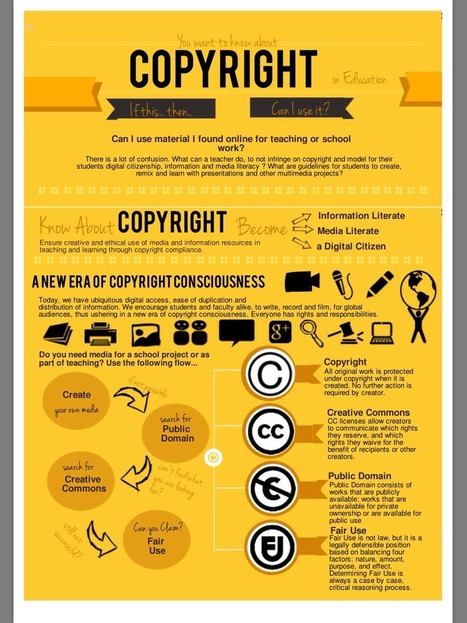
by Silvia Tolisano "It is the responsibility of all educators to model good digital citizenship for their students. Especially when it comes to copyright, plagiarism and intellectual property. The waters are murky. Not being familiar with online digital rights and responsibilities (hey, teachers did not grow up with the Internet being around), educators are wading through uncharted waters (hey, I did not know that I could not just google an image to use. If someone puts it up online it is free for the taking). That does not mean they can close their eyes and pretend life is the same or that the same rules apply to online versus offline use of copyrighted material with their students."
Via Jim Lerman
|
|
Scooped by
Dennis Swender
June 12, 2014 10:51 PM
|
Live Events, Twitter Feeds, Chat Rooms, and other resources for the Understanding Cheating in Online Courses MOOC (Massively Open Online Course)
|
|
Rescooped by
Dennis Swender
from Educational Technology News
June 11, 2014 1:31 PM
|
"Responsive design refers to ensuring that media is available across a number of devices. For eLearning, that means creating a course or module that can be accessed via mobile phone as readily as it is on the computer. Responsive design makes learning more accessible, regardless of device, time or location, which can be a huge advantage for learners who are short on time or can’t physically attend a class."
Via EDTECH@UTRGV
|
|
Rescooped by
Dennis Swender
from Educational Technology News
June 11, 2014 1:29 PM
|
Social media. Connecting teachers. Intriguing students Offering resources. Cataloguing information with hashtags. Streamlining information consumption. Awesome, right? All of this and more only happens, however, when you’re using social media effectively. That said, what does ‘effectively’ mean, anyway? How can you Tweet incorrectly? What constitutes a ‘bad’ social media profile? While much of that is …
Via EDTECH@UTRGV
|
|
Rescooped by
Dennis Swender
from YouyaTralaLing
June 11, 2014 1:26 PM
|
This report outlines findings from an international online survey of 711 academics about their use of social media as part of their work conducted in January 2014. The survey sought to identify the tools that the respondents used, those they found most useful and the benefits and the drawbacks of using social media as a university faculty member or postgraduate student. The results offer insights into the sophisticated and strategic ways in which some academics are using social media and the many benefits they have experienced for their academic work. These benefits included connecting and establishing networks not only with other academics but also people or groups outside universities, promoting openness and sharing of information, publicising and development of research and giving and receiving support. While the majority of the respondents were very positive about using social media, they also expressed a range of concerns. These included issues of privacy and the blurring of boundaries between personal and professional use, the risk of jeopardising their career through injudicious use of social media, lack of credibility, the quality of the content they posted, time pressures, social media use becoming an obligation, becoming a target of attack, too much self-promotion by others, possible plagiarism of their ideas and the commercialisation of content and copyright issues. The report ends by contextualising the findings within the broader social and political environment and outlining areas for future research.
Via YouyaTralaLing
Motionshows is an online-based SaaS based short video and web presentation tool that allows you to make fantastic multimedia video presentations and on the fly video webpage creation without any editing expertise. Transform any product, promotion or idea into a video slideshow masterpiece complete with special effects, music, text and natural voice then compliment it with an instant customized webpage and URL address to host your new video.
Via Baiba Svenca
"One way to be creative with your photos is to capture motion. You can use any of the following 3 techniques... "
Via John Evans
|
|
Scooped by
Dennis Swender
June 9, 2014 4:31 PM
|
Learn about a new "superpower" that isn't being taught in 90% of US schools.
"Juanito Olonia’s weak immune system and low muscle tone prevent him from attending school every day, but he still got to be an active member of his first-grade class at Enos García Elementary School this past school year."
Via EDTECH@UTRGV
|
|
Rescooped by
Dennis Swender
from Educational Technology News
June 9, 2014 12:49 PM
|
It is popular to write about how the internet is changing the way we think. Education and parenting journalists like to speculate about what new technology is doing to our children. People write both negative and positive versions. The negative versions complain that we are raising a generation of kids that [...]
Via EDTECH@UTRGV
|















Who knew??? So happy!!