The classroom is not what it used to be. The pace of technology adoption is accelerating. It pays to keep track by reading the latest education news. Here are fifteen information resources to help you stay up to date.
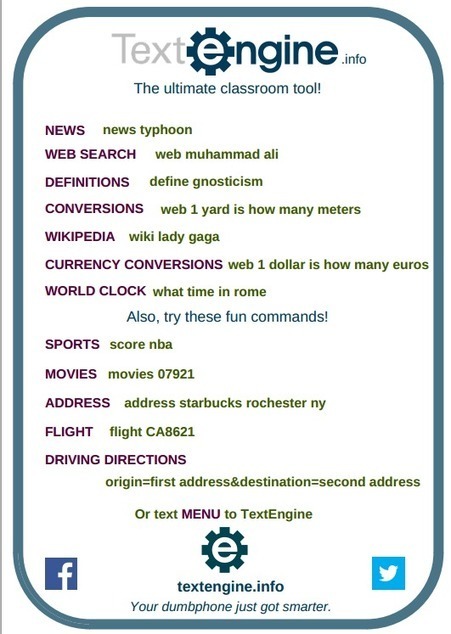
Text Engine was developed to offer cell phone users a means to search the web using their text messaging service. This is great news for educators and students in low-income and rural communities.
And that's a good thing, because while smartphones are popular, there is still a great need for text-only services in low-income and rural districts. There is also a need in districts like NYC that empower students to bring their own devices to school, but don't have the means to enable students to connect to the internet.
In this short article and video advertisement learn how you can leverage a texting free tool to obtain Internet info. This is a great tool for anyone with limited data plan, or no data plan.
Over the last few years I've seen more schools opening up access to YouTube, at least to teachers, than I had in the past. YouTube for Schools has partially contributed to that trend. Tools like ViewPure and Watchkin have made using YouTube videos in schools a little less scary too. All that said, there are still lots of schools that block access to YouTube. That's why a few years ago I started to maintain a list of alternatives to YouTube.
Recently, we discovered a feature of Google Drive that has changed how we prepare and access materials and resources for our students. As we attempt to make all curricula digital and thus make it available to all students, the idea of using PDFs was always a problem. PDFs are just not editable in most situations, and this was an issue when it came to modifying and differentiating documents. Adobe Acrobat was our “go to” application for this type of conversion, but it was costly and often hard to come by in an educational setting. Note: We still use Adobe Acrobat for complex projects or documents that do not convert well in Google Drive. With the most recent update to Google Drive, OCR (Optical Character Recognition) capabilities are better and easier than ever.
Mobile devices as teaching tools are becoming a more and more common part of the American education experience in classrooms, from preschool through graduate school. A recent Pew Research Center survey found that 58% of U.S. teachers own smartphones — 10 percentage points higher than the national average for adults. Those teachers are building that tech-savviness into their lesson plans, too, by embracing bring-your-own-device policies and leading the push for an iPad for every student. In 2013, an estimated 25% of U.S. schools had BYOD policies in place and it’s reasonable to assume those numbers have risen in the past two years.
What do these mobile devices really add, though? Is there more to this tech trend than just grabbing the attention of students? Is mobile technology boosting classroom instruction, or is it all just a flashy way to accomplish the same things as analog instruction?
Some great ideas here particularly using eBook texts and school blogs allowing students access to school work anytime, anywhere. Tech use presupposes teacher familiarity and confidence to use.
App Ed Review (www.appedreview.com) is a web-based tool dedicated to supporting teachers in how they find and use educational apps with their students. Their product is unique in the field of educational app resources.
Mobile devices as teaching tools are becoming a more and more common part of the American education experience in classrooms, from preschool through graduate school. A recent Pew Research Center survey found that 58% of U.S.
"Editing documents in Microsoft’s Sway app is about to get a bit more friendly. An update lets you edit you create and edit content with friends and team members.
Now you can share an edit link with a potential collaborator. When someone clicks on it, your sway will show up on his or her own list of content (with an icon indicated it’s a shared doc). Then both people can work on the document at any time, including simultaneously."
LEARNing To LEARN, the PracTICE | With ALL that mass of information which WE get on each day in OUR technology driven Digital World, with the messages from Social Media through OUR PLN (Personal [Professional] Learning Network), there is a MUST to organize OUR LEARNing! WE MUST unlearn the OLD and learn to learn differently as that was the case twenty years ago!
LEARNing To LEARN, the PracTICE | With ALL that mass of information which WE get on each day in OUR technology driven Digital World, with the messages from Social Media through OUR PLN (Personal [Professional] Learning Network), there is a MUST to organize OUR LEARNing! WE MUST unlearn the OLD and learn to learn differently as that was the case twenty years ago!
Seriously. I can't believe I need to write this post. I thought most teachers understood social media do's and don'ts. But I am finding they don't. Really? Okay. Here it goes. Teachers - you are in...
Seriously. I can't believe I need to write this post. I thought most teachers understood social media do's and don'ts. But I am finding they don't. Really? Okay. Here it goes. Teachers - you are in...
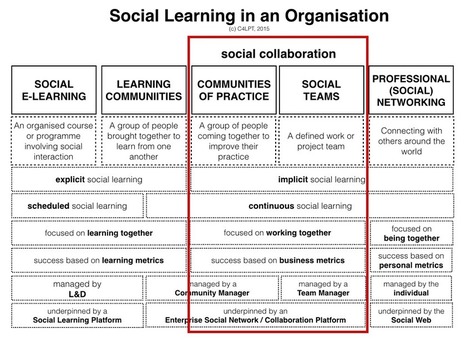
In my framework of Modern Workplace Learning (see diagram on right) I use the term social collaboration to label an important new element of work of the modern-day L&D department. I deliberately chose not to label it social learning. So what is the difference – or rather connection – between these two terms?
In my framework of Modern Workplace Learning (see diagram on right) I use the term social collaboration to label an important new element of work of the modern-day L&D department. I deliberately chose not to label it social learning. So what is the difference – or rather connection – between these two terms?
Three tech tools -- SAS Curriculum Pathways, Newsela, and EDpuzzle -- can help differentiate instruction by showing where students are and offering appropriate formative assessment.
"Do you like doodling? How about some iPad apps to help you create beautiful doodles? The collection below features some interesting applications you can use on your iOS devices to help you carry out a variety of things that include: doodling using different colours, text and fonts, drawing using simple and powerful tools, sketching out your ideas, and sharing your productions in real time."
Makerspaces are not just for kids! Public libraries are developing makerspaces so that ALL community members can explore the possibilities. One great example @CranstonLibrary #ALLACCESS
The list of the Best Password Manager Apps for iPhone & iPad is here. In this list, you can see 7 best password manager apps for iPhone & iPad. Now see the best iOS password manager apps-
Publishing your podcast through iTunes will probably give it the best opportunity to reach a large audience. People are familiar with the process of subscribing to podcasts through iTunes which will help you help them subscribe to your podcast. The drawback to using iTunes to publish your podcast is that the set-up process is confusing the first time you do it. WordPress can make the process a little easier. But if you're only publishing occasionally or only looking to share your audio recordings with a specific audience (let's say students, their parents, and perhaps another classroom or two) then you might be better served by using a simpler method of publishing your audio recordings.
Move over, Facebook! If you teach middle or high schoolers, you know that Instagram is one of the most popular social media channels for teens and tweens today. And while it may not seem like it at first, there are many applications for Instagram in the classroom.
In her speech to various universities and organizations Marissa tells us innovation means “changing something for the better.” When it comes to using technology in school, she is right on target. For example, in many cases interactive whiteboards neither make learning more interactive or better. Word processing can slow down, rather than enhance the writing process, barely reaching the bottom rung of the SAMR model. Just having and using technology does not mean we are doing something better.
Imagine a world where resources were limited to what was found in the classroom or the school closet known as the "Curriculum Materials Room." Picture a world where students wrote letters with pen and paper to communicate with other students and adults outside of the building. Due to postage costs, the teacher either sent the letters in bulk or paid for stamps out of his or her own pocket. Can you recall a time when student interests like skateboarding or video were never used as part of learning curriculum because the tools needed were either too expensive or not yet conceptualized? Do you remember a time when non-traditional learners struggled, and absenteeism meant a high likelihood of students doing poorly in school, and possibly having to retake the course?
If you experienced none of these scenarios, then you live in a world of possibility because you grew up with the many social media tools available to support all learners. If any of these scenarios bring back memories as a teacher or student, then you understand that we have many more tools today to ensure that learners succeed despite struggles, because students and teachers have so much more available to meet every learner's needs.
Evernote helps you remember what's important. And now, it lets you take your Post-it® Notes with you wherever you go. Whether it's a to-do list, reminder, sketch, or big idea, just capture your Post-it® Notes into Evernote, then save, tag, search, and sync them across all of your devices.
The way Eugene Kaspersky sees it, there may soon come a day when you wake up and your coffeemaker refuses to brew anything – or worse, will only brew decaf – until you pay up on the ransomware that has infected it.
Kaspersky, CEO of Kaspersky Lab, told some of the company’s top partners at its annual North American Partner Conference here this weekend that he believes IoT stands not only for “Internet of Things,” but also for “Internet of Threats.” The emergence of IP and intelligence in an increasing number of previously disconnected devices will lead to new and novel attack vectors, the executive predicted.
“It’s not just the pleasures of this world, the benefits and the beauty, that we have to think about,” Kaspersky told partners. “We also have to think about the other side, the bad guys, as well.”
And while the coffee maker was a bit of a perhaps a tongue-in-cheek example, Kaspersky said he does see a variety of attack opportunities on devices that have heretofore not been connected to the network. The first one to be hit, he posited, will be right in our living rooms.
The way Eugene Kaspersky sees it, there may soon come a day when you wake up and your coffeemaker refuses to brew anything – or worse, will only brew decaf – until you pay up on the ransomware that has infected it.
Kaspersky, CEO of Kaspersky Lab, told some of the company’s top partners at its annual North American Partner Conference here this weekend that he believes IoT stands not only for “Internet of Things,” but also for “Internet of Threats.” The emergence of IP and intelligence in an increasing number of previously disconnected devices will lead to new and novel attack vectors, the executive predicted.
“It’s not just the pleasures of this world, the benefits and the beauty, that we have to think about,” Kaspersky told partners. “We also have to think about the other side, the bad guys, as well.”
And while the coffee maker was a bit of a perhaps a tongue-in-cheek example, Kaspersky said he does see a variety of attack opportunities on devices that have heretofore not been connected to the network. The first one to be hit, he posited, will be right in our living rooms.
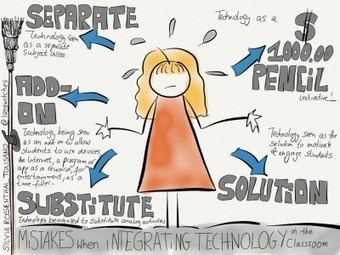
What are the Biggest Mistakes Teachers Make When Integrating Technology into the Classroom?
The word “mistake” is a harsh word. It implies flaws, pointing fingers, errors in judgement, something wrong and possibly even a dead end. I would rather think or connect the word “mistake” to first steps, stepping stones, experimentation and exploration. With that being said, those “first steps” or that exploration cannot become a routine cemented in stone how technology is being used in the classroom. Stepping stones are meant to lead to something else.
For the sake of the prompt given, here are my top 5 “Mistakes” (in no particular order) which I see, read and hear about as I travel the world to learn and work with schools, teachers and students:
- Technology being used to substitute an analog activity
- Technology use being seen as an add-on to allow students to use devices, the Internet, a program or an app as a reward, for entertainment, as a time filler for students who finish early
- Technology use as a separate subject area
- Technology as a $1000 pencil initiative
- Technology seen as the solution to motivate and engage students
- Technologie utilisée pour substituer une activité analogique. (NDLR: Quoiqu'il faille bien commencer quelque part!) - Utilisation de la technologie considérée comme un add-on pour permettre aux étudiants d'utiliser des dispositifs, l'Internet, un programme ou une application comme une récompense, pour le divertissement, comme un passe-temps pour les étudiants qui terminent plus tôt. - Utilisation de la technologie comme un sujet distinct du cours. - La technologie comme un crayon à € 1000. - Technologie vu comme la solution pour motiver et engager les élèves.
To get content containing either thought or leadership enter:
To get content containing both thought and leadership enter:
To get content containing the expression thought leadership enter:
You can enter several keywords and you can refine them whenever you want. Our suggestion engine uses more signals but entering a few keywords here will rapidly give you great content to curate.


 Your new post is loading...