


This week I was the keynote for the pre-conference event at ISTE 2016. Here are the resource slides for my presentation on Google Classroom.
Via Jim Lerman

 Your new post is loading...
 Scoop.it! This week I was the keynote for the pre-conference event at ISTE 2016. Here are the resource slides for my presentation on Google Classroom. Via Jim Lerman No comment yet.
Sign up to comment
Scoop.it!

Snapchat is now known as a platform for individuals and brands -- one that allows users to create quick, lighthearted, and even educational video content without using valuable production resources. For brands, this means a new opportunity to show off their culture, share knowledge, and connect with their audience in a new and exciting way. After reporting more than 100 million daily active users, and over 8 billion video views a day, we decided to give it a go: The official HubSpot Snapchat account launched in March 2016. And while we're still getting our feet wet, we've already learned a lot about executing and iterating a successful Snapchat business strategy. To help you get started, we've detailed everything we've learned (so far) below. We'll start by going over the basics -- how to set up an account, create a Snap, leverage effects, etc. -- and jump into some tips after that. ... Via Jeff Domansky, Marco Favero, massimo facchinetti 
Jeff Domansky's curator insight,
June 30, 2016 2:43 AM
Learn the basics of how to leverage Snapchat for your business -- along with tips from HubSpot's account.
Scoop.it!

Blogs are a great choice for summer reading because not only are they current, but they also invite you to connect with others and join the conversation that is of interest to you. EdTech: Focus K-12 makes choosing those blogs easy with their 2016 honor roll featuring the 50 top K-12 ed tech blogs. Via John Evans
Scoop.it!

Looking to enhance your Gmail productivity? Check out our list of the best 20 hidden features of Gmail now. The list includes how to make a filter. Via Techgeeker, Jim Lerman
Scoop.it!

Social Learning: Popular ways of Twitter utilization in Instructor-led Training. 3 main ways in which Twitter can support instructor-led training. Via Maggie Rouman
Scoop.it!

How do I properly use Facebook in the classroom? What are the golden Facebook rules for teachers? How can as a teacher utilize Facebook in the classroom? These are some of the questions that you will be able to answer after reading the Facebook Guide for Teachers. Via Maggie Rouman 
Maggie Rouman's curator insight,
June 28, 2016 1:04 AM
Great guide for incorporating Facebook in your classroom.
Scoop.it!

Some educators find Facebook daunting and potentially perilous, but the advantages are well worth it, especially once you master all the settings Facebook has to offer. Now, is it like being in the classroom? No, it’s not like being in the classroom, but it’s purposeful, interactive, and enjoyable, and exactly what my dry, strictly discussion-board online courses were missing. Facebook makes for an optimal virtual classroom, and this is why: Via Maggie Rouman
Maggie Rouman's curator insight,
June 28, 2016 1:08 AM
Ten good reasons why Facebook would enrich online learning.
Scoop.it!

The next semester, I decided to embrace social media and created a Facebook page for the class, which was comprised of 25 students. It was actually fun and easy. In less than two hours, I had created a page with relevant material for the course. For the sake of privacy, I kept the class page separated from my personal Facebook account. Via Maggie Rouman
Scoop.it!

It’s the why and the how to get you started, to move you beyond the initial frustrations, and to create a fantastic learning network. TABLE OF CONTENTS (Click on any of these to go to that part of the post, on mobile devices you might just have to scroll down.) Via Maggie Rouman
Scoop.it!

Pinterest is an educator's dream come true because of its many options for curating and sharing ideas, displaying student work, and building a PLN. Via Maggie Rouman
Scoop.it!
Pinterest and your students Via Maggie Rouman
Scoop.it!
Do you use social media professionally? What about with your students? Click to read how easy and effective it can be in both cases! Via Maggie Rouman
Scoop.it!

There are two things you can be sure of in today’s mobile world: Social media is booming, and most people use more than one device to browse the web. Via Daniel Watson 
Brie McKinley's curator insight,
March 2, 2016 2:47 PM
Those who are yet to be sold on social media advertising need to know that social networks are booming, and that for the majority of networks, those accessing their social media accounts via mobile devices, far outweigh those using desktop computers. The sheers numbers of those accessing social media platforms means that business owners who avoid social media advertising are missing out on a high proportion of their potential customers. If you need to be further convinced then this article is for you. 
Charles Appleton's curator insight,
March 3, 2016 10:19 PM
Those who are yet to be sold on social media advertising need to know that social networks are booming, and that for the majority of networks, those accessing their social media accounts via mobile devices, far outweigh those using desktop computers. The sheers numbers of those accessing social media platforms means that business owners who avoid social media advertising are missing out on a high proportion of their potential customers. If you need to be further convinced then this article is for you. 
QUENUM's curator insight,
March 6, 2016 5:56 PM
Those who are yet to be sold on social media advertising need to know that social networks are booming, and that for the majority of networks, those accessing their social media accounts via mobile devices, far outweigh those using desktop computers. The sheers numbers of those accessing social media platforms means that business owners who avoid social media advertising are missing out on a high proportion of their potential customers. If you need to be further convinced then this article is for you. |
Scoop.it!

This List Includes Tips for Discussion, Organization, Project Building, and More! Who Know Being Social Could be so Educational? Via Maggie Rouman
Scoop.it!
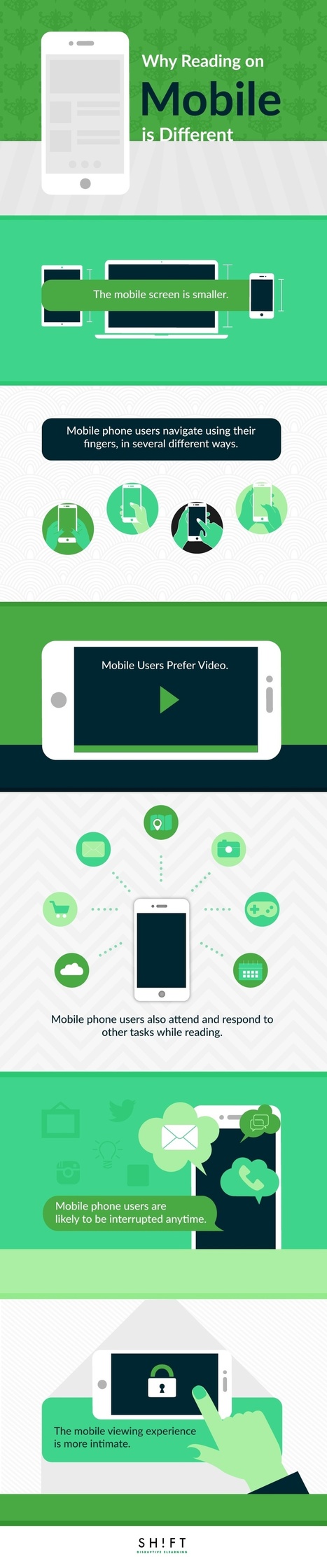
Learn the critical differences between reading on mobile and desktop computer screens and what can you do to work around the differences in eLearning design.
Scoop.it!

Looking for some social media stats to use for your strategy or in your next presentation? You will find what you need in the list below — updated to June 2016. (Bringing you this quarterly roundup
Scoop.it!

New WhatsApp text formatting options released this recently. You can bold, italicize, and strikethrough text with our guide to use new text options. Via Jim Lerman
Scoop.it!

We're showcasing the top 100 video sites for educators to use in their classrooms. Appropriate for a variety of subjects and age levels. Via Jess Hass, Charles Marvin, Maggie Rouman
Maggie Rouman's comment,
June 12, 2016 11:34 AM
Love this resource. I'm scooping this! Helpful for teachers of all levels.

Rosemary Tyrrell, Ed.D.'s curator insight,
June 15, 2016 9:16 PM
Excellent list of resources. Well organized, too!
Maggie Rouman's curator insight,
June 23, 2016 2:49 PM
Incorporating videos in a PBL/flipped setting goes beyond just using YouTube or Khan Academy videos. What a great list of video sites. Lots of ideas here!
Scoop.it!

Social media offers some great opportunities for learning in the classroom, bringing together the ability to collaborate, access worldwide resources, and find new and interesting ways to communicate in one easily accessible place. Teachers around the world have found innovative ways to use Twitter as a teaching tool (including TeachThought’s favorite), and we’ve shared many of these great ideas here with you. Read on, and we’ll explore 60 inspiring ways that teachers and students can put Twitter to work in the classroom. Via Maggie Rouman
Maggie Rouman's curator insight,
June 27, 2016 4:30 PM
Great list of ideas here. There's something for every level of student!
Scoop.it!

We’ve seen all sorts of creative use cases, but here are the most common forms: Teachers and students use Twitter for communication and conversation so they can keep the in-class discussion going after class! Twitter is a great way to add context to content especially when students need to study a topic and find experts in the field and ask them questions on Twitter! Via Maggie Rouman
Maggie Rouman's curator insight,
June 27, 2016 11:15 PM
This is THE definitive guide. Great ideas how to use twitter in a project based, flipped or blended setting. Many links to useful resources.
Scoop.it!

Instagram revolutionized photography with an engaging and simple social platform that allows photo editing and sharing. Use this free app in your classroom with both smartphones and tablets. You can even start an account just for your class! Via Maggie Rouman
Scoop.it!

Move over, Facebook—if you teach middle or high schoolers, you know that Instagram is one of the most popular social media channels for teens and tweens today. And while it may not seem like it at first, there are many applications for Instagram in the classroom. Via Maggie Rouman
Scoop.it!

I’m not the most dedicated Instagrammer (need to get out more) or the best photographer (wish I was) but like many other educators, I enjoy sharing my photos on Instagram. Via Maggie Rouman
Scoop.it!

Maggie Rouman's curator insight,
June 29, 2016 11:50 PM
This is a fun way to use "faux" social media in the classroom. Fakebook has a Facebook template but can be used to create fictional social profiles. How can you use this? Book character profile? Famous American profiles? The possibilities are endless!
Scoop.it!
This List Includes Tips for Discussion, Organization, Project Building, and More! Who Know Being Social Could be so Educational? Via Maggie Rouman |






