Distance Learning, mLearning, Digital Education, Technology
16.5K views | +0 today
Distance Learning, mLearning, Digital Education, Technology
Your new post is loading...
Scooped by Dennis Swender
October 30, 2016 4:19 AM
Scoop.it!

Jane McGonigal: The Gaming Fix for the Real World - Science Not Fiction

Jane McGonigal: The Gaming Fix for the Real World - Science Not Fiction | Distance Learning, mLearning, Digital Education, Technology | Scoop.it
When you bundle up all the time that gamers everywhere pour into their favorite games, the statistics are simply staggering. World of Warcraft’s legion of devotees, for example, have now spent more than 50 billion hours—about 6 million years—roaming their mythical, digital universe. Halo 3 players banded together to reach a kill tally of 10 …
No comment yet.
Rescooped by Dennis Swender from Educational Technology News
October 29, 2016 1:36 PM
Scoop.it!

Designing eLearning for Multiple Devices: Five Tips for Mobile-Friendly Content

Designing eLearning for Multiple Devices: Five Tips for Mobile-Friendly Content | Distance Learning, mLearning, Digital Education, Technology | Scoop.it
Mobile learning is not in the future; it’s now. And the use of mobile is likely to increase. Follow these tips to create effective
responsively designed eLearning that works for learners anywhere.

Via EDTECH@UTRGV
No comment yet.
Rescooped by Dennis Swender from Into the Driver's Seat
October 29, 2016 1:32 PM
Scoop.it!

Online Mathematics Homework Increases Student Achievement

Online Mathematics Homework Increases Student Achievement | Distance Learning, mLearning, Digital Education, Technology | Scoop.it
In a randomized field trial with 2,850 seventh-grade mathematics students, we evaluated whether an educational technology intervention increased mathematics learning. Assigning homework is common yet sometimes controversial. Building on prior research on formative assessment and adaptive teaching, we predicted that combining an online homework tool with teacher training could increase learning. The online tool ASSISTments (a) provides timely feedback and hints to students as they do homework and (b) gives teachers timely, organized information about students’ work. To test this prediction, we analyzed data from 43 schools that participated in a random assignment experiment in Maine, a state that provides every seventh-grade student with a laptop to take home. Results showed that the intervention significantly increased student scores on an end-of-the-year standardized mathematics assessment as compared with a control group that continued with existing homework practices. Students with low prior mathematics achievement benefited most. The intervention has potential for wider adoption.

Via Jim Lerman
Michael Paul's curator insight, May 21, 2024 10:46 PM

With an abundance of online resources for students, it is great to see that it is truly beneficial. Students need to practice to improve their mathematics abilities. These online resources can truly help students find success.

Rescooped by Dennis Swender from Educational Technology News
October 29, 2016 1:30 PM
Scoop.it!

The 6 Essential Steps Of The eLearning Development Process

The 6 Essential Steps Of The eLearning Development Process | Distance Learning, mLearning, Digital Education, Technology | Scoop.it
Want to know about the essential steps of the eLearning Development Process? Check the 6 essential steps of the eLearning Development Process.

Via EDTECH@UTRGV
No comment yet.
Rescooped by Dennis Swender from Curation, Social Business and Beyond
October 26, 2016 12:43 PM
Scoop.it!

Ultimate Social Media Tips and Tools [Infographic]

Ultimate Social Media Tips and Tools [Infographic] | Distance Learning, mLearning, Digital Education, Technology | Scoop.it
This infographic is choc full of Social Media tips, tools and fun facts, along with hints on best posting times. File this away as a handy resource!

Via janlgordon
janlgordon's comment, October 14, 2016 10:41 AM
Thank you @BOUTELOUP Jean-Paul @Techgeeker & @DISHRUS :-)
janlgordon's comment, October 17, 2016 10:40 AM
Thank you @Chris Carter & @Bonnie Bracey Sutton :-)
janlgordon's comment, October 18, 2016 10:46 AM
Thank you @MiniTool Software :-)
Scooped by Dennis Swender
October 26, 2016 12:43 PM
Scoop.it!

Making Your Student Room a Home Infographic - e-Learning Infographics

Making Your Student Room a Home Infographic - e-Learning Infographics | Distance Learning, mLearning, Digital Education, Technology | Scoop.it
The Making Your Student Room a Home Infographic shows some fantastic ways to instantly transform your student space into your new home.
Alan Hendrick's curator insight, October 23, 2016 9:35 PM

Good advice for arranging your class.

Corina Barbu's curator insight, October 24, 2016 6:00 PM

#SCEUNED16

Rescooped by Dennis Swender from Eclectic Technology
October 26, 2016 12:28 PM
Scoop.it!

The Four Negative Sides of Technology | Edudemic

The Four Negative Sides of Technology | Edudemic | Distance Learning, mLearning, Digital Education, Technology | Scoop.it

"We live in a high tech world—with high tech classrooms. We embrace the benefits of using iPads during class, integrating tweets during presentations, and teaching students while using smart TVs. We know the many benefits of incorporating technology while teaching, such as adding diversity to lessons, increasing student interaction, and to bringing new perspectives and knowledge to the class.

But there can be a negative side resulting from inappropriate or overuse of technology, and that negative side can have serious and long-term consequences."


Via Beth Dichter
Beth Dichter's curator insight, May 3, 2015 7:21 AM

Technology has many benefits, but it can also cause harm. Edudemic shares updated information on some of the harmful effects technology may bring, as well as five ways you may address the harmful impacts. Two of the harmful effects are below.

1. Technology changes the way children think. Research shows that "the use of technology can alter the actual wiring of the brain." There may be benefits to this, but there are some known issues that are discussed in the post.

2. Technology changes the way children feel. A study of two groups of 6th graders showed that those who "no access to technology for five days" were more empathetic than those who were using it. Studies also show that children who use technology  more than 4 hours a day may experiences difficulties in "social skills and emotional reactions."

In addition to two additional negative impacts the five suggestions include:

* Teach responsible usage.

* Use classroom technology intentionally.

These are issues that are impacted by how students use technology outside of school. You may want to include some of this information in a parent newsletter.

Daniela Tabares Restrepo's curator insight, March 8, 2018 11:23 PM
This is an important text since we have to know that the use of technology has many benefits for the learning processes, and nowadays it has become a trend having one or more technological devices. The point is that an excessive use could have some negative points. For example, many years ago kids had a lot of interaction with their friends face to face, either playing or doing another things, but it have changed a lot since the excessive use of technology has caused that now kids do not want to get out for sharing time with their friends, they only want to be in Social Networks. Also, as it is mentioned in the text "Technology can put privacy and safety at risk"; it is true since many people, not only kids, share in their social Networks about private things that other people should not know. In conclusion, it is important to take into account the good aspects of implementing technology for education, but teachers should make their students conscious of the problems that excessive use of it can brings..
Julián David Cano's curator insight, March 20, 2018 7:32 PM
As I already have reflected in the other articles that I have published, there is not any doubt about the important role that technology can have in education . Technology offers us millions of reasons to contribute positively in the learning process, and there are infinite resources, applications and web pages that help in our profession.

As technology has become a daily tool, it has advantages and disadvantages. It is important to take a look to this article due to the fact that ir presents four negative aspects of technology. Children are losing the ability to interact face to face with others because they only want to be focused on their digital devices. In addition, as the author says: "Technology can put privacy and safety at risk". It can be evidenced because many people are using social networks in a deliberate way without paying attention to the risks of exposing the privacy to everybody. Those are examples described in the article about the negative aspects that can arise from the bad use of technology.
Rescooped by Dennis Swender from Eclectic Technology
October 26, 2016 12:18 PM
Scoop.it!

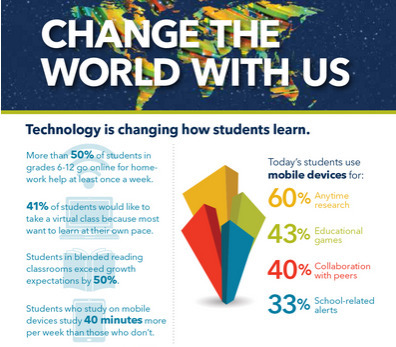
Ed tech can change the world (infographic)

Ed tech can change the world (infographic) | Distance Learning, mLearning, Digital Education, Technology | Scoop.it
Educational technology is making a huge impact on how students learn, how teachers teach and how education is done.

Via Beth Dichter
Beth Dichter's curator insight, June 15, 2015 6:10 AM

ISTE has released this new infographic that shares data on how technology in impacting our learners. It is divided into the following categories:

* Technology is changing how how students learn.

* Technology is changing how teachers teach.

* Together we're changing education - one classroom at a time.

Before clicking through to the infographic take a moment to think about how technology is used in your school or classroom. Then check out the infographic and see if these statistics surprise you. There may be some new avenues you would like to explore.

Ellen Dougherty's curator insight, August 1, 2015 11:50 AM

ISTE has released this new infographic that shares data on how technology in impacting our learners. It is divided into the following categories:

* Technology is changing how how students learn.

* Technology is changing how teachers teach.

* Together we're changing education - one classroom at a time.

Before clicking through to the infographic take a moment to think about how technology is used in your school or classroom. Then check out the infographic and see if these statistics surprise you. There may be some new avenues you would like to explore.

Rescooped by Dennis Swender from Eclectic Technology
October 26, 2016 12:16 PM
Scoop.it!

7 Social Media Strategies Every Teacher Needs to Learn Today and Teach Tomorrow

7 Social Media Strategies Every Teacher Needs to Learn Today and Teach Tomorrow | Distance Learning, mLearning, Digital Education, Technology | Scoop.it
Students are curating content and impacting the world. Help them make the right choices with these 7 social media strategies.

Via Beth Dichter
Beth Dichter's curator insight, June 29, 2015 10:20 PM

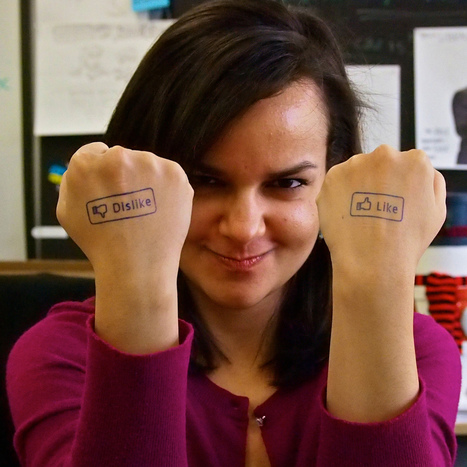
Today our students are online and often are not thinking about what they post, and the long-term impacts of their digital tattoo. In fact, teachers must also think about these same issues. This post looks at seven choices to consider:

* Think before you share (a message that Common Sense Media shares a 'think before you post' in a video for tweens and up that was put out by Flocabulary).

* Never respond in anger

* Understand the long term impact of your social shares

* Ask, "Why am I liking or retweeting this?"

* Avoid confrontation

* Try for the "Warm and Fuzzy" reward

* Change the world

Additional information is available in the post, and consider sharing this information with your students next year.

Rescooped by Dennis Swender from Business Improvement
October 25, 2016 9:42 PM
Scoop.it!

6 Ways to Create Killer Webinars 

6 Ways to Create Killer Webinars  | Distance Learning, mLearning, Digital Education, Technology | Scoop.it
A well-planned webinar gives you a chance to interact with, and sell to, your customers while building value for them at the same time.

Via Daniel Watson
No comment yet.
Rescooped by Dennis Swender from Business Improvement
October 25, 2016 9:41 PM
Scoop.it!

10 Things You Need to Know about Search Engine Optimization 

10 Things You Need to Know about Search Engine Optimization  | Distance Learning, mLearning, Digital Education, Technology | Scoop.it

Think you know SEO? It’s all about keywords, content, and optimization, right? Not quite. 


Via Daniel Watson
No comment yet.
Rescooped by Dennis Swender from 21st Century Learning and Teaching
October 22, 2016 11:48 AM
Scoop.it!

The Give and Take of Social Networking | #LEARNing2LEARN #SocialMedia #ModernEDU #ICT

The Give and Take of Social Networking | #LEARNing2LEARN #SocialMedia #ModernEDU #ICT | Distance Learning, mLearning, Digital Education, Technology | Scoop.it
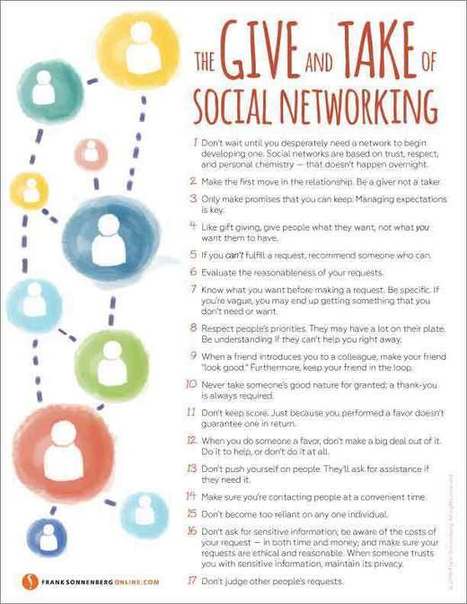
The Give and Take of Social Networking

Looking for a job? Need some personal advice? Looking to make some valuable connections? Perhaps you should try social networking, but only consider it if you’re prepared to help others first. Otherwise, your efforts will fall short.


Learn more / En savoir plus / Mehr erfahren:


http://www.scoop.it/t/21st-century-learning-and-teaching/?tag=Frank+SONNENBERG


Via Gust MEES
Gust MEES's curator insight, October 13, 2016 11:40 AM
The Give and Take of Social Networking

Looking for a job? Need some personal advice? Looking to make some valuable connections? Perhaps you should try social networking, but only consider it if you’re prepared to help others first. Otherwise, your efforts will fall short.


Learn more / En savoir plus / Mehr erfahren:


http://www.scoop.it/t/21st-century-learning-and-teaching/?tag=Frank+SONNENBERG


Rescooped by Dennis Swender from iPads, MakerEd and More in Education
October 22, 2016 10:38 AM
Scoop.it!

Learn How to Create Engaging Green Screen Videos with Students

Learn How to Create Engaging Green Screen Videos with Students | Distance Learning, mLearning, Digital Education, Technology | Scoop.it

Learn how to create compelling green screen videos with your students. (inc. tutorial video) 


This video is included with the book, "40 Simple Ways to Inspire Learning with Mobile Devices".


Via Sam Gliksman, John Evans
Alan Hendrick's curator insight, October 23, 2016 2:23 PM

cheap advice to make a green screen

Rescooped by Dennis Swender from Digital Presentations in Education
October 29, 2016 1:37 PM
Scoop.it!

8 Innovative Types of Visual Content (You Probably Haven’t Tried Yet)

8 Innovative Types of Visual Content (You Probably Haven’t Tried Yet) | Distance Learning, mLearning, Digital Education, Technology | Scoop.it
A list of visual content types you probably haven't tried yet, from cinemagraphs and progress GIFs to interactive sliders and mixed-media infographics.

Via Baiba Svenca
Baiba Svenca's curator insight, October 27, 2016 3:43 PM

Fantastic visuals + tips how to create them.

paul rayner's curator insight, October 28, 2016 5:12 PM
Share your insight
Rescooped by Dennis Swender from Educational Technology News
October 29, 2016 1:36 PM
Scoop.it!

User Testing for eLearning That Is Usable and Useful

User Testing for eLearning That Is Usable and Useful | Distance Learning, mLearning, Digital Education, Technology | Scoop.it
User testing can help designers and developers create eLearning that is both useful and usable. Some testers are willing to
participate over and over again as a product—or multiple products—are developed. Here are some great ideas to facilitate
this key step in eLearning creation!

Via EDTECH@UTRGV
Susanna Lavialle's curator insight, October 28, 2016 4:25 PM
Sounds like a simple truth but often gets omitted or given too little importance
Patricia Cruz's curator insight, September 16, 2023 3:28 PM
During graduate school we are often reminded to keep learners in mind. Although it may sound simple I always had to remind myself as I was creating lessons. Creating lessons and testing them out with actual learners is beneficial to see if it is actually going to work or not. It also allows the creator to fix problems in the early stages before the final product. Asking for feedback is also beneficial so that the feedback can help improve the plan as well as see it through the eyes of the learner.
Rescooped by Dennis Swender from Digital Delights for Learners
October 29, 2016 1:31 PM
Scoop.it!

Interactive #Videos

Interactive #Videos | Distance Learning, mLearning, Digital Education, Technology | Scoop.it

Via Ana Cristina Pratas
No comment yet.
Scooped by Dennis Swender
October 26, 2016 9:57 PM
Scoop.it!

Three competing visions of educational technology. Which is yours?

Three competing visions of educational technology. Which is yours? | Distance Learning, mLearning, Digital Education, Technology | Scoop.it
Gary Stager says: There are three competing visions of educational computing. Each bestows agency on an actor in the educational enterprise.
No comment yet.
Scooped by Dennis Swender
October 26, 2016 12:43 PM
Scoop.it!

4 Ways To Get People Addicted To eLearning - eLearning Industry

4 Ways To Get People Addicted To eLearning - eLearning Industry | Distance Learning, mLearning, Digital Education, Technology | Scoop.it
Want to get people Addicted To eLearning? Check 4 ways to get people Addicted To eLearning and not even realize that they are learning!
Alan Hendrick's curator insight, October 23, 2016 9:32 PM

I like the idea of rewards and prizes offered . How can we keep students interested in the online learning site?

Rescooped by Dennis Swender from Eclectic Technology
October 26, 2016 12:29 PM
Scoop.it!

7 Brainy Ways to Boost Knowledge Retention in eLearning

7 Brainy Ways to Boost Knowledge Retention in eLearning | Distance Learning, mLearning, Digital Education, Technology | Scoop.it
As instructional designers, you have to create courses that are easy to remember and difficult to forget. Here's how:

Via Beth Dichter
Beth Dichter's curator insight, April 25, 2015 8:05 AM

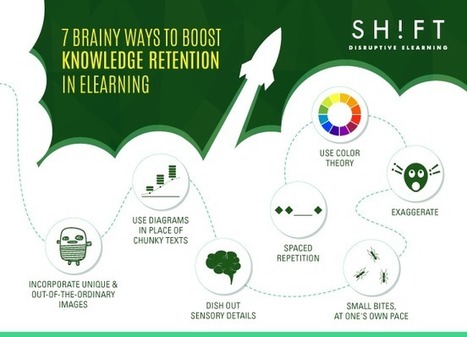
When we think of ways to boost knowledge retention in our learners, what works for students that are online also works for students in face2face classes. This post from SH!FT provides seven ways to help student retain knowledge. The visual above illustrates the concepts. The post provides additional information as well as links to

#1 - When possible, use diagrams. Many people are visual learners. Consider using graphic organizers to provide "holistic views, expressing relationships, and identifying contrasting data."

#2 - Incorporate unique and out-of-the ordinary images. Why? Images stay with us longer, and the more unique, the longer they tend to stay with us.

#3 - Dish out sensory details. The more details that engage the learner the better.

#4 - Use color therapy. Color works on many levels. Color can be used to organize, to grab our attention, and it can impact our mood.

The last 3 suggestions are below...but you will need to click through to the post to learn more about each.

#5 - Exaggerate.

#6 - Small bites, at one's own pace.

#7 - Spaced repetition.

Rescooped by Dennis Swender from Eclectic Technology
October 26, 2016 12:28 PM
Scoop.it!

Six Top Sources for Free Images, Video, and Audio | Cool Tools

Six Top Sources for Free Images, Video, and Audio | Cool Tools | Distance Learning, mLearning, Digital Education, Technology | Scoop.it
A curated list of resources to help students find high-quality, copyright friendly media for use in projects or presentations.

Via Beth Dichter
Beth Dichter's curator insight, May 11, 2015 6:25 AM

Are you looking for resources that provide "copyright friendly" images, audio and video for your learners? This post, by Richard Byrne, provides six resources. Each one provides access to materials that are in the public domain.

* The Moving Image Archive. This is part of the Internet Archive and includes over 1.7 million clips.

* The Public Domain Review is a project of the Open Knowledge Foundation and provides access to images, books, films, audio recording and essays.

* The Free Music Archive (FMA) provides access to free music. This collection is curated and provides a range of genres.

* Sound Gator provides free sound effects. Do you need the sound of a horn honking, or whipped cream coming out of a can?  This is a great place to go.

* Pixabay and the Morgue File are both great places to search for images. The Morgue File is a collection of photos, and Pixabay provides high-resolution images in the public domain.

Byrne provides additional details on each of these six resources in the post. Click through to learn more.

Marco Favero's curator insight, May 12, 2015 1:56 AM

aggiungi la tua intuizione ...

Rescooped by Dennis Swender from Eclectic Technology
October 26, 2016 12:17 PM
Scoop.it!

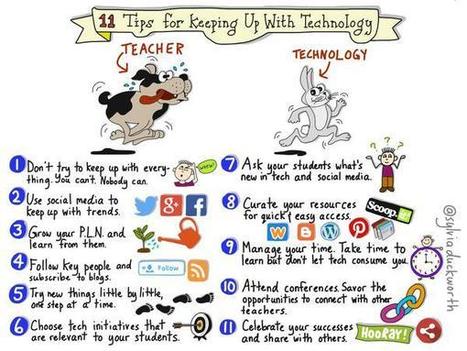
Tips for Keeping up with Technology Using Twitter

Tips for Keeping up with Technology Using Twitter | Distance Learning, mLearning, Digital Education, Technology | Scoop.it
Via Beth Dichter
Beth Dichter's curator insight, July 8, 2015 5:45 AM

Check out this great visual by Sylvia Duckworth that provides 11 tips on how to use Twitter to help you keep up with the ever changing world of technology! Below are her first three tips.

1. Don't try to keep up with everything. You can't. Nobody can.

2. Use social media to keep up with trends.

3. Grow you PLN and learn from them.

Twitter can be a great tool to use for yourself, or with your students. These 11 tips may help you determine ways to make Twitter more manageable.

Ellen Dougherty's curator insight, August 1, 2015 11:44 AM

Check out this great visual by Sylvia Duckworth that provides 11 tips on how to use Twitter to help you keep up with the ever changing world of technology! Below are her first three tips.

1. Don't try to keep up with everything. You can't. Nobody can.

2. Use social media to keep up with trends.

3. Grow you PLN and learn from them.

Twitter can be a great tool to use for yourself, or with your students. These 11 tips may help you determine ways to make Twitter more manageable.

Monica Lamelas's curator insight, March 16, 2016 5:07 AM

Check out this great visual by Sylvia Duckworth that provides 11 tips on how to use Twitter to help you keep up with the ever changing world of technology! Below are her first three tips.

1. Don't try to keep up with everything. You can't. Nobody can.

2. Use social media to keep up with trends.

3. Grow you PLN and learn from them.

Twitter can be a great tool to use for yourself, or with your students. These 11 tips may help you determine ways to make Twitter more manageable.

Rescooped by Dennis Swender from Eclectic Technology
October 26, 2016 12:16 PM
Scoop.it!

How Technology is Changing the Way People Learn

How Technology is Changing the Way People Learn | Distance Learning, mLearning, Digital Education, Technology | Scoop.it

"We can make all sorts of assumptions about the way technology is changing learning, but what does the science actually say? According to Alfred Spector, Google’s vice president of research, it says a lot. For example, virtual tutors have helped average students reach the top 2% of their course; video games provide immersive environments that take the bordedom out of studying; and social networks are being used to increase interaction between students."


Via Beth Dichter
Beth Dichter's curator insight, July 15, 2015 10:56 PM

Technology...some argue for it and others against it, but was does the research say? This post explores current research. Sections include:

* Better at maths, worse at reading - In short, "edtech applications boost mathematics achievement, especially when individualized computer-assisted instruction is involved."

* More games, bigger brains - Research shows that playing video games can make an impact on the brain. One study cited stated "a robust positive association between the cortical thickness and video game duration in teens who invested the most time in games." Two areas of the brain, the prefrontal cortex (responsible for decision making and self-control) and the Frontal Eye Fields (which govern visual-motor processing) showed cortical matter increases.

* Selective knowledge, shallow creativity - This section discusses how technology may make it easier for us to recall information. Are we potentially "outsourcing our knowledge to digital tools"?

What do you think? Many schools are moving towards 1-to-1 digital devices to help students learn. Will this improve their outcomes at school? This post explores some of the issues that may help us choose the best ways to use digital tools, and when it may be better to approach learning using other methods.

Mel Riddile's curator insight, July 16, 2015 8:56 AM
Beth Dichter's insight:

Technology...some argue for it and others against it, but was does the research say? This post explores current research. Sections include:

* Better at maths, worse at reading - In short, "edtech applications boost mathematics achievement, especially when individualized computer-assisted instruction is involved."

* More games, bigger brains - Research shows that playing video games can make an impact on the brain. One study cited stated "a robust positive association between the cortical thickness and video game duration in teens who invested the most time in games." Two areas of the brain, the prefrontal cortex (responsible for decision making and self-control) and the Frontal Eye Fields (which govern visual-motor processing) showed cortical matter increases.

* Selective knowledge, shallow creativity - This section discusses how technology may make it easier for us to recall information. Are we potentially "outsourcing our knowledge to digital tools"?

What do you think? Many schools are moving towards 1-to-1 digital devices to help students learn. Will this improve their outcomes at school? This post explores some of the issues that may help us choose the best ways to use digital tools, and when it may be better to approach learning using other methods.

Carlos Rodrigues Cadre's curator insight, July 16, 2015 9:08 AM

adicionar sua visão ...

Rescooped by Dennis Swender from Business Improvement
October 25, 2016 9:42 PM
Scoop.it!

12 Vital Items to Include in a Start Here Page 

12 Vital Items to Include in a Start Here Page  | Distance Learning, mLearning, Digital Education, Technology | Scoop.it

Most websites don’t have visitors walk through the front door. Instead of having a clear Start Here page, the site depends on search engines and social media links to bring visitors their way.


Via Daniel Watson
Rescooped by Dennis Swender from Business Improvement
October 25, 2016 9:40 PM
Scoop.it!

Top Nine Attributes of Effective Websites

Top Nine Attributes of Effective Websites | Distance Learning, mLearning, Digital Education, Technology | Scoop.it
There’s actually lots more to a great website than meets the eye – tempting as it is to judge a good website by appearance alone.

Via Daniel Watson
EU residency permit's comment, October 20, 2016 1:13 PM
http://www.goamgsolutions.com/single-post/2016/06/28/Poland-best-European-economic-performer-1
Daniel Gonzales's curator insight, October 20, 2016 1:32 PM
Don't miss this! Click image or heading; awesome checklist to keep in mind, definitely share with your team ;-)
Rescooped by Dennis Swender from E-learning
October 22, 2016 10:39 AM
Scoop.it!

The Padagogy Wheel English Version 5 - In Support of Excellence

The Padagogy Wheel English Version 5 - In Support of Excellence | Distance Learning, mLearning, Digital Education, Technology | Scoop.it
“In my experiences as an EdTech leader, I find that contemporary educators are passionate about using technology to extend and deepen learning. Most recognize the changing landscape of “the real world” and the modern pedagogies needed to prepare students for that world. However, more often than not, they find challenges in applying these new concepts with specific tools. 
With Allan Carrington’s Padagogy Wheel Model, teachers have an at-hand reference that ties apps to specific learning outcomes directly connected to modern pedagogies and theories. They can easily sit with the wheel during lesson planning time to find tools that will best aid their students or use it during class time to extend or deepen learning towards a specific 21st century skill or content area. This connection of theory, practice, and application makes the Padagogy Wheel an invaluable resource that should be on the wall of every classroom”.

Via John Evans, paul rayner
No comment yet.