Well the rumors of Nokia combining its Pro Cam and Smart Cam photography apps into one package have proven to be true. Just a little while ago Nokia released its Nokia Camera App for Lumia Windows Phones.

 Your new post is loading...
 Scoop.it! Well the rumors of Nokia combining its Pro Cam and Smart Cam photography apps into one package have proven to be true. Just a little while ago Nokia released its Nokia Camera App for Lumia Windows Phones. 
No comment yet.
Sign up to comment
Scoop.it!

Most of you followed the webcast and our live blog here on NN, but sme not - well you can watch the replay here.
Scoop.it!

Vaclav Krejci creates a shocking replica of Apple's iOS 7 home screen using Microsoft Word symbols, fonts and colors.
Scoop.it!

The Surface 2 is an attractive, solid, highly usable mobile device that remains, unfortunately, caught between two worlds. And that’s not a place you want to put tablet consumers. It took me a while to realize this, but the pass I gave them last year for keeping a traditional Windows desktop environment and even a second instance of Internet Explorer, just doesn’t hold up for a second-generation product. I want Microsoft to figure this stuff out. In fact, I demand that they make the Surface 2 (not the Surface Pro that runs Intel, but the device running on an ARM Nvidia Tegra 4 processor) a consistently Windows Design (Metro) experience. I don’t care if I am running the awesome Office 2013 suite on it — make that suite a part of the Windows Design experience.
Okay, before I let a rant consume this review, let’s back up a bit and talk about what we have here. The 1.5-pound, magnesium-bodied Surface 2 truly stands out among a field of, often, plastic or polycarbonate-bodied competitors. Where Apple has chosen aluminum for its iPad full and mini, Microsoft opted for magnesium. It feels cool and smooth to the touch, though there’s enough texture for it to never feel slippery. The new generation even comes in something approaching white (though it’s actually silver). It’s a decent look.
One of the things Microsoft gets right is the Surface 2 setup routine. It’s easy, inviting and hard to mess up. Even though I cringe when Microsoft calls the surface “your PC,” I still appreciate how simple it is to get started, especially if you already have a Microsoft account (Outlook or Hotmail).
Microsoft’s Windows Design screen, which is essentially like the “Start” button turned inside out, is inviting patchwork of colorful squares and rectangles. These boxes or “tiles” represent apps and environments like Desktop. Some of them are "Live Tiles" that tell you what's going on in your email inbox, calendar, and people connected to you via your favorite social networks. Instead of filling the screen, they sit along a movable center rail, leaving lots of space above and below. Since you can add as many apps and tiles as you like, they scroll off the screen to the right. A left swipe takes you through them. If you want to see them all, you can pinch the screen to zoom out. This is all largely unchanged from the original Surface RT and is really a product of Windows 8 platform. The Surface 2 was surprisingly buggy during my tests. Among the glitches I encountered: It froze with only the Wall paper showing. The screen turned all blue when I launched another app. When I wanted to check for a Windows RT update, the system told me some were available, but it would download them later. I couldn’t force it to do an update. It finally updated on its own later that night. Do More
These bugs were occasional and generally did not get in the way or overshadow what’s great about Surface 2; things like all-day buttery life (11 hours), excellent productivity chops, gaming fun, music (Xbox music and radio), movies (Xbox video and the Netflix App). Also, if you have an Xbox and Xbox live account, you can use the tablet to access the account and even control games via the second-screen Smart Glass App. Apple would do well to copy something like this with, someday, Games on Apple TV and controls on the iPhone or iPad.
Excellent construction. Smart, Easy-to-Use OS Office Suite SkyDrive Good value Buggy Desktop Mode Content consumption not center stage. Price does not include a TouchCover 2
Scoop.it!

While you can certainly pay for music (such as CDs or online downloads), or you can subscribe to any number of excellent streaming music services (like Nokia Music with MixRadio which fills our office with sounds each day), you can also find some really solid radio apps that will have you humming along in no time. For the time being, we’re going to spin the dial past apps like Pandora, Soundtracker, Spotify, Aupeo and others so that we can tune in to those apps that truly play radio stations, like the kind you find on the AM/FM format. Let’s start with the one whose name says it all: FM Radio. It has a simple user interface, but it does cut to the chase. One thing to note – as they do in their app description: Windows Phone 8 needs the Lumia Amber update to play the FM Radio app. Without the update, you will not be able to listen to FM Radio. A little more style and finesse is available in the TuneIn Radio app. You can see stations by music genre or location (stations are available worldwide), as well as by language (from Aboriginal to Yoruba – and everything in between). You will also find news and sports radio stations. In fact, there are more than 70,000 different stations to choose from worldwide. Each station displays what is currently playing, as well as information about the DJ that is currently on the air, if available. You can find music for different holidays, and music festival tie-ins, too (such as SXSW). There are ads periodically while you listen, but nothing that gets in the way of your listening experience. TuneIn does not require any registration to use the app – just pick a station and go. (If you like Alternative Rock, look for “The Dump – Internet Radio” – it kept me rocking.) ...
Scoop.it!

Days after its release, Microsoft took its Windows RT 8.1 update offline on Saturday, after users reported major issues with the software on some devices.
Scoop.it!

Last night, there was evidently no Facebook Beta update. We suppose the beta team is on vacation, taking a week off.
Scoop.it!

Back at Casual Connect in August, we interviewed German developer Handy Games about some of their upcoming Windows Phone and Windows 8 titles: 1941: Frozen Front and Townsmen.
Scoop.it!

If you have a PC either running Windows 8 or capable of doing so, here are our top 10 reasons to upgrade.
Scoop.it!
Hear from one of the masterminds of Internet search, Derrick Connell, CVP at Bing. He gives a walk-through of how to search all of your documents, pictures, ...
Scoop.it!
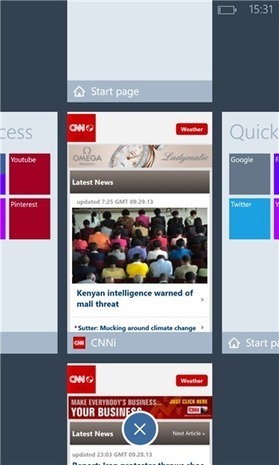
As we reported earlier, IE shell Maxthon for Windows Phone is now available for download. The popular 3rd party browser brings the following features to Windows Phone:maxthonqr Cloud Services Make the Multi-Device Web Easier
Scoop.it!

Lenovo, the world’s biggest PC maker, finally unveiled its first 8-inch Windows tablet on Wednesday. Equipped with the latest version of Microsoft’s mobile operating system, Windows 8.1, the tablet is the company’s formal entry into the nascent field of small-screen Windows tablets. Dubbed the Miix2, the tablet is most distinctive perhaps for its extremely minimalist design, offering a look that is one of the cleanest we’ve seen in terms of form meeting function. SEE ALSO: How to Install Windows 8 Without Ditching Windows 7 The 8-inch tablet comes with both front- and rear-facing cameras, 2 megapixels and 5 megapixels respectively, and up to 64GB of storage expandable up to 128GB via its Micro SD slot. Powered by an Intel Bay Trail-T Quad Core processor, the Miix2 can even run older apps made for Windows XP or 7. It has a 1,280 x 800 display — pretty standard these days, but nothing spectacular. The tablet also has an optional stylus and detachable cover that comes in multiple colors (black, pink and blue) and does double duty as a stand for viewing the screen at an angle. Priced at $299, Lenovo says the device will be available for purchase later this month.
|
Scoop.it!
News and perspectives covering the top stories, events and activities from Microsoft. The content for this blog includes the official information and stories from all of Microsoft's primary businesses.
Scoop.it!

Announced as part of the apps suite coming with the new Nokia Lumia 2520 here at Nokia World 2013, Nokia Video Director does exactly what it says on the tin.
Scoop.it!

The official Windows Phone Blog is the place for Windows Phone news, tips & tricks, app reviews, podcasts, and more!
Scoop.it!

Nokia, at Nokia World 2013 in Abu Dhabi, have just launched the long awaited Nokia Lumia 1520 made of recycled polycarbonate.
Scoop.it!

Microsoft's second-generation Surface Pro tablet takes the experience to another level, but it's not the hardware that stands out.
Who has a tablet? That’s right, pretty much everybody. Now, who has a tablet that can run full Photoshop? Suddenly the show of hands goes way down, limited pretty much to only non-ARM-powered Windows slates. And finally, who has a tablet that can run full Photoshop, Adobe Premiere Pro, multiple web browsers and more all at the same time without slowing to a crawl. Then you’re down to just Intel Core-powered tablets like the Surface Pro 2. SEE ALSO: The Problem With Windows 8 The Surface Pro 2 is Microsoft’s second-generation flagship for the Windows 8 (now 8.1) platform. It’s a powerful PC inside a tablet form factor, meant to fulfill a power user’s computing and consumption needs — all of them. It’s a great idea, and not just in theory. I used the original Surface Pro as my primary computing device for weeks when I researched my review earlier this year. The Surface Pro and its successor have the power to drive an entire workstation The Surface Pro and its successor have the power to drive an entire workstation, complete with external monitor, hard drives, speakers and oodles of USB gear. Then, when it’s time to kick back, the tablet is ready to detach and run a little Netflix whenever you are. Does the Surface Pro 2, which goes on sale Tuesday for the starting price of $899, take the experience further? In a sense, yes, but not really because of the hardware. The Surface Pro 2 ships with Windows 8.1, which includes a slew of important upgrades that augment the existing tools. But more than that, the world has fully embraced the cloud — one of the pillars of Windows 8. The Surface Pro was already a great piece of hardware, but now it has more software rooting for it. More of the Same With the Surface Pro 2, Microsoft isn’t messing with success. The design is nearly identical to the original: Weight and dimensions are exactly the same, and all the ports are in the same places. If Microsoft hadn’t switched out the Windows 8 logo on the back for one that simply says “Surface,” you wouldn’t be able to tell them apart without booting up and checking the Control Panel. Surface Pro 2 It’s actually too bad that Microsoft didn’t try to shave at least a little of the weight with a redesign. At 2 pounds, the Surface Pro 2 is still pretty beefy as tablets go. In fact, it’s starting to seem beefy as Ultrabooks go — the Sony Vaio Pro 11 is actually about an ounce lighter, and that machine has a real keyboard. Surface chief Panos Panay called the Surface Pro 2 a “beast” at its unveiling; he was referring to its processing power, but it’s an apt description for the physical footprint, too. Instead of making the tablet sleeker, Microsoft focused on revamping the insides. The Surface Pro 2 packs an Intel fourth-generation “Haswell” processor, meaning it’s capable of greater feats of computing while using much less power than last year’s model. The latter point matters most to the Pro, since battery life in the original was pathetic — about four hours, and I clocked considerably less than that. I’m happy to report the Pro delivers on its promise of greater battery life. Microsoft’s promise of 75% more juice translates into about 7 hours total, which I found to be about accurate. If you’re compiling video footage with the brightness turned all the way up while watching some YouTube at full HD — and you can — you’ll probably burn through the battery much faster, but at least now we’re talking hours, not minutes. The display on the Surface Pro 2 is almost exactly the same as the one Pro 1: Both are 10.6-inch displays with 1,920 x 1,080 resolution. Microsoft says it improved the color accuracy of the new tablet, but I couldn’t discern any difference in side-by-side comparisons with a few photos. But for pro illustrators, every little bit helps, I guess. Extras However, the new Type Cover -– the variant of the infamous keyboard Touch Cover with actual keys — is a superb upgrade. Type Cover 2 ($129.99) works just as well as the first version, except this one’s backlit, a very handy feature when typing in a dark room — say, when you’ve got the lights down to watch TV and you’re kicking back with Surface Pro 2 for a little second-screen action. Which, by the way, Surface Pro 2 is very good at. Not necessarily the second-screen stuff (although it’s fine for that too), but the kicking-back stuff. The kickstand’s new lower position is tailor-made for lying around with the Surface with your feet up. There’s a reason that kickstand extends the entire width of the device, and it’s so you can use it as an actual laptop. It also looks like Microsoft cleared up any issues with the Type Cover not responding so well when in a lap — in all my usage, it didn’t miss a keystroke. Microsoft Surface Pro 2 And then there’s the digitizing pen that comes with every Surface Pro and Pro 2. If pens (digital or otherwise) are part of your workflow, then you’ll find the pen and its 1,024 points of pressure essential. Anyone else will see it as a seldom-used perk. While I was disappointed to see over half the Surface Pro 2’s 64GB of storage eaten up after I’d installed a few apps, I actually don’t see it as that big a weakness now that Microsoft is offering 200GB of free SkyDrive storage with every Surface purchase. SkyDrive works much more seamlessly in Windows 8.1, I found, with fast access to files and virtually no lag even when saving directly to the cloud. Who needs local storage? When deciding which model to get, I recommend saving a little money and get fewer gigabytes than you planned. The Pro 2 Experience It’s too bad, then, that most of the upgrades to Windows 8.1 are about the modern UI. The new live tile sizes will tickle the power-user bones in Pro 2 buyers, but they won’t satisfy them. And a Health & Fitness app? Spare me. However, improved multi-monitor support is a big deal. However, improved multi-monitor support is a big deal. The Surface Pro 2 is very intelligent about detecting what kind of display you’re connecting to and scaling both the Desktop and the modern UI to the ideal size, depending on whether you’re mirroring displays or extending them. Beyond that, you can also manually change things to your liking. And it looks like app support is much better: In Windows 8, Google Chrome looked weirdly fuzzy on an external monitor, and in Windows 8.1 it’s razor-sharp. I especially liked the subtle touches — like when the Charms menu shifts a bit up or down on my monitor depending on whether I pushed my mouse into the top or bottom corner. However, I didn't like the actual touches in the Desktop on the Surface Pro 2 — that is, the way it responded to finger taps. In some apps, like Chrome, the tablet didn't even get the general area where I was touching right, instead assuming I was tapping about an inch higher than where my fingertip was. And the onscreen keyboard never automatically popped up when I tapped a text field — it looks like Microsoft has just given up with using touch in the Desktop environment with Windows 8.1. The new software has other bugs, such as when I tried to change the scrolling direction of the trackpad on my Type Cover. After typing “direction” from the Start screen, the setting “Reverse the touchpad’s scrolling direction” came up. This looked like exactly what I was looking for, except when I clicked it, nothing of the sort came up. A search for the setting in the Control Panel proved fruitless. It’s a quibble, but it’s an annoying one. The Surface Pro 2 is supposed to combine the power of a serious PC with the convenience of a tablet. But bugs like these undermine the latter persona. If changing a basic feature necessitates a visit to the Control Panel, I’ll probably just end up grabbing an iPad mini when it comes time to fire up Hulu Plus. At least with the deeper app catalog for modern UI apps, the tablet side of Windows is stronger than ever. The new Facebook app, for one, works very well, although I prefer to run it in portrait mode since I find the default menus off to the sides a little “chromey” for my taste. A Higher Surface That’s one of the more exciting things about this machine and its Windows 8.1 software — it’s a powerful PC that’s fully cloud-connected in a cloud-powered world. Since Windows 8 debuted, other services (such as Adobe Creative Cloud) have followed Microsoft into cloud services, and the Surface Pro 2 is a machine that isn’t just fully equipped to handle this world — it’s designed for it. So although I’m still skeptical whether Microsoft’s tablet experience has any value over competitors (and it's worthless in the Desktop), the Surface Pro 2 succeeds because that part is just gravy anyway. This is a tablet with the heart of a PC and its brain in the cloud. For a serious workhorse machine that you can really take anywhere, it's hard to beat. Have something to add to this story? Share it in the comments.
Scoop.it!

Microsoft launched Windows 8.1 via Windows Store on Thursday. If you have several machines to install it on, here's how to install it from a flash drive.
Scoop.it!

Windows Phone Remote Desktop app is now available on android and apple. soon the app would be making it's way to Windows phone as well. the app is free on
Scoop.it!

Locking the screen rotation on Windows Phone 8 is simply wonderful.
Scoop.it!

Continuing our video coverage of Windows Phone 8 Update 3 (GDR3), we look at the new screen rotation module in the Settings app. This new setting lets you control the behaviour of automatic screen rotation.
Scoop.it!

Are you a desktop diehard? If you've got no use for the Start screen and Metro-style apps, I have some good news for you. Windows 8.1 has a handful of interface tweaks you can make that will put the Windows desktop back in charge. ...
In unveiling Windows 8.1 earlier this year, Microsoft executives said, “We’re listening to feedback.” That’s a polite way of saying they were trying to avoid being splattered by a barrage of rotten tomatoes.
Scoop.it!

A little over a month ago, Dell surprised a few of us in the tech community by reviving the Venue branding for a product. It’s not a Windows Phone or Android smartphone, but instead a new family of tablets. There's the Dell Venue 8 Pro, an 8-inch tablet running Microsoft’s Windows 8.1 operating system. Dell now has full pricing and pre-orders up on their website. Details below. The Dell Venue 8 Pro certainly looks like one of the more appealing tablets running Windows in the 7 to 8-inch space. Earlier this week, Lenovo announced the Miix2 tablet, which appears to be similar in specs to the Dell Venue 8 Pro. Here’s what you’re getting for $299 with the Dell Venue 8 Pro: Intel Atom 1.8GHz quad-core processor (Z3740D) That’s what the base $299 gets you on the Dell website. You can upgrade to 64GB of storage for an extra $50. There are also two other configurations, one will get you a case for the Dell Venue 8 Pro, while the other includes the case in addition to an “active stylus”. This tablet is shaping up to be a killer device on paper. We won’t know how it performs until we get our hands on it. You can pre-order today (link below) and the devices are set to ship out on October 25th. Anyone thinking of getting this little tablet for just $299? Looks t
Scoop.it!

Microsoft has released this bouncy new advert for its Windows 8.1 release, which rolled out yesterday.
|