Scoop-It non officiel sur l'excellent Scrivener, logiciel de traitement de texte spécialement conçu pour les auteurs, informations et ressources aussi sur l'écriture et la lecture numérique
Portability and accessibility are important for writers. You never know when inspiration will hit, and when it does you don't want to be caught off guard. Professional software suites can be nice but often times are overkill, localized, and more hassle than they're worth. Browser-based writing tools are available no matter where you go. Whether…
I know we all (don’t we?) use Scrivener for our own personal writing. I also use it when I’m writing and researching a T.M.A. with the Open University, great for keeping all my notes together and for putting footnotes in a place to keep them out of the way.
My latest discovery (probably not the first to do so though) is that it is great for reviewing submissions to Wicked Words Quarterly.
Scrivener comme aide à la gestion éditoriale d'une revue scientifique, utilisation de ses fonctionnalités documentaires, de révision, et de compilation.
Vous avez une bonne plume mais l’Orthographe vous cloue le bec. Rassurez-vous, vous faites souvent plus de fautes d’attention que de fautes d’orthographe.
Any historian who has been to an archive in the digital era remembers each day as a race to capture as much material as possible in a limited time. The key to keeping this process organized is to keep track of archival location and to file your images with precise location data as soon as possible. Among all the programs that help manage images, I prefer Zotero, a free and open-source research tool available from the Roy Rosenzweig Center for History and New Media at George Mason University. Zotero is best known for capturing bibliographical data, but can also help with note taking and managing research files. While other programs are better for one of these tasks—just notes, or just article PDFs, or just images—Zotero excels as a Swiss Army knife, do-it-almost-all research tool. Here, I will describe how to use Zotero in conjunction with a camera (in my case, an iPhone), image import software (in my case, iPhoto), and a PDF editor
Zotero est utilisé pour gérer la collection de recherche qui comprend images, notes et références. Le tout associé à un dispositif "cloud" pour disposer de sauvegardes, pour cela l'utilitaire Zotfile qui se charge des sauvegardes dans Dropbox est utilisé. Enfin, quand il s'agit de passer à l'écriture, les éléments les plus utiles sont transférés dans Scrivener.
... Si je comprends bien l'article, Zotero est utilisé pour gérer la collection de recherche qui comprend images, notes et références. Le tout associé à un dispositif "cloud" pour disposer de sauvegardes, pour cela l'utilitaire Zotfile qui se charge des sauvegardes dans Dropbox est utilisé. Enfin, quand il s'agit de passer à l'écriture, les éléments les plus utiles sont transférés dans Scrivener.
I haven’t tried Scrivener with EndNote or Mendeley, but with Zotero there are two relatively easy ways to ensure you can work with Scrivener and Zotero and let Zotero format your references etc.
One of the things I love about Scrivener is the fine attention to detail. The app never goes the way of the obvious unless it makes sense. It's put together in a fashion that understands the way wr...
Comme les navigateurs, Scrivener est doté d'un bouton back (retour) et forward (suivant) qui permet directement de retourner sur la précédente page - là où on travaillait encore il y a quelques minutes. Cela correspond bien au mode d'écriture non linéaire.
I just submitted an application to the NSF DDIG*. It's a big grant and a big deal and getting it in makes me a very happy camper. I had already done a lot of writing for it in Word, which is where ...
«Depuis peu, j’utilise le “traitement de texte” – si l’on peut l’appeler ainsi – Scrivener (malheureusement non open source) développé par Litterature and Latte. Scrivener s’est donné pour mission d’être plus adapté à l’écriture de projets complexes (roman, thèses, etc) […]
Seul (énorme) problème: il n’y a pas de ponts entre Zotero et Scrivener de la même manière qu’il existe des plug-ins pour Open/LibreOffice et MS Word.
Mais, Zotero étant open source et pouvant compter sur une large communauté, des membres de cette dernière ont développé un petit plug-in permettant de travailler avec les deux logiciels …»
So you've written your book and now you need to make it into an ebook. Don't sit there staring into space like Mrs. Newton, this post will show you how to compile a Scrivener file into an ePub. But...
Recently I wrote a post showing how I compile my ebooks in Scrivener on the Mac. A few authors emailed me wondering if I’d create the same post for Windows users, since Scrivener for Windows is a little different than Scrivener for the Mac.
So here it is—how to create a simple but clean version of a kindle ebook using Scrivener for Windows. And by the way, I’m using Scrivener version 1.6.10 on a laptop running the home edition of Windows 7.
Quelques axes de réflexion sur l'écriture en ligne : un champ littéraire autonome, qui remet en cause circuits et concepts traditionnels ? (de @L_margantin #webassoauteurs @webasso_auteurs Qu’est-ce que l’écriture web ?
"...Il y a donc une autonomie du champ littéraire web qui me paraît forte, et qui correspond depuis le départ à une volonté des auteurs de sortir de la marchandisation généralisée de l’objet livre.
The layoutis where you’ve placed everything and how you’ve adjusted the screen you’re working in. For example, making the window size bigger or changing the visibility of the binder.
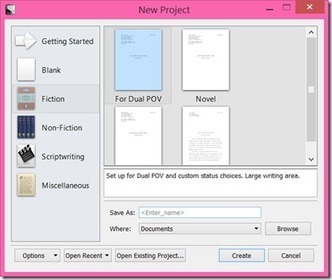
The project template includes pretty much everything. This is what you want if you need to save things like your keywords or label and status settings to use again.
Scrivener is the world's best software for writers.....However, I have often thought that Scrivener is so well designed that it could serve other purposes. One of these is as a project management center.
Pour ceux qui travaillent déjà sur Scrivener, l'outil peut aussi servir à d'autres usages, comme la gestion de projet : toutefois, il n'a pas l'ensemble des fonctionnalités des outils dédiés à la gestion de projet.
Pour ceux qui travaillent déjà sur Scrivener, l'outil peut aussi servir à d'autres usages, comme la gestion de projet : toutefois, il n'a pas l'ensemble des fonctionnalités des outils dédiés à la gestion de projet.
Although I use Scrivener s Mac version, I ve had several people ask me questions about the Window s version. I do have it installed in my Asus notebook, but truth be told it takes a long time to boot and every program I open causes it to freeze and crash.
Mise à jour de taille, plein de nouveautés..Je n'ai pas encore eu le temps de voir si la version Windows compte désormais toutes les fonctionnalités de la version Mac, mais on s'en rapproche
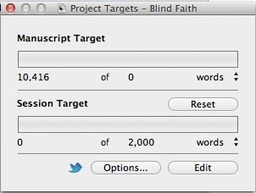
After using a scientific method to calculate the optimal daily word target which I should be aiming for, I'm now challenged but happy. It's called trial and error, and it's taken two novels to work...
Scrivener is software that allows you to easily organise a large writing project, so that you can easily switch between scenes, arrange scenes into chapters, store your research, sort, categorise, ...
Depuis l’écriture jusqu’à la mise en marché, j’ai tout effectué seul. Alors que mon premier ouvrage, paru en 2011 fut très difficile à formater (surtout pour Kindle), fort heureusement, il existe aujourd’hui des outils qui facilitenténormément la vie.J’utilise Scrivener pour écrire et, outre ses qualités d’outil d’écriture, il présente le gros avantage de compiler très facilement au format .epub ou .mobi.Il y a quelques paramétrages de base qui peuvent être pénibles (numérotation et/ou titre des chapitres, préservation de l’alignement du texte), mais une fois cesécueils passés, on compile extrêmement rapidement et efficacement.J’utilise ensuite Calibre pour envoyer par email mon manuscrit sur mon kindle et vérifier ainsi le formatage."
Ce tutoriel s’adresse à ceux (écrivains, blogueurs professionnels, journalistes, chercheurs) dont la profession ou l’occupation majeure est l’écriture. Établir un processus efficace et constant de recherche documentaire et d’écriture utilisant plusieurs excellents outils peut vous aider dans votre travail. Il s’agit d’utiliser avec méthode : Evernote, qui capturera et gérera la documentation Scrivener, pour réaliser votre projet d’écriture Et, si le projet d’écriture requiert de nombreuses références bibliographiques, Zotero pour les gérer et les insérer automatiquement.
This is a video tutorial demonstrating how to export a novel from Scrivener using collections for different versions (Amazon, Kobo, print versions, etc.). Wa...
To get content containing either thought or leadership enter:
To get content containing both thought and leadership enter:
To get content containing the expression thought leadership enter:
You can enter several keywords and you can refine them whenever you want. Our suggestion engine uses more signals but entering a few keywords here will rapidly give you great content to curate.


 Your new post is loading...