 Your new post is loading...

|
Scooped by
FrancoisMagnan
January 6, 2014 4:46 AM
|
Over the years I have tried many writing programs. Of them, my favorite by far is Scrivener. I discovered Scrivener less than a year ago, though I had heard of it before that. To put that in Indie publishing perspective, that was about three and half novels ago. I have come to use Scrivener almost exclusively for planning, writing and editing novels. I only switch to another program when I am ready to share my work with an editor or format it for publication. What is Scrivener?
|
|
Scooped by
FrancoisMagnan
January 1, 2014 9:01 AM
|
|
|
Scooped by
FrancoisMagnan
December 31, 2013 6:21 AM
|
|
|
Scooped by
FrancoisMagnan
December 27, 2013 1:03 PM
|
Organizing extensive notes in a mind map, linking those notes to a writing project.
|
|
Scooped by
FrancoisMagnan
December 14, 2013 5:12 AM
|
I wrote here the other day about how you could use multiple project notes in Mac Scrivener to manage a project. One of those uses is for a checklist of things to do. But a to-do list is only really...
|
|
Scooped by
FrancoisMagnan
November 16, 2013 8:26 AM
|
Recently, I've been writing shorter pieces and have developed a new workflow in Scrivener. At the beginning of a writing session, I work on the text which I'm prepared to write (i.e. I have all the...
|
|
Scooped by
FrancoisMagnan
November 12, 2013 3:07 AM
|
|
|
Scooped by
FrancoisMagnan
November 10, 2013 5:10 AM
|
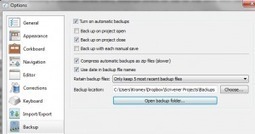
Backing up your stories with Scrivener and DropboxPosted on 2 November 2013 by Kromey As I have for the last six years (with one exception owing to being in India for the month), this year I am doing NaNoWriMo. The short version? I’m writing a 50,000-word novel in the 30 days of November. What would happen if my computer were to die on November 29th, just before I hit that goal after working so hard for it all month? Would I crawl into the fetal position and bawl my eyes out like a little baby? Well, I might, actually, but not because of any work lost on my novel. Thanks to Scrivener and Dropbox, my novel is well in hand and quite securely backed up!
|
|
Scooped by
FrancoisMagnan
November 7, 2013 3:29 AM
|
Any reader of this blog will know that I like to compose in Scrivener and, like the name of the company which develops Scrivener (Literature and Latte), I love coffee too. The best place to drink c...
|
|
Scooped by
FrancoisMagnan
October 31, 2013 4:38 AM
|
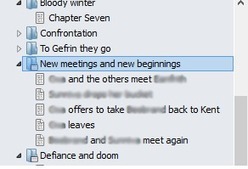
In part 1 I talked about using Scriveners Chapter and Scene titles as a condensed version of an outline, which makes navigating your novel a breeze later on. Part 2 covered using labels to flag each chapter (and/or scene) with some specific thing that is important to your book. In my case it was keeping track of whose POV each chapter would be from. In yours it might be the location the chapter takes place in, or the time period, maybe various subplots, or something else entirely. Whatever you think will be useful later when you might want to get a \”view\” of your story narrowed down to just one of these elements. In my case, I liked to be able to get rid of everything so that Scrivener only showed me the chapters from a specific character\’s POV. Now, I\’d like to talk about the other key feature I use in Scrivener: comments.
|
|
Scooped by
FrancoisMagnan
October 23, 2013 1:35 PM
|
Importing research, images, and web pages into Scrivener is handy, but sometimes creating a reference might be a better option. When might you want to use a reference instead of importing? When you...
In this post I’m going to talk about my method for writing–both fiction and non-fiction–using two popular software tools: Evernote and Scrivener.
|
|
Rescooped by
FrancoisMagnan
from Revolution in Education
October 14, 2013 9:01 AM
|
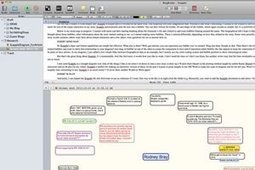
Literature and Latte, le producteur de Scrivener, vient d'adapter pour Windows son nouveau logiciel de prise de notes et de brainstorming : Scapple. Ce n'est pas du mindmapping, ni encore du conce...
Via Marco Bertolini
|
|
|
Scooped by
FrancoisMagnan
January 4, 2014 6:22 AM
|
Learning to how use the Synopis section in Scrivener s Inspector
|
|
Scooped by
FrancoisMagnan
January 1, 2014 8:56 AM
|
I have structured my writing process around small chunks of time.
Here is what I do:
|
|
Scooped by
FrancoisMagnan
December 30, 2013 7:11 AM
|
Tutorials for Scrivener Users
|
|
Scooped by
FrancoisMagnan
December 20, 2013 11:40 AM
|
Have you ever tried installing a book shelf speaker on a wall with only a screw driver? If you have, you know it is not impossible to do so but it is a major pain; it requires unnecessary work and can take hours to achieve the goal. But what happens if you have a stud finder, a drill, drill bit, a leveler, a pencil, a measuring tape and a light hammer for the job? With these tools you can finish the same task in a no time? Writing on Scrivener makes me feel I have all the needed tools to do the writing task. It makes writing a breeze just like all the tools above make installing a speaker so easy. The larger and more complex the writing task, the greater the power of Scrivener.
|
|
Scooped by
FrancoisMagnan
November 20, 2013 5:35 AM
|
I became aware of Scrivener, an alternative writing tool, several years ago, and have been intrigued ever since. At first glance, the benefit for creative writers is clear, but numerous scholars also use Scrivener.
How could this fail to be of interest to academics? However, because I no longer undertake such project, I’ve looked at how academic researchers report using it. This post summarizes what I’ve found.
|
|
Scooped by
FrancoisMagnan
November 13, 2013 1:23 PM
|
In addition to the five reasons to write your thesis in Scrivener there is at least one more: Scrivener provides a possibility of seeing and editing concurrently several snippets of texts. It's in...
|
|
Scooped by
FrancoisMagnan
November 12, 2013 3:03 AM
|
"Writing a thesis is painful. And it should be. But the pain should rest in wrestling with ideas and data not with software. Scrivener takes the pain out of the software side and ensures that your attention is always in the right place."
|
|
Scooped by
FrancoisMagnan
November 7, 2013 1:05 PM
|
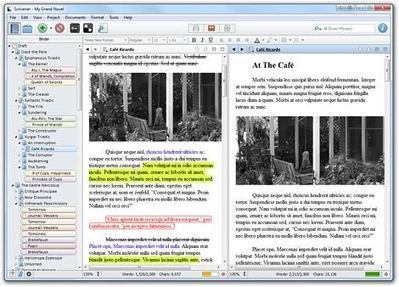
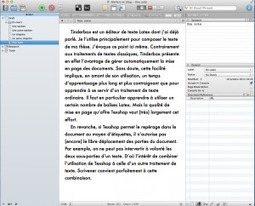
TeXShop est un éditeur de texte Latex dont j’ai déjà parlé. Je l’utilise principalement pour composer le texte de ma thèse. ...si TeXShop permet le repérage dans le document au moyen d’étiquettes, il n’autorise pas (encore) le libre déplacement des parties du document. Par exemple, on ne peut pas intervertir à volonté les deux sous-parties d’un texte. D’où l’intérêt de combiner l’utilisation de TeXShop à celle d’un autre traitement de texte. Scrivener convient parfaitement à cette combinaison. Sur la capture ci-contre, l’interface de Scrivener. À gauche, la partie consacrée au classement des documents.
|
|
Scooped by
FrancoisMagnan
November 4, 2013 4:38 AM
|
Scapple from Literature & Latte, not to be confused with scrapple, a meat dish I’d rather forget I’ve ever heard of, is a handy mind-mapping tool that I have found very useful for brainstorming...
|
|
Scooped by
FrancoisMagnan
October 30, 2013 5:10 AM
|
Given that NaNoWriMo is almost upon us I thought I'd share a little writing trick that's helped me heaps. I know you're supposed to write 1,667 words a day for NaNoWriMo but for many of us that's j...
|
|
Scooped by
FrancoisMagnan
October 22, 2013 5:44 AM
|
In Descrambling Scrivener: Part I, I promised to tell you what I’d learned from Gwen Hernandez’s excellent course on Scrivener. Here are the basics: Creating a new project: Think of Scrivener as a ...
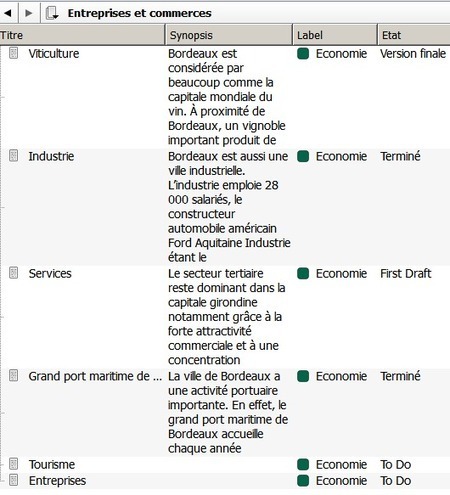
Un précédent billet sur ce blog présentait Scrivener, un traitement de texte conçu pour structurer aisément vos écrits, votre documentation et disposant de données d’organisation, comme les synopsis qui peuvent contenir des résumés et les métadonnées qui servent à étiqueter les différents écrits et la documentation à l’aide de mots-clefs. Ce billet traitera de l’utilisation de ces métadonnées très utiles pour gérer un volumineux projet d’écriture comme une thèse.
|


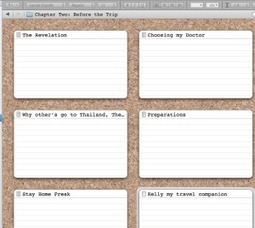















Tour d'horizon des fontionnalités.