Scoop-It non officiel sur l'excellent Scrivener, logiciel de traitement de texte spécialement conçu pour les auteurs, informations et ressources aussi sur l'écriture et la lecture numérique
Objectifs : Acquérir les bases suffisantes sur Scrivener pour mener un projet d’écriture, savoir utiliser les fonctionnalités essentielles de rédaction, structuration, gestion de la documentation, des écrits et des notes de travail, mise en forme et compilation finale.
Contenu : 1/ Présentation de Scrivener Comprendre les usages de Scrivener, possibilités, limites. 2/ Création du premier « projet » choisir un modèle de conception, découvrir le système de fichier, l’interface du logiciel 3/ Les fonctionnalités qui facilitent l’écriture, la visualisation, la décision Classer, gérer les écrits et la documentation Le mode éditeur pour écrire, comparer Le mode panneau de liège/corkboard pour une vision synoptique Le mode plan/outliner pour une gestion avancée du plan 4/ Les fonctionnalités qui facilitent le classement, la gestion des écrits et de la documentation Les métadonnées La recherche d’information Mise en lien avec Zotero, logiciel de gestion de références bibliographiques 5/ La compilation : sortie finale Sélectionner les items qui figureront dans l’œuvre finale Principaux réglages pour la mise en forme de l’écrit Principaux formats de sortie : pour ebook, pour traitement de texte, etc.
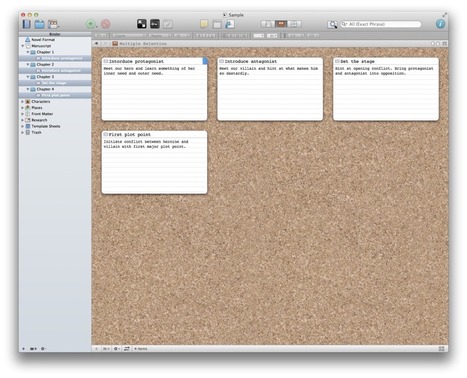
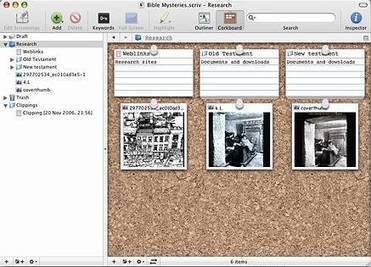
" let’s talk about the corkboard in Scrivener. First, click on the main project file in the binder- on the left, with your project or manuscript title. This tells Scrivener to show index cards for each chapter. (If you only want specific chapters, etc. to show, highlight them. Choosing only one chapter will show index cards for only the scenes in that chapter.)"
Labels, keywords, and meta-data Scrivener gives you a lot of different wants to flag things for later reference. And because of that it can be easy to get overwhelmed by these options, and equally easy to go overboard using them. "
Before reading this, there's one thing you absolutely need to know. When it comes to writing, "there's no rules, only tools." Take all writing advice with a grain of salt. If you have time, or know you need a change, give things a try and keep what works for you. If things are working for you, keep doing what you're doing and file this stuff for future reference."
I started using the first ever beta version of Scrivener for Windows after Claire's blog post here, .... I could try it out for more than the regular 30-days-trial, to see if I really liked it and if it was the right program for my non-fiction writing.
And of course did I like it, even if I learned fast that the beta versions weren’t quite as great as the Scrivener Claire described . There were many features that Scrivener for Mac had which they hadn’t even had time to think about for Windows, and some of these features are still missing.
... I'd like to give you an overview of these differences here, along with a demonstration of how one can use it for non-fiction writing, because that's what I use Scrivener for.
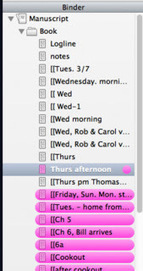
You might notice in some of the screen shots that my Scrivener is pretty colourful. I like working with colours, and in addition to that, the colours help me to organise and keep track of all the files.
There are all kinds of ways you can use keywords in Scrivener. And the beauty of it is that they’re so simple to use.
For my latest project, I used keywords for three things. One, to keep track of several storylines. Two, to make sure characters showed up consistently throughout the story. And three, to see where I had included communication (and what type) between two of the characters."
Un article sur l'utilisation des mots-clefs dans Scrivener, une fonctionnalité qui permet de gérer la documentation du projet comme ses écrits, pratique quand on a des centaines d'items.
Cet article est directement une conséquence du précédent, qui présentait une brève synthèse de manuels de dramaturgie. En vue d'établir la fameuse prémisse qui contiendra l'ensemble des idées et po...
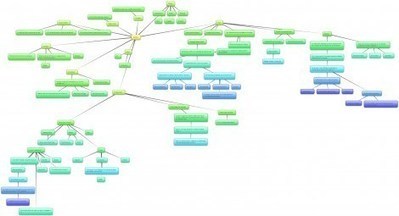
Scrivener, c'est bien pour gérer un plan, des items de texte, mais l'outil peut sembler un peu lourd lorsqu'il s'agit de trouver les toutes premières idées d'un projet d'écriture. Un outil heuristique peut alors être employé : Scapple, du même éditeur que Scrivener, peut être employé sur Macintosh, ou sur Windows, Freeplane, dont les cartes pourront être exportées au format OPML et récupérées sur Scrivener.
Bonjour François : ton papier sur Scrivener m'a été d'un grand secours pour la prise en main du bousin. Après, oui, le développement Linux est, comme souvent, communautaire, d'où la version béta. Perso, je serais ravie d'acheter une licence Linux pour aider au développement... tout comme je paie pour Antidote. D'ailleurs, Antidote et Scrivener gagneraient vachement à bosser ensemble. Je dirais même que ce serait le combo du siècle!
About a month after I used Scrivener to finally finish a novel I started years ago, I got the idea of trying to use it as not only a staging area for posts here on my blog, but also as an infrastru...
"One of the issues with using a program like Scrivener is that it currently only exists as what Microsoft is calling a “Windows 7 app”, meaning it’s the version that exists on any previous version of Windows–it opens on the Desktop. This means that some of the interface items are small, but what it has going for it is that it works with the touchscreen just fine. The scroll bars and drop-down menus are large enough to manipulate with your finger, though tapping on specific documents or images in the Binder may be somewhat hit or miss, even though the Desktop has been sized to 150% of what you’re used to–a must for the Surface Pro’s 10-inch 1080p screen. "
. I’ve been a PC user since the beginning of time. When I started hearing ecstatic references to a Mac program for writers called Scrivener several years ago, I was a bit envious, but I didn’t thin...
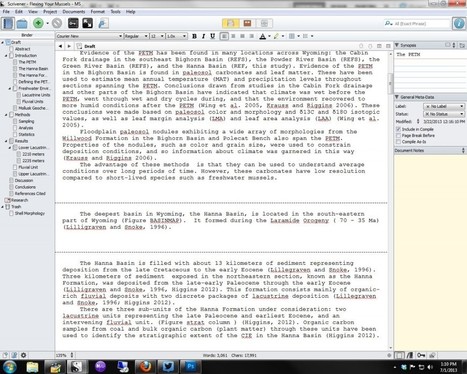
I’m working on a technical science manuscript. Most science types default to MSWord, or OpenOffice, and LaTeX for technical writing. I don’t like any of those...
My colleagues in the sciences often ask if Scrivener is something useful for them. With this brief post, I’d like to illustrate the power of Scrivener for piecing together professional, technical manuscripts....
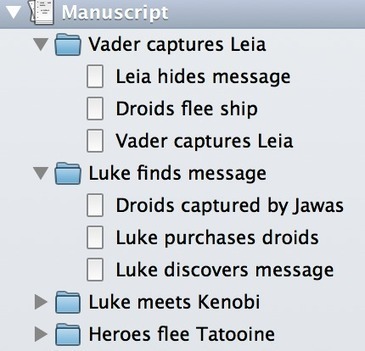
What makes Scrivener great for writing manuscripts is that you can have everything you need in a single ‘file’ (it’s actually a compilation of smaller files called a ‘project,’ but you only have to click once – that’s the point.) You can move sections and sub-sections around as you like. You can use the outline mode to discover where things are missing. You don’t have to write your manuscript in order. You can export things however you like.
<< Documenter un station radioamateur est très facile quand vous avez un transceiver sans amplificateur ou autres accessoires, mais cela peut devenir très compliqué avec l'ajout d'autres transceiver et accessoires, la difficulté augmentant la complexité de l'effort de documentation.
J'essaie d'utiliser deux outils pour écrivains afin de planifier et documenter ma station :
- Scrivener, qui est un éditeur de fichiers multiples et un système d'organisation de projets de rédactions;
- Scapple, qui est un éditeur de relation graphique à forme libre.
".... I’ve dabbled with different ways to represent the underlying architecture of my plots. I’ve tried Post-it notes stuck to a whiteboard. I’ve tried spreadsheets. I’ve tried timelines scrawled in notebooks. For this revision, I hoped to find a way to keep my architectural blueprint, the story overview, in sync with the text as I moved things around and re-wrote what needed re-writing....'
Très intéressant récit d'un essai d'organisation de l'écrit au travers des outils de Scrivener, notamment l'utilisation du panneau de liège de Scrivener qui permet de gérer ses notes sur ses écrits.
Récit d'autant plus utile que Scrivener est bardé d'outils d'organisation, ce qui peut être autant utile qu'être source de désarroi dans l'appropriation de l'outil sans ces idées d'organisation.
Scrivener for Mac OS X and Windows is an Award-winning writing software for novelists, scriptwriters, academics or anyone working on long texts requiring research and structure, or taming the chaotic process of writing. Scapple is an easy-to-use tool for getting ideas down as quickly as possible and making connections between them. It isn’t exactly mind-mapping software—it’s more like a freeform text editor that allows you to make notes anywhere on the page and to connect them using straight dotted lines or arrows. If you’ve ever scribbled down ideas all over a piece of paper and drawn lines between related thoughts, then you already know what Scapple does.
Scapple, c'est l'outil proche du Mindmapping de "Literature and Latte",l'éditeur du logiciel d'écriture Scrivener. . La réalisation de "cartes" est beaucoup plus libre que sur d'autres logiciels de mindmapping et il n'y a pas nécessairement de centre Scapple permet en tout cas de représenter des idées de façon très intuitive, et de faire glisser des images et du texte directement dans une mindmap. Disponible depuis des mois pour Macintosh, sa version Windows est maintenant disponible à l'achat pour environ 12 euros.
A big welcome to author Heather McCoubrey, who talks about two of my favorite programs, Scrivener and Evernote (which I've only recently discovered!). I started writing when I was thirteen and back...
There are a lot of online tools and apps for writers designed to boost productivity and organise research, stimulate creativity and destroy writers' block. Here are some of the best.
Welcome to my Scrivener Review and Video Tips page. Below you will find the following: my in-depth review of the Scrivener software Scrivener tutorials. Video tutorials of Scrivener ...
I was talking to ma100 about Scrivener and she suggested I write a bit of an article about some of the facilities I make a lot of use of, in simple terms. So here it is! I’m not going to explain what buttons to press. Feel free to ask if you don’t know how to use some facility but the point is more about ‘how’ I use them. Hope it helps. Scrivener is a fabulous writer’s tool, but a tool is useless without a process for using it. Waving a hammer in the air achieves nothing, you have to go through the process of putting a nail in the right place and using the hammer effectively to drive it into place before you achieve anything.
I didn't intend to do a post today, but got an exciting announcement via Twitter this week--Scapple for Windows is in a free open beta! Those of you who've followed this blog know I'm a fan of Lite...
Sans tenir compte des aspect liés au travail d'écriture, les puissantes fonctionnalités d'organisation documentaire de Scrivener en font un outil qui peut gérer toute la documentation d'un projet.
ADVANCED NOVEL FORMATTING (FOR PRINT AND EBOOK) WITH SCRIVENER Okay, that headline is a mouthful. But then again, this post is a mindful. See what I did there? Mindful? Like it will fill your mind?...
Une série de tutoriels Scrivener, depuis l'organisation jusqu'à l'édition de l'ebook (la compilation et son résultat). Concerne la version mac (avec mention de fonctionnalités absentes sur Windows).
I mentioned Scrivener in a recent post. It would appear that this word-processing and file management desktop programme - specifically developed by Literature
Scrivener is not a desktop layout application like Word and Pages, but it helps you organize and export your documents to other applications. In addition to being useful for full-time writers, I think Scrivener could be very useful to students and professors who write research papers, anyone who has plans to write a book, and even bloggers looking for an application to draft and manage blog posts.
Today I will share my personal workflow and tips for getting the most out of Scrivener.
One thing I've also quickly learned to love is the labels function. I use it in a variety of ways. For example, for my Triple Trouble series, which is growing into a massive project, I can use them to color-code characters. Like wolves one color, dragons another, jaguars, etc. Makes it easy when I'm looking for a character to find them that way.
To get content containing either thought or leadership enter:
To get content containing both thought and leadership enter:
To get content containing the expression thought leadership enter:
You can enter several keywords and you can refine them whenever you want. Our suggestion engine uses more signals but entering a few keywords here will rapidly give you great content to curate.


 Your new post is loading...


 Scoop.it!


















intéressant