


by High School Principal, David Mahaley
An iPad and Apple TV can combine to provide an advantageous alternative to more expensive, traditional interactive white boards.

 Your new post is loading...
 Scoop.it! by High School Principal, David Mahaley An iPad and Apple TV can combine to provide an advantageous alternative to more expensive, traditional interactive white boards. 
No comment yet.
Sign up to comment
Scoop.it!

As the newest iPad launches today, odds are that it will become an even more popular tool for use in the classroom.
Scoop.it!

Master your new iPad with these quick tips and handy iOS shortcuts.
Scoop.it!

So far on the trial we have looked at the following ways of working with the iPads: School leaders having them 24/7 to trial productivity Teachers have a class pack to use with students in varying ... Via John Evans
Scoop.it!
What apps will be ready for the new iPad's screen? CNET rounds up 20 apps that will be ready to go, and a dozen others just around the corner. Read this blog post by Josh Lowensohn on Apple Talk.
Scoop.it!

In order to help educators integrate iPads effectively, we have compiled a list of apps focused on learning goals consistent with the CRCD framework. While many of these apps have also appeared in our iPads in the Classroom section, this list is driven by specific learning goals that promote critical-thinking, creativity, collaboration, and the creation of student-centric learning environments. Via Ana Cristina Pratas

Chris Carter's comment,
October 4, 2013 9:07 PM
Thank you, Dr. Lerman. I post pieces that I find fit at least two of these criteria: Highly relevant, unusual perspective that adds insight, easily overlooked.
Scoop.it!

You can perform basic editing of your PDF files on an iPad or iPhone with these apps. Remove pages from a PDF document, merge multiple PDFs and more.
Scoop.it!
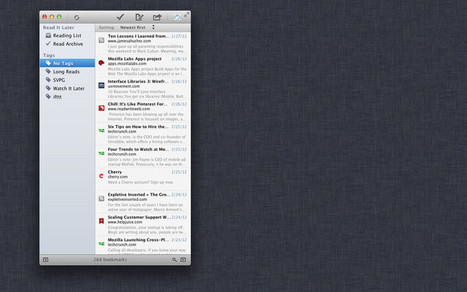
Read reviews, get customer ratings, see screenshots, and learn more about Read Later on the Mac App Store. Download Read Later for [?] and enjoy it on your Mac.
Scoop.it!

With an unsurprisingly elegant user interface and a reasonably broad image-editing feature set, Apple's iPhoto app for iOS may work on older devices but seems optimized for the Retina Display. Read this blog post by Lori Grunin on MacFixIt. Via Sam Gliksman
Scoop.it!
With SlideShark you and your team can view and show PowerPoint presentations on the iPad – the way they were meant to be seen. The SlideShark App is easy to use, powerful, professional, and – best of all – free! Built for business, SlideShark is the one and only to accurately and reliably show PowerPoint on the iPad. Via kathy pryor
Scoop.it!

Apple Configurator is a brand new application aimed at making it faster and easier to deploy, manage, and configure iOS based devices. The great thing about this utility is it does not require an OS X Server or an MDM solution and provides a fast way to get devices ready-to-go. You can download Apple Configurator from the Mac App Store. It is a free application. To get started...
Scoop.it!
Yesterday, was direct instruction based on information that our textbook provided. I didn't feel that students had the concept mastered. Today, we made the problem more relevant to the students and more interactive and engaging! We implemented multiple tech tools:
|
Scoop.it!

Get a free sample or buy iPad User Guide for iOS 5.1 by Apple Inc. on the iTunes Store. You can read this book with iBooks on your iPhone, iPad, or iPod touch.
Scoop.it!

You’ve taken the plunge and bought yourself a new iPad. Whether this is your first (or your third, like some of us), it can’t hurt to use your new tablet to find a little extra productivity.
Scoop.it!

Now that the iPad Cart in my building is up and running ( a process that was frustrating, confusing, annoying and ultimately rewarding ), it is time to start using the iPads in classrooms. Along with a colleague of mine, @katrinakennett, we are going to embark on a completely paperless research process with a 10th grade English class. The process will take place over a three week period and along with this initial blog post, I will be chronicling, blogging and reflecting on the process along the way. Before we start the process, we had a conversation about the goals of this research process and why iPads would be a good fit. I think it is critical to have this conversation when not only integrating iPads, but using any type of technology in the classroom.
Scoop.it!

The new iPad is equipped with a new camera that takes does a surprisingly good job at recording 1080p video. It also has a built-in Camera app that not only lets you shoot 5 megapixel photos, but 1080p video as well.
Scoop.it!

Grandpa's iPad...short little video, you will get it even though it is in German! Via Marianne Riddile
Scoop.it!

Eyejot is an easy way to send and receive video email from your computer or mobile device, such as Apple's iPhone, iPod Touch, or Android smartphone. Our web client requires no download or installation!
Scoop.it!

Keynote is one of the best, flagship iPad apps. It’s easy to use, powerful, full of nice features, and just superb to use for creating great slide presentations on the iPad.
Scoop.it!
If you've been struggling to manage the unwieldy stash of documents piled on your desk, you can now pack your collection away and heave a sigh of relief. Snap2PDF is the most elegant and convenient way to carry important data and documents around, wherever you go. Via kathy pryor
Scoop.it!

For most power users (and I’ll assume that most of you are), security is important. Even for you non-power users, it should be important. Don’t make the tragic slip-up of using “123456” as your password for every site and service you frequent.
Scoop.it!

Khan Academy, the wildly popular Youtube lecture series, is slated to launch its iPad app any minute now in Apple's store. Via Sam Gliksman
Scoop.it!

Offline learning is the latest tool for the unorthodox education organization. Here's how that and other new features will power Khan Academy's new app. Khan Academy, the wildly popular YouTube lecture series, has launched its free, new iPad app in Apple's store. The enhanced version of Khan Academy includes time-syncing between devices--no Internet connection required--an interactive transcript of the lectures for easy searching, and a handy scrubber for moving between parts of the lectures. Perhaps more importantly, now that more schools have begun adopting Khan's lectures for their own classrooms, the iPad app could possibly replace or supplement textbooks, saving cash-strapped schools and students a lot of money.
Second, with inspiration from TED, Khan lectures will now have an interactive time-stamped transcript, which is a convenient search function, considering some of the lectures can be quite long.
Scoop.it!

I have discovered many cool free apps that are incredible for creating digital stories, reading stories, and interacting with stories.
|






