


These 5 Moodle design tools are CRITICAL for creating visual, engaging courses and saving tons of time. A must read.

 Your new post is loading...
 Your new post is loading...
Your new post is loading...
 Scoop.it!
These 5 Moodle design tools are CRITICAL for creating visual, engaging courses and saving tons of time. A must read.

No comment yet.
Sign up to comment
Scoop.it!

Much of the excitement surrounding the release of Moodle 3.1 is focused on the core software itself, and the various new features and updates that have come along with it. And, rightly so. However,… Via Donna Thompson
Scoop.it!

Online learning, new media, connectivism, MOOCs, personal learning environments, new literacy, and more from Stephen Downes
Scoop.it!

It is no secrete that there are high expectations around version 3.1 of Moodle that will be coming out later this month. Many have even said that 3.1 is what 3.0 was actually “meant” to be, in terms of new functionality and just general “wow.” Via Miloš Bajčetić, Juergen Wagner
Scoop.it!

Want to know some SCORM Facts? Check what exactly is SCORM and 5 important SCORM facts that will help you get to grips with the full potential of SCORM.
Via Laurent Picard
Scoop.it!

Progress Bar block which has got maximum number of votes for this years project development cycle in the Moodle Users Association voting, has been updated to a new version with new presentation options like squeeze, scroll and swipe. Via Miloš Bajčetić
Scoop.it!

Moodle 3.1 the next LTS version of Moodle which was scheduled to be release in the Second week of May is delayed by 2 weeks due to final touch-up of amazing new features coming in this version. Via Laurent Picard
Scoop.it!

The Moodle Cloud service was introduce by Moodle HQ just over one and a half years ago as a way to support smaller scale users of Moodle. The service is completely free (unless you want to turn off… Via Donna Thompson
Scoop.it!

From
etale

Some of us have assessed the situation, & the prognosis is not good for the test. We might be witnessing the death of testing. I know that it is sad news for some, but more than a few of us have assessed the situation, and the prognosis is not good for our friend (or perhaps the arch enemy to others of us), the test. We might be witnessing the death of testing. Tests are not going away tomorrow or even next year, but their value will fade over the upcoming years until, finally, tests are, once and for all, a thing of the past. At least that is one possible future. Via Elizabeth E Charles, Miloš Bajčetić, Laurent Picard
michel verstrepen's insight:
Interesting article
Scoop.it!
Embedding a live feed into Moodle via an RSS feed is a quick and easy way of keeping your Moodle area up to date with news and events in your subject area Via Miloš Bajčetić
|
Scoop.it!
From
moodle
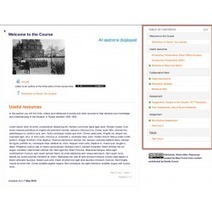
Course Module navigation: by clement Prudhomme. A block to replace Moodle "block navigation". Show t... https://t.co/J7yXKvij67 #moodle
Scoop.it!
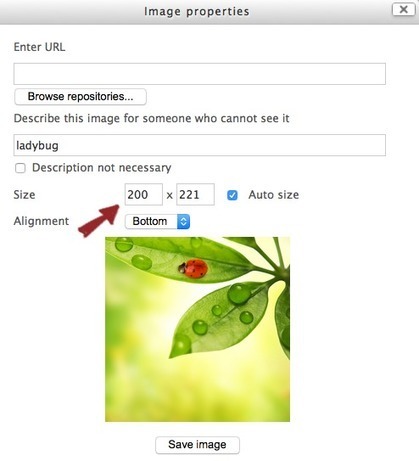
Moodle courses can be SUPER boring unless you use some sneaky design hacks to make the course more visual and fun. Moodle is so much more interesting if you think outside the box. Via Miloš Bajčetić
Scoop.it!

Moodle Badges are the fastest way to add engagement to your course. In less than an hour, you can take ANY course and boost learner motivation + completion. Via Gisele Brugger
Scoop.it!

Moodle has supported ClamAV from the era of Moodle 1.3 and by default, ClamAV was the only antivirus tool available for Moodle sites. In Moodle 3.1, a new plugin type is added to incorporate external Antivirus plugins developer by different service providers (see our previous coverage over the Moodle Tracker issue here.) Via Miloš Bajčetić, Juergen Wagner
Scoop.it!

As the run up to the release of Moodle 3.1 heats up (92% of QA tests have been passed as of this post), the Moodle HQ team has announced the release of the beta version of Moodle 3.1.
Via Laurent Picard
Scoop.it!
An attempt to explain Moodle to our staff or anyone else by using an analogy with modular Lego bricks. Background details, copy of the presentation and
Scoop.it!
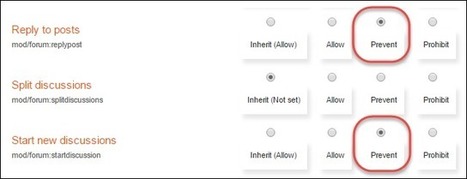
Recently during one of our training events, a participant had a need to prevent students from posting to forums from earlier in a course. 2. In the Administration block, select Forum administration > Permissions 3. From the Advanced role override drop-down list, select Student 4. For the Reply to posts and Start new discussions capabilities, set the Permission to Prevent. 5. Scroll down and click on the Save changes. 6. Students will now be able to access the forum activity as before, but will no longer be able to post nor create new discussions in that particular forum. Via Miloš Bajčetić
Scoop.it!

From
moodle
On the 31st of March, Martin Dougiamas, founder and CEO of Moodle received an Honorary Doctorate of the University of Vic – Central University of Catalonia. Via Miloš Bajčetić, Juergen Wagner
Scoop.it!
Moodle 3.1 the next LTS version of Moodle which was scheduled to be release in the Second week of May is delayed by 2 weeks due to final touch-up of amazing new features coming in this version. Via Laurent Picard
Scoop.it!

Peter Mellow's curator insight,
April 3, 2016 3:48 AM
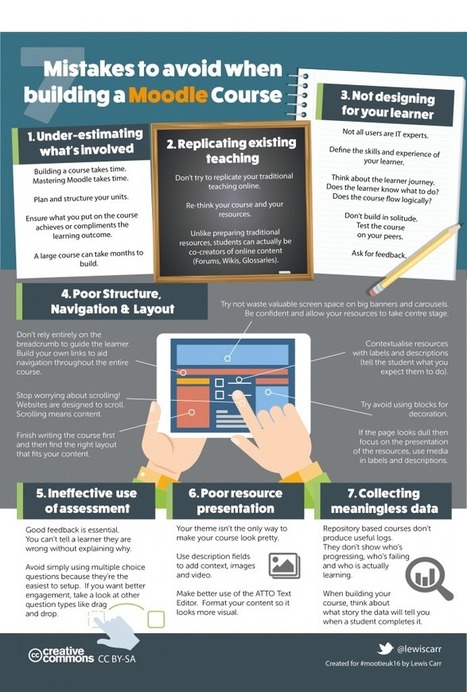
Moodle or Blackboard, the advice here is good.

elearning at eCampus ULg's curator insight,
April 4, 2016 2:35 AM
Moodle or Blackboard, the advice here is good.
Scoop.it!

Le carnet de laboratoire est indispensable dans plusieurs disciplines scientifiques; il constitue la « mémoire d
Scoop.it!

Recently, in the Moodle.org forums, Gareth Barnard announced a substantial update to the Essential Theme for Moodle 2.9 and 3.0. There are a good deal of both new features and fixes for both versions. Via Miloš Bajčetić
|






