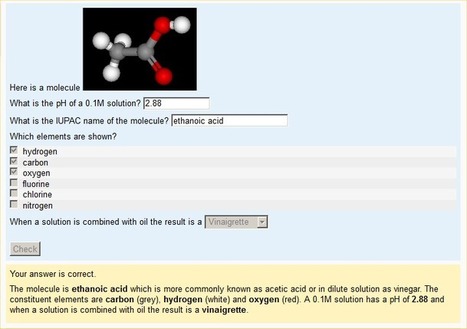
A Moodle question type which allows questions to be built up from parts that are other simpler question types (requires you to have these question types installed)
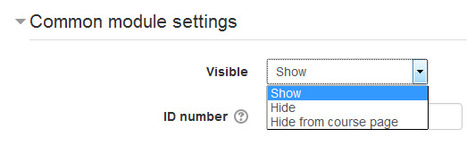
Stealth activities which were requested in Moodle tracker a long time back since 2006 are coming soon in Moodle and currently under peer review process. A prototype to test out the functionality of stealth activities is setup at Moodle Prototype site here.
Stealth activities are those activities which are accessible to students, but not listed on the course front page. The course creator will manually put a link to the activity somewhere else in the course and the activities would be available by following URL but hidden from the course page.
This online instructor tutorial explains how to facilitate a discussion thread including sample questions that will launch you to becoming a strong facilitator!
Via JohnThompson
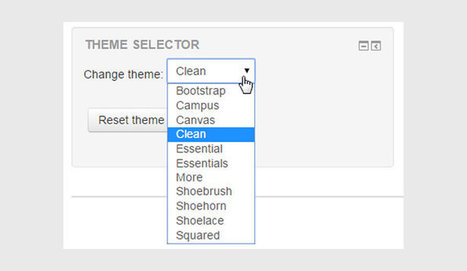
A fair bit of time back, Gareth Barnard talked about creating a block that would allow administrators and developers to switch between themes on their Moodle easily to compare and contract changes …
Questions about Moodle's language capabilities are ones that we get often here at Lambda. The multi-language capabilities in Moodle can be used to teach new languages, or support students with different language backgrounds. We know there are resources out there, but we thought we would put together a quick list of the top 6 things we think you should know about the out-of-the-box language capabiltiies available in Moodle!
Mobile is no longer the future, it is the reality of today. So beyond a nice to have, it has become a standard expectation for the higher education student body of today – and students who are already a part of the workforce. (Think I’m kidding? Mellennials, who were born post-internet, make up the largest segment of the workforce in the US. Today.) What this means for Moodler’s around the world is simple: your course, instance, design, project… your everything Moodle needs to be mobile friendly.
Gareth Barnard recently announced on Moodle.org that he has updated the Collapsed Topics Course Format for Moodle 2.7 – 3.0. If you’re not interested in what this all means – you can head over and download the update right now from this link.
Durée : 4 semainesCharge de travail : elle est à déterminer par vous-même - 3 à 4 heures par semaine est recommandé
Disponibilité : le MOOC est disponible en ligne 24 h / 24 et 7 jours / 7
Audience : le cours est conçu pour les formateurs et enseignants qui débutent avec Moodle, et couvre les concepts de base. Les utilisateurs expérimentés sont les bienvenus pour s'inscrire et aider dans les forums, en prêtant attention que les réponses soient simples et ciblées sur la question
Récompense : Chaque participant recevra un badge Moodle, ainsi qu'un certificat si le cours est terminé avec succès.
MoodleRooms released a series of updates in the Moodle.org repository recently that update the Flexpage theme as well as a number of other associated plugins.
MoodlePalooza have finally released the YouTube playlist of the online strand of their f2f conference held Jan 12. My contribution was an introduction to EVO, Electronic Village Online,and especially to EVO Minecraft MOOC, and I had meant the session as a keynote for #evomc16.
It was given in Zoom, which I found out, was a robust platform for presenting via screenshare where I could run my presentation from Google Slides, click on the links to show them in my browser, and also have Minecraft running in a window on my computer which I was able to show as well, having arranged for other moderators and presenters to meet me there. This post embeds the YouTube of the Zoom recording, and includes a downloadable mp3 as well.
Day 2 kicked off with the annual keynote by Martin Dougiamas. It was interesting to see how Moodle Could has been expanded to include ad-free , higher user packages. This makes Moodle Cloud an attractive solution for schools looking for a low-cost SAAS Moodle. The Moodle Association which was announced this time last year is now fully under way and it was great to see this gaining traction. We were also taught the valuable lesson of not “Moodling whilst Driving!”.
The roadmap for Moodle 3.1 is exciting. When Moodle 3.0 was released, it felt more like 2.10, and it was met with little fanfare. However, 3.1 is really the version to look forward to, and the version I’m sure HQ wanted to release if it wasn’t for versioning numbers getting in the way :)
Learning Plans and Competencies (due in 3.1) have been a long time coming but one of the most exciting things coming to core I’ve seen in a long while. The possibilities with this are amazing, I can think of so many use cases.
Moodle Plugins are the most efficient way to get the most out of your learning management system. Think of your LMS like a smartphone - it does everything you need it to do, but sometimes you need a little more! If you want entertainment, you have a plethora of game apps to choose from. If you want to tap into social media, there's the Facebook app. If you want to work on you physical or mental health, there's a long list of apps that you can download that will assist you. Apps take our smartphones from a piece of technology, to a virtual hub for your everyday life. Moodle plugins are like applications - adding them to your LMS will tranform your online learning experience, allowing you to get the most out of your LMS.
Collaborating with eLearning team members, offering live training events, and enabling online learners to reach out to their peers are just a few of the many uses for web conferencing software. However, due to the sheer abundance of web conferencing software tools that are available today, finding the one that suits your needs and fits your eLearning budget can be challenging. Just to make the process less time consuming and stressful, below you will find a list of the best 10 web conferencing software you may want to consider.
Technology can transform the way we teach and learn. Students can engage in independent and collaborative learning. Technology provides opportunities fo
Via JohnThompson
We’ve been following the development of the Heatmap activity tracking block being developed by Michael de Raadt (see here and here) and we’re excited to see that it is now officially in…
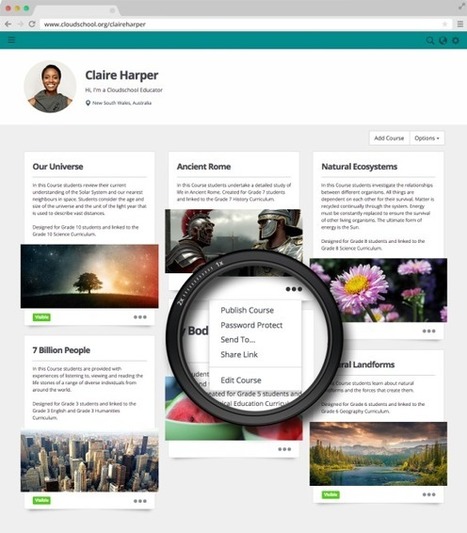
CloudSchool est une plateforme gratuite qui permet de créer très facilement des cours en ligne puis de les proposer à des élèves ou apprenants. CloudSchool
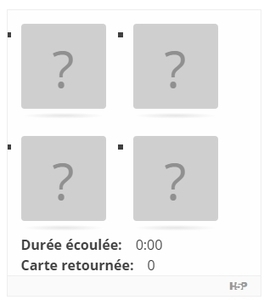
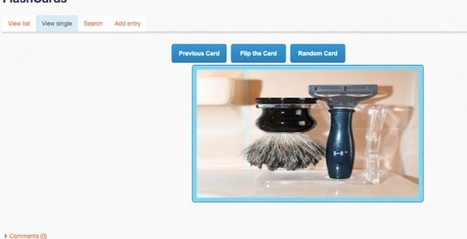
I work with some truly wonderful people. Chris Kenniburg, Bob Harrison, Amy Gwizdz and Sean Williams are four of those terrific people. Together, they have developed a way to do FlashCards in Moodle.
Why FlashCards? Well, there are several sites that allow for FlashCard creation. However, these all take the user out of Moodle. FlashCards can be a terrific way to study vocabulary and other concepts. Even better, doing so in Moodle means that the students can create the FlashCards. (I’ve noticed that teachers tend to create flash cards for students to study. I believe that this is backward. Let the students create. That is where the learning really happens.)
So, Chris was the lynch pin in this project (he is after all, a particularly helpful moodler). He put together a few disparate pieces of information: a request for FlashCards, a post by the Moodle Fairy (AKA Mary Cooch) on postcards, and a post about CSS tips. Chris started running with the CSS. Unfortunately for us, the CSS “flips” the card on mouse roll over. This is not ideal for kids and flipcards. Fortunately, Chris was able to change the CSS so that the card “flips” on click, not roll over. We also wanted a way to select a random card instead of just moving along in a linear fashion. Enter Sean. Sean whips up some javascript so that we have a Random Card button that, well, displays a random entry instead of a sequentially ordered card. Perfect.
Off to the Tech Coaches for thoughts and feedback. Bob and Amy propose some changes. They provided several tweaks to make things look and work better. One of those suggestions was the addition of “Next” and “Previous” buttons. This allows the students to work through the cards in order.
There are many things about this that I really like. First off, it allows for the students to create the flashcards. I’m really, really big on the students creating the content. Since this is a database activity, the teacher could set it so that the students would have to create some FlashCards before they would see any of the already created ones. The teacher can also approve the FlashCards before the students see them. Since it is a database activity, the FlashCards are visible for the entire class (again, once approved if the teacher wants to review them first). The FlashCards can contain text, images and/or video. Text, images and videos are available for both the front and back sides of the cards.
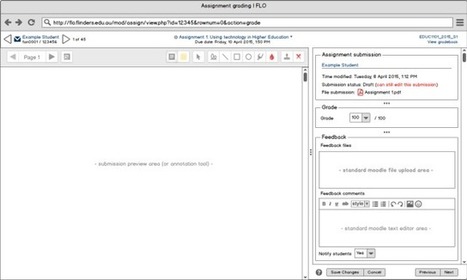
Earlier this month, Damyon Wiese, posted about HQ starting the development of a new grading interface in the Moodle.org forums. He also posted a link to the specification doc that contains mock ups of the new design.
If you’re a teacher who has just started with Moodle and are interested in diving deep in Moodle, it may be well worth your time to check out this tutorial by Sali Kaceli. The 3 hour and 16 m…
What does user experience look like at your organisation?
How do we begin designing the online learning experience with the end user, our learners, in mind? What functions does Moodle have to ensure a positive user experience?.
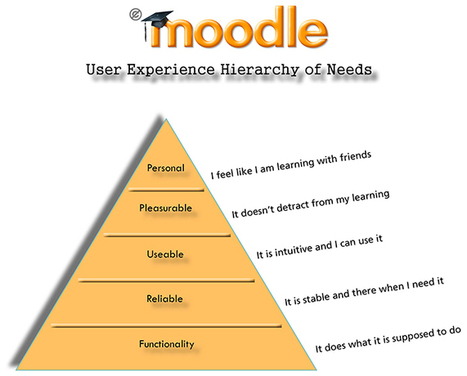
I have based the following Moodle User Experience Hierarchy of needs upon Maslow, Growth engineering and also Stephen Anderson’s user experience hierarchies of needs.
Le LMS Moodle vu sous l'angle de l'expérience utilisateur (UX) - = actions et perceptions d’une personne qui résultent de l’usage ou de l’anticipation de l’usage d’un produit, d’un service ou d’un système-. La projection proposée s'appuie sur la pyramide de Maslow (= hiérarchie des besoins humains) revisitée par Stephen Anderson qui l'a adaptée à l'utilisation d'un LMS.
To get content containing either thought or leadership enter:
To get content containing both thought and leadership enter:
To get content containing the expression thought leadership enter:
You can enter several keywords and you can refine them whenever you want. Our suggestion engine uses more signals but entering a few keywords here will rapidly give you great content to curate.


 Your new post is loading...