


ProfessorMoodle has created some tutorials on Youtube for Moodlers, highlighting Moodle 2.0.
The videos are easy to watch, short (most under 6 minutes) and have clear audio narration.
Via John Dalziel, Rui Guimarães Lima

 Your new post is loading...
 Scoop.it! ProfessorMoodle has created some tutorials on Youtube for Moodlers, highlighting Moodle 2.0. Via John Dalziel, Rui Guimarães Lima No comment yet.
Sign up to comment
Scoop.it!

Good design is an important part of getting your point across in a presentation. Over time we’ve added a bunch of features to help you bring a little something extra to your decks, like slide transitions and animations, thousands of free stock photos, and a growing collection of templates. Via Baiba Svenca 
Baiba Svenca's curator insight,
December 25, 2012 2:49 PM
Add new cool fonts to your Google presentations, they will also work on Google docs and vice versa. To add a new font, open the drop-down menu of fonts, scroll down to Add fonts and select the ones you like. 
Louise Robinson-Lay's curator insight,
December 26, 2012 5:28 PM
The google tools are easy to use and effective. This how to guide gives advice on how to improve presentations.
Scoop.it!
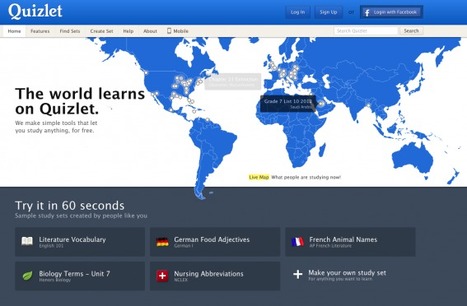
Quizlet is a web-based service, which allows for the creation of sets of 'flashcards' for teaching Via Gust MEES, michel verstrepen 
Dolly Bhasin 's curator insight,
December 26, 2012 2:22 AM
Can even be used for creating lifelong learning or workplace learning content!
Louise Robinson-Lay's curator insight,
December 26, 2012 5:27 PM
This can add a healthy element of competition to learning and allow students to self test. 
Jeris Walters's curator insight,
August 13, 2013 2:03 PM
Create words with definitions for study aids.
Scoop.it!

File system repository - MoodleDocs http://t.co/cHui6wIr
Scoop.it!

Students can create dynamic, animated 3-D videos with Xtranormal. I encourage you to give it a try! Via Ms. Hall
Scoop.it!
Dawson College Pedagogical Day – October 12th, 2012The Best Web 2.0 Tools for Teachers - 2012 Edition - Rafael Scapin, Ph.D. Coordinat Via Bmw
Scoop.it!

Your complete guide to Web 2.0 design style.
Scoop.it!

Design a QR Code 'Treasure Hunt' to get students using their mobile devices to move and to learn Via Juana Rodríguez 
Susan's comment,
January 3, 2013 3:04 AM
This was a great success! I actually used it for teachers and they had a lot of fun!!
Scoop.it!

Cutting through the buzzwords to talk about what matters in school technology. Via Mª Jesús García S.M.
Scoop.it!

Free Icons Section containing 68 Icon Sets: Socialize Part 5, Travel and Tourism - Part 1, Architecture Blueprint, Stylistica, Christmas Magic, Coquette Part 9, Socialize Part 4... Via Baiba Svenca, HIND ABDELRAHMAN, molly mullee, R.Conrath, Ed.D., aulafran, Ana Cobos 
Martin (Marty) Smith's comment,
September 2, 2012 11:07 AM
Good scoop. Added to my Power of Icons scoop from yesterday on Design Revolution. Thanks, Marty

Robert Sims's curator insight,
March 14, 2013 10:34 AM
These icons will help learners associate visual elements with their learning!
Scoop.it!

StudyBlue is your online home to store lecture notes and make flashcards. Study online and on your phone for effective, productive learning. Free. Via Danita Russell |
Scoop.it!

Do you know the actual theories of learning? A learning theory is an attempt to describe how people learn, helping us understand this inherently complex process. Via Leonardo Ornellas 
Tim Hopper's curator insight,
January 4, 2013 2:05 PM
Like this quote. "Learning theory is an attempt to describe how people learn." It is complex because it is emergent and defies being reduced to simple components, but we must keep trying to understand it. "The journey is the destinaton" as an Eastern philospher once said. 
Alan Ovens's comment,
January 17, 2013 2:21 AM
Great diagram. We just need to always keep in mind that theories of learning are not theories of teaching. Always "mind the gap" as a voice once said to me as I sat on a train in London.
Scoop.it!

A newspaper by juandoming - updated daily with a curated selection of articles, blog posts, videos and photos. Via juandoming
Scoop.it!
Dawson College Pedagogical Day – October 12th, 2012The Best Web 2.0 Tools for Teachers - 2012 Edition - Rafael Scapin, Ph.D. Coordinat Via Mbarek Akaddar 
Patricia Mann's comment January 20, 2013 11:49 AM
Take a look at Ed Canvas for an easy and quick way to gather resources for a theme or lesson.
Scoop.it!

Products, Blog, and The Trunk. Products. Evernote arrow Remember everything; Skitch arrow Draw attention; Penultimate arrow Beautiful digital handwriting; Evernote Web Clipper arrow Save webpages forever.
Scoop.it!

Twitter is a brilliant resource for student collaboration. Here are 5 great ways for students to collaborate using social network. Via Grant Montgomery, buket
Louise Robinson-Lay's curator insight,
December 22, 2012 3:38 PM
More great ideas for buildingndigitalmliteracy skills.
Scoop.it!

The time that is taken by travelling is seen by many as wasted, but with a mobile optimised Moodle this can change. At a touch of a screen, homework can be marked, assignments set, or resources browsed, remotely.
Scoop.it!

This is a great way to find or share public domain images. This can be really useful for presentations, teaching materials or projects. Via Nik Peachey, WebTeachers 
Alfredo Corell's curator insight,
December 22, 2012 11:52 AM
More public and free images always useful for our presentations and posters. 
Annette Schonborn's curator insight,
March 15, 2013 10:51 PM
You can use these photos for presentations.
Scoop.it!
Record sound and video directly on Moodle and save it in the Media Capture repository (Record audio and video directly in #moodle - by @moodlefairy - http://t.co/058Eldds...)... Via Rui Guimarães Lima, Donna Thompson, Jean Jacoby, Miloš Bajčetić 
gideonwilliams's curator insight,
January 4, 2013 7:34 AM
Super explanation (as ever from Mary) from both a student and teacher's viewpoint.
Scoop.it!

Download Free PPT templates and backgrounds for your presentations with original slide designs and themes for MS PowerPoint 2007 and 2010. Via Baiba Svenca, Ramon Aragon, Teresa Torné, aulafran, Ana Cobos |






