


Design a QR Code 'Treasure Hunt' to get students using their mobile devices to move and to learn

 Your new post is loading...
 Scoop.it! Design a QR Code 'Treasure Hunt' to get students using their mobile devices to move and to learn
Scoop.it!

Screenr | Instant screencasts: Just click record. Screenr’s web-based screen recorder makes it a breeze to create and share your screencasts around the web. Just click the record button, capture your screen & voice, and share the link.
Scoop.it!
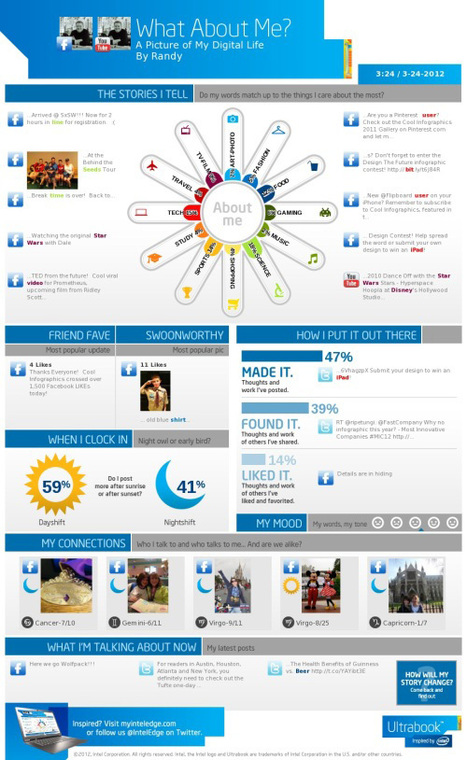
A picture is worth a thousand words – based on this, infographics would carry hundreds of thousands of words, yet if you let a reader choose between a full-length 1000-word article and an infographic that needs a few scroll-downs, they’d probably... Via Rosário Durão, Evdokia Roka, sarspri
Scoop.it!

These are keyboard shortcuts that will enable you to easily navigate your way around Twitter. Be it you want to favorite a tweet or simply want to search for a profile user, the graphic has some of the most popular Twitter shortcuts. Via Ms. Hall
Scoop.it!

CoSketch is a multi-user online whiteboard designed to give you the Via Kathleen Cercone
Scoop.it!

One-to-one technology can transform a classroom. When implemented correctly, students are engaged and excited to learn, and teachers can assess their progress in real-time. Via Jon Samuelson
Scoop.it!

Despite this, many of the Moodle course I've seen don't take advantage of these capabilities. I won't get into the reasons for that here (that's the subject of another post), but one reason few people take advantage of the Lesson ...
Scoop.it!
From
vimeo

Explain a Website is an iPad screencasting tool that allows to record interaction with a website within the iOS web browser. This enables users to explain how a certain website works or how to use a specific webpage.
How does it work? There's a large browser on the screen and annotate & record buttons on the toolbar at the bottom... Via Baiba Svenca 
Baiba Svenca's curator insight,
January 2, 2013 1:18 AM
Explain a Website is an app created by Morris Cooke, the author of Explain Everything. Great app for educational purposes when you need to demonstrate to your students how to navigate a certain website or a web page. Link to the app https://itunes.apple.com/us/app/explain-a-website/id541723452?mt=8&affId=1822652 
Louise Robinson-Lay's curator insight,
January 2, 2013 6:47 PM
This is something ipad users have been waiting for. It gives users the ability to create screencasts of web pages on their ipad.
Scoop.it!

SlideSnack is a web service for sharing presentations online. SlideSnack is pretty straightforward to use as all you have to do is to upload a PDF or JPG presentation, customize its layout and select a custom template to enhance its look and publish it online. Furthermore, you can also record comments or notes and create a slidecast with presentation and voice over. Via Baiba Svenca, Juergen Wagner, Patrick W.
Louise Robinson-Lay's curator insight,
December 30, 2012 2:24 AM
Share slides and images and present them to your audience. 
Ruth Vilmi's curator insight,
January 2, 2013 2:02 PM
Share Image And PDF Presentations Online With SlideSnack
Scoop.it!
SlideSnack is a web service for sharing presentations online. SlideSnack is pretty straightforward to use as all you have to do is to upload a PDF or JPG presentation, customize its layout and select a custom template to enhance its look and publish it online. Furthermore, you can also record comments or notes and create a slidecast with presentation and voice over. Via Baiba Svenca
Louise Robinson-Lay's curator insight,
December 30, 2012 2:24 AM
Share slides and images and present them to your audience.
Ruth Vilmi's curator insight,
January 2, 2013 2:02 PM
Share Image And PDF Presentations Online With SlideSnack
Scoop.it!
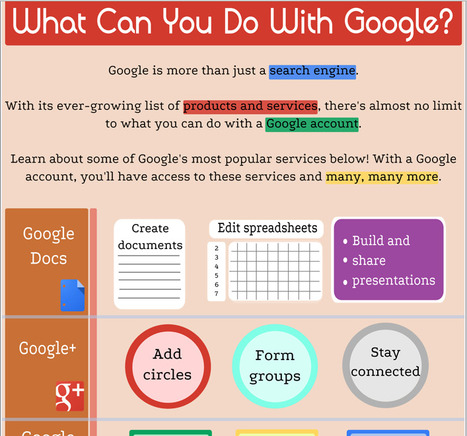
Are you aware of the many services that Google offers? This infographic, from the Goodwill Community Foundation (GFC), provides a look at some of the services. In fact the GFC website provides a wide range of materials that you may find useful. This infographic is a part of a lesson that teaches you about many of the services Google provides. Via Beth Dichter, michel verstrepen, Profdoc
Scoop.it!
RT @CathyLAnderson: Do Web 2.0 tools really work? « Online Blogucation http://t.co/RA055GLx
Scoop.it!
Introducción al uso técnico y didáctico de Twitter en educación Via Juan Jesús Baño Egea, Gisele Brugger 
Comunicación 5.0's curator insight,
December 26, 2012 4:57 PM
Twitter es una gran herramienta para hacer actividades más interactivas y atractivas para los alumnos, pero siempre hay que recordar: - que debemos tener un plan B (las tecnologías pueden fallar en los peores momentos) - que nuestros alumnos siempre pueden comprobar lo que les estamos enseñando con un solo click en su smartphone - que el hecho de trabajar con nuevas teconologías no garantiza el éxito, sino que hay que ofrecer en todo momento contenidos de calidad. |
Scoop.it!

"Over the last month I've started using Diigo as my primary tool for bookmarking links. Yesterday, Diigo released a new version of their browser extension. The updated extension includes some features that are quite handy.
... If you've never tried Diigo, watch the video below for an overview of its features. ..." Via Dr. Tom D'Amico (@TDOttawa) , sarspri
Scoop.it!
UTILIZING GOOGLE HANGOUTS BY SMS|RMW A DIVISION OF THE WARE AGENCY. SMS | RMS is a S Via Gumersindo Fernández 
Marco Bertolini's curator insight,
January 6, 2013 2:11 AM
Se réunir avec des collaborateurs lointains ? Rassembler quelques copains en vue d'organiser une fête d'anniversaire ? Ou simplement passer un bon moment avec un membre de la famille qui étudie en Australie ?
Autant d'occasion de se réunir sur la toile avec Google + et Hangout : une fonctionnalité qui permet les réunions en ligne jusqu'à personnes.
Scoop.it!

I have used Triptico for many years and have always found it to be excellent. Essentially, it’s a collection of spinners, timers, quiz-templates and name-pickers for use in the classroom. It’s par... Via Louise Robinson-Lay
Louise Robinson-Lay's curator insight,
January 4, 2013 7:28 PM
Some great ideas here for adding some competition to your classes.
Scoop.it!

Pedro Barbosa's curator insight,
January 5, 2013 4:23 AM
Pedro Barbosa | www.pbarbosa.com |www.harvardtrends.com
Scoop.it!

American Press Editorial: Schools must keep up with new technology American Press “Moodle,” a classroom management program, is used by teachers to make their assignments, teacher notes and presentations readily available to students.
Scoop.it!

Free eLearning Video Tutorials for eLearning Professionals! Viva eLearning!
Scoop.it!


Jeff Domansky's curator insight,
December 30, 2012 3:37 PM
This is a very easy to use tool, well explained with good potential for marketing, training, PR and community relations. 
asnal abbas's comment,
December 31, 2012 7:33 AM
survived in lowland lowland semogah year there is a change in 2013
Scoop.it!

Mindmapping.com provides information on creating mind maps, mind mindmapping software and the theory behind mind mapping. Mind mapping is a highly effective way of getting information in and out of your brain. Mind mapping is a creative and logical means of note-taking and note-making that literally "maps out" your ideas. All Mind Maps have some things in common. They have a natural organizational structure that radiates from the center and use lines, symbols, words, color and images according to simple, brain-friendly concepts. Mind mapping converts a long list of monotonous information into a colorful, memorable and highly organized diagram that works... Via Baiba Svenca
Baiba Svenca's curator insight,
December 26, 2012 1:11 PM
A great website dedicated solely to mind mapping. It provides theoretical background of mind mapping, gives some insight into creating and using mind maps in education, compares and reviews mind mapping software. |










Great challenges and great expectations for teachers....
Here's a clever system that will guide you through the Treasure hunt process. Fun for students with cell phones and a QR reader!