Bubble Browser is a clean, visual (and fun!) way to explore your Evernote data. All of your tags, notebooks and dates are presented as colorful bubbles to show what's most important in every given context.

 Your new post is loading...
 Scoop.it! Bubble Browser is a clean, visual (and fun!) way to explore your Evernote data. All of your tags, notebooks and dates are presented as colorful bubbles to show what's most important in every given context. No comment yet.
Sign up to comment
Scoop.it!

If you’ve been using Dropbox for a while, you may not have noticed that a whole ecosystem of applications have been built up to use the service. Over time, these apps have sprung up to fill all of the little holes Dropbox left unfilled. Via Laurence Bernard
Scoop.it!
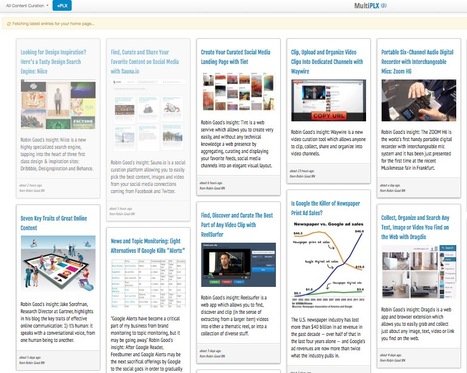
RSS Reader Reimagined; Everything you want to read - news, your favorite blogs, art and more - in one convenient place designed for you. Via Robin Good 
Bart van Maanen's curator insight,
May 8, 2013 4:41 AM
Google gaat de Google Reader service, een rss feedreader, stopzetten. Nu is Feedly een uitstekende vervanger, maar ook MultiPLX lijkt een goed alternatief. Het design heeft veel weg van Pinterest. Toch denk ik niet dat ik mijn Feedly account snel zal opgeven.
Scoop.it!

Anne Sturgess's curator insight,
April 20, 2013 11:46 PM
There are so many great ways to use clouds, wordstorms, wordles, tagxedo, etc for writing, research, presenting...
Scoop.it!
From
youtu

petit tuto vidéo sur les nouvelles fonctionnalités de Moodle 2.5 - les Open badges, Bootstrap, les améliorations des formulaires complexes - oh! et beaucoup ... Via Carmen Vera, Juergen Wagner, michel verstrepen, Florian Le Hung 
Gilles Le Page's curator insight,
April 13, 2013 3:14 AM
Moodle est la plateforme la plus utilisée dans le monde entier. Le tuto de Mary Cooch sur la dernière version est très bienvenu !
Scoop.it!
Great Presentations have features that resemble great ads. It's all one big package that hit hard and strong! FREE Download with a tweet: http://goo.gl/X26Ui Via Baiba Svenca, Luísa Lima 
Alfredo Corell's curator insight,
April 23, 2013 2:32 PM
Very nice presentation about presentations....
Scoop.it!

During a Q&A after a reading at Duke, Jonathan Safran Foer described his writing process as “more an act of collecting than one of genesis; something created from nothing.” How did I remember that quote? I didn’t, initially, but I did take notes on my iPhone throughout the evening and then emailed them straight to Evernote. When I started writing this post, I ran a search in Evernote for “writing” and “collecting” and bam!—I had my opener! Via jheil65, michel verstrepen, juandoming 
jheil65's curator insight,
April 17, 2013 2:00 PM
A nice personal account of how one professor uses Evernote. . . 
sarspri's curator insight,
April 18, 2013 6:20 PM
A very useful tool that syncs notes, images and tags across multiple platforms (phone, tablet, desktop, etc).
Scoop.it!
Get Qrafter - QR Code and Barcode Reader and Generator on the App Store. See screenshots and ratings, and read customer reviews. Via Ana Cristina Pratas 
Ana Cristina Pratas's curator insight,
April 18, 2013 1:11 AM
Features: - Very fast QR Code, Data Matrix and Aztec Code scanning NOTE:
Scoop.it!
Sometimes the hardest part is deciding what to put on your Moodle page. There is no wrong way to create a Moodle page. Your page should fit the needs of you, your students and parents. Below is a list to help you decide what to include on your page. Have fun creating with Moodle!. Via Patric Lougheed, Juergen Wagner, Mariano Fernandez S. |
Scoop.it!

I really like Symbaloo! A place where you can organize and share your favorite websites. How do you like Symbaloo? Via Kathleen Cercone
Scoop.it!

Scoop.it!

See the Glog! Horizontal Glog: text, images, music, video | Glogster EDU - 21st century multimedia tool for educators, teachers and students Via Juana Rodríguez
Scoop.it!

RT @jleyvadelgado: Moodle Mobile official app for Android and iOs available in Play Store and Apple App Store #moodlemobile #moodle http://t.co/ZqPutY6tMr Via Instituto Mexicano de Comunicación Intercultural, Rui Guimarães Lima
Scoop.it!

Infographic - The Study Habits Of Online Students #onlinelearning #studyhabits #onlinestudents #infographic #edtech
Scoop.it!
The presentation slides for the 2-day OER workshop at IMU (22-23 Nov, 2012). It explores OER and how we can find, reuse, remix, create and share them. It provid Via Ana Cristina Pratas, Renee Maufroid, Evdokia Roka 
Robert Sims's curator insight,
April 20, 2013 8:33 AM
This is a pretty comprehensive introduction to the Open Education concept. If you have any questions about the idea of Open Education....this presentation will answer your questions and offers a multitude of resources from around the world. 
Christoph Meier's curator insight,
April 21, 2013 8:07 AM
Umfangreicher Foliensatz (200+ Folien) von Zaid Ali Alsagoff, E-Learning Manager, International Medical University Malaysia
Scoop.it!
Juergen Wagner's insight:
Webinar by Shona Whyte (Université de Nice): Interactive technologies for classroom language teaching: ITILT and the IWB Other LPM-Webinars: http://www.lpm.uni-sb.de/typo3/index.php?id=1258
Scoop.it!

Join us and listen to 21 speakers from 17 countries talking about: - amazing projects - web 2.0 tools - hands-on experience - wonderful ideas that worked in their classrooms - and get inspired and motivated! Via Sue Lyon-Jones
Scoop.it!
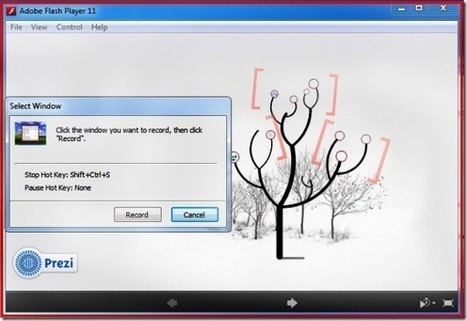
Anyone who has used the Prezi platform would know that creating a Prezi and uploading it to Prezi.com is easy enough, however when it comes to converting it to a YouTube video, there seems to be no native method of doing so... Via Georgios Panagiotou, Maria Kallergi
Scoop.it!
Recently, I was asked why do I use Diigo for my social bookmarking tool. The more I thought about it the more I needed to write about all the great features Diigo is not just for regular ol' users but has some great features for educators too. Via Todoele |