


Snagit allows you to grab an image or video of what you see on your computer screen, add effects, and share with anyone.

 Your new post is loading...
 Scoop.it! Snagit allows you to grab an image or video of what you see on your computer screen, add effects, and share with anyone. No comment yet.
Sign up to comment
Scoop.it!
How to print a Google Form or save it as PDF.
Scoop.it!

Today’s video-conferencing is anything but bad, thanks to the range of great free and efficient tools at our disposal like Google+ Hangout and Skype. Via Dr. Tom D'Amico (@TDOttawa)
Scoop.it!

News4teachers Via Klaus Meschede
Scoop.it!

Estas 50 herramientas 2.0 para profesores le darán un vuelvo positivo a la manera de dar clases, ¡atrévete, innova, crea! Y sonríe más. Via JAG
Scoop.it!

Annotary es una herramienta 2.0 muy útil para realizar anotaciones en páginas web pudiendo guardarlas para leerlas en otro momento. Es un bookmarklet que se añade a la barra de marcadores y se... Via Ramon Aragon
Scoop.it!

On Tuesday 17th March Phil, Daniel (TEL), Gabby Wilson (VPE), and I met in Holgate to undertake a survey which encouraged students to share their thoughts around the use of Moodle in their Faculty.... Via Moodle_UK 
Moodle_UK's curator insight,
April 10, 2015 12:50 PM
Great feedback, ideas and prompts from the people whose opinion really matters...the students
Scoop.it!

Badges are new in Moodle 2.5+ . Badges are a great way to motivate users. They are an electronic way to demonstrate that you have mastered a specific skill. Moodle badges may be awarded based on a variety of criteria chosen by the teacher. You can upload your own images as badges or get them from a site such as Badges for Your Moodle. 
Elizabeth Dalton's curator insight,
April 11, 2015 8:38 AM
Digital badges have been around for several years, but still have a way to go until they are fully integrated and recognized appropriately in education and in the world of work. The fact that Moodle, a widely-used and free system for online instruction, has integrated them in their system is definitely a step in the RIGHT direction. Go Moodle! 
Steve Whitmore's curator insight,
April 11, 2015 10:54 AM
What would you badge together? Oakland Schools is exploring this in special education professional development
Scoop.it!

From
pageflow

In herkömmlichen Internet-Reportagen werden Texte, Fotos, Audios und Videos zumeist voneinander getrennt präsentiert. Mit „Pageflow“ stellen wir ein Reportage-Werkzeug zur Verfügung, mit dem alle Elemente einer Internet-Reportagen zu einem Erzählfluss verschmelzen. Dabei kommen multimediale Reportagen mit bildschirmfüllenden Fotos und Videos heraus. Via Guido Knaus
Scoop.it!

YouTube Capture, an iOS app by YouTube, is a great tool for recording, editing, and uploading content to YouTube. Via Dr. Tom D'Amico (@TDOttawa)
Scoop.it!
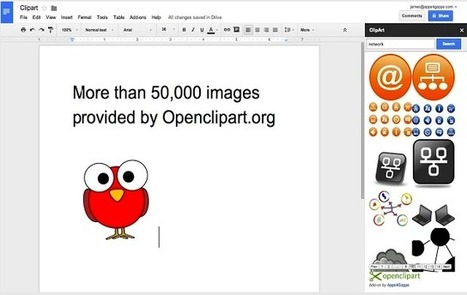
Below are two excellent Google Drive add-ons to use with your Google Docs. The first one in the list is an application that enables users to generate tag clouds from documents that have over 50 words. The second add-on provides users with a super easy way to integrate images from the popular OpenClipart right into a Google doc. The app's gallery has over 50.000 pictures to choose from. Via Gumersindo Fernández
Scoop.it!

View post on imgur.com Via Yashy Tohsaku |
Scoop.it!

22 Simple Examples Of Social Media In The Classroom
Scoop.it!

From
medium
Can your students make the same learning gains with paper as they can with your current classroom technology?
Scoop.it!
In this tutorial we'll show you how to use true and false variables to build interactions and conditional navigation. Learn more and download the practice fi...
Scoop.it!

The use of ITC in the foreign language classroom
Juergen Wagner's insight:
#Moodle and #Web 2.0: The use of ITC in the foreign language classroom - Curated by Juergen Wagner | http://www.scoop.it/t/moodle-and-web-2-0
Scoop.it!

Adobe revolutioniert die Arbeit mit PDF-Dokumenten CHECK.point eLearning München, April 2015 - Ab sofort ist die Adobe Document Cloud verfügbar, die neueste Cloud-Lösung von Adobe, mit der Dokumente geräteübergreifend aus dem Büro, von zuhause und... Via Klaus Meschede
Scoop.it!
Quick guide to getting started with using Google Forms. Please feel free to utilize this resource with students and teachers in trainings on Google Forms. Please do not republish this graphic to yo... Via Pippa Davies @PippaDavies , Jamie Forshey
Scoop.it!
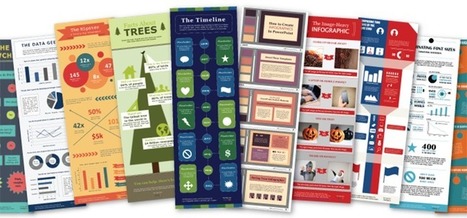
Wouldn't it be great if creating infographics was just as simple as writing regular ole text-based blog posts? Unfortunately, the reality is that making visual content like this usually takes a lot more time, effort, and let's face it -- skill -- than the written word. Usually.But considering the popularity and effectiveness of visual content in marketing today, you can't just afford to throw in the towel. That's why we decided to take all the pain and suffering out of infographic creation. Seriously -- don't throw in the towel just yet. You, too, can create professional-looking, high-quality infographics ... quickly! And I'm going to prove it. First things first ... Via Jeff Domansky, Rui Guimarães Lima 
Carmen Ramos's curator insight,
April 12, 2015 12:36 PM
Infographiken erstellen einfach gemacht, mit Power Point 
Lori Wilk's curator insight,
April 14, 2015 10:04 AM
It's great to have tools to make your more #effective and #efficient that allows you to improve your #productivity. Execellent to help us to learn about creating #infographics

Mery Elvis Mt's curator insight,
October 7, 2015 8:34 PM
Crear infografías genera un alto engagement, aprende como hacerlas en menos de 1 hora
Scoop.it!
I have been using Moodle for more than 6 years and have been using Google Classroom in seven of my classes since the start of 2015. Classroom has a great user interface and with Google behind it, it can only get better. However, I did get a distinct impression that Google did not try to learn from Moodle and chose to instead find out the issues the hard way. A lot of the problems I will be mentioning are well-documented and publicly accessible issues (and solutions) that Moodle had to over come. Google chose instead of reinvent the wheel. They are also less transparent (a lot less) on how and when issues will be fixed. Hopefully that will change in the future.
Here are what I think could still be improved in Classroom. They are the reasons why Moodle is still my preferred LMS currently. Note that Classroom gets updated all the time and some of what I say here may already be out of date.
Via Miloš Bajčetić 
Emmanuel Aligé's curator insight,
June 17, 2015 9:12 AM
Une comparaison entre Moodle et Google Classroom
Scoop.it!
“Moodle VR, or Virtual Reality, is a three-dimensional, computer generated e-learning environment which can be explored and interacted with by a student, teacher or admin. Moodle VR allows...” Via AgileBelma
Scoop.it!

From
blog
-
April 8, 2015 8:55 PM
To help these kids make the kinds of gains they need to master the Common Core, students must learn to receive feedback and also how to use it to improve. Via Dr. Tom D'Amico (@TDOttawa)
Scoop.it!

How to edit course sections using the Learn Moodle site - an introduction to segmenting courses in Moodle. Via Miloš Bajčetić
Scoop.it!

There are 300+ tracker items that are part of the upcoming 2.9 release. I’ve looked through them all and pulled some of those that I found to be the most interesting. Based on that this is going to be a great release, but without the major changes that were ushered in with previous releases. A lot of the changes will be more minor (but in aggregate should go far in creating a much more usable Moodle site for you and your users). Via Miloš Bajčetić
Moodle_UK's curator insight,
April 9, 2015 8:56 AM
More features and further development to look forward to |






