Moodle and Web 2.0
176.9K views | +0 today
Moodle and Web 2.0
The use of ITC in the foreign language classroom
Curated by Juergen Wagner
Your new post is loading...
Rescooped by Juergen Wagner from Moodle Best LMS
June 24, 2015 9:19 AM
Scoop.it!

Julian Ridden: Don’t blame the tool, blame the setup - Moodle Chile

Julian Ridden: Don’t blame the tool, blame the setup - Moodle Chile | Moodle and Web 2.0 | Scoop.it
I recently read an article posted on TechnicianOnline titled “Moodle


usage increases regardless of complaints” that really got me thinking. The article outlines the difficulties being faced by educators at NC State University as they come to grips with the use of the Moodle system. I strongly recommend before reading this blog post further that you read the article they posted in it’s entirety by clicking here.

I do not doubt that many educators reading this article will feel that this could just as easily be describing their own school/Uni/workplace. The points raise are ones we all hear often. But what if all of this could be avoided? Well..it can and it should!

Let’s start by lifting one specific quote.

“The problem with Moodle is that it has so many features that are complicated for the instructors to use. A lot of us don’t run our classes that way and don’t need all of those things . . . I would like to see them come up with a Moodle lite, or something like that.”
Bob Larson (communication lecturer)

Is this statement true? Resoundingly so. Moodle IS a complex tool with a wide range of features ranging in complexity.

Does it need to be so for the teacher? ABSOLUTELY NOT. The issue here is not Moodle itself, it is bad admin setup. But it is far easier to blame the tool and hence, here we are.

The aim of this post is to address just some of the techniques that can be implemented to make Moodle a far more pleasant experience.

------------------------------------

Implementing Simplicity (or How I Learned to Stop Worrying and Love the Moodle)


Moodle provides numerous areas where Admins can enable/disable functionality as well as setting defaults. No organisation uses all the features. Why have them all on? The admin should customise the site to the needs of the organisation. How can we do this. Some examples are below:


* Disable/enable plugins based on what you need moodle to do.

* Set defaults

* Customise your plugin settings

 * Create custom permissions

* Create course templates

* Create a help course

* University of Nottingham Moodle Help

* Focus on Design

* Invest in PD


Via Miloš Bajčetić
No comment yet.
Rescooped by Juergen Wagner from Cartes mentales, cartes heuristiques
June 24, 2015 9:17 AM
Scoop.it!

How to Create a Mind Map with GoConqr

Watch how you can easily create a Mind Map online using the free elearning tools at GoConqr. Use the design features to unleash your creativity on your study ...

Via George Huba, Christine Berthilier
Rescooped by Juergen Wagner from iGeneration - Humane Use of Technology in an AI world (Pedagogy & Digital Innovation)
June 23, 2015 2:12 PM
Scoop.it!

13 Simple Ways to Integrate Technology into any Lesson Plan

13 Simple Ways to Integrate Technology into any Lesson Plan | Moodle and Web 2.0 | Scoop.it
The pressure is on, and educators are feeling it more and more. Principals and school boards everywhere are requiring teachers to integrate technology into the classroom. Sometimes, the change is as…

Via Dr. Tom D'Amico (@TDOttawa)
Omar Naseralla's curator insight, June 28, 2015 2:47 AM

13 طريقة لدمج التكنولوجيا في الحصة الصفية

Rescooped by Juergen Wagner from Moodle Best LMS
June 23, 2015 1:02 PM
Scoop.it!

Grid and Collapsed Topics released for Moodle 2.9

Grid and Collapsed Topics released for Moodle 2.9 | Moodle and Web 2.0 | Scoop.it

Both popular course formats, Grid and Collapsed Topics, have been released as stable versions for Moodle 2.9 this week. Grid provides a unique user experience with flippable cards hiding course topic materials. Collapsed Topic provides an expandable view of course topic information reducing the number of page refreshes required to launch a course resource. Neither have altered functionality, the major change is that IE9 is now required in Collapsed Topics (a prereq for Moodle 2.8).

Each is maintained by Gareth Barnard.

Download links:

* Grid Format: https://moodle.org/plugins/view/format_grid
* Collapsed Topics: https://moodle.org/plugins/view/format_topcoll


Via Miloš Bajčetić
No comment yet.
Rescooped by Juergen Wagner from Technology and language learning
June 23, 2015 10:26 AM
Scoop.it!

Educational Technology and Mobile Learning: 11 of The Best Mac Apps for Teachers

Educational Technology and Mobile Learning: 11 of The Best Mac Apps for Teachers | Moodle and Web 2.0 | Scoop.it

Via Yuly Asencion
No comment yet.
Scooped by Juergen Wagner
June 23, 2015 10:23 AM
Scoop.it!

Russell Stannard's webinar presentation with an audience of 150 :-)

Juergen Wagner's insight:

Russell's presentation

No comment yet.
Rescooped by Juergen Wagner from Moodle Best LMS
June 23, 2015 5:50 AM
Scoop.it!

User Restore: Un-delete a user from Moodle

User Restore: Un-delete a user from Moodle | Moodle and Web 2.0 | Scoop.it
Here’s a handy tool if you’re in the habit of deleting users rather than suspending or archiving them: a way to restore a user who’s been deleted from your system.

The tool, which works best on Moodle 2.7 versions and newer restores user information from the user table and logs bringing the user back to your Moodle’s userbase (and even notifying the user if you so choose). Administrators of pre-2.7 versions beware though, according to the description,

Before Moodle 2.7 there is NO way we can retrieve all information. However, with Moodle 2.7 and the new event logging tables, the original user information is stored in the event data. Therefore, from Moodle 2.7 onwards, this plugin will try and restore the original user information from there.

This effectively means, that from Moodle 2.7 onwards, we will have the correct original username, email, idnumber, picture and mnethostid. Before that, only the email could be restored, and even that method is not foolproof (due to the fact the username is cleaned with PARAM_USERNAME upon deletion).

This plugin is contributed by Sebsoft Plugins and is available for download here: https://moodle.org/plugins/view/tool_userrestore

Via Miloš Bajčetić
No comment yet.
Scooped by Juergen Wagner
June 23, 2015 5:49 AM
Scoop.it!

Import/Backup/Restore Moodle

No comment yet.
Rescooped by Juergen Wagner from iGeneration - Humane Use of Technology in an AI world (Pedagogy & Digital Innovation)
June 22, 2015 2:57 PM
Scoop.it!

How to Convert Images of Text Into Editable Google Docs

How to Convert Images of Text Into Editable Google Docs | Moodle and Web 2.0 | Scoop.it
Google continues to blur the line between physical and digital. What used to only live on ink and paper can be edited right in your Drive. The OCR (Optical Character Recognition) feature in Google Drive can convert an image of a physical page of…

Via Dr. Tom D'Amico (@TDOttawa)
No comment yet.
Rescooped by Juergen Wagner from Technology Advances
June 22, 2015 2:52 PM
Scoop.it!

The Must-Have EdTech Cheat Sheet

The Must-Have EdTech Cheat Sheet | Moodle and Web 2.0 | Scoop.it
This infographic and article from Edudemic features a cheat sheet for using edtech that every teacher can make use of in any modern digital classroom.

Via Lynnette Van Dyke
No comment yet.
Rescooped by Juergen Wagner from E-Learning-Inclusivo (Mashup)
June 22, 2015 10:37 AM
Scoop.it!

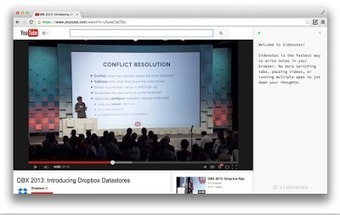
Sidenotes: A great tool for annotating videos and webpages

Sidenotes: A great tool for annotating videos and webpages | Moodle and Web 2.0 | Scoop.it
Sidenotes is also integrated with Dropbox so you can access your notes on the cloud. All the notes you create are automatically synced with your Dropbox account. More importantly, the notes are saved with a generated URL linking back to the original source page where the note was initially added.

Sidetones works on all kinds of browsers and is a great tool to use for curating and annotating educational content to use in your lessons or to share with your students. It is also ideal for flipped classrooms and for creating explanatory tutorials. The only thing lacking in this app is integration with Google Drive. Other than that the app is absolutely convenient.

Via Edumorfosis, juandoming
No comment yet.
Rescooped by Juergen Wagner from Tools and Applications
June 22, 2015 6:52 AM
Scoop.it!

Zoho ShowTime

Zoho ShowTime | Moodle and Web 2.0 | Scoop.it

Bring life to your presentations. Deliver your presentations the smarter way. Use your mobile to deliver presentations. Interact and engage with your audience, measure your presentation peformance and hightlight your presentation skills and credentials as a speaker.


Via Baiba Svenca, Elke Höfler
Baiba Svenca's curator insight, June 19, 2015 2:11 AM

Zoho have just released their new presentation app Show Time which lets you make your presentations interactive. Use your PPT or pdf to start with and engage your audience.

Rosemary Tyrrell, Ed.D.'s curator insight, June 21, 2015 7:45 PM

This nifty little program not only lets you run your slide show from your smartphone, but it has audience engagement and analytics. Cool! 

Justin Hurd's curator insight, May 21, 2017 10:30 AM
I like the ability to use this tool on a mobile device. Another way to deliver presentations, need to play around with it a little bit more to get the full use out of it. 
Rescooped by Juergen Wagner from Teaching Scoops
June 22, 2015 3:26 AM
Scoop.it!

LEARNing with and through Twitter | Hashtags for Education | SocialMedia | eSkills

LEARNing with and through Twitter | Hashtags for Education | SocialMedia | eSkills | Moodle and Web 2.0 | Scoop.it
What are Hashtags and Why Do They Matter? Definition: People use the hashtag symbol # before a relevant keyword or phrase (no spaces) in their Tweet to categorize those Tweets and help them show more easily in Twitter Search.


Learn more:


- https://gustmees.wordpress.com/2012/06/27/how-to-use-twitter-with-success-for-education-and-more/


- https://gustmees.wordpress.com/2013/02/20/what-you-should-know-about-twitter-chats/


Via Gust MEES, Frans Paffen
Gust MEES's curator insight, June 21, 2015 11:12 AM
What are Hashtags and Why Do They Matter? Definition: People use the hashtag symbol # before a relevant keyword or phrase (no spaces) in their Tweet to categorize those Tweets and help them show more easily in Twitter Search.


Learn more:


- https://gustmees.wordpress.com/2012/06/27/how-to-use-twitter-with-success-for-education-and-more/


- https://gustmees.wordpress.com/2013/02/20/what-you-should-know-about-twitter-chats/


Maruja Romero's curator insight, June 23, 2015 12:21 AM

El uso de tuiter en educación

Rescooped by Juergen Wagner from Outils collaboratifs innovants, pensée visuelle et créativité.
June 24, 2015 9:18 AM
Scoop.it!

Prezi Experts On How To Create An Extraordinary Prezi

Prezi Experts On How To Create An Extraordinary Prezi | Moodle and Web 2.0 | Scoop.it
Prezi is great. It gives speakers loads of freedom to deliver their ideas, captivate audiences and make everyone feel a part of the story. There is no doubt

Via Spyros Kaloghiros, Christine Berthilier
No comment yet.
Rescooped by Juergen Wagner from Moodle Best LMS
June 23, 2015 2:13 PM
Scoop.it!

Video: Navigation Changes in Moodle 2.9

Video: Navigation Changes in Moodle 2.9 | Moodle and Web 2.0 | Scoop.it
This HQ produced video highlights the navigation changes in Moodle 2.9 such as the ease of sending emails, the “new” student dashboard which has replaced “My Moodle” in name, preferences, the user menu, and much more. Navigation and usability were definitely improved in the newest release of Moodle. Check out the demonstration narrated by Mary Cooch here or embedded below: https://www.youtube.com/watch?v=JM0DnSxxw4E

Via Miloš Bajčetić
No comment yet.
Rescooped by Juergen Wagner from Educational Technology News
June 23, 2015 1:02 PM
Scoop.it!

Do Teachers or Schools Own Resources Created in the Cloud?

Do Teachers or Schools Own Resources Created in the Cloud? | Moodle and Web 2.0 | Scoop.it
This past December, after nine years of teaching Sophomore English at the same high school, I took a new job. I loved my school, the people I worked with, and the students I taught, so leaving was one of the hardest decisions I’ve ever had to make. Leaving also raised an interesting question: Wha

Via EDTECH@UTRGV
No comment yet.
Rescooped by Juergen Wagner from iGeneration - Humane Use of Technology in an AI world (Pedagogy & Digital Innovation)
June 23, 2015 1:00 PM
Scoop.it!

The Teacher's Guide to Pinterest - Part 1: What is Pinterest?

The Teacher's Guide to Pinterest - Part 1: What is Pinterest? | Moodle and Web 2.0 | Scoop.it
Getting Started with Pinterest!

I'm surprised to find out how many educators are still not using Pinterest! So I've decided to put together this guide to help new users get started, and help more advanced users find great educational content. So why not

Via Dr. Tom D'Amico (@TDOttawa)
Karen Dunlap's curator insight, June 24, 2015 11:08 AM

Easy guide to Pinterest use!

Елена Гончарова's curator insight, June 24, 2015 2:16 PM

добавить ваше понимание ...

 
Carla Gordon's curator insight, June 27, 2015 3:10 AM

There is so much outstanding material for foreign language teaching on Pinterest. Beware of the lower quality material, too!

Rescooped by Juergen Wagner from learning by using iPads
June 23, 2015 10:25 AM
Scoop.it!

Pedagogy Before Technology - 10 Ideas to Consider

Pedagogy Before Technology - 10 Ideas to Consider | Moodle and Web 2.0 | Scoop.it
Pedagogy Before Technology Indubitably, IT has changed aspects of the nature of knowledge and the way we access it. But what knowledge do we need in the 21st century? Before I go any further, I  re...

Via Viljenka Savli (http://www2.arnes.si/~sopvsavl/)
Viljenka Savli (http://www2.arnes.si/~sopvsavl/)'s curator insight, June 23, 2015 8:48 AM

I like this: Knowledge is power. Besides, our students see much more outside of school than we realize or like to admit via the interweb or hanging with friends.

...Just embrace these facts and add also those from the curricula and...

Knowledge is power. Besides, our students see much more outside of school than we realize or like to admit via the interweb or hanging with friends.

Rescooped by Juergen Wagner from iGeneration - Humane Use of Technology in an AI world (Pedagogy & Digital Innovation)
June 23, 2015 5:51 AM
Scoop.it!

How to use MoveNote for screencasting - Innovation: Education

How to use MoveNote for screencasting - Innovation: Education | Moodle and Web 2.0 | Scoop.it
Movenote embeds you in your screencasts. App-smash it with VideoNotes for video-based assessment. Wondering how? Let's look at how to use Movenote.

Via Dr. Tom D'Amico (@TDOttawa)
No comment yet.
Scooped by Juergen Wagner
June 23, 2015 5:50 AM
Scoop.it!

Add a book to moodle

A breif tutorial to start you off. You can add as much content to your book as your imagination allows.
No comment yet.
Rescooped by Juergen Wagner from Technology Enhanced Learning in Teacher Education
June 23, 2015 5:45 AM
Scoop.it!

Interview with Steve Wheeler: New and emerging technologies.

Interview with Steve Wheeler: New and emerging technologies. | Moodle and Web 2.0 | Scoop.it
I was interviewed recently by the team from Sponge UK in the beautiful gardens of Drake's Place, at Plymouth University.

Via Carola Brunnbauer
No comment yet.
Rescooped by Juergen Wagner from Screencasting & Flipping for Online Learning
June 22, 2015 2:56 PM
Scoop.it!

▶ A mini lecture on the Flipped Classroom - YouTube

A lecture on the Flipped Classroom from Russell Stannard who flipped his classes back in 2006.

Via Peggy George
No comment yet.
Rescooped by Juergen Wagner from iGeneration - Humane Use of Technology in an AI world (Pedagogy & Digital Innovation)
June 22, 2015 10:39 AM
Scoop.it!

How to Plan Biking and Walking Routes in Google Maps

How to Plan Biking and Walking Routes in Google Maps | Moodle and Web 2.0 | Scoop.it

Via Dr. Tom D'Amico (@TDOttawa)
No comment yet.
Rescooped by Juergen Wagner from E-Learning Methodology
June 22, 2015 6:52 AM
Scoop.it!

Ten years ago, a video-sharing site called YouTube was born. Then, this happened

Ten years ago, a video-sharing site called YouTube was born. Then, this happened | Moodle and Web 2.0 | Scoop.it
Ten years ago, a video-sharing site called YouTube was born. In the decade since, it has changed our world.

Via Elke Höfler
No comment yet.
Rescooped by Juergen Wagner from Moodle Best LMS
June 22, 2015 6:50 AM
Scoop.it!

Moodle plugins: Simple Clock

Moodle plugins: Simple Clock | Moodle and Web 2.0 | Scoop.it

A simple JavaScript clock that highlights the time difference between a student and the Moodle server


Via Miloš Bajčetić
No comment yet.