"When your school issues you a new Google Apps for Education account your profile picture will just be a simple letter icon featuring your first initial ..."
©
Via Leona Ungerer, Lynnette Van Dyke

 Your new post is loading...
 Scoop.it! "When your school issues you a new Google Apps for Education account your profile picture will just be a simple letter icon featuring your first initial ..." © Via Leona Ungerer, Lynnette Van Dyke No comment yet.
Sign up to comment
Scoop.it!

One of the best ways to encourage learner progress or course completion and to add value to your course is to provide some way of certifying that an individual has legitimately pass the course. Certificates, diplomas, etc. are all ways to do this, but in today’s digital world, digital badges are a great option that people can use to verify and display their skills and knowledge. Via Miloš Bajčetić
Scoop.it!

Scoop.it!

PDF to Word converters are a dime a dozen. We have compiled the 5 best ones you can get for free, for both on- and more secure offline use. Via Luísa Lima
Scoop.it!

"Adobe Illustrator is awesome but it costs quite a bit due to the Creative Cloud subscription. This web app alternative is almost as good and costs nothing! ..." Via Leona Ungerer
Scoop.it!

Louise Robinson-Lay's curator insight,
April 15, 2016 6:06 PM
A good tool to get student creating timelines of events linked to maps.
Scoop.it!

Google Docs are resembling Word and Pages documents more and more as features continually get added to the suite of apps. A question I get asked regularly is if it is possible to change the margins of the page on a Google Doc. That answer is yes! Here’s how: Open the Google Doc you want … Via Dr. Tom D'Amico (@TDOttawa)
Scoop.it!

Vimeo downloader offers you the simplest way to download Vimeo video free. No need to sign up or install program, just enter video URL and start Vimeo video download. Via Dr. Tom D'Amico (@TDOttawa)
Scoop.it!
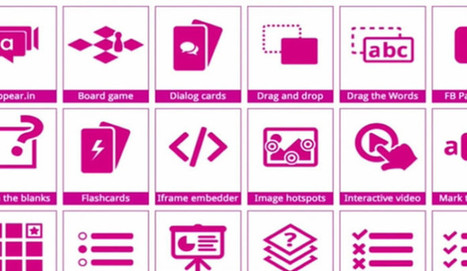
Recently there was, what could have been, a fairly benign thread posted on the Moodle forums about how to create more interactive lessons. JP, the thread originator, was simply looking for a way to bring a little more life to the Moodle experience. Via Miloš Bajčetić, Rui Guimarães Lima 
Raquel Oliveira's curator insight,
April 25, 2016 12:17 PM
alternativas surgindo para engajar participantes que utilizam a plataforma Moodle (gratuita) para ensino a distância. h5p é uma das ferramentas que promete ajudar aqueles que estão desmotivados em treinamentos on line. Confira as dicas. #avancee
Scoop.it!

Want to blur out faces, objects, and brands from your videos on YouTube? The built-in editor makes it easy to do that with this new feature. Via Ana Cristina Pratas, Javier Sánchez Bolado
Scoop.it!

Learn how to use Typeform to create quizzes for your online course with this step-by-step tutorial. Via EDTECH@UTRGV 
K_Lynam's curator insight,
April 15, 2016 8:08 PM
Great tool for flipped instruction! Can be used with any platform, not just thinkific. Lots of choice with free account! Check out www.typeform.comcoach-ks-academy.thinkific.com Great tool for flipped instruction! Can be used with any platform, not just Thinkific. Lots of choice with Free account! Check out www.typeform.com (& help pages)! 2 |
Scoop.it!

Need to record your desktop? Luckily, you'll find that screencasting apps are more common than you might think. Here are some of the best free ones. Via Mariano Fernandez S. 
vgpascal's curator insight,
April 23, 2016 2:05 AM
De vraies nouveautés à tester, en particulier ezvid.

Tony Guzman's curator insight,
April 29, 2016 1:44 PM
This article lists some video tools for both a Windows, Mac or Linux PC which faculty can use to record their lectures and other class materials.
Scoop.it!

Moodle Forums are a wealthy resource of knowledge about Moodle and provide support to all Moodle users by experienced Moodle users. But for a newbie Moodlers, the forums may appear to be confusing at first. Via Miloš Bajčetić
Scoop.it!

A flipped classroom is one where the lectures become the homework and the traditional homework tasks take place in the lesson time. This enables students to attend sessions with an understanding of the subject and to conceptualise and build upon it through doing exercises in class, with you, as the tutor, on hand to answer questions and explore the topic in more detail Via Nik Peachey
Tony Guzman's curator insight,
April 29, 2016 1:41 PM
Good article for any instructor considering doing a flipped classroom approach.

William Curran's curator insight,
April 29, 2016 11:33 PM
UkEdChat lists methodologies to further activate the Flipped Classroom. 
Monica Reyna's curator insight,
October 8, 2016 4:25 PM
I was initially introduced to a flipped classroom by one of my colleagues from another campus. At first I was confused about what it actually meant and how to implement it. This reading does a great job of defining it in a way that I can share with my fellow math colleagues at my campus.
Scoop.it!

Technology in schools is a neutral resource. It does not harm or help student learning when put into classrooms. Only when technology is employed by the teacher to serve as part of the learning experience does it have any impact, positive or otherwise. It's like saying pencils and textbooks can hinder a math lesson. These are tools… Via Dr. Tom D'Amico (@TDOttawa) 
Karinna Lazcano's curator insight,
June 8, 2022 2:08 PM
This article stated some points that I disagree with. The author stated that technology does not harm or help students learning when they are in the classroom. A principal of one of the most expensive private school stated that laptops were not necessary in class and that more traditional teaching methods were effective.
Scoop.it!

PDF to Word converters are a dime a dozen. We have compiled the 5 best ones you can get for free, for both on- and more secure offline use. Via Ana Cristina Pratas 
Andrew 's curator insight,
May 6, 2016 9:48 AM
Teachers are always looking for an easy way to convert, here is the answer

Willem Kuypers's curator insight,
June 8, 2016 3:29 PM
Un article pas très utile pour le prof, mais il faut savoir que cela existe.
Scoop.it!
by Jennifer Rita Nichols, TeachThought Intern Digital portfolios are becoming increasingly popular in classrooms across North America. Schoo
Via Dr. Joan McGettigan
Scoop.it!

Welcome to a post I always have fun writing. Last year I attempted finding ways to use Word Clouds (Wordle) in education. When I concluded writing that post I was at 108 possible ways. More than a half year went by, and I was up to 125 ways to use Word Clouds in the classroom. I am so proud that this post now includes 170 ways. I was able to put together this list because of you and a lot of reflection. I would like to get the number close to 200, so if you have any ideas… please let me know. Leave a comment or send me an email at mjgormans@ Via Gumersindo Fernández
Scoop.it!

Classtools.net, developed and maintained by history teacher Russel Tarr, offers lots of great templates that you can use to create review activities for your students. Recently, I received an email from a reader who was having trouble with the Dustbin game template on Classtools.net. To help her out I created the video that you see embedded below. Via Gumersindo Fernández
Scoop.it!
54 Flipped Classroom Tools For Teachers And Students by TeachThought Staff The flipped classroom has continued to enjoy momentum years after it Via Luísa Lima
Scoop.it!
To give you some inspiration in your gamified online learning, here are 10 uses for gamification in online learning to make your training go further. Via EDTECH@UTRGV 
elearning at eCampus ULg's curator insight,
April 10, 2016 3:58 AM
Gamification is welcome everywhere, not only online ;-)
|