


|
Rescooped by
Kim Flintoff
from iPads, MakerEd and More in Education
May 3, 2015 10:27 PM
|


No comment yet.
Sign up to comment

 Your new post is loading...
 Scoop.it! No comment yet.
Sign up to comment
Scoop.it!

MakerBot’s 3D printing experts offer interactive workshops, private lessons, and on-site training. Get started with the MakerBot Learning program.
Scoop.it!

Make this super easy and cool looking 2.8 touchscreen Internet Radio that can be controlled with PC, Smartphone and basically every machine that has ...
Scoop.it!

"These blogs and websites will keep you up to date with 3D printing news and trends. "These sites include 3D printing guides, instructions, history, and provide further context. "These sites provide curriculum examples for 3D printing programming and instruction." Very solid collection of quality resources -JL Via Jim Lerman

David Prince's curator insight,
May 27, 2015 12:46 AM
After working at the high school for prac 1, I found these machines interesting to say the least. After reading this resource I can relate by seeing them in action as well as having had the opportunity to design and produce an item from one of these 3d printers. Although the printer I used was more like the generation 1 machine, I know that with continuing technology these 3d printers will improve to levels that we are yet to see in manufacturing. The article also contain valuable information pertaining to many sites giving information on the benefits and uses of these printers. 
Brett Coleman's curator insight,
May 31, 2015 6:13 AM
This would be great for when students are learning about 3D printing. Also great to see that their are blogs that students could follow about this subject 
David Nicholls's curator insight,
May 21, 2020 12:05 AM
Another great resource where students and teachers alike can share and learn different techniques around 3D printing.
Scoop.it!

How can you support the learning by doing maker movement in your classroom or school library media center?
Description: Learn evidence-based instructional strategies that support building models, prototypes, inventions and innovations and encourage creative problem solving and team collaboration across a wide range of subject matters and all grade levels. Applications of learning theory and assessment strategies will be employed to create K-12 interdisciplinary inquiry-based maker experiences.
Scoop.it!
Highlights: * The crankshaft is glass. The piston is glass. The counterweight that makes the wheel spin evenly is glass. Imagine that everything is made out of glass. * There are no sealants used. All is accomplished by a perfectly snug fit. The gap between the piston and its compartment is so small, that the water that condensates from the steam seals it shut! * Notice the elaborate excessive steam exhaust system next to the piston. * The piston is the most arduous part to make due to to extreme level of precision needed. Its parts have to be so accurate that no machinery is of use here. The piston and its cylinder must be hand sanded to perfection, and they are very likely to crack in the process! On average, three out of four crack.
Scoop.it!

One of my favorite aspects of writing about technology like 3D printing is watching how many different types of industries find uses for it. Over the years I’ve seen 3D printers used to help surgeons plan for complex medical procedures, help restore ancient artifacts, replicate living tissue, and... Via Brittney

Brittney's curator insight,
April 20, 2015 3:07 PM
Stratasys 3D Printers Helping to Launch Rockets into Space http://3dprint.com/59428/united-launch-alliance-rockets/
Scoop.it!
Welcome to the official Silhouette channel. Here you'll find instructional videos and tutorials to help you get the most from your Silhouette electronic cutting tool and other Silhouette products. Whether you're a first-time Silhouette user or you're just looking for some inspiration and new ideas, you've come to the right place. New videos are added all the time so keep checking back. Watch our 101 series videos for an introduction to our products, and our 102 series videos for project ideas! If there's a tutorial you'd like to see, let us know—we want to hear from you.
Scoop.it!

Institutions gamble on free-for-all tool shops as engines of entrepreneurship.
Karen Miller's insight:
Fabulous projects happening at Think[box] - a $35 million, $750,000 per annum, 7 story makerspace - at Case Western Reserve University in Cleveland.
Scoop.it!

Makerspaces should be seen as a metaphor for unique learning environments that encourage tinkering, play, and open-ended exploration for all. Purposeful planning will allow your makerspace to insinuate itself into the mindset of students, educators, and families within your school. Taking the overall approach outlined here will ensure that your makerspace is a well-designed learning environment, one that it will serve your students and your wider school community tremendously, ensuring opportunities for growth and success for the future.
Laura Fleming is a media specialist at New Milford High School in New Jersey. This article was adapted from her new book “Worlds of Making: Best Practices for Establishing a Makerspace for Your School [4]
Scoop.it!

It is a media in DiY mode: with its small team, Makery progressively grows in an open, transparent and participative manner, following the principles of digital ethics born by the lab wave.
Scoop.it!

3D printers are coming to schools. How do we make the most of them?
A glimpse of a Lab School classroom reveals students working on projects in small groups, with 3D printers arrayed along the walls — one for every four students. Other fabrication technologies, such as computer-controlled die cutters, drawers of microelectronic components, sensors, motors and actuators, soldering stations, hand tools, and even laser cutters and CNC machines are readily available. Student projects are open-ended to incorporate engineering design into science teaching.
Scoop.it!

There are so many of us doing amazing Makerspaces in our libraries and schools, Diana and I thought it would be fun to turn it into a Show & Tell type show inviting six of our wonderful friends to join us. It turned out to be one of my favorite shows yet!
|
Scoop.it!

An exciting new microcomputer for Linux and Android enthusiasts has arrived.
Scoop.it!

Designed for beginners who want to get started quickly with 3D printing, the new Shape Maker app allows users to transform sketches, photos and screen captures into files that can then be sent to a variety of MakerBot printers.
Scoop.it!

With littleBits anyone, of any age, can harness the power of electronics, microcontrollers, and the cloud. You can combine these snap-together magnetic bricks to make simple electronic circuits or build robots and interactive projects that combine sensors and an Arduino-compatible microcontroller. Via Jim Lerman
Scoop.it!

Get the kit that brings learning, problem solving, and the joy of invention to any kid anywhere. | Crowdfunding is a democratic way to support the fundraising needs of your community. Make a contribution today!
Scoop.it!
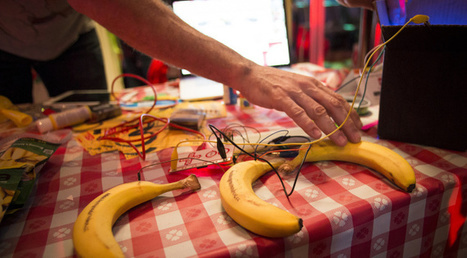
The Makers: the ones mad for tinkering, experimenting, creating crazy things that move, blink and buzz. (Also known as the Inventor with 1000 Ideas or the DIY Guy/Gal). The Makers: the ones mad for tinkering, experimenting, creating crazy things that move, blink and buzz. (Also known as the Inventor with 1000 Ideas or the DIY Guy/Gal).

Ana C. Robles's curator insight,
April 24, 2015 8:57 AM
Inspiring and interesting Ted talks to Create.
Scoop.it!

A pWhat does any of that have to do with copyright? Owners, tinkerers, and homebrew “hackers” must copy programming so they can modify it. Product makers don’t like people messing with their stuff, so some manufacturers place digital locks over software. Breaking the lock, making the copy, and changing something could be construed as a violation of copyright law.
Kim Flintoff's insight:
A political motivation for making, tinkering and recoding...
Scoop.it!

This past week in New York City, 3D printing was all the rage, thanks in large part to an event that was aimed at taking the city by storm. 3D Print Week NY, a Via Brittney
Brittney's curator insight,
April 20, 2015 3:35 PM
3D Print Week NY Recap: Impressive, Inspirational, Amazing http://3dprint.com/59298/3d-print-week-ny/
Scoop.it!
https://www.ucutathome.com/store/product/Silhouette-America-Machines-Silhouette-Cameo/id/18574 Introducing the NEW Cameo digital die-cutting machine from Sil...
Scoop.it!

Hackerspaces are community-operated physical places, where people share their interest in tinkering with technology, meet and work on their projects, and learn from each other.
Scoop.it!
"Makerspaces are an amazing way to bring STEAM, creativity and informal learning into your school, but with so much information out there, many educators aren’t sure of where to get started. In this session, you will get ideas and inspiration on how to bring the Maker Education Movement into your school. Topics covered will include: cultivating a Maker culture, getting student input, finding space, securing funds and donations, gathering supplies, making it happen, and sharing with others. Throughout the presentation, you will see examples from the creation of our school’s library Makerspace, as well as examples from other schools." Via John Evans
Scoop.it!

In “Saving the World”, theorist Michel Bauwens defends his optimistic vision of the P2P, on the brink of revolutionizing production and society.
Scoop.it!

Pins about Elementary Library Makerspaces hand-picked by Pinner Amanda Ehll | See more about school libraries, old cds and engineering.
|






