What are the key tips to shooting great news photography? This video by award-winning Reuters photographer Damir Sagolj, compiled by the Thomson Reuters Foundation, share his seven ideas on how to shoot news photos that engage audiences and tell a great story.
1 – Anticipate : Shooter beaucoup avant de photographier les moments importants. Si on ne le fait pas, les moments importants risquent de vous passer sous le nez car vous serez empêtré dans vos questions sur comment faire, quelle ouverture, quelle exposition, etc…
2 – Research : Faites des recherches sur le lieu que vous visitez et les personnes que vous rencontrez. Il faut savoir ce qui est important pour votre histoire.
3 – Reach Out : trouvez des personnes qui connaissent les lieux, la langue, les us et les coutumes.
4 – Prioritize : Concentrez vous sur un exemple précis. N’essayez pas de couvrir trop d’évènement (NDLR : par exemple, si vous voulez faire un reportage sur le conflit « Israelo-Palestinien », concentrez vous sur l’histoire de deux familles opposées. Racontez une histoire précise qui symbolise le conflit.)
5 – Practice : Connaissez votre matériel sur le bout des ongles.
6 – Interact : Interagissez avec les personnes qui vous entourent.
7 – Be Invisible: Ne soyez pas intrusif, mais discret
If you want to give your portraits more of a professional look or simply expand your repertoire as a portrait photographer, you’ll want to start experimenting with studio lighting techniques.
Chances are you’ve dabbled with flash or tried a simple lighting set-up at home, but if you want to really start taking control of your lighting and drawing out the character of your subject, you’ll want to broaden your horizons a bit.
Below we’ve suggested three straightforward studio lighting techniques using two-head lighting set-ups you can use to fine tune your light.
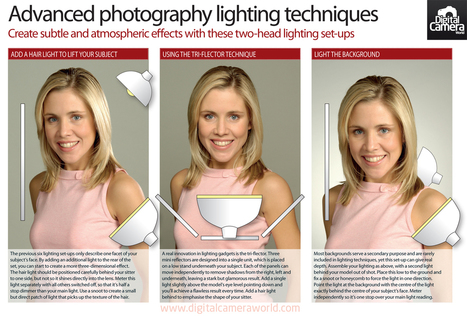
We’ve also compiled these advanced studio lighting techniques as a photography cheat sheet, which you can either drag and drop to your desktop or click on directly to view in higher resolution.
No. 1 : Add a hair light to lift your subject
Most studio lighting set-ups only emphsasise one facet of your subject’s face. By adding an additional light to the rear of the set, you can start to create a more three-dimensional effect.
The hair light should be positioned carefully behind your sitter to one side, but not so it shines directly into the lens. Meter this light separately with all others switched off, so that it’s half a stop dimmer than your main light.
Use a snoot to create a small but direct patch of light that picks up the texture of the hair.
No. 2: The Tri-flector technique
A real innovation in lighting gadgets is the tri-flector. Three mini reflectors are designed into a single unit, which is placed on a low stand underneath your subject.
Each of the panels can move independently to remove shadows from the right, left and underneath, leaving a stark but glamorous result.
Add a single light slightly above the model’s eye level pointing down and you’ll achieve a flawless result every time. Add a hair light behind to emphasise the shape of your sitter.
No. 3: Light the background
Most backgrounds serve a secondary purpose and are rarely included in lighting techniques, yet this set-up can give real depth. Assemble your lighting as above, with a second light behind your model out of shot.
Place this low to the ground and fix a snoot or honeycomb to force the light in one direction.
Point the light at the background with the centre of the light exactly behind the centre of your subject’s face. Meter independently so it’s one stop over your main light reading.
Download the Advanced Studio Lighting Techniques Cheat Sheet : http://goo.gl/aet3C
Looking happy in a photograph is a tall task for many people. But don't worry, because this little video will teach you how to look naturally cheery whenever somebody points a camera your way.
Rule number one: Don't say cheese. Ever. Instead, you should say something that ends in an "uh" sound. But there's far more to it that that, so take a watch. The camera will love you for it.
We’ve all had that terrified day when we read on some blog that, “Real photographers shoot in M mode.” That moment is always followed by a frantic google search for, “WTF is M mode,” and the sudden realization that it is a) terrifying and b) something you have to learn.
We’ve put together an infographic that gives a brief explanation of all the parts that make M mode so boss. Whether you’re new to the wonderful world of photography, or so O.G. you can’t even remember what that little “P” on your camera means it is a great primer for Manual Mode shooting.
Our collection of top digital camera tips and essential photography advice will have you improving your photos in no time. Culled from experts and photographers who have been taking pictures for quite some time, they all agree that these 44 camera tips are essential knowledge for honing your craft.
So feast your eyes below, check out some of our best photography tips on everything from setting up your digital camera to honing your photo composition, and by the end you will learn the secrets and shortcuts to getting high-quality pictures every time.
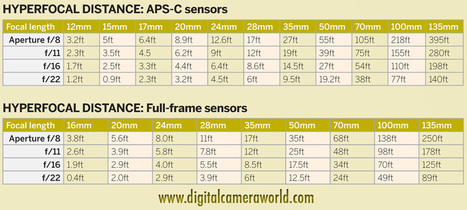
Before the introduction of autofocus cameras, the use of ‘hyperfocal distance’ was a popular focus technique used by photographers – and it’s still one of the really neat camera tricks for times when your camera struggles to autofocus in difficult lighting conditions.
Hyperfocal distance is basically the distance that you can focus to at any given aperture, where the resulting depth of field will retain sharpness in the scene from as far away as infinity to the closest possible point.
The depth of field increases greatly when combining smaller apertures with wider-angle zoom settings, so using the hyperfocal distance technique is particularly useful for landscape photography, especially when you’re using a lens that has a built-in distance scale.
For our latest photography cheat sheet we put together an easy-to-follow table charting the hyperfocal distance at common focal lengths and apertures for cameras with both APS-C or full frame sensor sizes.
Current cameras deliver much higher resolution images than you need for sending as email attachments or for posting online.
Reducing the physical size and increasing the compression ratio of JPEGs results in files with much smaller data sizes. All good photo-editing programs have tools for doing this, while retaining decent image quality. For on-screen viewing, it’s best to find out the native resolution of the computer monitor, TV, tablet, mobile phone or other device on which you want to display the photos.
The aspect ratio will probably be different to that of your camera, so you may also need to crop the images to fill the screen and avoid black bars at the edges.
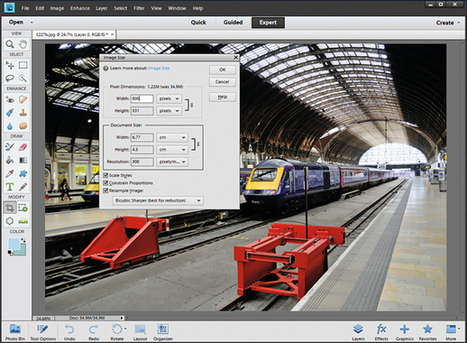
1 Reduce the size In Photoshop Elements’ Image Size window, enter a new width or height in Pixel Dimensions. Tick the Resample Image box then choose the Bicubic Sharper method to retain sharpness.
2 Compression Choose a moderate JPEG compression setting. After reducing the dimensions of this detailed image to 800×531 pixels, even the high quality setting generates a manageable 207k file.
3 Cropping The Crop tool has some handy preset values for popular sizes of photo prints. There’s also a 16×9 preset, which works well for cropping images for widescreen TVs and computer monitors.
4 Upscaling For large-format printing, enter the document dimensions in the Image Size dialog box. Select the required print resolution and use the Bicubic Smoother resampling method.
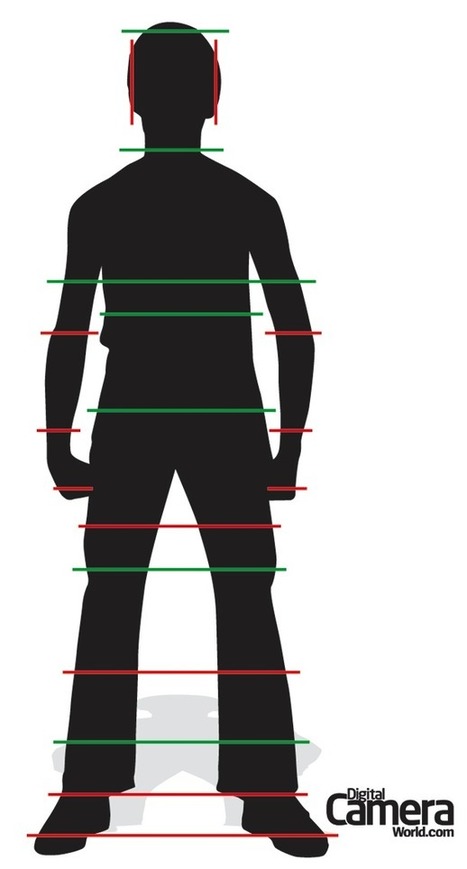
Portrait photography is challenging for a whole host of reasons. Getting your portrait right in-camera is only half the battle. Knowing how to edit your portraits can be quite difficult when it comes to cropping a photo. Cropping in an awkward position on your subject can end up ruining a perfectly good shot.
In the latest of our photography cheat sheet series of free infographics, we’ve put together this easy guide for understanding some of the best places to crop a subject in a portrait, and some of the places where you should not. ‘Yes’ areas are marked in green, while ‘bad’ locations are marked in red.
Shooting great night photography means applying the same attention to light and photo composition as you do in daylight. In fact, you’ll find that most night photography tips are just as relevant for photographers during the day.
Nevertheless, before you head out into the night, it will pay dividends and save you time if you plan ahead. For instance, pick some good photo locations beforehand by scouting out local spots that have interesting lights and architecture. Or if you’re looking to shoot light trails, check which roads are busiest and when is the best time for traffic.
Likewise, if you’re shooting low-light seascapes or landscapes, arrive at your location with plenty of time to set up. The best photographers know that you’ll get better pictures when there’s still some light and colour left in the sky.
This is also particularly true of floodlit buildings. The architectural photographer will know that his or her pictures will be more interesting – and exposures easier – if the brightness of the sky and that of subjects lit by artificial light are balanced.
Finally, for the best results, shoot in raw format. This way your images will retain the most ‘information’, whcih gives you greater scope for enhancing your shots in Adobe Camera Raw and other raw-processing software.
Raw is especially beneficial when shooting night photography because it gives more flexibility when you want to change things such as colour temperature, or brighten or darken your exposures.
In our latest photography cheat sheet, we’ve seized upon these themes and created a handy flowchart that explains step-by-step how to achieve four of the more popular night photography subjects.
Quick and easy night photography tips and techniques for better photos in the dark. From night photography settings for your DSLR to ideas for creative low light pictures.
Night Photography Tip 1: Get high quality night shots
If you want the best night shots you need to shoot in the best image quality, and that means RAW. By shooting in RAW your images will retain the most ‘information’, which gives you greater scope for enhancing your shots in Adobe Camera Raw and other raw-processing software. RAW is especially beneficial when taking night shots as it gives more flexibility when you want to change things such as colour temperature (or White Balance) or accurately increase (brighten) or decrease (darken) your exposures.
Night Photography Tip 2: Use a tripod for sharp pictures
Shooting at night obviously means there will be less light and therefore slow shutter speeds, anywhere from 1-30 seconds – that’s way too slow to shoot hand-held. So you’ll need to attach your digital camera securely to a tripod if you want sharp results. Make sure your tripod is set up correctly and rock solid – it’s easy to end up with soft images because you haven’t double-checked. Hang your camera bag off the hook on the bottom of the centre column if you can. And don’t hold onto your tripod as you’re shooting with slow shutter speeds because any slight movement can mean blurred photos.
Night Photography Tip 3: Pick your night photography locations in advance
Before you venture out into the night, it will pay dividends and save you valuable time later if you plan ahead. Pick good locations beforehand by scouting out the best spots in your local town to find the most interesting lights and architecture, or if you’re looking to shoot traffic light trails, check which roads are busiest, when is the best time for traffic, and which is the best (and safest) position to take photos from. Check out the photo galleries here on PhotoRadar for inspiration, to see how other photographers have tackled the local city lights at night.
Night Photography Tip 4: Use the lens sweet spot
Use the ‘sweet spot’ range of apertures for your lenses – this is usually between f/8 and f/16, but take test shots to find out. Even pro-level lenses don’t produce the best results when used at their maximum and minimum apertures. By using apertures in the middle of the available range you’ll increase your chances of capturing the sharpest shots with your lens.
Night Photography Tip 5: Night photography settings
To take control of your exposures it’s best to shoot in Manual mode so you can choose the best narrow aperture and slow shutter speed for night photography. Begin by composing and focusing your shot, set a narrow aperture around f/16, then dial in the right shutter speed until the Exposure Level Mark is in the middle of the Exposure Level Indicator. Take some shots and review them on your LCD. Remember this is what your camera thinks is the best exposure, but if your shots are looking too bright, underexpose by 1-2 stops so that they actually look dark!
Night Photography Tip 6: How to get a ‘starburst’ effect on street lights
Using a narrow aperture (around f/16) will not only ensure a deeper depth of field, so your shots are sharp from foreground to background, but will also make street lights ‘sparkle’ in your scenes to give your pictures an added magical effect. See the shot below…
Night Photography Tip 7: Composition at night
Carefully study the scene before you start taking photos. Are parts of the scene in darkness? Do areas of the shot become more interesting, brightly lit or colourful as it gets darker? If so, don’t be afraid to zoom in on the most photogenic areas. Zoom in with your wide-angle zoom lens or ‘zoom with your feet’ – just move closer to your subject…
Night Photography Tip 8: Use Mirror Lock-up
The slightest movement can create unwanted camera shake, and this even includes the mirror moving up and down inside your digital SLR. You can quickly enable Mirror Lock-up (look for it in your camera menu’s Custom Functions menu) to get around this potential pitfall.
Night Photography Tip 9: Don’t touch your camera!
When taking long exposures at night, even touching your camera to press the shutter button can create enough movement to leave you with blurred results. Use your digital camera’s built-in self-timer to trigger the shutter after you’ve pressed the button to avoid any problems. For shots that rely on accurate timing, use a remote release instead.
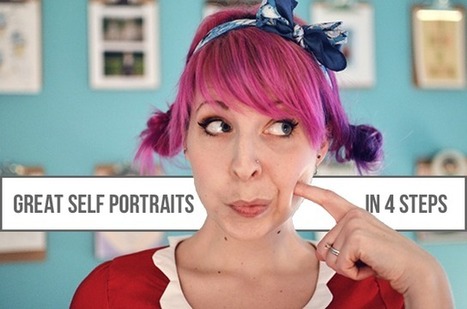
Today I'm here to talk to you about something that is so fun for me... taking my own outfit photos! Every so often I grab my husband and have him snap a few outfit shots for me but more often than not I take them all by myself! Here are 5 things that help me out when taking my own outfit photos.
1. Get yourself a tripod.
Not only does a tripod make taking outfit photos of yourself easier, it makes it safer! Having a tripod prevents you from trying to balance your camera on something that it could tumble off of. You definitely do not want to break your lovely camera while trying to get a photo of your lovely outfit. My tripod has a little detachable screw on piece that I actually leave on my camera at all times so it is just a matter of quickly clicking it in when I want to snap some outfit shots.
2. Get a remote!
In the beginning I experimented with taking outfit photos without a remote and it was very hard. While most cameras have a self timer so that you can set the camera and then run in front of it, it is very difficult to set the focus correctly when you don't have anything to focus on! It can be done but it takes a ton of trial and error and you will not have fun, trust me! Get yourself a cheap little remote, stand in front of the camera and shoot away! You can usually even set a few second delay on your camera so that you have time to hide the fact that you are holding a remote.
3. Take tons of photos.
When I take my own outfit photos I take literally 10x more than when I have someone else take them for me. I like to shoot lots so that I am sure to get a good shot. While I am snapping away with my remote I periodically run back to the camera to check and make sure I got some good ones.
4. Move yourself and the camera around.
I try to take a variety of shots when I am doing my own outfit photos. I take some full body shots, some closer ones and usually a bunch of detail shots as well. This involves moving yourself towards and away from the camera and sometimes raising and lowering the tripod. Try to take all of your far away full body shots before you start moving the tripod around, this will save you time. Also, change the orientation of the camera. Take some landscape shots as well as some portraits. It makes it more interesting when you have a mixture of the two!
5. Be silly!
Don't be afraid to take a "bad" photo. The best part about taking your own outfit photos is that if you end up looking like a total goof, no one has to see it but you! Although, sometimes I like sharing my "total goof" photos! I am getting better at being comfortable in front of the camera when someone else is holding it but I tend to take fewer what-is-up-with-my-face-in-this-photo shots when I am controlling the remote. I am just more relaxed when it is just me and my remote in charge of the photos.
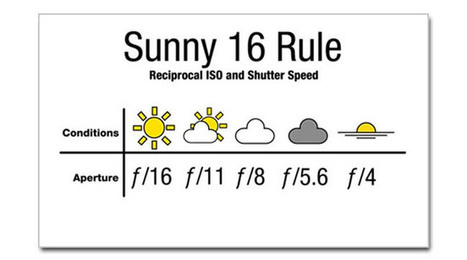
The Sunny 16 Rule is a way to meter for correct exposure during daylight without using the camera’s meter.
The basic rule of thumb states that if you have a clear, sunny day and your aperture is at f/16, whatever ISO you are using, your shutter speed will be the reciprocal value of that ISO value (ISO X = 1/X seconds shutter speed).
So for example, if your ISO is 200 at f/16, then your shutter speed will be 1/200 seconds. If your ISO is 100, then your shutter speed will be 1/100 seconds.
WHAT ABOUT OTHER APERTURE VALUES?
Ok, so now that we have f/16 out of the way, how can we use the Sunny 16 Rule to calculate shutter speed values with other aperture values?
If you recall from my tutorial on exposure, you may remember that aperture, shutter speed, and ISO make up the three-way balancing act in determining exposure. So the way this works is that if you increase/decrease one variable, you have to increase/decrease at one of the other variables in order to keep the exposure the same. If one factor goes up by one stop, another factor should go down by one stop, and vice versa.
So let’s say that your aperture is f/16, your ISO is 200 and your shutter speed is 1/200. If you want to open up your aperture by a stop by going from f/16 to f/11, then you have to go down a stop in either your shutter speed to 1/400 sec or ISO to ISO100.
HOW IS THE SUNNY 16 RULE USEFUL?
First of all, the Sunny 16 Rule is a good way to check if your camera is spot on with exposure or does it consistently under or over expose. Some cameras have a tendency to slightly under expose, and this is a good way to test that camera.
Additionally, unlike the camera metering system, the Sunny 16 Rule is based on incident light instead of reflected light, which means that it’s based on the brightness of the light only, and not how the light that is being reflected off the subject and into the camera.
I wrote an extensive test on the advantages of incident light metering versus reflected metering before, but to sum it up, incident light metering cannot be fooled by very light or very dark clothing and very light or dark background. So as a quick example, a bride’s white wedding dress can throw off a camera’s reflected light metering the more and more of that dress fills the frame.
So the Sunny 16 Rule is can help you double check your camera’s metering to make sure it’s not getting thrown off. That’s all there is to it for the Sunny 16 Rule! It’s another good tool to have in your photography knowledge bag.
Today we will take a look at how to add some sense of depth to your photographs and thus make them become alive and more interesting to the viewer.
In photography, perspective is the technique of representing three-dimensional objects on a two-dimensional surface, and how objects’ appearance seems relative to one another as determined by their distance from the camera.
So to enhance the sense of depth in your shots, you can utilize some of the factors below:
+ Linear Perspective
In photography, this is the most common type of perspective and is characterized by converging lines. Although those lines are mostly in fact parallel, the further they move from the camera the closer they seem to get to each other until they eventually meet in one or more vanishing points if they expand for a sufficient distance within the frame. This is because straight lines mostly become diagonal i
n a photograph, giving it a sense of dynamism, moving the eye through the scene, and adding a sense of depth.
+ Diminishing Perspective
Diminishing perspective is much related to linear perspective and it describes the way one thing appears smaller and smaller the further away it is placed from the camera. If you had a scene with a road and electric poles on both sides, the poles would appear the tallest at the foreground of the frame and then consecutively become shorter and shorter the more you move towards the background until they are but a speck in the frame.
+ Aerial Perspective
Aerial perspective (also known as atmospheric perspective) is mostly prevalent in landscape photography especially in misty, hazy scenes. Taking pictures in fog and mist emphasizes subjects’ shape and form as well as adds depth to your scene. The closest subjects to the camera appear the most saturated and bold, but as objects move further away from the lens things start to get a bit hazy and colors desaturated.
+ Tonal and Color Perspective
Tonal perspective describes the way we perceive object placement within a frame (and thus the photo’s sense of depth) in that lighter tones appear to advance within the frame and darker tones appear to recede. This can be emphasized by placing lighter objects against darker backgrounds which helps make them stand forward and adds a sense of depth to a photograph.
+ Depth of Field
Depth of field influences the degree of sharpness or blurriness that different elements of the frame have. Our brain perceives sharp objects as being closer in distance while it perceives blurry objects as being further and further away the more blurry and unclear they become.
+ Frame within Frame
Using foreground objects to frame your main subject or the receding elements of your photograph can be a very effective way of adding depth and guiding the viewer into your scene so that they feel like they are inside the photo as if almost exploring it rather than just looking at it. This also helps add a feel of activity, dimension and dynamism.
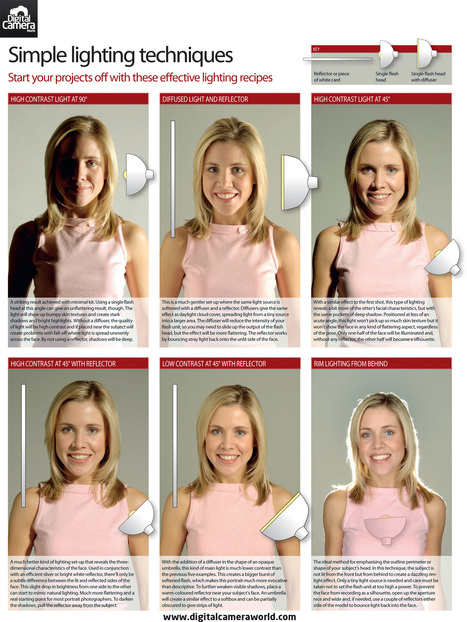
In this tutorial we show you 6 simple studio light setups that will help you capture some of the most classic portrait lighting effects.
f you’re looking to take your photography further you’ll probably want to learn how to use off-camera flash. In this tutorial we show you 6 simple studio light setups that will help you capture some of the classic portrait lighting effects.
What’s more, these lighting techniques will provide you with a solid foundation from which you can start experimenting to find your own style.
In our lighting setups cheat sheet below you’ll learn how to use high contrast light at a 90-degree angle; diffused light and a reflector; high contrast light at 45 degrees; high contrast light at 45 degrees with a reflector; low contrast light at 45 degrees with a reflector; and finally rim lighting from behind.
Did you ever wonder how people get those beautiful endless finishes in their photos? White and bright shots of their products? This is how (or, at least it is an inexpensive diy substitute). By taking photos inside a box that diffuses natural light from all sides, you can remove shadows and give a white, magazine-like finish to your photos.
I first learned how to make a light box from Alessandra Cave, a beautiful photographer, from whom I took a great class at the Makerie, a lovely retreat in Boulder, CO. I built the first light box for my jewelry tutorials, 24 Days of Glam. Taking photos using the box seriously elevated the level of and look of this this blog as a whole.
The box is inexpensive to make. It's simply a cardboard box, white paperboard and some tissue paper. My excuses piled up–I don't have the right size box (um, hello, I just moved) or I couldn't find the tissue paper, (again, with the move). But truly, the light box is so simple and fast to make and the impact on photo quality is SO enormous, I have no idea why I waited.
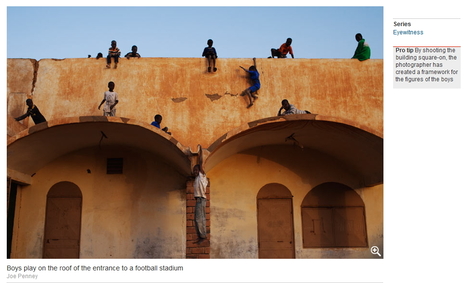
To take a good photograph you need to know what good looks like….sounds daft I know, but training your eye is very important. In this article, I’m going to show you several free sources of amazing photography one of which even tells you ‘pro tip’ per picture. Plus an exercise to train your eyes.
The first and my all time favorite is the British newspaper; The Guardian; eyewitness series and although photo journalism is not my thing you can’t help but be amazed, intrigued and learn so much from these images. It’s available on web (http://goo.gl/Y5l6c) or where it really shines is on an Ipad, if you have one.
The pro tips are on the right hand side online, or behind the info button bottom left hand side on an Ipad.
This tells a story with a single powerful image and I feel its simplicity is its strength. When you take a look at each image I want you to start to do the following exercise:
Your mind analyses pictures in a fraction of a second without you consciously understanding the logic or the process. I want you to become very aware of the process, its super quick so pay attention.
Your eye will enter an image at a point it is drawn too, then wanders around gathering information until it can exit and move on to the next task. That’s why some images hold your eye for longer than others.
I often close my eyes load the images and then concentrate on observing my mind and my eyes.
1. Put your finger on the point your eye is draw towards (often the lightest, brightest or most colourful point)
2. Mentally trace the path your eye takes around the picture. (spot any S shapes or reverse S shapes?)
3. Has the photographer used the rule of thirds? (Here’s a link to one of our 10 easy lessons on composition : http://goo.gl/NmIh8)
4. Has the photographer shot from his eye level (a lower or higher perspective make a huge difference)
5. What is the photographer trying to SAY? (Strong pictures have a narrative)
6. How has the photographer used the environment to do this?
7. How has the photographer used light? (i.e: Darker edges keep your eye in the picture for longer)
8. Why does the picture work?
9. Does it evoke an emotional response?
10. From the above list, what could you apply to your pictures?
The Second source I can recommend is from the news agency Reuters called The Wider Image and is only available as an Ipad app. It has a lead image and then a slideshow per story, but no pro tips I’m afraid.
Give the exercise a try; I want you to become very conscious of good images and why they work. Once you have mastered this, I’ll teach you to apply it to your own images.
Overwhelmed by all those photos you have on your computer? Here's a way to tackle it one step at a time
I think photos and photo albums are one of the only things that really give me true anxiety…..because it’s so easy to get behind! The only way that I can keep myself from worrying about it all is having a system. I thought I’d lay out my system since it works well for me…..and maybe it will help someone else! I’m sure there are lots of ways to do this….but here’s what works for me since I get easily distracted!
Most of this is geared towards a Mac system but it can be easily applied to a PC as well. Let’s get started!
Partons de la définition, les ISO c’est l’unité de mesure de la sensibilité à la lumière de votre capteur numérique. Sur les appareils photo numérique, vous avez la possibilité de régler la sensibilité de votre capteur : 100 ISO, 200 ISO, 400 ISO, 800 ISO. Plus la valeur ISO est basse, (100 – 200 ISO) moins le capteur est sensible, ce qui veut dire qu’il lui faut plus de lumière pour créer une image. Et plus la valeur ISO est élevée, plus votre capteur est sensible à la lumière. En contrepartie, vous allez voir apparaître du bruit sur vos images. Le bruit, ce sont des grains qui peuvent être disgracieux pour la photo.
J’ai pris deux photo pour vous montrer ce qu’est le bruit numérique. On voit bien qu’avec les ISO élevés, l’image s’en trouve dégradée par l’apparition de grain. Suivant cette logique, lorsque vous prenez des photos en plein jour, vous allez utiliser une valeur ISO comprise entre 100 et 400 ISO. Mais pour des photos en intérieur mal éclairé, en concert, vous allez être obligé d’utiliser une sensibilité de 800 ISO et au-delà.
Concrètement, les ISO ca sert à quoi ? Et bien, cela sert à s’adapter à différentes situations de lumière. Pour bien vous faire comprendre, je vais vous donner un exemple. Mais pour bien comprendre ce qui va se passer, je vous encourage à voir la vidéo sur l’Exposition (http://goo.gl/YgzMg) et celle sur le Mode Priorité ouverture (http://goo.gl/bGzKG).
Donc pour l’exemple, je me met en mode priorité ouverture (Mode A ou AV) pour prendre en photo ma petite boite. Dans la situation présente, j’ai de la lumière en abondance qui vient d’une grande fenêtre en plein après-midi. Je règle mon ouverture sur f/2.8 et mes ISO sur 400. L’ordinateur du reflex lui me donne la vitesse, et dans ce cas là elle est de 1/60ème de seconde. Je prend la photo. Voilà on a une photo bien exposée.
Maintenant, voyons ce qui se passe quand les conditions de lumière se gâtent. J’ai fermé les volet pour simuler la fin de soirée, et je vais prendre la même photo avec les mêmes réglages. Mode priorité ouverture, Ouverture f/2.8 et ISO 400. Et là, l’ordinateur de bord me donne une vitesse de 1/10ème …beaucoup plus lente. Normal parce qu’il y a moins de lumière ( c’est là que la vidéo expo sert à bien comprendre). Et la vitesse est tellement lente, que vous allez avoir un flou de bougé. Voici la photo pour vous montrer pourquoi. Parce ce que pendant le laps de temps ou le rideau reste ouvert, le capteur va enregistrer tous les mouvements.
Pour être quasiment sur de ne pas avoir de flou de bougé, une règle empirique dit que vous ne devez pas utiliser une vitesse en dessous de votre focale. Ca peut paraitre du chinois, mais c’est très simple. Si je photographie avec mon 50mm, je dois utiliser une vitesse égale ou supérieur à 1/50ème de seconde. Si je suis avec mon 200mm, pour éviter le flou de bougé, je dois essayer d’utiliser une vitesse égale ou supérieure à 1/200ème de seconde.
Là, dans mon exemple, je suis avec mon 50 mm et ma vitesse était de 1/50ème de seconde. Pour augmenter ma vitesse, j’ai deux solutions, soit ouvrir mon diaphragme, soit augmenter la sensibilité de mon capteur. Et c’est ce que je vais faire.
Je vais régler mes ISO et passer à 1600 ISO. A chaque fois que je vais doubler les ISO, ma vitesse va doubler. Et donc là je vais reprendre la photo f/2.8, ISO 1600 et ma vitesse est maintenant de 1/50ème de seconde, ce qui est suffisant pour ne pas bouger.
Conclusion, comment je règle mes ISO d’une manière générale ? Je dois utiliser la valeur la plus faible possible selon ce que la situation me permet.
Autres cours de photo gratuits en vidéo expliquant simplement le fonctionnement de la sensibilité ISO et l'exposition sur un appareil photo numérique : http://goo.gl/hZ7W8 & http://goo.gl/FjcRW
Because lighting is the number one concern of us photographers, we should be concerning ourselves with understanding how to utilize it whatever capacities it is available to us. While it’s nice to have a studio full of equipment to give us complete control, all is not lost if we do not have those things. In just under two hours, Jerry Ghionis, gives viewers an informative lesson on using what you’ve got to create interesting, well executed images in any kind of lighting.
Using any number of tools that can be sourced on location, it is possible to use what many would consider poor lighting to your advantage. In the photo below, Ghionis used the shade of the standing woman’s coat over the top of the bride to create contrast and establish a point of focus.
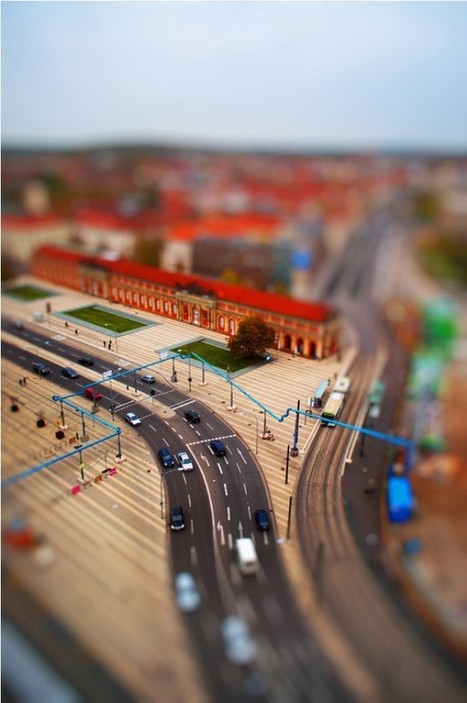
I want share some tips which you should always keep in mind while Tilt shift Photography
+ The photo must be taken from above, but not directly overhead. This only reflects what someone taking a photo of a miniature scene would likely do; it’s unlikely they would (or even could) be level to the subject. If you have a direct over shot, you won’t be able to get a decent depth of field that is required.
+ A simple scene is usually better than a complicated one. This is because miniature scenes are usually very simple; you wouldn’t find a dense city block, for example, in a model railroad scene.
+ Photo sharpness is a must, as well as good lighting. There will be enough blur in the photo as it is; your focal point must be sharp.
+ If people are in the scene, they need to be fairly obscure and small. Again, reflecting what you’d see in a real miniature scene. People are very small, and not well detailed in miniature scenery.
+ Generally, avoid wide shots, and make sure the scene is interesting For instance, an aerial photo of a cathedral with spires and flying buttresses is interesting, while an aerial photo of a flat-topped shopping mall would not be.
Once the photo is selected, then the tilt shift treatment can begin. I use Photoshop, and while a complete tutorial is out of the scope of this post. Yet, I can give you a brief over view of the process. First, you determine what your point of interest (and therefore focus) will be in the photo. You create a mask, they use the gradient tool on the mask to select was is to be in focus, and how the blur gradient will be placed. The the Lens Blur filter is applied. The gradient placement and amount of Lens Blur usually requires some trial and error to get right. Once it is satisfactory, the look of being a miniature is already apparent. Next, I kick up the master saturation level about 30%, giving more to greens sometimes, or other colors that you want to pop out. In miniature scenes, typically colors are very bold and saturated, hence this step. Finally, using the Curves tool, I will enhance the contrast in the high tonal highlights of the photo. That’s pretty much it, in brief.
Below are some more great stuff recommended by Patrick Ashley. Its really worth reading such a awesome stuff.
Your digital camera’s histogram serves as a guide to help you better underststand your exposure. To this end, it aims to illustrate the range of tones in a scene. On the left of your histogram you’ll find the extreme of dark shadows, while on the far right you will find your bright highlights. But it’s not always that simple to read a histogram (find out What your histogram says about your landscapes).
In the latest of our photography cheat sheet series we’ve compiled this handy guide for explaining how this exposure chart represents the range of tones withing your scene. Simply drag and drop this chart on to your desktop and keep it for a handy reference the next time you find yourself confused as to how to read a histogram.
Black and white can add drama and emotion to many different kinds of photographs. There are however, many different ways to convert your digital images to black and white and an almost limitless amount of effects that you can apply after that.
Here are some of the best Photoshop tutorials for black and white lovers that we could find : http://goo.gl/GTfpo
An introduction to the scientific, artistic, and computing aspects of digital photography - how digital cameras work, how to take good pictures using them, and how to manipulate these pictures afterwards.
Topics include lenses and optics, light and sensors, optical effects in nature, perspective and depth of field, sampling and noise, the camera as a computing platform, image processing and editing, history of photography, and computational photography. We'll also survey the history of photography and look at the work of famous photographers.
I have been a professional photographer for the past 6 years and the number one question I get asked from other professional and hobbyist photographers is...HOW do you pose groups?GREAT question. I struggled with the same thing for a long time, but I have since come up with my four favourite tips that really make for interesting group photos. These tips will work with any group size from 3 to 30!1.
1. Pay Attention to Hands!
Hands play an important part in the language of the portrait. Especially when photographing families, we want to portray a feeling of closeness and togetherness. That means we want to see the subjects interacting with each other and looking as natural as possible. Try not to have arms or hands hanging straight down. It looks about as fun and exciting as it sounds. BLAH! Instead, encourage those you are photographing to put their hands into their pockets, around shoulders of those next to them, or have them hold hands.
2. Stagger the head levels.
This is so important in creating an “interesting” group pose. We want to avoid lining everyone up like they are being arrested. This is supposed to be fun! Pose short people next to tall people, have tall people sit, crouch, or kneel, or have moms hold little ones in their arms. Try to be considerate of the elderly who may not be able to crouch or kneel, though.
3. Make sure you can see each face.
This takes just a second looking through the viewfinder in your camera. Take a quick glance at each face to be sure they can be seen easily with nothing concealing any part of anyone (including shadows from other faces!).Creative posing can help with this, too, as well as moving yourself around. Find the best possible spot where you can see each and every beautiful face.
4. Get CLOSE Together.
Going along with the idea mentioned in number one, we want to convey a feeling of closeness...so, the obvious solution is to physically GET CLOSE to one another! Look for gaps and try to fill them by having your subject shift slightly, move an arm, or tilt their head. It will change the whole feeling of the photo!
5. Have some fun!
I know it sounds cliché, but really having FUN makes for the best and more memorable group photos. Remember, that they don’t have to be looking at the camera to get a great shot! Let them interact with each other naturally. Tickle fights are usually a great start, unless it’s great-grandma - though, maybe even then ;) Have a few knock-knock jokes up your sleeves to get them laughing. Have the parents tell a joke to the kids, or have them sing their favourite song. Having them sing their “A,B,C’s” gives you a lot of great expressions. I have even resorted to telling them that I need to change a few settings so they can just relax for a bit – then I secretly start shooting. I find these group shots are the ones that families love best.
Winter landscape photography offers a particular set of challenges that can spoil the efforts of even the most seasoned of photographers. Even the best landscape photography tips often can’t prepare you for how to deal with extreme contrast and highly reflective surfaces.
Our new winter landscape photography cheat sheet presents four handy flowcharts which take you step-by-step through how to compose for winter landscapes, and then how to fine tune your exposure for snow, extreme contrast and bright skies.
To see the larger version of our winter landscape photography cheat sheet : http://goo.gl/6hnnU
To get content containing either thought or leadership enter:
To get content containing both thought and leadership enter:
To get content containing the expression thought leadership enter:
You can enter several keywords and you can refine them whenever you want. Our suggestion engine uses more signals but entering a few keywords here will rapidly give you great content to curate.


 Your new post is loading...















Blog Objectif Photographe :
1 – Anticipate : Shooter beaucoup avant de photographier les moments importants. Si on ne le fait pas, les moments importants risquent de vous passer sous le nez car vous serez empêtré dans vos questions sur comment faire, quelle ouverture, quelle exposition, etc…
2 – Research : Faites des recherches sur le lieu que vous visitez et les personnes que vous rencontrez. Il faut savoir ce qui est important pour votre histoire.
3 – Reach Out : trouvez des personnes qui connaissent les lieux, la langue, les us et les coutumes.
4 – Prioritize : Concentrez vous sur un exemple précis. N’essayez pas de couvrir trop d’évènement (NDLR : par exemple, si vous voulez faire un reportage sur le conflit « Israelo-Palestinien », concentrez vous sur l’histoire de deux familles opposées. Racontez une histoire précise qui symbolise le conflit.)
5 – Practice : Connaissez votre matériel sur le bout des ongles.
6 – Interact : Interagissez avec les personnes qui vous entourent.
7 – Be Invisible: Ne soyez pas intrusif, mais discret