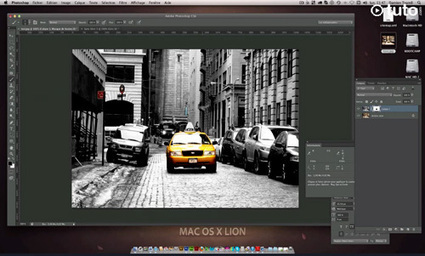
Your memories are important, and deserve to be displayed as best they can. Many people find older photos in boxes, albums, shoes, and they are torn, or folded. These things happen, don’t feel bad, just learn how to repair the damage on Phlearn. In Part 1 we are covering how to repair the border of the photo, and some great ways to blend layers together. Part 2 will focus on the Photo itself, and in Part 3 we are taking this photo and using it to make another photo look aged.
In this episode of Posing and Lighting, Doug Gordon explains camera height and the difference it makes when shooting portrait images.
Gordon notes that many photographers use the same camera height for all portraits, which leads to stagnant, dull results. He explains that paying attention to camera height yields a world of difference and can truly make your portraits pop.
Working with camera height and understanding how it affects your results is key in improving your portrait photography. Gordon recommends shooting at waist level for full length portraits, bust level for seated portraits, and slightly above eye level for head shots. That said, simply understanding the tendency to stay in one position and breaking that pattern can make a world of difference in your photography.
Knowing how to read and use the histogram on your camera will help you make the leap from auto to manual mode and still be able to take properly exposed photos
What Is a Histogram?
As Greengo explains, a histogram is essentially a graph of the tonal distribution of a photograph. It tells you the tonal quality of the darks, shadows, mid-tones, and highlights by displaying whether they are over-, under-, or properly exposed. When looking at the histrogram chart on your camera, these values are read from left to right, with the far left side of the histrogram representing the darks and working its way through shadows, mid-tones, and highlights, which are on the far right side of the chart.
How to Read a Histogram
Now that you understand how the histogram is laid out, reading it should be fairly easy for you. Depending on how the historgram spikes or dips, you should be able to tell exactly how the image is exposed.
The correctly exposed image has a histogram that is balanced nicely in the mid-tones, with a slight weight toward the shadows. This histogram tells us the mid-tones have a lot of pixel values and a nice exposure, whereas the extreme darks and highlights have no pixel values, signifying that the image is neither irrecoverably dark nor does it have blown-out highlights.
1. Shutter speed controls how long the sensor is exposed to light. A slower shutter speed will let in more light and a fast one less light. Slow shutter speeds such as 1/15 sec. show motion while fast shutter speeds freeze action.
2. Aperture controls how much light is allowed through your lens, and is controlled by f-stops. A bigger aperture (f/1.8) will let in a lot of light and a smaller aperture (f/22) will let in less light.
3. ISO is super important and one major difference between film and digital SLRs. It controls how sensitive your camera’s image sensor is to the light. In bright light use a low ISO, in low light you can use a higher ISO. The higher the ISO the more noise (digital grain) will appear in your photo so keep it as low as possible.
4. In Program (P), Aperture Priority (A, Av), and Shutter Priority (S, Tv) you are responsible for setting 1 or 2 of the 3 exposure options (ISO, shutter speed, aperture) and your camera takes care of the rest to get you a well exposed photo.
5. When your camera is wrong in Program (P), Aperture Priority (A, Av), and Shutter Priority (S, Tv) and gives you an over or underexposed photo you can override its decision with exposure compensation which will allow you to make the photo brighter or darker.
6. Manual mode allows you to have complete control over your camera and allows you to set all three aspects of exposure. You make sure you photo is well exposed by using the light meter at the bottom of your viewfinder.
7. White balance measures the temperature of light in the scene. It is what is responsible for making sure you don’t get blue pictures when shooting in the shade and orange pictures when shooting in a gym. There are several preset options for white balance but to completely accurate you will need to use a custom white balance tool or a grey card.
8. Aperture is the easiest way to affect depth of field. A shallow depth of field is where less of the photo is in focus and is achieved by having an open aperture, ie f/1.4. A deep depth of field is where more of the photo is in focus and is achieved by having a smaller aperture, ie f/16.
9. Flash can be a lifesaver! While I don’t recommend the pop-up flash that is built into your camera, an external flash can really step up your photo game, no matter what kind of photography you do.
10, Select the correct focus mode for your camera. Know whether you want to be using single point, continuous, or manual focus to help you achieve the shot you want.
To help beginners and intermediate users, we decided to collect some of the best resources around to help you get started on your learning journey. With thousands Photoshop blogs out there, we decided to scout for the ones that pump out great content on a regular basis. Below you’ll find a list of websites you should check out first.
Method & Craft provides a variety of articles, videos, notes, and interviews. Each medium is used for different purposes. For example, articles are related to workflow and process, and videos show designers working. The site has a really clean design, separating the different categories onto separate pages, and information is presented in a grid.
Despite the name of this website, it’s not only intended for women. Photoshop lady has a diverse selection of Photoshop tutorials. Information is separated into 8 different categories: 3D effect, abstract effect, articles, drawing effect, photo effect, text effect, texture & patterns, and UI design.
The objective of Psdtuts+ is to give users access to the best Photoshop tutorials around. One nice thing about Psdtuts+ is that their tutorials are deeply explained so that even beginners could easily understand them. However, even though the content may be approachable, this doesn’t mean that the techniques learned in the tutorials aren’t advanced.
Advanced Photoshop markets itself towards professionals who want to master Photoshop. As such, it focuses on Photoshop trends and popular techniques. To give you an idea, here are just a few of the topics covered; new media, graphics, typography, photomanipulation, digital painting, and photo editing. There’s even a feature on the website called “face-off,” which lets users vote for the best of two images created in Photoshop. You can view image galleries of other users on the site, which could serve as a source of inspiration. Advanced Photoshop is a great resource for Photoshop pros. There are plenty of features on the site to keep even the most advanced user satisfied.
If you’re a Photoshop Lightroom user, you might find Presets Haven useful. Lightroom is a useful Photoshop feature that allows users to edit digital photography easily. Presets Heaven offers a wide range of Lightroom presets to make your job much easier. They’re one of the largest Lightroom preset resources online. The website also provides news, plugins, and various tutorials.
Photoshop Tutorials offers exactly what the name implies – Photoshop tutorials. The tutorials are exceptionally clear, showing the end product and many screenshots along the way to help the user obtain the intended results. Tutorials are offered on a wide variety of subjects, such as basics, drawing, layouts, photo manipulation, photo effects, photo retouching, and special effects. There is also a section on the website for creative inspiration.
Video is exceptionally helpful if you’re trying to recreate an effect in Photoshop. There are a bunch of Photoshop tutorials on YouTube, but many of them are unclear. The Photoshop tutorials section on Lynda is a great choice for Photoshop users looking for clear, descriptive, and professional video tutorials. Furthermore, all of these videos are taught by Photoshop experts. They know what they’re talking about.
Photography can be an expensive hobby and buying the camera alone is not enough to get the greatest photos. You also need additional equipment, which is mostly also expensive. But here are seven simple photography hacks that will greatly improve your photos without greatly reducing your wallet.
Knowing where to focus when shooting is critical. This article will cover where to focus when shooting subjects like people, pets, and even statues.
The old saying, "The eyes are the window to the soul," is never more true than in photography. If you are taking a photograph of a person, then the question of focus is an easy one: you want the eyes in focus. (Like any so-called "rule," there are, of course, exceptions.) We tend to look immediately at the eyes in a photograph, and out-of-focus or blurred eyes are one of the quickest ways for your brain to tell you that something is not quite 'right' with your photograph.
Now, you may be wondering, "What if there is more than one person or animal in the photograph?" The answer then is that you want to make sure that the eye nearest to the camera is the one in focus. Our brains are generally much more forgiving of blur if it is in the background of the image, rather than in the foreground. We often find background blur interesting and pleasing, but foreground blur seems distracting or even irritating. (Again, this is a broad generalization. Rules are meant to be broken.)
Focusing on the nearer/nearest eye works for any type of subject with eyes. Think beyond people and pets to even inanimate objects like statues or stuffed animals.
Even if you don't wear much makeup day-to-day, a professional makeup artist can create a natural look that accentuates the positive and eliminates the negative. They know what types of makeup work for portraits. This goes for hair as well.
2. Dress nicely yet comfortably
Structured, well-fitting clothes can help create shape to your body. Think hourglass, which is the most flattering shape for women. Wear something you are comfortable in too, something that is true to who you are. Solids look better in a photograph. Patterns or stripes will draw attention away from your face and to your clothing instead. A pop of colour is great, adding dimension to the image and it makes a statement. Avoid thin, clingy fabrics for your professional image.
3. Stand at an angle to the camera
No one wants to look bigger than they actually are. Even the skinniest person in the room feels that way. Standing with shoulders and hips square to the camera will do just that - make you look bigger. Turn your feet and shoulders to a slight angle to the camera and turn your face back towards the lens.
4. If it bends, bend it
Straight arms and legs look stiff and unflattering. Hold your arms slightly away from your body, with a soft bend in your elbows. This creates space, making your arms and waistline appear thinner and more hourglass shaped. Bend the knee closest to the camera, putting your weight on the back leg and pushing your hip away.
5. Stand up straight then be a turtle
Once your back is straight and tall, then stick your neck forward so your whole head moves, not just your chin. This feels weird but does wonders for the look of the picture, and it helps stretch out that double chin.
6. Smile
Your image will be approachable and you will physically relax. One trick for a relaxed, natural smile is to breathe through your mouth, and place your tongue behind your top front teeth. When we smile or laugh naturally, we tend to pull our chin towards our neck, creating the dreaded double chin look. There’s that turtle move again. Be aware of it with smiling and you will avoid the double chin.
7. Hire a professional photographer
Let’s be honest. No one looks great in a selfie, and it certainly isn’t professional. Good photography is more than just a “nice” camera. A professional photographer knows how to get the shot predictably. She will spend time getting to know you, your preferences and requirements. She brings the knowledge and experience to create images in the style you are looking for to reflect your business and personality. She will light you, pose you and help you to look your best.
8. Be Yourself
A good photographer will help your personality to come out. Unless you are a professional actor, it is best to be genuine for your portraits. If you are playful by nature, let that shine. If you are more reserved, let that shine too. If you try to be something you are not, you will feel awkward and it will show.
Color has a couple of functions in photographs. First, color grabs the attention of the viewer. Perhaps, because this function of color is so palpable, many photographers miss the more sophisticated, and in some cases far more powerful, function of color: color sets the mood of an image.
Mood
Setting the mood through the use of color tends to be a more subtle application of color than when color is used to grab the attention. However, that does not mean that it is any less powerful.
Different colors elicit different moods. Since there are a huge number of colors, it is not possible to cover all of the colors and their impacts on viewers’ moods in an article such as this one. Instead, a few colors will be reviewed in an effort to convey how colors affect viewers’ feelings.
Blue
Blue tends to bring forth feelings of calm or cold depending on how the color is used. This is a reflection of how we perceive the color in nature: the deep calm ocean is blue, peaceful cloudless skies are blue, and large amounts of ice have a blue tint. Therefore, a photographer that wishes to create a feeling of calm in an image should include blue objects in the image such as a peaceful blue stream or a blue lake.
Green
Green often communicates a feeling of lushness and freshness. Again, our feelings about this color are tied up with how we frequently experience that color in nature. We tend to associate green with spring and new growth. Green is frequently used in landscape photography. Green meadows, plants, and fields can be used to convey the mood of a flourishing scene.
Yellow, Orange, and Red
The last colors to be evaluated are the warm tones: yellow, orange, and red. These colors are associated with feelings of warmth and comfort (again the colors are tied to how we experience them in nature). Sunsets are a perfect example of how these warm colors create a comfortable feeling. Photographers that wish to take advantage of these colors can include, in their photographs, objects such as flowers, plants, food, and rocks that contain these colors.
In this B&H Event Space lecture, Luke Ballard discusses the elements of a memorable travel photograph, the process he follows to capture unique travel images, and the key ingredients for becoming a successful travel photographer:
The Elements of a Memorable Travel Photograph
1. It is correctly exposed. Yes, you can fix exposure in Photoshop to a certain extent, but the best photographs tend to be those that are correctly exposed at capture. Don’t be afraid to take test shots to get your settings just right.
2. It correctly uses white balance and color balance. Pay special attention to the colors in your images—they should be natural, but striking.
3. It is properly composed. Travel photos aren’t exempt from accepted standards of composition such as the rule of thirds, so keep those principles in mind as you compose images.
4. It is free from distraction. Check your scene carefully for any unnatural, distracting elements, such as a piece of trash or a clump of dawdling tourists. Remove what you can, hide what you can’t remove, and use long exposures to make moving tourists disappear.
5. It has meaning to you and to the viewer. Travel photography is storytelling; it’s about documenting a given area’s people, culture, and geography. Know what story you want to tell before you click the shutter.
6. It is different than other photographs of the same subject or location. Don’t settle for capturing the same old shot of a tourist attraction. Figure out how the icon is usually photographed and force yourself to be creative and do something new.
Ballard’s photographic process can be broken up into two categories: before travel and on location.
In our latest photography cheat sheet we show you how to set up studio lighting with 3 classic arrangements photographers like to use.
Here we’ve focused on three basic setups which will be more than enough to get you going, but the sky’s the limit even with just two heads.
It’s always a good idea to ‘build’ your lighting. Start with your main light and once that’s in the right position introduce the next light and then position your reflectors.
The height, angle, power and distance of your lights will have a dramatic impact on the shape of your subject’s face, not to mention whether you use a naked flashbulb, a softbox, a snoot or an umbrella.
+ How to set up studio lighting: 01 High In most cases you’ll want to have your main light positioned above the model. Notice how the shadow from the nose falls down the face, elongating the features. Ideally you want the shadow of the nose to point towards the end of the lips. The triangle of light on the cheek on the shadow side is often referred to as ‘Rembrandt’ lighting; get your model to move their head slightly to achieve this.
+ How to set up studio lighting: 02 Eye level With the flashlight to the side and at the same height as the model the light falls across the face, causing a shadow that widens the facial features. If this light is balanced with one of equal strength on the other side it can be quite effective, but as a sculpting technique height would be better. Keep your flashlight’s modelling lights switched on so you can see how the shadows will lie.
+ How to set up studio lighting: 03 Low There are unlikely to be too many situations when a low light is going to work well as your primary light source. It gives a spooky look, so Halloween is probably the only time you’re even going to think about using this technique. As you can see from our example, underlighting is not very flattering even on a young model. With underlighting the nose shadow is clumpy and any bags under the eyes will be amplified.
This short video gives a beautiful and inspiring introduction to night photography. Don’t watch it if you already have plans tonight — it might make you want to grab your camera and shoot once the sun goes down.
On parle souvent des retouches d'image, notamment sur les photos des mannequins. Bien sûr, il y a de nombreux abus, la chasse aux moindres défauts semble être aujourd'hui la norme, mais avant d'en passer par la case Photoshop, il y a d'autres techniques qui rentrent en jeu.
Dans la vidéo ci-dessous, le photographe Karl Taylor nous dévoile les résultats avant/après de trois techniques aujourd’hui largement employées dans le monde du portrait : l’éclairage studio, le maquillage et, bien évidemment, Photoshop. Chaque étape est décortiquée et comparée aux autres, pour tenter d’évaluer la part de chacune d’elle dans la composition finale.
Le but de cette étude n’est pas de définir (ni même d’essayer de définir) où se situe la limite entre ce qu’il faut faire et ce qu’il ne faut pas faire, ce qui est éthique et ce qui ne l’est pas. Il s’agit ici de faire réfléchir et d’amener au débat, dans le bon contexte, techniques à l’appui, avec les résultats de chacune…
La photo numérique, ça s’apprend! Stéphane Noël (professeur à l’Ecole de Recherche Graphique, Bruxelles) propose sur son site Internet un cours complet d’initiation à l’image numérique.Chaque chapitreest composé d’articles thématiques sur des points précis avec un effort de définition, bien évidemment des photos et des explicitations sur la terminologie technique ou artistique propre.
Compression : le JPEG ; Taille des images ; Historique technique de la photographie ; Le sténopé et autres pratiques pré-photographiques ; L’appareil numérique ; Mise au point, diaphragme, profondeur de champ ; Le capteur CCD ; Transformation de la lumière en signal électrique ; La balance des blancs ; Le flash ; Formats de compression ; Extra : les types d’appareils photo ; Extra : Etapes de l’élaboration d’une image photographique ; Extra : le dye transfert.
La Mission héliographique ; La mission photographique de la DATAR ; Samuel Morse parle du daguerrotype ; Les pionniers ; Le pictorialisme ; La « straight photography » ; L’épopée de la Farm Security Administration.
In this is a series of videos, Mark Wallace discuss everything you need to know about photography basics.
We’ll talk about the ‘exposure triangle’: shutter speed, aperture and ISO. We’ll talk about focus, depth of field and sharpness, as well as how lenses work, what focal lengths mean and how they put light on the sensor. We’ll also look at the camera itself, how it works, what all the options mean and how they will affect your photos.
As photographers we all want the same thing; sharp pictures. And sometimes we don’t always get them, sadly enough. I’ve experienced more than my share of unsharp images but I’ve also used the tips below to help me combat the evils of blurriness to help me get better photos. They can probably help you too!
1. Increase Your Shutter Speed
The number one problem with un-sharp photos is that they are taken with a shutter speed that is too slow or not stabilized. Even though our camera is taking photos at a fraction of a second our hands are just not as steady as we think they are. We shake and the shakier we are the more blur shows up in our photos. It’s a pretty easy fix but one to do wonders for your photos.
2. Image Stabilization
Image stabilization is something you may have seen when you go to purchase a lens. Depending on the lens company it is called different things but they all do pretty much the same thing; the lenses have the elements of the lens suspended inside the lens and they are constantly moving to compensate for the movement caused by not holding the lens still. Many different lenses offer image stabilization but it is especially noticeable if you use a heavy telephoto lens because the weight alone can make enough of a difference.
3. Tripod
Tripods are an essential part of photography, and a good tripod is something every photographer should invest in. There are plenty of times when we are shooting an image and we simply need a longer shutter speed. When these come alone we need a tripod that can produce a photo without any blur.
4. Timer or Shutter Release
Along the same lines of using a tripod I also highly recommend using a timer or shutter release. Often when we are taking stabilized images or set up on a tripod the act of pressing the shutter will cause our cameras to move just a tiny amount. By setting the timer or using a shutter release we can increase stability and get better photos.
5. Focus In the Right Place
Improper focusing technique can be a photo killer. Usually the problem is that the photographer isn’t as accurate in their focus as they should be. Pay attention to where you are focusing; if you are taking a photo of a person you should focus on the eye, not the nose or mouth.
6. Use the Correct Focus Mode
Additionally, making sure you are using the correct focus mode is also very important. If you are taking photos of a stationary object use single point focus, but when photographing moving object always use continuous focus. This mode will track the subject and will constantly change with them allowing you to get a sharp photo throughout the movement as opposed to having the camera lock on and take the photo a fraction of a second after they have become out of focus.
7. Sharpen In Photoshop
Tragically no photo is ever going to come out of the camera as sharp as you want it to be. So for the best in image sharpness you need to sharpen your photos when post processing them. This is one area where shooting a photo in RAW is much better as the Camera RAW processor is much better when adding sharpness.
8. Depth Of Field is Too Shallow
We love using a shallow depth of field! It immediately tells the viewer what is important and what isn’t. However good this may be sometimes we can have too shallow a depth of field. For example, if you are taking a group portrait and you are using an f-stop of f/1.8 and are focusing on the front row of people, chances are the people in the back are going to be blurry.
9. The Reciprocal Rule
Along the same lines as shutter speed, we also need to pay attention to focal length we are using on our lenses. If using a telephoto lens we need to increase our shutter speed to compensate for the movement caused by zooming in on something. A good rule is to have a minimum shutter speed that matches the focal length. So if shooting at 200mm on our lens the minimum shutter speed should be 1/200 sec.
10. Find Where Your Lens is Sharpest
This may sound odd, but the hard truth is that lenses are sharpest at certain f-stops and it varies for every lens. Lenses are typically not as sharp when shooting with very wide-open or very closed apertures but somewhere in the middle, around f/8. An easy test for this is to take photos of something close up while using a tripod and adjust your aperture for every photo and decide where it is the sharpest for you. Your lens has a sweet spot and finding it will allow you to get sharper pictures.
Get a better lens
I hate to say it, but equipment makes a big difference in image sharpness. Buying new equipment is never going to make you a better photographer, but it certainly can increase sharpness and help you get a great image straight out of the camera.
Visual content is the key to success on the Web. Here is the guide to some of the best image resources available to you for free.
In this post, we’ll break down more than 50 different sources and tools for visual content. We’ll cover the following (click on any section to be taken to that area directly):
If you have been photographing for more than a year or two, you will have heard about HDR (which stands for High Dynamic Range). We have probably seen them, the “overcooked”, over processed HDR images that float around the photo websites. For some photographers, the process seems to force them to overdo their images and after a while that seems to be the only result they are trying to achieve. Do a Google search on “bad HDR” and you will see what I mean. The images have halos, the colours are surreal and look metallic, the contrast is off and in short, the image is really messy.
When I first shot HDR, I fell into this trap too. These results caused many photographers to say that HDR is not a useful technique and is really gimmicky. That perception is partly true. HDR in the hands of someone who cannot use it effectively can result in some weird looking images, however, HDR done properly can produce some incredible results. It should be the best combination of the highlights and the shadows properly exposed, the image should look as real as it can. So, how do you get this right you might be asking, read on to find out.
What is HDR?
As I said earlier, HDR stands for High Dynamic Range. Your cameras sensor has the ability to capture light and colour. The extent to which your camera can do this is called the dynamic range. More specifically, if your camera can render lots of details in the shadows and the highlights in the same shot, then it has a high dynamic range. Over the past few years, digital sensors have become so much better at capturing more detail. This is a huge benefit for photographers and of course for HDR photography. This means that we can get more details out of every image and as a result, the HDR images will be that much more detailed.
How do I shoot HDR?
Making an HDR image involves 3 distinct and separate processes. I will go into detail on each one, but at a high level, they are as follows:
Image Capture
HDR Processing
Image editing in Photoshop
These are the steps I follow when I intend to do an HDR shot.
Ce site de Nicolas Perrin (photographe) propose via son blog, des dossiers d’actualité et astuces en matière de matériel, technique et composition et traitement. Ces contenus synthétiques et richement illustrés présentent des conseils à mettre en oeuvre. On apprécie des articles sous forme de dossiers comme 75 conseils pour les amateurs de photographie, Retouche d’image : idées reçues et purisme malvenu…
1Point2Vue
« Apprendre à faire des photos et à les retoucher » : depuis 2009, ce site de référence coordonné par Antoine Anfroy est très riche en contenus pédagogique sur 2 thématiques essentielles : retouche photo et technique photo avec plus de 500 dossiers publiés. Chaque article est présenté comme une fiche pratique avec des exemples et un apprentissage étape par étape. On aime aussi le lexique photo qui définit plus de 100 termes relatifs à l’univers de la photo et une lettre d’info (assortie de l’envoi d’un guide gratuit : faire ses premiers pas en photographie – au format pdf).
Phototrend
L’un des blogs didactiques photo les plus actifs. Le site Phototrend se distingue par la rubrique Mercredi Pratique qui comprend plus de 100 articles pour expliquer un aspect particulier de la photographie numérique. L’ensemble des Mercredi pratique sont listés sur cette page : de quoi apprendre pas à pas avec facilité!
Blog Photogalerie
Au sein de ce site commercial, on trouve 2 livres blancs utiles téléchargeables gratuitement : Comment bien choisir son appareil photo numérique et 10 règles de base pour cadrer comme un professionnel ainsi que des articles conseils avec des exemples de clichés circonstanciés.
Shooting whole families can be a hassle: the kids are bored, the babies crying, the parents anxious, the grandparents falling asleep. Well, Michelle Ford is here to help with five quick tips for planning your next family shoot that can keep the process as quick and fun as possible:
Create levels. Bring a stool or chair to transform boring old all-in-a-row shots into dynamically staggered shots for more depth and visual interest.
Bring props. Kids are more comfortable around their toys, and they can become part of the photo’s story. Invite the parents to bring a book, blanket, or doll if they think their child will react better with it, and aim for naturalism.
Consider grandparents. Find out in advance of the shoot how easy it is for them to move around. Be considerate of their limitations. If it’s an issue, sit them down first—you might want to bring a stool.
Consider infants. If the little one can’t stand on her own, plan who’s going to hold her before the camera starts shooting. Make the child an anchor to capture the right moment–position everyone else around the person holding the baby.
Monitor your time. Michelle recommends nothing over 45 minutes to an hour for young children. The first five minutes should be a basic warm-up, then focus on safety shots for 10 or 15 minutes, and after that you should have fun. Don’t wear your subjects out—end on a high note.
Joe McNally is a name you have likely heard before. He’s a National Geographic photographer and a master of lighting. He’s also seemingly fearless, or a little bit crazy – doing things like photographing from the very tip (and I do mean TIP as in climbed up tiny ladders on a harness tip) of the worlds tallest towers, and other hair raising stunts.
I’ve seen Joe teach live and he’s as entertaining as he is informative. If you ever have a chance to go to one of his seminars, do it! He’s engaging and you’ll go away having had a lot of fun and learning a ton. I promise.
For today’s video I have two lighting tutorials by Joe. The first is on comparing sizes of the light source and how it effects the final image. He goes from a regular on camera flash direct from camera, to off-camera, to adding diffusers and softboxes. After each step he shows the resulting image. So if you are having a hard time grasping quality of light and how it is affected by the size of the light source – watch this, it should help.
Christopher O’Donnell :: Before you delve into the unforeseen, and sometimes complicated, world of Photoshop editing, consider the following simple techniques that are the foundation of impressive landscape photographs.
1. Straighten Your Horizon
Presenting the most stunning photo of a sunset on the Venice canal won’t mean much if your horizon is crooked; it’s quite off-putting.
2. Make Your Horizon Off-Center
To be ascetically pleasing, a horizon that is not centered is much more intriguing to the eye and should be utilized whenever possible. In the example image, the horizon – although now straight – is too close to the center of the image.
3. Rule of Thirds
When looking at a photo, there are certain guidelines to follow composition-wise. One guide is called the “rule of thirds”, where you should visualize your photo as having two vertical and horizontal lines dividing the photo into thirds (imagine a tic-tac-toe board). The horizon (or other important line in your photo) should be along one of the horizontal lines, while other focal points should either lie along any of the lines or the point where they intersect (Figure 3). This creates an image that is more visually stimulating to the eye and allows it to wander across the whole image. If your photo has a focal point planted in the center of the frame, then the eyes will be drawn directly to the center and may not see a need to explore the other elements in your composition.
4. Photo Filters
Film photographers – and some digital ones as well – use photo filters when out in the field to cast special coloring effects over their images. Warming filters will cast a slight orange/yellow hue to your image, while cooling filters will give your photo a blue hue. These are just a small sample of countless other filters you can use to add special effects to your photos. In Photoshop, however, you can easily add these effects with little effort.
GIMP is one of the most popular and open-source Photoshop alternatives and probably the first stop for a lot of people who cannot afford expensive proprietary software. In order to get the most out of GIMP there are heaps of plugins that can be installed to provide more functionality. These are some of the most popular plugins that GIMP has to offer.
There really is no way to completely describe all the effects this plugin has. There are so many ways this plugin processes images that many GIMP users have commented this package should be included with the standard installation of GIMP. It’s available for all of Windows, Linux, and Mac and should be one of the first plugins that you download.
When posting pictures to the Internet, you need them to be small enough that others can download them quickly. However, you still need the picture to keep enough detail to be enjoyed by others seeing them. Instead of messing around with the settings manually, this plugin makes the judgment call for you. Many times, it gets it right on the first try.
This is another plugin that corrects errors. If your horizons are slightly off, this plugin will rotate the objects in focus to be completely flat and level without using the grid layover.
This plugin is nothing short of amazing. It re-sizes pictures without distorting important features like faces and bodies. This can be very useful for pictures of people set against and panoramic background. It is well worth downloading to see what effects you can get with it.
To get content containing either thought or leadership enter:
To get content containing both thought and leadership enter:
To get content containing the expression thought leadership enter:
You can enter several keywords and you can refine them whenever you want. Our suggestion engine uses more signals but entering a few keywords here will rapidly give you great content to curate.


 Your new post is loading...













How To Repair An Old Photo In Photoshop 2