JavaScript for Line of Business Applications
606.6K views | +10 today
JavaScript for Line of Business Applications
Keeping track of current JavaScript Frameworks that help design your clientside Business Logic Layers.
Curated by Jan Hesse
Beam to my Inbox:
Your new post is loading...

Popular Tags - Filter using the Funnel

Scoop.it!

KnockOut 3.0 DualListBox

KnockOut 3.0 DualListBox | JavaScript for Line of Business Applications | Scoop.it

This project consisted of project data such as team members assigned to a newly created project.
As I researched the best approach to building this wizard using the MVC pattern, I discoverd KnockOutJS.
I knew immediately that this was for me because it made it easy to maintain state as I moved from one wizard tab to the next.
In this article I will provide an example of how to create a Dual List Box that moves a list of team
members from one box to another indicating who has been selected to work on the newly created project.

No comment yet.
Scoop.it!

AngularJS Scopes: An Introduction

AngularJS Scopes: An Introduction | JavaScript for Line of Business Applications | Scoop.it

At Carbon Five, we build quite a few AngularJS projects. It’s a fun, powerful framework that gets you up and running quickly, but once you’ve got your feet wet, you run into its infamous learning curve. AngularJS has a fair share of deep concepts; taking some time to understand them can get you back on track.

One of these important concepts is scopes. In an AngularJS application, the controller and view share an object called a scope; this object is at the core of its amazing two-way data binding. The controller sets properties on the scope, and the view binds to those properties. AngularJS takes responsibility for keeping the two in sync.

Let’s start with a simple example...

No comment yet.
Scoop.it!

BDD in JavaScript V: CucumberJS and The Browser, II

BDD in JavaScript V: CucumberJS and The Browser, II | JavaScript for Line of Business Applications | Scoop.it

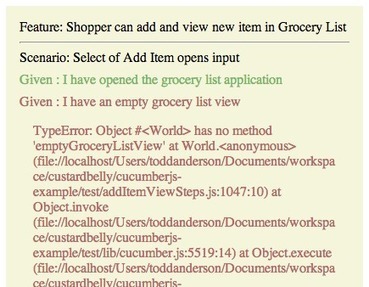
The intent of this article is to address incorporating cucumberjs-browser into our current Grocery List Application example and continue developing features that involve User Interaction with the DOM.

The cucumberjs-browser CLI tool was created to provide a means in which to write my Features, Step Definitions and support files as I normally would for a project, and bundle them to be run in a browser and provide custom reporting.

In a pervious article in this series, we added an add-item feature that detailed the scenarios of adding and accessible an item from a collection of the Grocery List application. This is still a valid logical feature that normally I would not modify to incorporate User Interaction when incorporating Features related to the application being browser-based. Instead, I would create a new Feature that details how a User can add and view new item in a browser environment.

Let's define our spec...

No comment yet.
Scoop.it!

Bridging Node.js and .NET using Edge.js

Bridging Node.js and .NET using Edge.js | JavaScript for Line of Business Applications | Scoop.it

Why .NET?
* 18K+ nuget packages
* SQL Server
* Microsoft Office
* Windows Azure
* Exchange, SharePoint, etc.


What is Edge.js?
* Run .NET in-process
* …including F#, ADO.NET, Python, and Powershell
* Run CPU-intensive code
* Alternative to writing native modules in C


What else could you do with Edge.js?

* Windows Event log
* Performance counters
* Registry
* Print
* Hardware (camera, microphone, Win32 drivers)
* Video encoding, image processing, other CPU-bound work
* Powershell

No comment yet.
Scoop.it!

backbone.supermodel - An improved Backbone.Model with a bunch of extra features

backbone.supermodel - An improved Backbone.Model with a bunch of extra features | JavaScript for Line of Business Applications | Scoop.it

Super as in fashion supermodel, not supernatural power. SuperModel extend Backbone.Model directly and override several of Backbone.Model methods to add support for nested attributes and many other features.

With SuperModel we will have a (maybe) better way to deal with nested attributes. Here is the list of some features:

* Support nested set and get
* Support change events
* toJSON
* Support relations
* Support backward reference

No comment yet.
Scoop.it!

Introducing Tready.js «

Introducing Tready.js « | JavaScript for Line of Business Applications | Scoop.it
Tready.js is a JavaScript framework, that allows running components in Node.js and the browser.

So we asked ourselves, “Wouldn’t it be nice to implement something once and use it in both environments?”. Luckily Node.js provides a way to run JavaScript on the server. Who knows, otherwise we might have ended up trying to run PHP in the browser.

We like to call this approach “Shared Code”, but it might be better known as “Isomorphic JavaScript”. We certainly weren’t the only ones thinking like this. Nodejitsu wrote about this in 2011 and Airbnb picked it up for their Rendr framework.

But we had more ideas. We wanted to build a modular thing similar to an app store, where you’d be able to choose from a pool of apps to put together a website.

No comment yet.
Scoop.it!

Dart, AngularDart & ES6

Dart, AngularDart & ES6 | JavaScript for Line of Business Applications | Scoop.it

Why Dart?
Why should I learn a new language?
Why put in the time?
Aren't there enough programming languages out there?
The answer is yes and no

Too much heavy lifting
Developers create missing features by making their own
Too much time and effort goes into doing this
JavaScript is too unfamiliar to non-JS programmers
CoffeeScript, ClojureScript & TypeScript

What is JavaScript lacking?
Solid programming structures (Sets, Maps, Classes)
On a low level
A consistent means of developing applications
Dart is a great stepping stone

...

No comment yet.
Scoop.it!

The Power Of Kendo UI And Straight Up HTML

The Power Of Kendo UI And Straight Up HTML | JavaScript for Line of Business Applications | Scoop.it

You already know that Kendo UI has magnificent widgets. UI is in the name, and Telerik has a long proud history of building amazing UI components. What you may not know, is that you can actually use Kendo UI (specifically MVVM) to work with plain HTML to construct your own widgets. This is sort of like running on the bare metal, but it’s tons of fun and thanks to Kendo UI’s streamlined MVVM, it’s quite easy as well.


Knockout provides the ability to loop over a collection by implementing a for iterator. The power of this really can’t be underestimated since it allows you to take collections and render them visually with HTML getting fine grained control over how each of the items will look. The only problem with this, is that for loops can get unwieldy and don’t mix very gracefully in HTML attributes. This earned some bad rep for Knockout in it’s early days through no fault of the framework itself. Regardless of it’s tendency to clutter HTML, it’s a powerful construct that is noticeably absent from Kendo UI’s MVVM implementation. Or is it?

No comment yet.
Scoop.it!

Creating a Simple RESTful Web App with Node.js, Express, and MongoDB

Creating a Simple RESTful Web App with Node.js, Express, and MongoDB | JavaScript for Line of Business Applications | Scoop.it

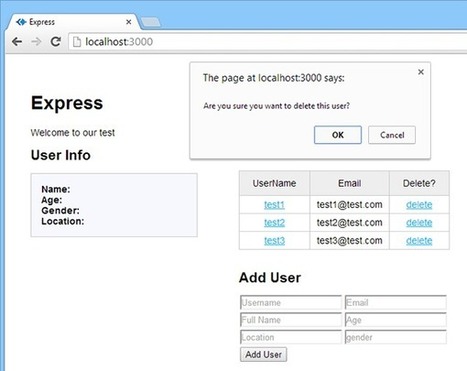
ou're going to need to know how to get a webserver running with Express, and how to use app.get and app.post to communicate with both the server and the database. It's all covered in that original tutorial, and if you're a developer who's familiar with JavaScript, it's not hard.

Back? … or rolling your eyes and going, “dude, I already know that stuff”? Either way, great! Let's add some new tools to our toolbox, and create a simple little app that works without a single page refresh.
Here are the goals:
* Learn what REST means in plain English
* Store and retrieve JSON data in a MongoDB collection using HTTP POST and HTTP GET
* Remove data from the collection using HTTP DELETE
* Use AJAX for all data operations
* Update the DOM with jQuery


PART 1 - SERIOUSLY, WHAT THE HELL IS REST?
PART 2 - SETUP
PART 3 - STARTING IN ON HTML
PART 4 - THE DATABASE
PART 5 - LISTING USERS
PART 6 - POPULATING USER INFO
PART 7 - ADDING USERS
PART 8 - DELETING USERS
CONCLUSION

No comment yet.
Scoop.it!

Building a Single Page Web App with Grails and DurandalJS

With the increasing prevalence of JavaScript and JSON you can pretty much find a lot of framework choices out there that covers both points even if you are a front-end developer primarily knowing only JavaScript. As for me, my roots are in Java server-side development. I do write JS for front-end development but I am not as comfortable to structure and write JS to develop server-side code. If you're like me, then what's the solution?

What're we making? In honor of TodoMVC we are going to build a Todo app which enables us to post a list of things to do. Just simple enough to give a taste of what these frameworks we're choosing are capable of.

Jan Hesse's insight:

http://blog.everyday.web.id/building-a-single-page-web-app-with-grails-and-durandaljs-part-2/

No comment yet.
Scoop.it!

Apps With AngularJS

Apps With AngularJS | JavaScript for Line of Business Applications | Scoop.it
Is creating mobile apps with AngularJS and PhoneGap a viable alternative to native development?

Mobile development is converging. Websites are beginning to feel like applications in their own right, with hardware powered graphics, smooth interfaces, and multiple versions for multiple devices. That begs the question, can web technologies power a full blown app?

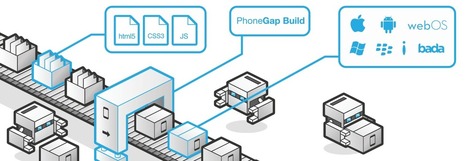
n order to make an application feel as responsive as its native counterparts we'll need to take advantage of several new technologies. Having an interface to access the functionality of the phone such as accelerometer, camera and gps is crucial. PhoneGap allows us to do this, interfacing with the device to allow access to these hardware features through javascript. 

No comment yet.
Scoop.it!

Build Desktop Apps with JavaScript and Node WebKit

Build Desktop Apps with JavaScript and Node WebKit | JavaScript for Line of Business Applications | Scoop.it

While current browsers are occasionally limiting, the languages and underlying tech we use in browsers are not. There is a long history of various wrappers that take a web app and give it extra capability as a desktop application. These wrappers will often remove many of the restrictions imposed by browsers and allow us to do virtually anything we as developers might want to do.

What if we could approach the problem from a different angle? What if we took an existing, non-visual platform that already allows developers to do whatever they want and put a visual layer on top of it? That platform is Node.js and that visual layer is WebKit. Put them together, with Javascript as the underlying engine and WebKit as the visual layer, and you have Node-WebKit!

Node-WebKit is created and developed in the Intel Open Technology Center. It has a couple years’ worth of maturity under its belt as well. In this post I’ll show you how to get started with Node-Webkit and even build your first application.

No comment yet.
Scoop.it!

Introduction to HTML5 Desktop Apps With Node-Webkit

Introduction to HTML5 Desktop Apps With Node-Webkit | JavaScript for Line of Business Applications | Scoop.it

Using Node.js, we can create web applications easily. Now, thanks to the node-webkit we can also create desktop apps with it, using a unique combination of HTML5 and Node.

The library combines WebKit engine and Node.js in a unique way. Both WebKit and Node share the same context, allowing you to write your code like it's meant to be executed in a browser, but with the addition of all Node's features.

The list of uses is endless. You can create business apps, text and image editors, games, presentations, admin panels, etc. Just name the desktop app that you would like to create, and I can assure you that it will be possible with node-webkit.

In this tutorial, I will show you how to get started by showing you how to create a simple text editor.

No comment yet.
Scoop.it!

Flattening Promise Chains

Flattening Promise Chains | JavaScript for Line of Business Applications | Scoop.it
Managing asynchronous activity is Javascript is almost easy when you using Promise chains.

Promises allow developers to easily attach 1x-only notifications of response to any asynchronous request/action. Promises also enable two (2) other very important things. We can:

  • Transform the responses before subsequent handlers (in the chain) are notified of the response.
  • Use the response to invoke more async requests (which could generate more promises).

But even more important than the features above, Promises support easy chaining of custom activity or computations. Managing sequences or chains of asynchronous activity can be a very difficult and complex effort. Promise chains are amazing and provide means to easily build sequences of asynchronous requests or asynchronous activity.

No comment yet.
Scoop.it!

Panda.js - HTML5 game engine

Panda.js - HTML5 game engine | JavaScript for Line of Business Applications | Scoop.it
Free open source HTML5 game engine for mobile and desktop with Canvas and WebGL rendering.

Features:

* Canvas/WebGL renderer
Pixi.js powered rendering with super fast speed.
* Physics engine
Hit detection and response with different shapes.
* Particle engine
Create special effects with particle engine.
* Tweening
Tween objects with timing, easing and looping.
* Timers
Add timers with callback functions and repeating.
* Mobile support
Make games for mobile and tablet devices.
* Sound manager
Manage sound effects and music with automatic looping.
* Modules
Split your game into modules and keep your code organized.

No comment yet.
Scoop.it!

From Web to Android In Two Steps

From Web to Android In Two Steps | JavaScript for Line of Business Applications | Scoop.it

Today we can fulfill our dreams and improve the world we live in by building super-mega apps. This article describes the process of creating a hybrid application for Android OS.

A hybrid app combines features of web and native apps. As a native app, it can be distributed through the store and can take advantage of numerous features available on mobile devices. As a web app, it consists of HTML, CSS and JavaScript files.

This type of applications provides the following advantages:

  • Almost all applications can be written in JavaScript for all mobile platforms;
  • These apps can use some fancy features of a mobile device like a camera, an accelerometer, etc.;
  • All HTML, CSS and JavaScript files can be instantly updated before a new version of an app is approved.

However, a hybrid app is slower than a native app. Nevertheless, it’s not a big deal because the slowest parts of your app can be written in Java or Objective-C and added to the next update.
Now let’s build an app and change the world!

No comment yet.
Scoop.it!

Create REST API on Node.js using Visual Studio

Create REST API on Node.js using Visual Studio | JavaScript for Line of Business Applications | Scoop.it

In this post I am not going to explain, what is REST? I assume you are already aware of REST concepts hence on this post to create REST API on Node.js which will perform CRUD operations. I am going to use Visual Studio to create Node Application.

First we are going to create data and CRUD operation on that. Keep in mind that we are going to expose CRUD operation as REST API on a JavaScript Array. In real projects you may want to perform these operations on database.

Let us start with writing function to return products. If you notice function is taking two parameters req and res. We send data in HTTP response with res.send . In this case we are sending JSON object product as HTTP response...

No comment yet.
Scoop.it!

How to Build an iOS & Android App in 24 hours with HTML5 and Cordova

How to Build an iOS & Android App in 24 hours with HTML5 and Cordova | JavaScript for Line of Business Applications | Scoop.it

What can one create during the New Year and Christmas holidays? As it turned down – quite enough. Even if you have two kids and a bunch of family members whom you want to visit. The only thing you cannot accomplish in time is to finish an article for Dzone. It takes a lot of time, nearly the entire January.

By the 5th of January I had a laptop and a couple of days to spend on some development. Having estimated what I can do here, I decided to create a mobile app that would work faster than the original. For this, I needed to find communicative creators of a popular app.


The Gartner research company reports that by August, 2013 most of the enterprise mobile software was created using PhoneGap or PhoneGap-based products (like Kony). From my consumer experience, it's far from true. Maybe I was wrong?

I'm not so good at HTML and JavaScript. I can create mark-up with stackoverflow.com and I can write simple selectors with jQuery. I can also find the required information in their documentation. In other words, HTML+JS was a gap in my knowledge and I was ready to fill it or gain some experience.

Thus, I planned to create a cross-platform application that could become an advantage over the original iOS-only Spender app. Moreover, I wanted to spend my time in the most effective way. On the one hand, I had a potentially effective JS framework, on the other – a lack of JS experience. I hoped that the JS framework advantages could balance my poor experience.

No comment yet.
Scoop.it!

Using CreateJS

Using CreateJS | JavaScript for Line of Business Applications | Scoop.it

In this tutorial we will be exploring the CreateJS suite of libraries. CreateJS is suite of JavaScript libraries and tools for building rich, interactive experiences with HTML5. The CreateJS suite is divided into four libraries.

* EaselJS - Makes working with HTML5 canvas easy.
* TweenJS - For tweening HTML5 and JavaScript properties
* SoundJS - Lets you easily work with HTML5 audio
* PreloadJS - Lets you manage and coordinate loading of assets


EaselJS is a library for working with the HTML5 canvas. It consists of a full, hierarchical display list, a core interaction model, and helper classes to make working with Canvas much easier. ...

No comment yet.
Scoop.it!

Sharing secrets in Javascript

I was wondering if there was a way to share data between instances of a particular javascript constructor, or at least between a limited set of objects, and not to the rest of the application.

In other words, private properties for a single object are easily implemented through the revealing module pattern, but what if you wanted a shared private property between all the instances of a particular constructor?

So let’s get to an example...

No comment yet.
Scoop.it!

UI Animation and UX: A Not-So-Secret Friendship

UI Animation and UX: A Not-So-Secret Friendship | JavaScript for Line of Business Applications | Scoop.it
The words “web animation” make many of us search frantically for the “skip intro” button, but adding motion to our work can be meaningful and functional—when we find the right circumstances. Animation can provide cues, guide the eye, and soften the sometimes-hard edges of web interactions. Val Head shows you how CSS makes it possible.
No comment yet.
Scoop.it!

Supercharging your Gruntfile: How to squeeze the most out of your build configuration.

Supercharging your Gruntfile: How to squeeze the most out of your build configuration. | JavaScript for Line of Business Applications | Scoop.it

Learn how to squeeze the most out of your Gruntfile, by splitting it across multiple files, autoloading, concurrent tasks and smart notifications.

In this article, we won’t focus on what numerous Grunt plugins do to your actual project code, but on the Grunt build process itself. We will give you practical ideas on:
* How to keep your Gruntfile neat and tidy,
* How to dramatically improve your build time,
* And how to be notified when a build happens.

Time for a quick disclaimer: Grunt is just one of many tools you could use to accomplish the task. If Gulp is more your style, great! If after surveying the options out there, you’d still like to build your own toolchain, that’s ok too! We chose to focus on Grunt for this article due to its strong ecosystem and long-standing user base.

No comment yet.
Scoop.it!

Small.JS

Small.JS | JavaScript for Line of Business Applications | Scoop.it

The Javascript world is dominated by frameworks, and it is because of our reluctance to having dependencies in our libraries. If you are going to write a Javascript library, you have two options:

  1. Depend on a proven framework.
  2. Depend on no one.

If you choose option #1, you contribute to the worship of the framework.

If you choose option #2, you are faced with a problem. If you make it too small, it may not be useful enough to warrant a download (are you download-worthy?). What happens sometimes is a set of smaller functionalities get packaged up into a larger library to give users more value for the download. Another thing that tends to happen is established libraries get bigger over time as new techniques are discovered and new features invented, because this makes it easier for existing users.


As someone who likes to write small libraries, the dream for me, is this: I want easy dependencies: regardless of how many dependencies and/or nested dependencies my project has, I want to be able tell people "using my library is as easy as 1-2-3."

What I want is something like NPM.

Jan Hesse's insight:

http://smalljs.org/

No comment yet.
Scoop.it!

Replacing callbacks with ES6 Generators

Replacing callbacks with ES6 Generators | JavaScript for Line of Business Applications | Scoop.it

In this article we’re going to go step-by-step. We’ll progressively modify a toy callback-based example towards a generator-based solution. The goal is for you to understand how the entire process works, from end to end.

Generators are a new concept in JavaScript, but not in programming. You might have used them in other languages like Python. If not, have no fear, we’re going to do a gentle intro.

Generators in ES6 are declared like functions, except they have an asterisk: function* ticketGenerator() {}

When you want a generator to provide a value and then pause you use the yield keyword. yield is like return in that it hands back a value, except the function pauses after yield is called.

No comment yet.
Scoop.it!

WebApp to DesktopApp with Node-Webkit

WebApp to DesktopApp with Node-Webkit | JavaScript for Line of Business Applications | Scoop.it

Node-Webkit combines a Chromium runtime environment with node.js to provide an easy way to create a Desktop App with Web technologies. While it is easy to run local apps in a browser, necessary security restrictions prohibitaccess to local file systems. In addition, variations in browsers complicate web apps and can make the result unpredictable.

Node-Webkit provides a standalone executable for Mac, Windows or Linux, with consistent behavior on all platforms and more control over the user experience, while enabling the use of node.js features and libraries.

My presentation will include an overview of Node-Webkit, an explanation of how to use it, and a demonstration of an example app built with Node-Webkit.

Jan Hesse's insight:

Talk: http://www.youtube.com/watch?v=d2tYH7vXMUM

No comment yet.