


I want to share some of the lessons I have learnt building them, especially what things I found difficult technically. Based on my experience I think the following are common issues that you may encounter when building them.


 Your new post is loading...
  Scoop.it! I want to share some of the lessons I have learnt building them, especially what things I found difficult technically. Based on my experience I think the following are common issues that you may encounter when building them. 
No comment yet.
Sign up to comment
Scoop.it!

JavaScript has come a long ways in its 20 years of existence. It’s grown from a language used to define a few variables and functions to one that can be used to build robust applications on the client-side and server-side. Although it’s popularity continues to grow in large part due to its dynamic nature and ability to run anywhere, JavaScript as a language is still missing many key features that could help increase developer productivity and provide a more maintainable code base. Fortunately, ECMAScript 6 (ES6) adds many new features that will take the language to the next level.
Scoop.it!
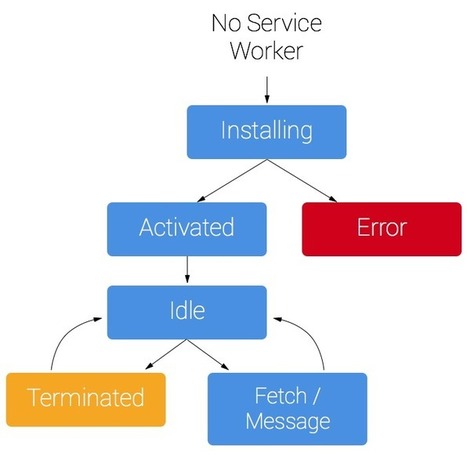
Service Worker will revolutionize the way we build for the web. Learn about what it is, why it is important and how to use it. Rich offline experiences, periodic background syncs, push notifications— functionality that would normally require a native application—are coming to the web. Service workers provide the technical foundation that all these features will rely on. Contents: * What is a Service Worker?
Scoop.it!

You can achieve a lot with HTML5 and CSS, but only if you employ JavaScript libraries as well. It used to be possible to restrict down to one or two libraries, but nowadays, the pressure is on to do more with a web page with such features as touch gestures, dynamic DOM updates or CSS switches. Is there such a thing as too much Javascript? Are we near the limits of what we can do with this technology?
Scoop.it!

Various JavaScript toolkits have been offered the past few years to enable the use of functional patterns on the frontend. While these tools promote composable APIs and pure functions to a certain degree, UI programming is still encumbered with stateful M
Scoop.it!

JavaScript admittedly has plenty of flaws, but one of the largest and most prominent is the lack of a module system: a way to split up your application into a series of smaller files that can depend on each other to function correctly.
Scoop.it!

What does it do?
Scoop.it!

For the past few years HubSpot has been building single-page apps exclusively with Backbone. And boy, have we learned a lot in the process. Mostly, we've learned that while Backbone is great at what it does, operating at a larger scale and a faster pace means we have bigger problems to solve that require different approaches. Over the past few months we've been experimenting with Flux &React by implementing them in internal tools and small portions of our products. The performance gains we've seen, coupled with the simpler mental model, have convinced us that this is the way we now want to build frontend web applications. In this talk, I go over some of the pain points we're currently experiencing with our frontend apps, and cover a fair bit about how Flux & React can help.
Scoop.it!

Simple, lightweight, persistent, framework-agnostic two-way databinding Javascript library.
Scoop.it!

LET'S TALK ABOUT NEW VERSION JAVASCRIPT FRAMEWORK SENCHA EXTJS 5PROS AND CONS+
Scoop.it!
KnockoutJS and MVVM (Comes with a sample application) - It's a beginner's guide that discusses about Knockout in particular and MVVM pattern in general. Knockout is a very cool piece of technology that makes your view code less cluttered. This ppt reaches every (not all :-) detail of Knockout. By following this ppt you'll surely be in position to get started with Knockout on your own projects.
Scoop.it!

Authoring React components always was a joy as it gives you a codebase with clear boundaries between concerns. However React.js, like most other solutions, doesn’t help with styling components. Should I write one big CSS file, or one separate file per component? You are basically left on your own. In this blog post I want to introduce React Style, a novel approach to styling React components which, I think, comes close to addressing the listed problems.
Jan Hesse's insight:
Scoop.it!

React gives you a template language and some function hooks to essentially render HTML. That's all React outputs, HTML. Your bundles of HTML / Javascript, called "components", are allowed things like storing their own internal state in memory (such as which tab is selected in a tab view), but in the end you just barf out HTML. You absolutely cannot build a fully functional dynamic application with React alone. We'll learn more about why below.
|
Scoop.it!

16 Steps. 1. verify you have a working & stable data API 2. select software management tools 3. create a foundational specification 4. select a software development process 5. select host platform & hosting service 6. select package managers 7. select site & user analytics 8. select code & style enforcement 9. select a task runner 10. select application architecture/structure 11. select testing methodologies & tools 12. select code quality/complexity tools 13. define deployment strategy 14. select package monitoring solution 15. select JS error monitoring solution 16. select performance monitoring solution
Scoop.it!
As we web developers transition from building web sites to building webapps, there are a few new techniques and best practices that need to be considered. The following lessons apply to any JavaScript framework, but I’ll be discussing them in the context of Meteor apps because that’s what I use day to day. Contents: 1. Avoid using href=”#”
Scoop.it!

ES6 gives us a new way to iterate. The ES6 spec defines non-string 'symbol' property names of objects to describe particular behaviours. Symbol.iterator is one of them, it describes how iteration works.
Scoop.it!

In this third post, I’ll show the inner workings of the little helper library that I wrote to build fluent asynchronous APIs. As you’ll see, it’s not simple, but analyzing it does, I hope, give interesting insights about asynchronous programming.
Scoop.it!
A helper and short documentation of Reacts API.
Scoop.it!

In this column, I'm going to go beyond creating a basic Backbone application with TypeScript that retrieves data and show how to create a master/detail page where the user selects a single entry which triggers a display of related data that includes multiple rows. In this application, after the user selects a customer from a dropdown list, the top of my page will display that single customer while the bottom of the page will display all of the sales orders for that customer.
Scoop.it!

In this comparison, Rails expert Fernando Villalobos breaks down the difference between AngularJS and Ember.js when it comes to choosing a JS framework for Rails applications.
Scoop.it!

The best way to learn how to use an application development framework, like Ember JS, is to code an application using Ember JS. You can take as many online courses as you want, but you only become productive with the language or framework when you apply yourself to a project and use the framework to build something.
Scoop.it!

Ext JS 5 introduced support for components in grid cells using the new “widgetcolumn”. At the same time, Ext JS 5 introduced a new type of lightweight component called a “Widget”. There are several widgets included in Ext JS 5, and this article will show you how easy it is to build your own.
Scoop.it!

We all know (I hope) how to test our back-end code. However, once we move to the front-end is a bit different. At the moment weare working on a big single page application and testing is one of our main focuses. In this article you will see how to unit test our client-side JavaScript.
Scoop.it!

Creating an extension for the Chrome browser is a great way to take a small and useful idea and distribute it to millions of people through the Chrome Web Store. This article walks you through the development process of a Chrome extension with modern web tools and libraries.
Scoop.it!

The StateStreamMixin allows to bind a component state to an RxJS Observable stream. The way to achieve the binding is to provide a getStateStream method on your component that returns an RxJS Observable, the StateStream mixin will automaticly merge the state of your component with the values published by the returned observable. The subscription will be automaticly cleaned on component unmount. The LifecycleMixin allows you to consume React components lifecycle events as RxJS Observable. The LifecycleMixin will inject a property lifecycle to the component, that property contains an observable for each lifecycle events.
|




