JavaScript for Line of Business Applications
606.5K views | +22 today
JavaScript for Line of Business Applications
Keeping track of current JavaScript Frameworks that help design your clientside Business Logic Layers.
Curated by Jan Hesse
Beam to my Inbox:
Your new post is loading...

Popular Tags - Filter using the Funnel

Scoop.it!

Getting Started with KnockoutJS in ASP.NET MVC

Getting Started with KnockoutJS in ASP.NET MVC | JavaScript for Line of Business Applications | Scoop.it
In this post we take a look at the slight mind shift that ASP.NET MVC developers working on JavaScript and jQuery face when they first start using KnockoutJS.

Knockout JS is a fantastic library when you are looking for a drop-in enhancement that brings in client side data-binding and elements of the MVVM design pattern into your website that’s a potpourri of Razor syntax, server side Html Helpers and jQuery plugins.

Well Knockout JS was built to bring meaning into this chaos, but before you get started, you have to detune yourself a bit. Let’s see what that means. By the way, this article assumes you have the KO cheat-sheet created by Sumit Maitra handy so that you can quickly lookup some of the syntax we throw around. Sumit has helped me a great deal in co-authoring this article and just like an AngularJS +  MVC series, we are planning to collaborate to do a KnockoutJS series too.

No comment yet.
Scoop.it!

Why Angularjs Beat Out Emberjs In Our Stack

Why Angularjs Beat Out Emberjs In Our Stack | JavaScript for Line of Business Applications | Scoop.it

I've come to expect that getting ramped up on a new framework is a rite of passage, and that indoctrinating oneself to its paradigms should necessarily be hard. After putting off my foray into AngularJS for far too long, I was pleasantly surprised to find that getting started was painless. There's a great community, extensive documentation, and tons of fantastic tutorials.To be honest, this was one of the things I found most lacking when working with Ember.js, and for better or worse, I think it may be because AngularJS is just simpler.

Is simplicity something you want when choosing a JavaScript framework? Call it a double-edged sword, or whatever cliché you choose, but I feel that simplicity is simultaneously underrated and overrated in the software world. Go too far in either direction and and you'll eventually end up cursing at your computer. Maybe Ember.js is the right choice for a really complicated JavaScript application, but that's not what we were trying to build. Inevitably, someone will point out what Ember can do that Angular cannot. Quite simply, I don't care. Angular's simplicity makes me more effective.

No comment yet.
Scoop.it!

Using the AngularJS FormController to control form submission

One of the more frequent things you have to do in a forms over data application, the kind where AngularJS really shines, is create and validate data entry forms. The basics of this are pretty easy, just create a controller, add a model to the $scope, create an HTML form and add ng-model input elements for each property the user should enter. No big deal there.


However it would be nice if we could do basic validation in the form and disable a submit button if the form is invalid or the user hasn’t made any changes yet. It turns out this is quite easy to do in AngularJS as each HTML from element automatically creates a FormController and this contains a number of properties that tell us what the status of the form is. In this case we are interested in the $pristine which tells us if the user made any changes and the $invalid which tells us the form is considered to be invalid.

Add to this the ng-disabled directive which we can use to automatically disable an input control and we have the last missing piece to automatically enable/disable the form submit button.

Jan Hesse's insight:

Also available:

Getting started with AngularJS

Creating an AngularJS Controller

The AngularJS $scope is not the MVC Model

Using repeating elements in AngularJS

Filtering the data in an AngularJS ngRepeat element

No comment yet.
Scoop.it!

Implementing Memoization in JavaScript

Programs often waste time calling functions which recalculate the same results over and over again. This is particularly true with recursive and mathematical functions. A perfect example of this is the Fibonacci number generator.

Memoization is a programming technique which attempts to increase a function’s performance by caching its previously computed results. Because JavaScript objects behave like associative arrays, they are ideal candidates to act as caches. Each time a memoized function is called, its parameters are used to index the cache. If the data is present, then it can be returned, without executing the entire function.  However, if the data is not cached, then the function is executed, and the result is added to the cache.

No comment yet.
Scoop.it!

Writing secure express.js apps

Writing secure express.js apps | JavaScript for Line of Business Applications | Scoop.it

Here is a starting guide for securing express.js applications, specifically Express v3. It is by no means a comprehensive guide on web application security. Standard rules and practices apply to express.js apps just as if they would to Rails, Django or any other web application.

I’m going to hit the high points of items that always seem to come up.

No comment yet.
Scoop.it!

Supplying Mocks for Services via $provide

Supplying Mocks for Services via $provide | JavaScript for Line of Business Applications | Scoop.it

Last time we talked about how to handle $http in a AngularJs unit test. This time around we are going to expand on this example by creating a ComplexService which takes the SimpleService as a dependency. Since our test for the ComplexService should not rely on the SimpleService we need to introduce a way to Mock our dependency.

Mocking out dependencies in services it a bit more challenging but using $provideallows you to supply mocked versions for your dependencies. You can view the full code out on github.

No comment yet.
Scoop.it!

JavaScript Callbacks are Pretty Okay

JavaScript Callbacks are Pretty Okay | JavaScript for Line of Business Applications | Scoop.it

I've seen a fair amount of callback bashing on Hacker News recently.

Among the many proposed solutions, one of them strikes me as particularly clean: "asynchronous wait" or "wait and defer". iced-coffee-script had this a while ago. Kal just debuted with an identical solution, only differing in syntax. Supposedly LiveScript supports this with "backcalls".

I must say, "asynchronous wait" or "monads" - whatever you want to call it - seems like an improvement over callbacks. But I'm here to say that actually... callbacks are pretty okay. Further, given how clean callbacks can be, the downsides of using a compile-to-js language often outweigh the benefits.

I have 2 rules of thumb for code organization which makes clean callback based async code brainless:

  1. Avoid nontrivial anonymous functions.
  2. Put all function declarations after the code that actually does things.
No comment yet.
Scoop.it!

EmberJS: Your front end is not your back end (design your API right)

EmberJS: Your front end is not your back end (design your API right) | JavaScript for Line of Business Applications | Scoop.it

 The talk was about designing your API based on what it was going to be used for by the users instead of designing it based on what is in the database.  I think that this tactic can be really effective as it reduces the complexity of the front end code, which is where your users are and where you really want everything to revolve around their experience, not the intricacies of your data layer. With more and more complexity living in the front end through frameworks like Ember.js our design decisions need to be giving more weight to the front end than they used to.

No comment yet.
Scoop.it!

Choosing the best strategy for Silverlight developers

Until recently, multiple vendors, including Microsoft, Adobe and Oracle/Sun, were competing to provide rich Internet application (RIA) frameworks for creating applications that could be delivered via the Web. However, this led to some fragmentation of the market. Some of the main challenges of these platforms included the need for special plug-ins, security risks and increased power requirements.

HTML5 has emerged as a standard framework for providing most of the features and functionalities of these RIA frameworks. As a result, vendors like Microsoft have started investing more effort in supporting this vendor-neutral standard. Silverlight has not gone away, but Microsoft is investing more attention in this emerging Web standard, and has advocated various steps developers can take to transition their existing Silverlight applications to HTML5.

No comment yet.
Scoop.it!

JavaScript MVC Framework Comparison

JavaScript MVC Framework Comparison | JavaScript for Line of Business Applications | Scoop.it

Javascript is emerging as a prominent development language in past few years. It has been increasingly adopted in various web based projects. It is also used to develop hybrid mobile applications. However, a common concern in the adoption of Javascript as a development languages has been the maintenance of  Javascript code in larger teams. Over the years, in order to improve code maintainability, separation of concerns using MVC pattern has been used. A lot of Javascript frameworks have emerged which have provided a means to enforce MVC pattern in Javascripe code as well. In this post, I will discuss top MVC frameworks and their pros and cons.

Jan Hesse's insight:

if you like bulleted lists, this one gets your attention

No comment yet.
Scoop.it!

Superspeed your angularjs apps

AngularJS renders HTML incredibly fast.

But when rendering large DOM trees like containing tables with sort able columns, filtering and stuff ... it might get slower than you want ...

While working on Orangevolt Ampere (which is heavily based on AngularJS) I realized a few remarkable performance tricks.


The hints detailed in this article can improve AngularJS pages rendering up to 1000% and more - no kidding !

Performance is actually not a AngularJS problem - it's YOUR code. Let me explain you why:...

No comment yet.
Scoop.it!

Understanding JavaScript – part II

Understanding JavaScript – part II | JavaScript for Line of Business Applications | Scoop.it

As you have seen in the previous article, a function does not necessarily require a name: function () {} (anonymous functions) is a completely valid expression. Since functions are objects, they will have a name property which contains the name of the function as a string. For anonymous functions the value of this property is an empty string: "".

No comment yet.
Scoop.it!

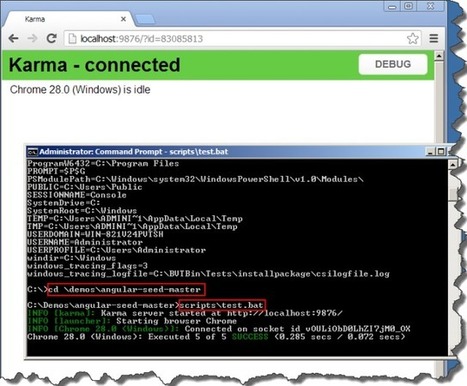
Setting-up AngularJS, Angular Seed, Node.js and Karma

Setting-up AngularJS, Angular Seed, Node.js and Karma | JavaScript for Line of Business Applications | Scoop.it

I’ve used AngularJS for a few months, but I have no knowledge when it comes to testing AngularJS apps. I have a subscription to PluralSight.com and wanted to go through their online video training course for AngularJS. Specifically with this course I want to learn how to use Karma to do testing.

I’m usually extremely happy with PluralSight.com course, but in the beginning of this course I was somewhat disappointed. In Section 7 (“Angular Seed”) new technologies were introduced. The author introduced Angular-Seed, Node.js and Karma. I’ve worked with Node.js, but there are probably many people who have never used it. I believe the author took for granted that the student knew Node.js. For those who have never used Node.js this could be an obstacle.

Here are the high level step we will follow:

  1. Download and install Angular-Seed
  2. Download and install JetBrains WebStorm (Optional)
  3. Download and install Node.js
  4. Confirm Node.js is installed
  5. Run Karma Unit Tests – will fail because Karma is not installed
  6. Install Karma
  7. Run Karma Unit Tests again – Will fail because Chrome will not start
  8. Add System Variable to Windows
  9. Confirm System Variable Were Added
  10. Run Unit Tests again – should succeed
  11. Confirm that Units are being tracked by Karma
  12. Start Web Server by using Node.js
No comment yet.
Scoop.it!

Why I Chose Ember.js

I have finally made the plunge to really dig into Ember.js. But, if you are familiar with the vast landscape of Javascript frameworks, you may wonder why I chose Ember.js. This isn't a light decision and Ember.js is thought to have quite a steep learning curve. However, I think that there are some reasons behind this that I will cover in a later post.

So to start, let's look at the various frameworks and my own relations to them in my track to eventually set upon Ember.js.

No comment yet.
Scoop.it!

JavaScript Design Patterns

JavaScript Design Patterns | JavaScript for Line of Business Applications | Scoop.it

In modern day JavaScript, it’s easy to pursue the development of large scale JavaScript applications. We are constantly writing more and more complex web apps that thrive on the latest frameworks and libraries. It’s easy for a developer to use four or more libraries in one project. Often though, we tend to overlook some of the core principles involved in the creation of these libraries.

It’s important to understand the significance of how and why your favorite libraries are written the way they are.

Having structured, reusable code makes for an easily maintainable code base that helps us to prevent repeating ourselves. JavaScript design patterns don’t solve every design problem but they do, however, provide a clear approach that provides stability and in some cases security, for our web apps.

No comment yet.
Scoop.it!

Integrating Pusher with EmberJS

The Ember Router takes events from user actions and hands them off to the appropriate Route depending on where the user is within the app.

Pusher receives events from your server which your app then handles, but you might want to do different things depending on where your user is within your app at the time the message is received.

Wouldn’t it be great if we could hook these two things up together?

No comment yet.
Scoop.it!

AngularJS: 6 Months Later

AngularJS: 6 Months Later | JavaScript for Line of Business Applications | Scoop.it

When we started planning the front end for SHIFT, the first question everyone asked was, “what framework should we use?” It was agreed upon early on that we wanted a single-page app built on the same API that we would be providing to third party developers. We wanted a solid front end framework to help us manage a large single-page app. Backbone seemed like the obvious choice because it was lightweight, easy to use, and it had a huge community. However, after doing a few prototyping exercises, we were impressed with the development speed we were achieving with AngularJS. Ultimately we were so impressed that we dove head first into AngularJS, and these are some of the things we found.


* What We Liked

* What to Watch Out For

* Conclusion

No comment yet.
Scoop.it!

d3.js and Angular.js Directive Collections

d3.js and Angular.js Directive Collections | JavaScript for Line of Business Applications | Scoop.it

This week we have created a collection of different d3.js basic Graph and Charts with Angular.js Directives.
We have made Angular.js Attribute Directive and Element Directive with sample JSON Data for all of the Directives and documented those. Some of those are listed below.
Reader should go to the main page from http://phloxblog.in/angulard3/start.html

No comment yet.
Scoop.it!

Rendering A Filtered Backbone.Collection

Rendering A Filtered Backbone.Collection | JavaScript for Line of Business Applications | Scoop.it

Displaying a list of items is one of the most common tasks in any application - and JavaScript and Backbone.js apps are no exception.

Backbone generally makes these two tasks easy. It provides the concept of a Collection to manage a list of items, and you can assign a collection to a View instance for display. But what happens when you need to filter that collection, and only display a subset of what it contains? And what if that sub-set changes when a user selects certain options or types something new in to a search box?

Filtering an in-memory collection is simple, sure. The collection has built in methods to do this. But filtering a collection and then rendering the results can create some unexpected challenges. The journey to find simple and clean code can be unexpectedly difficult.

No comment yet.
Scoop.it!

Ractive.js Expressions and the New Wave of Reactive Programming

Ractive.js Expressions and the New Wave of Reactive Programming | JavaScript for Line of Business Applications | Scoop.it

Dedicated followers of JavaScript fashion will by now have noticed this season’s hot new trend. If you haven’t spotted it yet, here are a few projects sporting this style on the GitHub catwalk: React, Reactive.js, component/reactive and reactive.coffee

That’s right: reactive programming is the new black.

At a high level, the idea behind reactive programming is that changes in state propagate throughout a system. Put crudely, this means that in a reactive system where a = b * 2, whenever the value of b changes, the value of a will also change, rather than forever being equal to whatever b * 2 was at the time of the statement.

When we take this idea and apply it to user interfaces, we eliminate the DOM manipulation drudgery that dominates web developers’ lives.

Ractive.js is a new library initially developed to create interactive (hence the name – not to be confused with Reactive.js!) news applications at theguardian.com. It is designed to dramatically reduce the effort involved in creating web apps by embracing these principles.

No comment yet.
Scoop.it!

AngularJS + TypeScript : Workflow

A introductory video on quickly creating AngularJS applications using TypeScript and how you can organize your project. 

This video shows you how you can organize your project so you can rapidly create new Controllers / Directives / Services / Filters with minimum dependency management and file path awareness. 

No comment yet.
Scoop.it!

Ember JS Best Practices - Helpful debugging tools

Ember JS Best Practices - Helpful debugging tools | JavaScript for Line of Business Applications | Scoop.it

This is a short post collecting some helpful debugging tools built into Ember or how you could easily implement some yourself.

You should include these few lines of code in every Ember App. I learned about those lines in the Blog of Ian Petzer. This snippet logs all exceptions that are thrown when resolving or rejecting promises. If you do not include this snippet, all exceptions will be swallowed silently and may leave you very irritated...

It is quite often that you will start your app and see no exceptions in the console, but you won’t see the desired result in the browser also. How to go about this? There may be a minor error in your template or the connected controller does not carry the right data. How to analyze this kind of error? As the Ember Contributors deeply care about usability, they are developing an extension for Chrome, which facilitates this kind of debugging. With this extension you can inspect DOM elements with one click and see the associated View and Controller. You can already install this extension, but it is not officially released yet. Alternatively you can mirror this functionality manually in the browser console. How to do that?

No comment yet.
Scoop.it!

Ember without Ember Data

Ember without Ember Data | JavaScript for Line of Business Applications | Scoop.it

Ember Data has ambitious goals, and it has come a long way in the last year. If you’re the kind of programmer who loves working on upcoming stuff, you might find it exhilarating. On the other hand, it is completely understandable if you’d want to avoid it. Deprecations and changing APIs can be frustrating and time consuming.

One thing that is not always clear to people starting with Ember is that Ember works perfectly well without Ember Data! Trust me on this: Discourse doesn’t use Ember Data for persistence and it’s working quite well. Moreover, using AJAX with Ember is something that is not difficult to do.

No comment yet.
Scoop.it!

jQuery Autocomplete, MVC4, and WebAPI

This article will describe how to implement jQuery Autocomplete with ASP.NET WebAPI. jQuery Autcomplete is party of the jQuery UI library of widgets and it allows one to easily transform a textbox into an autocomplete textbox by providing a data source for the autocomplete values. 

No comment yet.
Scoop.it!

Which Cross Platform Mobile Development Platform Should You Choose

Which Cross Platform Mobile Development Platform Should You Choose | JavaScript for Line of Business Applications | Scoop.it
There are many cross platform mobile development solutions, but which one should you choose? I have some answers to this question which will help you decide

I’ve published courses for Pluralsight on:

After working with all these different solutions and investigating others, I thought I would publish my thoughts on each of these choices and the differences between them.

I’m mostly going to focus on Android and iOS because even though there are other competitors, those are the only major players that exist at present.  Everyone else has a relatively tiny market share.

No comment yet.