JavaScript for Line of Business Applications
606.6K views | +21 today
JavaScript for Line of Business Applications
Keeping track of current JavaScript Frameworks that help design your clientside Business Logic Layers.
Curated by Jan Hesse
Beam to my Inbox:
Your new post is loading...

Popular Tags - Filter using the Funnel

Scoop.it!

Polling, Long Polling, Comet, Server-sent Events (SSE), and WebSockets

I've been asked about these concepts multiple times. Not being known for the most concise and easily understood explanations, I thought this would be an apt opportunity for sharpening my Yoda.

Challenge: provide the best explanation, to a software engineer with little understanding of HTTP, for Polling, Long Polling, Comet, Server-sent Events (SSE), and WebSockets. 

But ofcourse you're free to skip sections you're familiar with. However, if you're new to all this, then I really do think that you should just pucker up and read it all.

No comment yet.
Scoop.it!

JavaScript and Friends: CoffeeScript, Dart and TypeScript

JavaScript and Friends: CoffeeScript, Dart and TypeScript | JavaScript for Line of Business Applications | Scoop.it

This article assumes that the reader has a good knowledge of JavaScript and has done at least some development in it, but if this is not about you, you can just first refer to one of the beginner’s JavaScript books like Eloquent JavaScript.

JavaScript is an amazing, often underappreciated and misunderstood language. It has some really powerful concepts like functions as first-class citizens (see, for example, JavaScript: The World’s Most Misunderstood Programming Language), flexible prototypal inheritance and is a powerful generic programming language that can be used not only in browsers.

Despite all its power and flexibility the language has some well-known design shortcomings such as global variables, cumbersome emulation of lexical scoping, non-intuitive implicit conversions, etc. In fact, there are parts of the language that you better avoid using at all, as it is advised in JavaScript: The Good Parts. Let us also note that from the beginning JavaScript was not specifically designed for developing applications with large code bases and many developers involved.

Contents:
* Why JavaScript Isn’t Enough?
* Example JavaScript Program: Dijkstra’s Algorithm
* CoffeeScript
* TypeScript
* Dart
* Web Application Development
* ECMAScript 6
* Conclusions

No comment yet.
Scoop.it!

Form Autocomplete and Remember Password with AngularJS

Form Autocomplete and Remember Password with AngularJS | JavaScript for Line of Business Applications | Scoop.it

Recently a user complained about the log in form not saving the credentials. This is a common problem with AJAX and single-page applications. But I decided to get to the bottom with it.

The UserApp “dashboard” is built with the JavaScript framework AngularJS, and it doesn’t play along very well with the “save password” feature. These are the issues I addressed:

* The form cannot be dynamically inserted into the DOM.

* The form must perform an actual POST request.

* When the browser autofills the fields, the scope doesn’t get updated.

Firefox was easy, all it required was that the form had a name attribute.

No comment yet.
Scoop.it!

AngularJS: Scroll Animations

AngularJS: Scroll Animations | JavaScript for Line of Business Applications | Scoop.it

Everyone has seen scroll based animations right? You know, the ones where you start scrolling down the webpage and animations start triggering around depending on how much you have scrolled. One of my favorite examples is Let’s free Congress.

Now, sometimes we want to trigger an animation, but we don’t want to make theentire page to rely on the scroll… maybe, just a little part of it. However, we can’t trigger the animation until the user is viewing the part we want to animate, or else the animation will do all its magic without no audience. How do we do it?

No comment yet.
Scoop.it!

Switching Branches Without Committing

Typically you’d want to first switch to the right branch and then start modifying files in the working directory, right?

But, what if you have been working on some uncommitted changes in your working directory and then decide the uncommitted changes you’ve been working on actually belong on a different branch? If you switch branches with git checkout to a branch with different contents than the working directory, what should git do? Some choices git has: ...


No comment yet.
Scoop.it!

Partial Application in JavaScript

Partial Application in JavaScript | JavaScript for Line of Business Applications | Scoop.it

Unless you've used a functional programming language such as ML or Haskell, concepts such as partial application and currying may be foreign to you. Since JavaScript supports first-class functions, once you understand these concepts, you can put them to use in your code.

Whether writing code just for yourself or presenting an API to your users, it's often helpful to create a more specialized function as a "wrapper" to a more generalized function if you expect to be performing a task repetitively. One way to do this would be to just define the functions manually.

Jan Hesse's insight:

more current post at: http://benalman.com/news/2012/09/partial-application-in-javascript/

Mickael Ruau's curator insight, October 9, 2013 5:28 AM

Concepts de programmation  fonctionnelle utilisables en javascript.

Oriol Lluch's curator insight, October 15, 2013 4:19 PM

Great Article to understand the concept behind functions in Javascript

Scoop.it!

Deploying your Durandal 2.0 SPA to production

Durandal 2.0 has some breaking changes from its earlier version.  If you are converting from 1.x to 2.0, read this documentation first.  I haven’t converted my project that is currently in production (nepris.com) into 2.0 yet. I wanted to figure out 2.0 first before I jump into that change. So, for a different smaller application, I started with Durandal 2.0. I used Durandal Starter Kit with Visual Studio 2012 to get the base template up. While developing locally, everything ran pretty well, but ran into some issues with building it for production. Here are some notes… 

No comment yet.
Scoop.it!

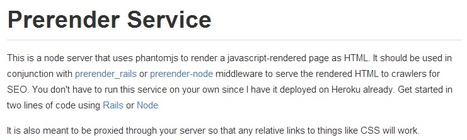
Prerender - AngularJS SEO, BackboneJS SEO, or EmberJS SEO

Prerender - AngularJS SEO, BackboneJS SEO, or EmberJS SEO | JavaScript for Line of Business Applications | Scoop.it

Allow your AngularJS, BackboneJS, or EmberJS apps to be crawled perfectly by search engines.

How it works:
* The Rails or Node middleware inspects the user agent of each request to your app
* If a search engine crawler is detected, the middleware makes a GET request to the Prerender service
* The Prerender service makes a call to your app for the same exact page that the crawler is requesting
* The Prerender service renders the page with all of the javascript using phantomjs
* The HTML of that rendered page is sent back to the middleware in your app
* The middleware then returns that HTML to the crawler

No comment yet.
Scoop.it!

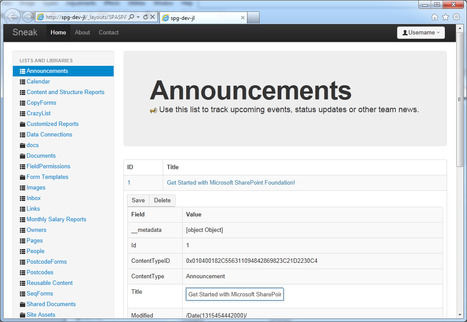
SharePoint 2010 as a Single Page Application

SharePoint 2010 as a Single Page Application | JavaScript for Line of Business Applications | Scoop.it

What is a Single Page Application?  Essentially, an application disguised as a single web page.  Like the official "Twitter" web application.  You click, things happen, data is loaded and released asynchronously, layouts are arranged and displayed.  Like magic.

On a crazy Thursday afternoon I had the mad idea of building a Single Page Application on top of SharePoint.

The story so far
* Everything in a SharePoint farm solution
* UI layout using Twitter Bootstrap - what you see above is based on the Fluid example template
* UI binding using Knockout.JS
* Additional glue with jQuery
* Reading from SharePoint via OOTB REST service API
* Exposes _spPageContextInfo object
* Expose SP.ClientContext objects/scripts

No comment yet.
Scoop.it!

A comparison of the two-way binding in AngularJS, EmberJS and KnockoutJS

This is not a talk about which framework is best, or which one you should use in your projects. The focus is on the strengths and weaknesses of the different implementations and finding out what the different frameworks have in common and what they can learn from each other.

No comment yet.
Scoop.it!

ECMA5 approach to building JavaScript frameworks

ECMA5 has given JavaScript a number of new ways to define and manipulate objects. In this session, attendees will learn how to combine Require.js and ECMA5’s object manipulation functions to create an inheritance model similar to class-based languages.

No comment yet.
Scoop.it!

Durandal vs. Framework “X”

Sometimes I am contacted by consultants or businesses regarding Durandal as it compares to other frameworks. And sometimes the questions that are asked take the form of “So and so says Durandal isn’t as good as Framework X because of Y. Is this true?” Frequently the people making the original statements aren’t basing them on correct information. Other times, they ignore the imperfections in their “framework of choice.” Below is a list I was asked to address recently for a customer who was very happy with Durandal, but who was receiving some pressures from a 3rd party who wanted them to switch to Angular.

No comment yet.
Scoop.it!

Complex Single Page Application Architecture with Backbone

Complex Single Page Application Architecture with Backbone | JavaScript for Line of Business Applications | Scoop.it

Over the past few months we've been developing the 2nd (and much improved) generation of the SOOMLA dashboard.  Though we use myriad front-side technologies, the jewel in the crown is Backbone.js.  Much has been written about Backbone, though still I find that most articles focus on HOW-TOs of models, views and events.  In this post, I’ll describe our dashboard’s Backbone architecture, with an attempt to zoom out a bit and understand the fundamentals of building complex, heavy single page applications (hereinafter SPA) with Backbone.  Disclaimer: this post is not about code, but about architecture concepts.  Therefore, the code examples won't be detailed to the bits and bytes, but they are all documented sufficiently to understand the idea.

We use:
* Require.js for dependency management and modular code.
* Backbone.js - for basic application structure and separation of concerns.
* Marionette.js - for composite application architecture and saving lots of Backbone boilerplate.
* underscore.js for general object, array and function utilities.
* undescore.string for extended string manipulation functionality.
* Handlebars.js - for client side templating.
* jQuery for DOM manipulation, AJAX, promises, and much more.
* These jQuery plugins: Qtip, SlimScroll, Isotope, jQuery UI sortable and jQuery validations.
* imagesloaded - for capturing and synchronizing image load events.
* Less - for CSS pre-processing.
* grunt.js - for build automation (tasks like pre-compilation, minifying and concatenating code).


No comment yet.
Scoop.it!

Writing Better JavaScript with CoffeeScript: The Basics

Writing Better JavaScript with CoffeeScript: The Basics | JavaScript for Line of Business Applications | Scoop.it

I’m a huge fan of JavaScript. Its popularity has really surged in recent years with the advent of rich internet applications (RIAs), Ajax and web development libraries likejQuery that makes JavaScript more appealing and accessible to a broader audience.

However, that doesn’t mean the language is without its quirks, and often these can come from nowhere to bite you. There’s a long running joke about JavaScript’s good parts compared to its bad parts and how the language has many problems. In this multi-part guide, I’ll present you with a solution to most of these problems:CoffeeScript.


This is the first part a series of articles that introduces you to this wonderful programming language.

No comment yet.
Scoop.it!

AngularJs native tag editor

AngularJs native tag editor | JavaScript for Line of Business Applications | Scoop.it

Continuing my series on directives that fill gaps in the angular framework, today I will discuss my implementation of a tag editor. In some ways this is simpler than my previous attempts, no new services needed to be created, however, there are a lot of styling concerns that need to be dealt with. I think I found a reasonable approach that provides adecent default look and feel and provides implementers the flexibility to provide their own styling.

Design Goals

* Native

* Control styling

* Enable tag interactivity

* Support edit & read-only modes

No comment yet.
Scoop.it!

Exploring AngularJS by AngularJobs.com

Exploring AngularJS by AngularJobs.com | JavaScript for Line of Business Applications | Scoop.it

A flipboard Magazin about AngularJS.

Fresh Insights On AngularJS Provided. Expand the capabilities of JavaScript with the Google backed framework which is reshaping the web.

No comment yet.
Scoop.it!

AngularJS: 6 Common Pitfalls Using Scopes

AngularJS: 6 Common Pitfalls Using Scopes | JavaScript for Line of Business Applications | Scoop.it

In the following I will describe some best practices when using AngularJS. If you are not familiar with AngularJS yet, please have a look at angularjs.org to get an overview and check out Kahlil's list of AngularJS Resources.

Here are six main pitfalls when it comes to working with scopes in AngularJS. Six points which are actually easy if you understand the underlying concepts behind Angular.

No comment yet.
Scoop.it!

Implementing a cross-browser event handling system

Implementing a cross-browser event handling system | JavaScript for Line of Business Applications | Scoop.it

JavaScript, in the browser, is an event-driven programming language – with no consistent event handling support. While adding and removing listeners might work in almost all JavaScript-enabled browsers, triggering events, to this data, has been a nightmare for many JavaScripters out there and I’m no exception.

While I’ve been working on Hilo a few months ago, I had to deal with this situation. And the thing which I came up with only worked in a few modern browsers. It did not work in Internet Explorer, no wonder. Even after a few days of peeking into other libraries I could not implement a consistent system, whatever the reason might be. Recently I started rewriting Hilo all over again. And as before, I had to deal with those events. As I already had a pretty bad experience implementing an event handling system, this time I wanted to do it the right way and the modern way whatsoever.

I went on and made addEvent and removeEvent methods which are pretty easy to do and then I wrote this code and started at it for more than 60 seconds…

No comment yet.
Scoop.it!

Bootstrap for Ember.js

Bootstrap for Ember.js | JavaScript for Line of Business Applications | Scoop.it

Bootstrap for Ember.js is a collection of UI components based on Twitter Bootstrap v3 for Ember.js

Bootstrap for Ember goes much further than using plain Bootstrap by providing extra functionality by leveraging the power of Ember.

With the power of Ember.js and the beauty of Bootstrap, expect interactive, clean, lightweight, powerful and most importantly very easy to use components. In fact, using the components is usually much easier and shorter than using Bootstrap as is, see showcase!

No comment yet.
Scoop.it!

Templating typeahead.js with Ember.js

While working on a recent project of mine, I came across an issue where I had to bind a custom template using typeahead.js. The options in front of me were to either use the example engine of Hogan.js or try to figure out a way to bind the template using Ember.js.

Now looking at the syntax used with typeahead, and reading a bit about Hogan. it was clear that the templating engine was predominantly a mustache based engine. And the idea that sparked from that was a very simple one – Ember usesHandlebars.js which is also based on Mustache. So if one version of mustache can render a template, so can the another.

No comment yet.
Scoop.it!

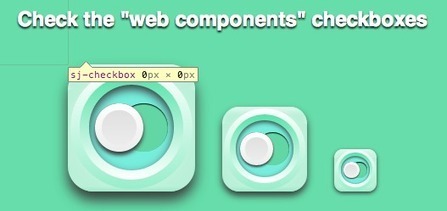
Getting started with web components and polymer.js - II

Getting started with web components and polymer.js - II | JavaScript for Line of Business Applications | Scoop.it

This article describes still rarely supported Shadow DOM features. 

This article will describe things to improve the checkbox component, that got built up in the last article. By improving I mean making the web component more configurable and making it stylable from the “outside”. Additionally it will cover some mistakes that were made in first place, but let us just dive into it. ;)

No comment yet.
Scoop.it!

Componentised Form Validation for Emberjs

Componentised Form Validation for Emberjs | JavaScript for Line of Business Applications | Scoop.it

Since emberjs has finally been released I thought that I’d update my my approach to form validation to make use of components and a simple controller mixin to keep things DRY.

With this validation solution there are a few thing that I want to achieve:

* Simplified templating. Each input is more than just a simple text box, but comprises label, editbox, validation text and visual feedback. I don’t want to have to type/copy this for every field.
* Validation encapsulation. Each validation form element should be self contained and minimise spaghetti code.
* Async validation support. Some validations happen on the server side (eg, check if email is taken).
* Unobtrusive UI. When a form is initially rendered, don’t immediately start telling the user what they did wrong. Ideally only inform them as they go (after each field loses focus) or when they try to submit.
* Controller integration. The controller should know via a single property if the form state is valid.

No comment yet.
Scoop.it!

Enhancing AngularJS $log using Decorators

Enhancing AngularJS $log using Decorators | JavaScript for Line of Business Applications | Scoop.it

AngularJS has a great hidden feature $provider.decorator() that allows developers to intercept services and substitute, monitor, or modify features of those intercepted services. This features is not deliberately hidden… rather it is masked by so many other great AngularJS features.

AngularJS has a built-in service $log that is very useful for logging debug and error messages to a console. Using this injected service, developers can easily monitor application workflows, confirm call sequences, etc. And since it is such a common useful mechanism, developers often complain about wanting more features.

No comment yet.
Scoop.it!

Angular.js directives - Difference between controller and link

Angular.js directives - Difference between controller and link | JavaScript for Line of Business Applications | Scoop.it

Angular directives can be a black hole of thoughts, and one of those being, “where do I put code, in ‘controller’ or ‘link’?” The short short answer: ‘link’. The longer short answer: Ask yourself “when do I want my code to run?

* Before compilation? – Controller

* After compilation? – Link

What does this mean? While I would never condone putting DOM manipulation in an angular controller, I see it constantly, and its important to know what is actually going on and when functions are run

No comment yet.