


@myen Over 40 Rapid E-Learning Posts with Free PowerPoint Templates & E-Learning Assets » @scoopit http://t.co/fAKKtHID...

 Your new post is loading...
 Scoop.it! @myen Over 40 Rapid E-Learning Posts with Free PowerPoint Templates & E-Learning Assets » @scoopit http://t.co/fAKKtHID... 
No comment yet.
Sign up to comment
Scoop.it!

By Katrina Schwartz
"A group of Harvard researchers is teaming up with schools in Oakland, Calif. to explore how kids learn through making. Through an initiative called Project Zero, they’re investigating the theory that kids learn best when they’re actively engaged in designing and creating projects to explore concepts. It’s closely aligned with the idea of design thinking and the Maker Movement that’s quickly taking shape in progressive education circles.
"Though it’s still in very early stages — just launched at the beginning of this school year — researchers and educators at the school want to know how kids learn by tinkering – fooling around with something until one understands how it works. They want to know what happens cognitively – how this learning process helps form habits of mind, builds character and how it affects the individual.
"To do that, they are working with both private and public schools in Oakland, headed by the Harvard researchers and 15 participating teachers who meet in study groups every six weeks to share ideas and to form a community."
Scoop.it!

By Hauna Zaich Summary by SmartBrief on EdTech
"English teacher Hauna Zaich writes in this blog post how she uses Learnist -- a website that is similar to Pinterest and is designed for educators -- in her eighth- and 10th-grade classes. Zaich uses "Learnboards," which are collections of Web resources, for her flipped-classroom lessons such as instruction on grammar where she uses reading, examples, videos and online activities. "I see so many possibilities for Learnist in my classroom and am excited to apply this innovation to my teaching practice," she writes."
Scoop.it!
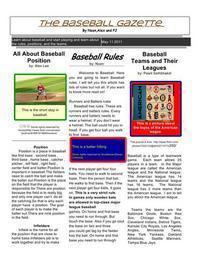
Great Ideas! Love the idea of uploading newspaper to Youblisher. Turns it into a flippable page newspaper. Via KB...Konnected, R.Conrath, Ed.D., Ann Papi Castro, michel verstrepen, Evdokia Roka, BookChook, Beverly Meyer, RitaZ, Pilar Pamblanco, Ana Rodera

Rachel Marker's curator insight,
September 27, 2013 11:30 PM
Could replace monthly newsletter. Student written! 
Kenevie Bryan-Solis's curator insight,
February 4, 2021 12:16 PM
This is such a fun activity for students in which teachers can embed different subjects in one class project.
Scoop.it!

By Diana Laufenberg
"I will be working with a group of roughly 65 professors at West Chester University. I am thrilled to have the opportunity to talk to the about PBL and the pedagogical foundations that support such learning. The organizers of the event did a survey and asked if the attendees had any requests or questions. One consistent theme ran throughout the submissions: How do we create functioning, collaborative groups? So I did a little thinking about the pieces of the puzzle the I consider when to facilitate effective collaboration and searched for some reputable sources for more ideas.
"My thoughts on group work and collaboration:"
Scoop.it!

Twitter Guide Book is a one stop educational source for learning more about Twitter and how to use it including advice for beginners, building your community, twitter for business, managing your Twitter stream and advanced tips. Via Dr. Tom D'Amico (@TDOttawa)
Scoop.it!

Tutorial > http://blog.lib.umn.edu/bhosack/videoant/2009/10/videoant_tutorial_video.html
I came upon Baiba Svenca's Scoop today and went to the site. Spent some time figuring it out and following the tutorials. When finished, I said to myself, "I'm impressed. This is quite a nice, simple video annotation tool. It has considerable functionality and is quite easy to use."
Since it was a couple of years old, I decided to Google it to see if there were any more similar ones. I found there are quite a number of them, and some are quite complex.
Then, I discovered the You Tube Video Annotation Tool [http://support.google.com/youtube/bin/answer.py?hl=en&topic=14354&answer=92710]. Holy Cow! Where have I been? (Apparently, this has been around since Spring 2008.)
This tool is amazing!!! It makes Video Ant, that I was quite impressed with, look like a horse and buggy compasred to an SUV. No doubt, there are, or will be, tools that surpass the YouTube annotator, but for me, now, this offers a dazzling array of functionality. Without spending too much time with it, what I found immediately most impressive is the capability to hyperlink from one video to another - right while the first video is playing. This can turn video videwing into quite a particip[tory experience.
No doubt, many have discovered this before me, but I can't imagine why a lot of folks haven't written about this. For the Flipped Classroom, this offers incredible olpportunities. For student plrojects, again, the possibilities are quite immense.
If anyone has experience using this tool, I'd very much appreciate your adding comments or links below. I want to know more!! -JL Via Baiba Svenca, Jim Lerman

Luis M. Gonzalez Cos's curator insight,
October 14, 2013 2:25 PM
En rubro de herramientras digitales.
Scoop.it!

By Don Power
"Although it’s been around since 2008, YouTube annotations may be one of the most powerful YouTubefeatures you’ve never heard of.
"Annotations are physically viewable, and in some cases, clickable layers that you put right on top of your existing YouTube videos. These layers alow you to add things like text, notes, and links to your videos, providing a more informative and interactive experience for your viewers.
Scoop.it!

Jeff Utecht has put together an excellent series of search lessons on Google for grades K-12. There are 4 lessons in all; this Scoop links to the gr. 9-12 lesson. If you scroll to the very bottom of the page, you will find easy navigation to the K-2, 3-5, and 6-8 lessons. I always look to Mr. Utecht for top notch resources. -JL Via Louise Robinson-Lay
Scoop.it!

Abreena Tompkins, instruction specialist at Surry Community College, has developed a brain-based online course design model based on a meta-analysis of more than 300 articles. In this study, she distilled the following elements of brain-based course design: Low-risk, nonthreatening learning environment Challenging, real-life, authentic assessments Rhythms, patterns, and cycles Appropriate chunking or grouping Learning as orchestration rather than lecture or facilitation Appropriate level of novelty Appropriately timed breaks and learning periods Purposeful assessments Learning that addresses visual, auditory, and kinesthetic learners Active processing with mental models The use of universal examples, analogies, and parallel processing Via Patty Ball, Louise Robinson-Lay, Jim Lerman
Scoop.it!

By Diana V. Faustmann
"Apps for Kids and Games for Kidson the App Store are great places to discover the best iPhone and iPad apps for your kids. They each give you widely praised and award-winning kids’ apps, grouped by type for easy browsing.
"Unfortunately, neither Apps for Kids nor Games for Kids provides an age gauge that tells you which top recommended kids’ apps would work best for your baby, toddler or tween.
"So to help you avoid guesswork, hours of research and wrong choices, we’ve launched iKidsAge. This age-rated version of Apps for Kids and Games for Kids is not as pretty or slick, but it will help you find age-appropriate iPhone and iPad kids’ apps — from among the best of the best — quickly, easily and (a lot more) precisely."
Scoop.it!
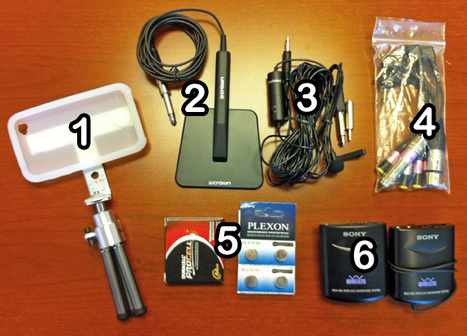
Robin Good: If you are looking forward to find the best tools, apps and hardware gear needed to do quality audio recordings for your iPhone-based video shootings, here is an excellent one.
Jeff Geerling has put together a comprehensive resource guide to external microphones and complementarty tools that can be utilized with most iPhone, iPad and iPod models.
If you are just starting with an effort to do quality audio recordings with your iOS device, you will find a ton of useful tools and resources in this guide.
Recommended. Very useful. Resourceful. 8/10
Video clip comparing audio quality of different microphones: http://youtu.be/yJ06qn0czak ;
Full resource guide: http://www.lifeisaprayer.com/articles/photography/iphone-4-ipad-external-mic-audio-input
Via Robin Good, Anca Toader

Samantha's curator insight,
September 11, 2014 2:31 PM
This article talks about what microphones are best to use when recording with the iPhone, iPad, and iPod. The list was put together by Jeff Geerling with the goal of helping people just beginning with audio. This article is very informative and it splits up into categories. Some of the categories are recording for concerts, interviews, and if you need a mobile microphone. The article include a video testing the audio of all the mice listed as well as where to purchase the mic and how much it costs. Overall this was a very informative and creditable article. 
john peterson's curator insight,
May 20, 2016 10:45 PM
a deep show of different microphones and what they do 
Esteban Pagan's curator insight,
November 11, 2018 10:15 PM
This article by Jeff Geerling shows many tools, apps and hardware, resource guide, videos and articles that you can use for quality audio on iPhone, iPad, and iPod.
Scoop.it!

Description by Internet Scout Project
"Where does all the time go? It's a good question, and Track My Life can help you learn more about how and where your time is spent. The application runs in the background of a user's phone and tracks how much time they spend in any given location. At the end of each day, users can look at a full report to see a breakdown of the places they were and how long they spent in each location. This version is compatible with iPhone, Windows Phone, and Android."
|
Scoop.it!

If you want to create engaging eLearning courses you should start considering one main factor: relevance. This means creating compelling courses that speak directly to your audience.
In eLearning, creating relevant and meaningful experiences for your target audience has always been the best way to capture learners. On the contrary, if your learners have no interest in your course, the information you have sent will convey very little value and success...
Scoop.it!

By Katrina Schwartz
"As the blended learning movement grows in the U.S., schools will need to experiment with what works best in different types of settings. There’s still a lot to learn about different types of blended learning models, and a new nonprofit called Silicon Schools will raise and invest $25 million toward that effort.
"With partial grants from the Bay Area’s Fisher family (owners of Gap), and the advice of board members Michael Horn from the Innosight Institute and Salman Khan of the Khan Academy, the nonprofit, which has raised $12 million so far, aims to fund new and innovative approaches in existing blended learning programs with grants to each school.
"The effort is led by Brian Greenberg, who chronicled the successes and challenges of piloting the Khan Academy in Oakland’s Envision Schools on the Blend My Learning blog. During that process Greenberg and his staff were very open about the pros and cons of integrating technology into the classroom, and other educators added their perspectives to what worked and didn’t work on the blog. Greenberg points to the parts of the program that worked well, namely letting the technology do some of the heavy lifting in terms of grading, lesson planning and collecting analytics that free up teacher time to focus on students."
Scoop.it!

By Alan Jacobs Summary by SmartBrief on EdTech
"While the Internet is heavy with sites and resources to aid students in cheating and plagiarizing, professor Alan Jacobs writes in this blog post that educators increasingly are using technology to catch cheaters. The latest of those tools to gain a following is one offered by CourseSmart that allows educators to track the total time it takes students to read a digital textbook. While some have raised concerns over privacy, officials say students may opt out of the tracking feature."
Scoop.it!

By George Couros
"This is a true story and I will do my best to tell it from my memory… Presenting to a group of staff and students in an Australian school, with them all in the same room (which was something that I think we should do a lot more of!), I talked about the notion of “Digital Footprint”. In this talk, I shared some of the negatives of being online, but also discussing the huge potential you can have by understanding your own digital footprint and leveraging it as well.
"I was actually quite surprised when one of the teachers had stated in front of the students that she would never go on Facebook because she would “lose her job” because of all the stuff (she actually didn’t say “stuff” but another ‘s’ word in front of the kids…wow) she didn’t want others to see in her personal life. As I challenged her on this statement that simply being online does not mean you will lose your job, she backed off but you could see she still did not see that being online in any way could be a good thing for our students, even if they are properly guided."
Scoop.it!

Pathbrite ePortfolios are the best way to collect, track and showcase a lifetime of learning and achievements, and to get recommended pathways for continuous success.
Gust MEES
Very easy to set up and you can chose your own categories to make it very personal... You can even use it as an ePortfolio to show your skills to future employers...
Read more:
Via Gust MEES
Scoop.it!
From the website
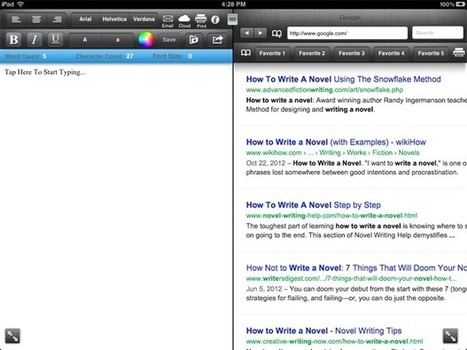
"There's no perfect formula for crafting a novel. In fact, some of the best tales that withstand the tests of time are the ones that break the rules and invent a new narrative. The simplest of ideas can blow up into 100,000 words of masterfully crafted storytelling with proper development. While the words are the most important part of any novel, what is a craftsperson without his or her tools? We've collected eight apps that will help you turn aspirations into novelizations. These come just in time to join the scribbling scribes participating in National Novel Writing Month (NaNoWriMo), so grab them and embrace your craving to compose some prose." Via Jon Samuelson, Jim Lerman

Katherine Conner's curator insight,
March 29, 2013 1:39 PM
Everyone, without exception, requires a tool to complete the task that they were employed to do. Often, when writing, people may not know where to begin. They may not have any idea as to how to organize their thoughts. The applications suggested by AJ Dellinger on Mac Life seem like an excellent way to structure not only the key points within your story, but also helps you structure your time in order to incorporate those key points. The application "Novel in 30" allows the user to set a word count target, and a deadline goal. It also allows you to sync the document between itunes and allows the use of Dropbox for easy access. "Writers App" helps structure all ideas dealing with plot, character, and setting. "MindNode"allows the user to create a literal map of their thoughts, and therefore allowing the user to re-create or continue their previous thought process at a later time. Other applications discussed in this article assist with research, brainstorming, timing, and even publication! I think these applications will prove to be powerful tools not only for aspiring novelists, but also authors who are veterans of the writing and publication processes. Each story that a person decides to tell is individual, so each journey to bring that story to an audience is just as individual.
Scoop.it!

By Tim Schmoyer
"YouTube Annotations are an important tool for any online video producer on YouTube, but many people either don't know how to use them nor use them well. This is not a tutorial on how to create annotations on your videos — there are plenty of those around on YouTube already. This is a look at how to use annotations to effectively engage with your viewers, how to use annotations to get new subscribers, how to introduce viewers to your other videos, and promote interaction with your audience."
Scoop.it!

From the website
"No doubt all our readers in the education field are well aware of the explosion of iPads and tablets in the classroom and their ability to make learning easier and more interactive. But we suspect at least some of you are still reluctant to turn the new tech loose on grading, an area where you could be needlessly wasting hours assessing students with an antiquated system. We know change can be daunting, but we promise that within this list of apps teachers love, you’ll find something you love, too."
Via Louis Robinson-Lay
Scoop.it!
Affordable webinar software. Create online presentations with synchronized video and PowerPoint. Via Sam Boswell, Louise Robinson-Lay
Scoop.it!

Posted by Katie Lepi
"If helping your students write papers is a part of your school day, you probably already know that there are enough issues to focus on without having to spend a lot of time teaching your students how to build a bibliography and correctly cite their sources. Your time is likely better spent helping create a focused, concise piece of work that uses excellent grammar and sentence structure.
"There are a lot of online bibliography tools out there that can help students learn to build bibliographies and ensure that their citations are correct, without them (and you) spending hours pouring over MLA, APA, or Chicago handbooks. The options include browser extensions, templates, and online citation builders (where you plug in your resource and the citation is generated for you." Via Louise Robinson-Lay
Scoop.it!

By Kim Fortson
"T.H.E. Journal asked eduTecher founder and FETC speaker Adam Bellow and Donna Criswell, an instructional integration specialist at the Sudbury (MA) Public School District, for the most creative storytelling apps available, and we did a little digging on our own, too. The results, listed below, turn students into novelists, artists, and moviemakers, with each tool bringing its own powerful mechanism for transforming the traditional narrative--both inside and outside the classroom."
Scoop.it!

P:osted by Katie Lepi
"It’s easy to see how a free tool that connects you to your students can be helpful. But Google+is not something you simply pick up and assume everyone knows how to use. In fact, I’d recommend making sure everyone you want to speak with actually has an account first!
"Once that’s settled, it’s time to figure out the best ways to use Google+ to host a ‘hangout’ with your students, teachers, parents, admins, or friends. It’s relatively simple but there are a few tips and tricks you should know about in order to make the most of your time hanging out." Via Dr. Tom D'Amico (@TDOttawa)
|





