"If you've ever dreamed of seeing computer science in an informal and "unplugged" setting, this website is for you. Computer Science Unplugged (CS Unplugged) is "a project that provides free games and activities to communicate Computer Science concepts to students of all ages." The site contains 50 different videos in a range of languages and topics like cryptography, binary numbers, and computer programming. Visitors can also look through the Featured Playlists area, which contains a variety of the CS Unplugged staff’s favorite videos. One of the cool things about the site is how interactive the videos are, featuring young people learning about computer science through group activities, games, and treasure hunts."
"Let's talk about LEARNING, not technology! What are some cultural shifts in our fast changing world, that have an impact on our own learning as educators?"
Excellent slide deck from Silvia Rosenthal Tolisano. I wish there were an audio track! -JL
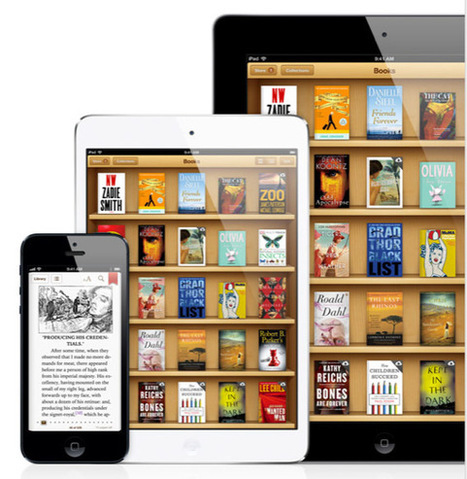
The recently announced iPad mini, along with similar digital tablets like the Kindle Fire and Nexus 7 make for nearly perfect e-reading devices.
Building an e-library is ten times easier than building and maintaining a paper book library.
So after you’ve purchased your iPad, you will want to install at least two e-book reading apps on your device: the iBooks Reader and the Kindle for the iPad. Both are free downloads.
This beginner’s guide recommends apps and features to get you started in building your library. Though the focus on is on the iPad, because it’s the device used for the last two years to build an e-library, the recommendations apply to other devices, including the Amazon Kindle and the Barnes and Nobel Nook. But the iPad offers some extra features that you will eventually find useful over other devices.
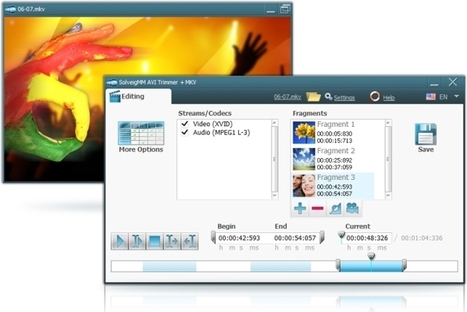
"Almost anyone (with or without experience) can make a good video coupled with a few basic guidelines. With a good video editing software, much more when its totally free, you can create and share your own videos much easier and simpler with the world. With the latest video editing software today, it provides you with the tools you need to capture, edit and share your videos around the world.
"And yes, there are actually a ton of free video editing software available in the Internet that you can freely download.
"So if you are a Windows user and you are fond of creating and editing videos, then here are your 21 best video editing software for free download."
Free online conference Nov. 12-Nov. 16. This event is always great! -JL
From the website
"We are pleased to announce the third annual Global Education Conference, a free week-long online event bringing together educators and innovators from around the world, will be held Monday, November 12 through Friday, November 16, 2012 (Saturday, November 17th in some time zones). The entire conference will be held online using the Blackboard Collaborate platform (formerly known as Elluminate/Wimba) with the support of iEARN worldwide as the conference founding sponsor, who will be running their annual international conference in conjunction with this event.
"The Global Education Conference is a collaborative, inclusive, world-wide community initiative involving students, educators, and organizations at all levels. It is designed to significantly increase opportunities for building education-related connections around the globe while supporting cultural awareness and recognition of diversity. Last year’s conference featured 340 general sessions and 18 keynote addresses from all over the world with over 10,000 participant logins. To attend this year's conference and to be kept informed of the latest conference news and updates, please join this network."
"iPads are quickly becoming a popular and powerful educational tool for classrooms. Beyond the immediate benefit of engaging students, iPads can improve education efficiency and standards. However, many teachers are unsure of how to use them effectively. Coupled with concerns over the costs involved, iPad implementation in schools is seen as an unnecessary and expensive risk.
"As the case studies below demonstrate, iPads are being used in education environments around the world with great success. Teachers can have paperless classrooms, take attendance, share interactive presentations and test their students—all on their iPad."
"Have you ever wanted to learn how to make your own computer games? This is now a possibility, and all one needs to do is look over the excellent "Invent Your Own Computer Games with Python" site. The guide has been written to be understood by people as young as 10 and each chapter gives users the complete source guide, then teaches the programming concepts from the example. There are twenty chapters here, including "Using the Debugger," "Hangman," "Tic Tac Toe," and "Installing Python." Each chapter includes graphics and flow-charts designed to help neophytes get acclimated to the entire experience and process. The work is rounded out by the inclusion of four appendices, including "Common Error Messages in Python."
A $10 million competition to bring healthcare to the palm of your hand.
Imagine a portable, wireless device in the palm of your hand that monitors and diagnoses your health conditions. That’s the technology envisioned by this competition, and it will allow unprecedented access to personal health metrics. The end result: Radical innovation in healthcare that will give individuals far greater choices in when, where, and how they receive care."
"Since we, as adults, did not model appropriate usage for our children and students, they don’t know how to react to these new communication styles, struggling to determine when they should use them and when they should not.This state of “anomie” or normlessness can be frustrating at the very least. This was true with the invention of cars, phones, Walkmen, iPods and is no less true for devices in the classroom.
"Just think about how hard theaters have worked to educate people about cell phone use during movies and plays. Consider the efforts currently being made to prevent texting and driving. Society is working hard to create norms in light of the rapid evolution of new technologies.
"As teachers, we will need to focus on helping students to learn the norms that relate to having devices in class as well as the appropriate context in which to use – or not use – them. We will need to help the students master the social implications of using these tools appropriately in order to make sure that they add to, rather than distract from, their learning.
HOW IT LOOKS IN THE CLASSROOM
"Given the challenges of piloting programs, integrating technology, and addressing 21st Century Skills, how do we also teach these complex communication strategies? What does this look like in the classroom?"
Three excellent examples of how Tweeting, blogging, and Facebook are used constructively by teachers in real classrooms. -JL
Infographic - 65% of today's grade school kids will end up at jobs that haven't been invented yet. Are our education systems well-equipped to prepare our kids for the life that doesn't exist yet?
"FlipSnack is a free online web tool that allows users to convert PDF documents into Flash page flip books for the purpose of sharing literary work (stories, poems) and/or visuals (pictures, graphs, charts). This very easy to use software only requires 3 simple steps:
1. Upload PDF files 2. Customize the flip book appearance 3. Convert & publish into a flip book
"I really like this web tool because it encourages students to focus on the writing process as the finalized copy will actually be published for the rest of the world to see."
"Pinterest is quickly becoming one of the biggest sources inspiration and innovation when it comes to cooking, design, and education. That’s right, education is a prominent fixture on Pinterest now and that, of course, means that education technology plays a starring role.
"In an effort to help curate the massive amount of Pinterest boards about education technology, you can use the following list as a jumping off point to start your Pinterest journey."
"In my New York Times column on Thursday, I pointed out that Microsoft’s new Windows 8 feels like two operating systems in one. There’s the traditional desktop Windows, best for mouse and keyboard, and the new TileWorld (as I call it), best for touch screens.
"Why “best”? Because desktop Windows has tiny buttons, menus and controls that are generally too small for finger manipulation, and TileWorld is filled with gestures that make sense only on touch screens.
I"f you install Windows 8, you’ll have to learn both environments, like it or not; you can’t live in just one environment or the other. So the question arises: how are you supposed to operate TileWorld if you have a nontouch computer?
"Answer: There are mouse and keyboard equivalents for the touch gestures."
"Created by the TeacherLink initiative at the Utah State University College of Education, this site provides direct access to NASA instructional units and lesson plans. Visitors will note that there are over 40 different resources here, listed alphabetically. The resources are designed for students from kindergarten to college, and they include titles such as "Amusement Park Physics with a NASA Twist" and "Rockets Educator Guide." Another notable item here is the "Packing Up For the Moon" human exploration project, which was created to help young people learn about lunar plant growth. It's a site that teachers will want to bookmark for future reference and share with their friends"
"It is absurdly easy to get hacked. All it takes is clicking on one malicious link or attachment. Companies’ computer systems are attacked every day by hackers looking for passwords to sell on auctionlike black market sites where a single password can fetch $20. Hackers regularly exploit tools like John the Ripper, a free password-cracking program that use lists of commonly used passwords from breached sites and can test millions of passwords per second.
"Chances are, most people will get hacked at some point in their lifetime. The best they can do is delay the inevitable by avoiding suspicious links, even from friends, and manage their passwords. Unfortunately, good password hygiene is like flossing — you know it’s important, but it takes effort. How do you possibly come up with different, hard-to-crack passwords for every single news, social network, e-commerce, banking, corporate and e-mail account and still remember them all?"
The jigsaw technique is a cooperative learning approach that reduces racial conflict among school children, promotes better learning, improves student motivation, and increases enjoyment of the learning experience.
COMMON SENSE MEDIA REVAMPS ITS DIGITAL LITERACY CURRICULUM
By Darri Stephens
"Maybe you’re a third grade teacher looking for a quick activity to introduce your students to effective online searching? Or maybe you’re a middle school librarian who’s been hearing more and more stories about cyberbullying, but you’ve never addressed it before? Or maybe you’re the technology liaison for your school looking to spruce up and inform your own digital citizenship curriculum across multiple grade levels?
"Either way, our new interactive Scope and Sequence makes it easier to browse lessons by grade and by topic and to find resources you can access, digest, and adapt quickly for your classroom.
"Our cross-curricular approach covers eight categories: Internet Safety, Privacy and Security, Relationships and Communication, Cyberbullying, Digital Footprint and Reputation, Self-image and Identity, and Information Literacy. (Read more in our Curriculum Overview). The sequence consists of spiraling units, each containing five lessons that build on one another, reinforcing developmentally appropriate topics through age-appropriate activities.
"If you’ve used our curriculum before, you’ll notice that our units are now organized by grade band, instead of by topic.
"We’ve made these changes in response to educators who told us that they wanted to be able to more quickly navigate and find the content and support with school-wide implementation."
By Jon Mitchell, originally published Aug. 24, 2011
"Today, a NYC-based startup called Jux has launched a personal publishing platform that kicks a field goal right over the heads of Tumblr and the post-blogging crowd. It's a big, beautiful, dynamic tool full of splashy images and sharp Web fonts. It offers six kinds of basic posts: BlockQuote, Article, Photo, Video, SlideShow, and CountDown. You start from there and build huge, full-screen posts that suck the viewer in. It's like a blog that can crank out whole About.me or Flavors.me pages for every post. You have to see itto get how powerful it is.
"Power, of course, is not everything when it comes to publishing. Jux isn't lean like Posterous or clean like WordPress, whose publishing platform powers nearly 15% of the world's websites. Compared to blog posts that feel more like pages, a Jux post is more like a Times Square billboard. It takes some time to load. There's an animated loading bar between screens, especially when editing. But it's worth the wait. Perusing a Jux profile is like taking a deep dive into someone's ideas."
I just came across Jux. It strikes me as a powerful, (relatively) new way to publish on the web. It can also be used to replace presentation apps such as PowerPoint and Prezi. There's a lot happening here. -JL
"Teachers are presenters. Let’s be frank. They get up in front of a room of people and present. They then encourage the students to work together and continue the presentation through other methods. in other words, teachers need to know how to present and create slideshows. If you’ve been hunting around for a few free presentation tools for teachers, then you’re in luck.
"Here are three of our recommended tools for teachers, admins, students, and just about anyone looking to show up to class with a kick-butt set of informative slides."
Animoto, Knovio, and Zentation - each with a useful description of key features. -JL
This is a nice little blog site devoted to the production of short videos that help teachers and learners use technology effectively in the teaching-learning situation. Started in 2010 by Emily McWorthy and Alan Paterka, in 2012 Emily and Alan [As they seem to prefer being known - I wish people who publish on the web would all make it easy to find their full names - sometimes it is so difficult.]. by 2012 they seem to have hit on a format of a monthly video of 3 minutes or less.
T4LT takes a single topic, explains it, and describes how it can be used in a learning situation. Alan and Emily are earnest people who seem very eager to share information they believe will be helpful. Viewers will not find a lot of razzle-dazzle here, or efforts to be rock-star ed tech gurus, just a couple of nice folks who want to let you know what they think is good.
Recent videos have focused on ePortfolios, Link Shorteners, To-do Apps, Pinterest, and QR Codes. Interviews with colleagues from Kirkwood Community College are also sprinkled among the selections. Good job Emily and Alan, keep up the solid work. -JL
To the many of you who sent good wishes over the past week, thank you so very much.
At 4:33 am today (Saturday) our electricty finally came on, and the darkest days of Sandy have now moved behind us. It's been a long and difficult week, but for us, at least, the worst is over and we can start getting back to "normal."
Yet, there are so many thousands throughout the region who have simply lost everything; and worse, have lost loved ones as well. We consider ourselves fortunate that our experiences were merely ones of uncertainty and inconvenience -- many have been pushed to the breaking point. Their ordeals are far more devastating and long-lasting; some perhaps, never to be fully overcome.
In times like these, our thoughts turn to questions and affirmations...of wondering why such things occur and how one's life fits into the grand scheme of things...as well as recognizing once again the significance of family, friends, and enduring values.
On a personal note, we urge you to do whatever you can to help alleviate the suffering of the many left in need by this storm. In addition, please make every effort to vote on Tuesday (and assist others who may have difficulty getting to the polls). The stakes have rarely been higher for choosing the correct direction.
"When the focus of technology is on the teacher and teaching not learners and learning, it is easy to see EdTech as a failure: a waste of time, money, and resources. For many of us, we’ve argued for a move away from teacher-centered only to find a movement and investment in EdTech that is the antithesis of such a movement. We’ve simply added teacher-centered technology to teacher-centered classrooms.
"Is it any wonder we find ourselves unable to fulfill the promise we’ve preached about EdTech?
"The expectation is that the teachers have the latest and greatest technology for teaching. Yet, there is little concern about what the students have in their hands for learning. This is one of the fundamental disconnects we experience when it comes to educational technology, when it comes to 21st Century teaching and learning, when it comes to student engagement and empowerment."
"In a traditional classroom, the teacher is the center of attention, the owner of knowledge and information. Teachers often ask questions of their students to gauge comprehension, but it’s a passive model that relies on students to absorb information they need to reproduce on tests.
"What would happen if the roles were flipped and students asked the questions?
"That’s the premise of the Right Question Institute and a new book by its co-directors Dan Rothstein and Luz Santana. The book, Make Just One Change: Teach Students to Ask Their Own Questions, documents a step-by-step process to help students formulate and prioritize questions about nearly everything.
"Coming up with the right question involves vigorously thinking through the problem, investigating it from various angles, turning closed questions into open-ended ones and prioritizing which are the most important questions to get at the heart of the matter."
"Evernote has become something of an indispensable tool for compulsive note takers, a group that will no doubt be happy to hear that a major update to the Mac version of the app has been announced. Evernote 5, as it's called, has been in the works for more than a year according to its developers and will feature a refreshed UI in addition to more than 100 new features.
"The revamp is intended to improve usability by current devotees in addition to making the app more accessible to new users. Evernote is offering a sneak peek at the app's new functionality in the form of a video, which we've embedded below, and intends to make a beta version of Evernote 5 available for download the week of October 29."
EssayTagger's Common Core Rubric Creation Tool. http://www.essaytagger.com/commoncore. You are ahead of the curve and are working hard to align your curriculum to Common Core. But assessing and tracking your ...
To get content containing either thought or leadership enter:
To get content containing both thought and leadership enter:
To get content containing the expression thought leadership enter:
You can enter several keywords and you can refine them whenever you want. Our suggestion engine uses more signals but entering a few keywords here will rapidly give you great content to curate.


 Your new post is loading...