Quick and easy way to take a photo of your computer screen.
Description by the Internet Scout Project
"Looking to grab a slice of your computer screen for later use? ScreenSnag has got you covered. This version allows users to capture the entire screen (or just a defined section) with a single click. Visitors can also use the Timer option to perform captures at select intervals. This version is compatible with computers running Windows XP and newer."
"Several of us at ProfHacker incorporate blogs into our pedagogy, and we have written on a range of course blog-related issues such as “Integrating, Evaluating, and Managing Blogging in the Classroom” (Julie) and “Tools for Managing Multiple Class Blogs” (Amy) among many others. In this post we (Jeff and Julie) will offer a few specific tips for evaluating course blogs and addressing the common question “how are you going to grade this?”
No matter how the evaluation criteria is spelled out on the syllabus and reiterated throughout the course itself, students are likely to continue to ask “how are you going to grade this?” Jeff notes he also receives this question frequently from other professors when they hear about his blog-related assignments."
Robin Good: The PanaCast Experience is a new prototype video camera capable of a 200° field of view, live streaming, and with the integrated ability for each viewer to custom select dinamically his favorite point of view.
"In videoconferencing applications, the Panacast goes beyond a stationary, rectangular screen by providing a real-time panoramic view of the room and giving users the ability to pan and zoom the scene from their computer or mobile device."
"The PanaCast uses a system of six cameras to capture HD video at 60 frames per second, and a custom-developed video processor that synchronizes and stitches all the images in real time to create a single, 200-degree panoramic view of the room."
The Panacast camera itself runs an instance of the Linux operating system and features a dual-core ARM 11 processor.
"Altia’s server then uses a low-latency encoding process that allows you to stream the video over a cellular or Wi-Fi connection, unlike some videoconference systems that require dedicated bandwidth.
Remote participants can view video using the company’s Mac or Windows app or on their iPhone or Android devices.
On mobile devices, you can use familiar touch gestures, such as pinch-to-zoom and swiping left or right, to zoom in on notes written on a whiteboard or to pan over to a speaker on the other side of the room."
You may have been given a ‘once-in-a-lifetime’ opportunity to plan and design a technology rich learning space. It may be a refurbishment of an existing space or a new build. You want a space that will be inspirational for learners and others, yet practical in that it must meet the multifarious needs of a variety of users. And is it possible to future-proof for tomorrow’s technology? So where to start? That is where our ‘Planning and Designing Technology-Rich Learning Spaces infoKit can help you.
"Our recent post Are You Ready to Remix Your Curriculum? outlined some of the problems to be overcome in the remix revolution, as well as several of the reasons that it is an inevitable part of the future of education. Remixing the curriculum – compiling resources from a variety of sources such as free online texts, proprietary information from publishers, and self-created media such as podcasts – is starting to push its way into K-12 and higher education. Get ahead of the curve with these tips for remixing your own online course materials.
Gathering the Ingredients Before Remixing
"Like any course development process, there is a good deal of research that goes into remixing the contents of a new or existing class curriculum. Beyond your own knowledge and expertise, providing high-quality resources for your students is the key to a successful class. This is just as true for a course which relies heavily or exclusively on free online resources. There is no need to dive right into the deep end though.
"Consider including a small selection of remixed materials at first and expand each time you teach the class. Start shopping early and evaluate materials you find with the same eye towards fulfilling or supporting your course objectives that you would normally use. Where you look for these materials will depend on the content of your course, but some general places to start searching for learning resources, free texts, and videos are:"
"I recently had the privilege of attending the first iPad Summit hosted by Ed Tech Teacherat Harvard Medical School. The conference brought together over 500 educators and experts from around the globe to consider one digital tool — the Apple iPad. The conference was one of the most innovative and exhilarating experiences I have had as an educator.
"This conference was unique: It didn’t focus on pedagogy or broad tools or philosophy. Instead, participants gave all their attention to a single piece of technology and how it might be applied in the realm of education. Speakers came from a broad array of backgrounds and experiences: school administrators, educators from shared platform classrooms, educators from 1:1 programs, technology coordinators, educational consultants, and educational researchers. They shared their experiences, successes and failures, and visions for the future.
"The keynote speaker was Tony Wagner, Ph.D., Harvard professor and author of Creating Innovators: The Making of Young People Who Will Change The World. (The photo above is from the book cover.)
"Wagner highlighted the themes of the conference: we must change the framework of education to reflect what our students need in the world today. Tools like the iPad allow educators and students to be creative, flexible, and innovative in ways never before seen. The same-old-same-old approach in education has only been driving the failure of the American educational system. If we want different results, we need to do something different."
Good links here to additional information on what looks to have been an excellent conference. -JL
"My daily PLN reading seems to be full of stories about how to use iPads in the classroom. While this is certainly important information, I believe our Twitter feeds could use a few more stories about the positive impact the introduction of iPads are having in schools.
"Our school has been working with iPads for three years now and I can easily say that these have been the most exciting years of my educational career.While the decision to share these positive results is a direct result of the positive impact on student learning, it is also important to realize the impact this initiative is having with teachers. I’ve observed the collective knowledge base of our teachers grow at a rate that far exceeds any other period of time in my 13-years at this school.
"I’ve never observed anything else that has had the impact on teacher personal learning like the introduction of the iPad.
"Our focus over this three year period has been to define what it means to teach in a way that allows students to learn differently as a result of this incredible influx of technology. While this project has probably been one of the most difficult things I’ve had to lead as a principal, the changes I’ve observed in teaching style as a result of this project is likely the most amazing thing I will ever have the privilege of being a part of."
"I see teachers learning more each day about what it means to become a facilitator of student learning. I see teachers who understand that students have access to unlimited numbers and types of educational resources and teachers that allow students to take more control of their learning. I’m fortunate enough to work with educators that understand our role is more about developing students that know how to learn than it is about filling their heads with rote knowledge.
"I believe that the most successful of the students we are educating today will be those that can find information the fastest and know best what to do with that information. I am simply blown away at the impact this initiative has had on the way our teachers teach and the way students learn."
"A middle-school teacher in Amherst, N.Y., has adopted the flipped instructional method -- with a twist. Rather than creating instructional videos for his students, Rob Zdrojewski has his students use screencasting technology to create instructional videos for teachers. In the videos, which serve as professional development for teachers, students offer instruction on technology, such as using Gmail and Google Drive. Each video is 90 seconds or less."
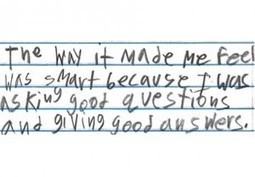
A Simple Strategy for Teaching Students How to Think We believe that knowing how to ask questions is a foundational skill that is essential for all learning.
Students who ask questions, who ask good questions, and who can set and follow a line of inquiry will succeed at a far higher rate than those who either do not know how to formulate their own questions or simply fail to regularly generate their own questions.
The ever-inventive Ozge Karaoglu has selected 18 web 2.0 tools and offers suggestions for how to use them to break the ice and warm up classes of young people...either in the beginning of the year, or whenever it seems like a productive thing to do. As always. a top notch selection of tools and ideas. -JL
We are excited to announce that the Public Resources feature is now available for instructors!
Educators can enrich their classrooms by browsing through and downloading diverse content shared by other Schoology instructors from across the world. Posted content includes lesson plans, reference materials, discussion concepts, and much more!
"Label 59 is a web application that lets you label anything interactively. It is ideal for creating engaging presentations that have interactive labels attached to them. These labels are hotspots on the photo and are represented by markers. You then define content for each of these markers by adding connectors, arrows, tooltips, text blocks and details window.
What you get as a result, is an impressive presentation (in Flash or HTML5) that highlights the key points on your photo when markers are clicked or when the mouse pointer hovers over them.
For a long time now I have been looking for a tool that enables instant polling in the classroom or in the lecture room. I specifically wanted something that; doesn't require registration (especially from the people I'm polling), updates very quickly, works on any platform from computers to mobile devices
It looks like I have finally found what I've been looking for and best of all it's free. The tool that I have found is Mentimeter and it does all of the above.
"Want to listen to any article on the go? It's all very possible with SoundGecko. This application will create an audio version of web articles, pages, and so on with just a few easy steps. Essentially, it's a text-to-audio service that lets users enjoy written content on the go. The free version allows users to listen to up to 30 web articles or pages per day, and subscribe to one RSS feed. This version is compatible with all operating systems, and it includes a demonstration and FAQ area."
"Most of us turn to the internet when we are looking for resources to use for a presentation, report or article. The internet holds the key to so many robust resources.
"Yet how many of these resources can you legally use for free? How many of them can you adapt?
"That’s where Open Educational Resources (OER) can help. Here’s an infographic from the Center for Open Educational Resources and Language Learning (at the University of Texas at Austin) that can help."
Integrating smart technology in public transit improves operational efficiency and reliability through real-time tracking and predictive analytics. Dynamic scheduling and route optimization adapt to changing conditions, ensuring optimal service delivery. Smart technologies enhance the passenger experience with mobile apps for ticketing and real-time updates, alongside amenities like Wi-Fi and charging stations. Safety and security are bolstered by enhanced surveillance systems, automated alerts, and health-related technologies post-pandemic. These advancements aim to reinstate public confidence in transit systems.
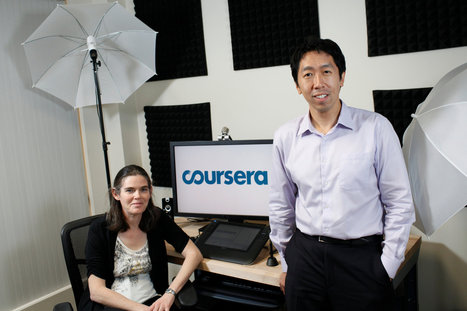
Photo of Daphne Koller and Andrew Ng, founders of Coursera, taken by Ramin Rahimian.
By Tamar Lewin
"While massive open online courses, or MOOCs, are still in their early days, the race has begun to integrate them into traditional colleges — by making them eligible for transfer credits, and by putting them to use in introductory and remedial courses.
"On Tuesday, the American Council on Education, the leading umbrella group for higher education, and Coursera, a Silicon Valley MOOC provider, announced a pilot project to determine whether some free online courses are similar enough to traditional college courses that they should be eligible for credit. "
"The Internet makes it easy for teachers to network, view video examples of colleagues' work and even make some money sharing their own work with others. Sifting through lesson plan resources online can be a daunting task, but the good news is that there is a lot out there and much of it comes free of charge.
"Every teacher is only a few clicks away from a vast community of educators who share common goals, face the same challenges and continue to search for similar solutions every day.
"Education Dive keeps tabs on a wide range of online resources for educators, and these are 19 of the sites that impress us the most with their lesson-planning libraries:"
Where did you learn to ask questions? Did you know the skill of asking questions is not used, shared and definitely not taught very well? Even worse, educators are given little training and often indirectly discouraged from spending time on teaching the skill. There's good news with a deceptively simple solution to the problem. Its called the Question Formulation Technique™ and you have a chance to learn and experience it!
Speaker Dan Rothstein is co-director of the Right Question Institute which had its first offices in Somerville. Dan and co-author, Luz Santana, wrote the book Make Just One Change: Teach Students to Ask Their Own Questions published by Harvard Education Press. Category: Education License: Standard YouTube License
To get content containing either thought or leadership enter:
To get content containing both thought and leadership enter:
To get content containing the expression thought leadership enter:
You can enter several keywords and you can refine them whenever you want. Our suggestion engine uses more signals but entering a few keywords here will rapidly give you great content to curate.


 Your new post is loading...