


Screencasting tools are a popular option for use in schools. At their most basic they allow you to record a video of what is on you
Via paul rayner

 Your new post is loading...
 Scoop.it! Screencasting tools are a popular option for use in schools. At their most basic they allow you to record a video of what is on you Via paul rayner 
No comment yet.
Sign up to comment
Scoop.it!
Scoop.it!

Scoop.it!

Free resource of educational web tools, 21st century skills, tips and tutorials on how teachers and students integrate technology into education
Scoop.it!

Your students probably already use these tools to write papers or create presentations, but they could be doing other projects you may not have thought of.
Scoop.it!

From
gijn

Whether it's tables of data embedded in reports or spreadsheets saved as PDFs, journalists get lots of data in PDF format. But until you get that data into a spreadsheet, there’s not much you can do with it. Luckily, there are a few great tools that can liberate your data quickly and with relative ease.
Via Stéphane Cottin
Scoop.it!

The study analyzes the improvement in generic competences through e-portfolio/PLE platform and didactic planning. The new version of the platform, Digital Folder, contains utilities for students and teachers and some PLE components that help the learning process through e-portfolios. Didactic planning is compared for students from the University of Vic and the University of Barcelona, with a total of 61 participants. A questionnaire has been applied for measuring the use of functions and how much these functions aid in the improvement of the generic competences (reflection, planning and selection of information). The results confirm that the most helpful functions for students are: the Schedule, the Academic tasks, the Teacher’s portfolio and Dialogue with the teacher. However, the implication of these functions in the improvement of the competences depends on didactic planning overall for reflection on learning. Via Edumorfosis, Teacher Rose

Edumorfosis's curator insight,
July 16, 2017 10:40 AM
Descarga la traducción al español de esta interesante investigación.
Scoop.it!

Have you ever used MS Word to write your blog posts and wondered if there was something more blogger-friendly out there?
Via Edumorfosis
Scoop.it!

"The right education technology can increase student engagement, enhance student learning, and save valuable instructional time. But with countless ed tech options available, finding the best tools isn’t easy. That’s why we’ve put together a list of our favorite ed tech apps, tools, and resources for the upcoming school year." Via EDTECH@UTRGV, Elizabeth E Charles
Scoop.it!

If you’re looking for a fast way to get news updates from specific sources, RSS is still the best way to go about it.
Via Serge Courrier
Scoop.it!

Triventy is a free quiz game platform that earlier today I introduced to a great group of teachers in New Hampshire. The concept behind Triventy will feel familiar to anyone who has used Kahoot or Quizizz. Triventy differentiates itself from Kahoot and Quizziz by allowing you to accept question suggestions from students. In the video embedded below I demonstrate how to create a quiz on Triventy and accept question suggestions from students. Via Gumersindo Fernández, Ressources pour les cours d'anglais
Scoop.it!

In the last ten years, technology has changed the way we work and communicate with others — and it’s also changed how we interact in the classroom. In fact, some educators argue that technology can improve the classroom by eliminating the need for a physical one, and allow students to learn remotely, from wherever they do their best work. While it’s still too early to know if this is the most effective way to teach, it’s important to stay-to-update on these innovations in education and see what we can learn from them. In these TED talks, students and educators share their … Via John Evans
Scoop.it!

You probably have seen them before, whiteboard style animations are everywhere online. They are used by profit and non-profit entities to advertise, educate or to simply communicate effectively. Two popular educational YouTube channels that use this animation style are TED Ed and RSA Animate. In short, whiteboard animation (also called video scribing or animated doodling) is a video clip in which the recorder records the process of drawing on a whiteboard while using audio comment. The final result is a beautiful synchronization of the drawings and the audio feedback. In education, whiteboard animation videos are used in language teaching/learning, in professional development sessions, to create educational tutorials and presentations and many more. In today’s post, we are sharing with you some good web tools you can use to create whiteboard animation videos. Check them out below and share with us your feedback in our Facebook page. Via Edumorfosis
|
Scoop.it!

Last week, my students began reading excerpts from The Sixth Extinction to complement our Environmental Unit. I shared the PDF version because our library only had a few copies of the book. When my students asked me how I wanted them to Via paul rayner
Scoop.it!

In his second post on digital teaching skills, Nik Peachey takes a look at creating collaborative digital writing tasks using PrimaryPad. Via Nik Peachey

Nik Peachey's curator insight,
August 10, 2017 12:49 AM
The second in my series of blog posts for CUP.
Scoop.it!
Free resource of educational web tools, 21st century skills, tips and tutorials on how teachers and students integrate technology into education Via Maria Margarida Correia, Timo Ilomäki

Anthippi Harou's curator insight,
August 2, 2017 5:40 AM
Great Tools --> Create Interactive Video Quizzes

Claude Tran's curator insight,
September 13, 2017 12:28 AM
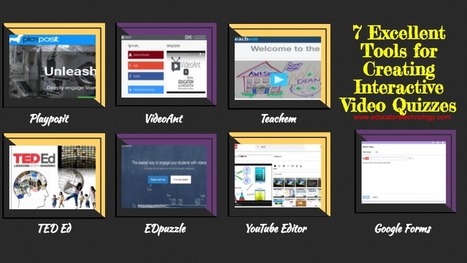
These are tools you can use to design quizzes based on selected video content. They allow you to import video clips, add a variety of interactive features to them (e,g different question types, comments, notes, links etc) and share them with your students. Some of these tools include the option to track student progress and access stats on how students are interacting with your video quizzes. Share with us in our Facebook page if you have other suggestions to add to the list.
Scoop.it!

You probably already know that video can be an excellent medium for training. But before you get started building your video, you need to decide what type of training video to create to get the best results. Via Edumorfosis
Scoop.it!

Free resource of educational web tools, 21st century skills, tips and tutorials on how teachers and students integrate technology into education
Scoop.it!

Fotostars is a free online photo editor that includes over 50 photo effects that will add a unique style and character to every one of your photographs. To use the online photo effects, just choose the effect you like from the list. You will see results and your photo’s transformation right away. Via Nik Peachey, Teacher Rose
Nik Peachey's curator insight,
July 16, 2017 1:55 AM
A useful and easy to use free online image editor.
Scoop.it!
A video summary of my blog post: http://peacheypublications.com/10-free-tools-for-building-blended-online-learning Via Ana Cristina Pratas
Scoop.it!

Free resource of educational web tools, 21st century skills, tips and tutorials on how teachers and students integrate technology into education Via paul rayner, ernestprats, Jim Lerman
Scoop.it!

"Creating and writing lesson plans are activities common to basic teacher education courses. Before entering a classroom, young educators are taught how to meticulously plan their time for the benefit of their students. The most obvious way that teachers avoid the traditional lesson planning concept is by finding ideas, or even entire plans, online ..." Via Leona Ungerer, Dean J. Fusto
Scoop.it!

The process of creating and publishing videos can be a great way to get students excited about researching, storytelling, and sharing Via Becky Roehrs, Mark E. Deschaine, PhD, Suvi Salo

Becky Roehrs's curator insight,
June 16, 2017 12:00 PM
Amazing array of tools provided-with explanations on why the tool is the best for your project...
Scoop.it!

"Education technology is one of the fastest growing sectors in the US and the national education market is already a $1.3 trillion dollar industry. AR is important for education technology innovators because it can offer significant benefits." Via EDTECH@UTRGV, WebTeachers

Daniel Collins's curator insight,
July 23, 2017 10:43 PM
A look at AR and its educational benefits for both children and adults.
Scoop.it!

SuperTeacherTools provides free programs to assist teachers or anyone else looking for fun review/training/classroom management materials.

Oskar Almazan's curator insight,
June 15, 2017 4:32 AM
Every single part of this site is free. 100% free. All of the work that I do on this site and all of the infrastructure that makes everything work is supported by ads. If you ever arrive at a page that is asking for any type of credit card or Paypal information, you may have inadvertently wandered away from our site. When in doubt, post a new support ticket here and I can help. |





