



We have launched WizIQ Recordor: an amazing lecture-recording software designed exclusively for your teaching needs.
Via Baiba Svenca

 Your new post is loading...
 Scoop.it! We have launched WizIQ Recordor: an amazing lecture-recording software designed exclusively for your teaching needs. Via Baiba Svenca 
Scoop.it!

Digital storytelling is a powerful way to engage students in the writing process. Whether they are telling stories from a summer vacation or writing a persuasive essay on a community issue, technology tools can help motivate reluctant writers. Students can use their writing, audio recordings, video creations, illustrations, and images to create a digital storytelling product that demonstrates their understanding of a concept. Via John Evans
Scoop.it!

“Typical presentations are dull affairs with text and corporate backgrounds providing little of interest. Microsoft knows this. They even released their own PowerPoint alternative called Sway.” Via Baiba Svenca, Timo Ilomäki, Juergen Wagner, David M

John Gravitt's curator insight,
February 4, 2015 9:09 AM
Make sure you have a strong connection. Test before you present.
Scoop.it!

In this quick post I am going to explain how to use a frame- work for project-based learning, which I have developed and used over the years. I like to use a lot of projects in my classes, but over... Via TeachingEnglish
Scoop.it!

Here is a big categorized list of YouTube channels that provide quality educational videos regularly. Via EdTechReview (@etr_in)
Scoop.it!

The Ultimate Guide to Podcasting by Lilach Bullock, Co-Founder of Comms Axis. Learn which tools to use to create podcasts and where to promote your podcast Via Elizabeth E Charles
Scoop.it!

Charlie Chaplin, one of the most legendary figures in the history of cinema, starred in over 80 films. We have created a handy list of 65 Chaplin films that you can watch for free online. Via Manuel Pinto
Scoop.it!

Scoop.it!

"Here are 16 of my favorite presentation tools for teachers and students! Which ones are your favorites?" Via John Evans
Scoop.it!
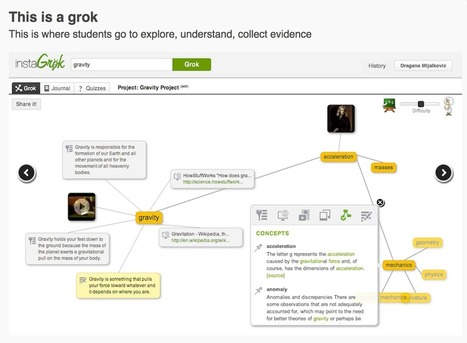
"InstaGrok is an interactive search engine that allows students to search for any topic in a visually engaging way. When students conduct a search query, InstaGrok finds the relevant information related to that query and present it in the form of interactive concept maps (grok). Using InstaGrok, students will be able to explore educational content including videos and images, evaluate sources, collect evidence and use it to craft a search report." Via Frédéric DEBAILLEUL
Scoop.it!
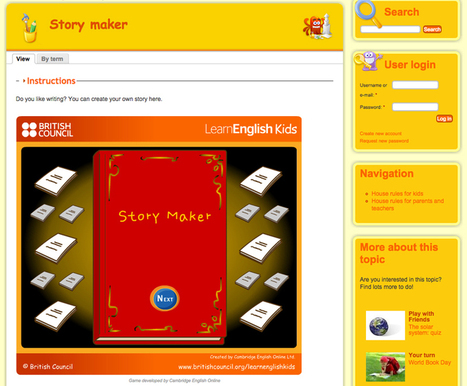
Stories are important. Whether one tells a story to evoke emotion or to gain a new client, there’s a certain simplicity in it that speaks to a lot of people, as everyone has a story to tell. Now with technology, there’s digital strorytelling too. Via Leona Ungerer, Tim Brook
Scoop.it!

Paste your own text here and click the 'Check Text' button. Click the colored phrases for details on potential errors. Via Nik Peachey

David Smart's curator insight,
November 1, 2014 9:10 PM
Help language learners improve their writing skill. 
emilioet's curator insight,
November 5, 2014 4:12 AM
Interessante strumento di controllo grammaticale online
Scoop.it!

The dramatic increase in online education, particularly massive open online courses (MOOCs), presents researchers, academics, administrators, learners, and policy makers with a range of questions as to the effectiveness of this format of teaching and learning. In early 2013, the impact of MOOCs had been largely disseminated through press releases and university reports. The peer-reviewed research on MOOCs was minimal. The MOOC Research Initiative (MRI), funded by the Bill & Melinda Gates Foundation, addressed this research gap by evaluating MOOCs and how they impact teaching, learning, and education in general. This special issue reflects the research questions and methodologies deployed by MOOC researchers over the past year and represents the current front line evaluation of how open online courses are impacting education. http://www.scoop.it/t/easy-mooc Via Lucas Gruez
|
Scoop.it!

Weavly is an easy and fun tool for creating stunning GIF and video mashups online. Give it a try on weavly.com! Via Kathleen Cercone
Scoop.it!


Marta Torán's curator insight,
December 14, 2014 12:55 PM
Una fantástica selección de herramientas y aplicaciones educativas.
Scoop.it!

Last year, Edudemic published a list of the most essential and popular educational tools used in modern classrooms across the globe. Via Becky Roehrs

Becky Roehrs's curator insight,
December 11, 2014 4:12 PM
Who are the top 5? 1. Google Apps for Education: 40 million students/educators can't be wrong-and it has Google Docs and no ads.. 2. Twitter: It's become a place for growing a personal learning network (PLN) among educators and is used in the classroom as well. 3. YouTube: With tons of channels that can help educators, it's the place both educators and students love. 4. Edmodo, like Google Apps for Education, has over 40 million members. It's free and has many options to provide content and assessments for students. 5. Remind made it into the top 5. “Think of it as a combo of sticky note and class newsletter for the digital age,” writes nprED reviewer Elissa Nadworny. “Remind allows teachers to send messages — via email, cellphone, iPad or Android device — to an entire class with the push of a button.”
Scoop.it!
Scoop.it!

BYOD (Bring Your Own Device) refers to the policy of permitting employees to bring personally owned mobile devices, but the term is also used to describe the same practice applied to students using personally owned devices in education settings. What is the meaning of BYOD in eLearning and... http://elearningfeeds.com/9-must-read-articles-about-byod-in-elearning/ Via Christopher Pappas
Scoop.it!

"Want to know which applications the top 12 tech-savvy educators love? Find out which tech apps are great for organizing classes, managing lessons and can save you time in your everyday busy life!" Via John Evans

Diana Engwa's curator insight,
November 30, 2014 9:00 PM
Despite reading up on tons of articles regarding the best and latest Apps in #edtech, I still find a couple of great suggestions. Proves that learning is a continuous journey.
Scoop.it!

Animated GIFs. You see them everywhere, usually as a response, reaction or qualifier that adds extra oomph to any statement. For the longest time GIFs have been associated with the Internet’s funny bone, but now brands are finding ways to incorporate this form of visual content into their marketing. After all, GIFs occupy a space between images and video that leaves much room for exploration. Here we’ll review 12 tools to get you started with creating, discovering and hosting GIFs. Some of the tools below require a bit more practice to master, but you’re guaranteed to find something that’s right for your GIF needs. 1. Giffing Tool This is a Windows tool that allows you to create customized GIFS. With features like trimming video frames, adding text, and quality settings adjustments you can be well on your way to creating a library of GIFs that you can go back... keep reading Via Ana Cristina Pratas, David M
Scoop.it!
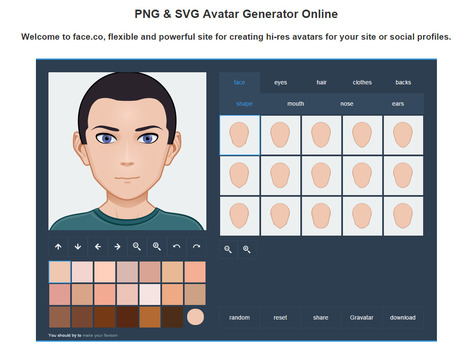
From
face

face.co is a SVG Avatar Generator - Online Vector Avatars Generator for Your Site Via Frédéric DEBAILLEUL

Geofrey van Hecke's curator insight,
November 17, 2014 4:43 AM
Pas mal l'outil de création d'avatar !
Scoop.it!

Seeking tips for using mobile devices in class? Check out these articles, how-to guides and tutorials. Via Jeroen Rougoor

Julio Hinojo Lopez's curator insight,
November 13, 2014 10:57 AM
Una pena que las nuevas tablets de la Junta de Andalucía no permitan la fácil instalación de cualquier app de nuestro interés!!! :( 
Ness Crouch's curator insight,
July 8, 2015 8:36 PM
Can never have too many resources when thinking about mobile devices in the classroom. Excellent How to guides :)
Scoop.it!

The missteps in LAUSD's 1:1 program rollout stand as a costly illustration of the vision, planning, and implementation actually required for successful district-wide technology integration. Via Juergen Wagner
Scoop.it!

There are hundreds of thousands of apps in the Apple App Store right now. Tens of thousands in the education section alone. Via Yashy Tohsaku
Scoop.it!

For a lot of people, a website will be their first introduction to a school. With this in mind, Schudio director Ian Richardson looks at his favourite apps for running a school website. Via WebTeachers
|







un plugin pour powepoint façon MIX
We have launched WizIQ Recordor: an amazing lecture-recording software designed exclusively for your teaching needs.