


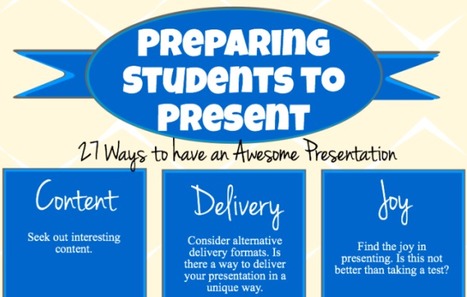

In an effort to help you become the next Steve Jobs of presenting, here are more than two dozen different presentation tips.
Via Baiba Svenca

 Your new post is loading...
 Scoop.it! In an effort to help you become the next Steve Jobs of presenting, here are more than two dozen different presentation tips. Via Baiba Svenca
Scoop.it!
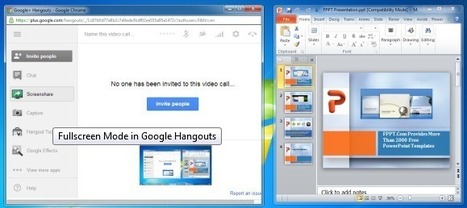
Google Hangouts is one of the best platforms for video calls, conference meetings and even small scale webinars. But Google Hangouts is not just limited to video call functionality, as you can perform a wide range of tasks via Hangouts, including providing online support or presenting presentations. In this post we will show you how to present a PowerPoint presentation using Google Hangouts. You can also use the below mentioned method for presenting your ideas using other applications, be it via a PDF Presentation, Excel Spreadsheet or even a video (e.g. a video presentation). Via Baiba Svenca 
Baiba Svenca's curator insight,
July 16, 2013 12:18 PM
One of the options how you can present to your audience is using Google Hangouts. The post explains what has to be done to launch your presentation on GH. Very useful for small online conferences and webinars. This method can be successfully employed in flipped learning.

Alfredo Corell's curator insight,
September 12, 2013 6:26 PM
Useful for online webinars. Launch your presentations on Google Hangouts (collaborative toll, flipped learning purpouses too) 
Halina Ostańkowicz-Bazan's curator insight,
September 17, 2013 9:15 AM
Now we know how to present a PowerPoint presentation using Google Hangouts. Thank you for sharing.
Scoop.it!

'We took a look at the world’s top 100 brands to determine which fonts, colors and formats were the most popular choices. Our infographic provides some good food for thought if you’ve hit a road block on your latest logo design.' Via Lauren Moss
Scoop.it!

From visual puns to the grid, or what Edward Tufte has to do with the invention of the fine print. Design history books abound, but they tend to be organized by chronology and focused on concrete -isms. From publisher Laurence King, who brought us the epic Saul Bass monograph, and the prolific design writer Steven Hellerwith design critic Veronique Vienne comes 100 Ideas that Changed Graphic Design — a thoughtfully curated inventory of abstract concepts that defined and shaped the art and craft of graphic design, each illustrated with exemplary images and historical context. Via Lauren Moss
Scoop.it!

The use of visual design elements can simplify complex information and make it easier to digest. This collection of infographics for designers covers topics from SEO tips to logo evolution and a Serif vs. Sans battle. Via Lauren Moss
Scoop.it!

Need to create online assessments for a flipped classroom or for a blended learning environment? Here are 26 tools to get you started. Via Pascual Pérez-Paredes
Scoop.it!

A Handy Guide to Everything Teachers Need to Know about Edmodo ~ Educational Technology and Mobile Learning http://t.co/0SN35rz29H #edchat
Scoop.it!

When I was a child, the epitome of chivalry was the scene of the man laying his cape down over a puddle so the woman could cross without getting her feet wet. I’m not sure where this came from, maybe a cartoon or Disney movie.
Scoop.it!

Robin Good's curator insight,
July 6, 2013 12:48 PM
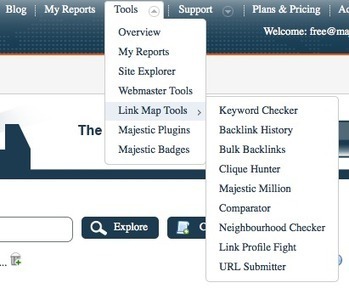
If you want to monitor new inbound links to your site, including their value, linking date, anchor text and more Majestic SEO has introduced recently a free-for-all service that any owner of a verified domain can use on his own site. With SEOMajestic you can also see where there are new broken links on your site. At times these happen just because the page you are linking to on another site has reorganized and its page addresses have alla changed. To access this free service you need to verify your own site either by including a text snippet in your home page meta tags or via Google Authentication. The PRO version, simply extends the powerful capabilities offered by SEOMajestic to the service of analyzing the link profile of any web site. Not just yours. More info: http://blog.majesticseo.com/development/site-explorer-goes-free/ Sign-up + try: https://www.majesticseo.com/account/register Home: http://majesticseo.com/ 
sophiedesc's curator insight,
July 7, 2013 7:35 AM
"Site Explorer lets you: -See your strongest links at a glance – with Crawl dates, Flow Metrics and anchor text. -Lets you see New Links and Lost links in easy to drill down charts with data being updated all the time. -Have an easy way to see a list of your referring domains -A geographical and visual map of where in the world your top 1000 referring domains are hosted -A clear break down of your anchor text with EASY drill down to see the exact links you have for any given anchor text."
Scoop.it!
Robin Good's curator insight,
July 11, 2013 6:16 AM
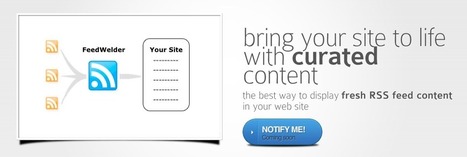
Feedwelder is a new web app for news and content curators that allows you to easily aggregate, mix and filter two or more RSS feeds and then to get a reliable JavaScript code to publish them on your website or bog. Feedwelder does an excellent job of simplifying the need to mix multiple RSS feed together, eliminating duplicates and filtering the resulting mix according to your own specifications. See part of the "mixing" interface: http://o7.no/154QOLH Here is how it works:
The key benefits of using Feedwelder to aggregate and publish RSS feeds on your web site are: a) Faster - Cloud cached feeds for maximum page load speed on your site b) Simpler - Easy to mix and display feeds c) Better looking - White label customizable look My comment: For anyone doing news curation this is as useful as oxygen for humans. Aggregating, mixing and filtering RSS feeds is one of the basic activities of a good news curator and FeedWelder provides a simple tool to do it. The only limitation of this approach remains the one that you are posting a JavaScript code snippet on your page and not the actual content of those RSS feed items. So, if you are doing this with the specific intention of improving the quality of content that search engines will find on your site, this is not going to help you. On the other hand if your first concern, - as it should - is for the end reader, the service provided by Feedwelder can provide a really useful and easy solution for publishing RSS feeds on your site while keeping control on their look. Get invited: http://feedwelder.com/ 
Adam Donkus's comment,
July 12, 2013 9:44 AM
Sweet..I have been using the free script from Google, which is lacking in a lot in the visual department..I will be checking it out..thanks for sharing..
Scoop.it!

Here is a quick roundup of some of the latest happenings in the social media world.
Scoop.it!

Keeping up with all of the required social tags across the various social media platforms can be grueling.
Scoop.it!

Fabrizio Bartoli's curator insight,
July 15, 2013 11:26 AM
Willing to find new ways I already use Pinterest a lot. thansk for sharing- |
Scoop.it!
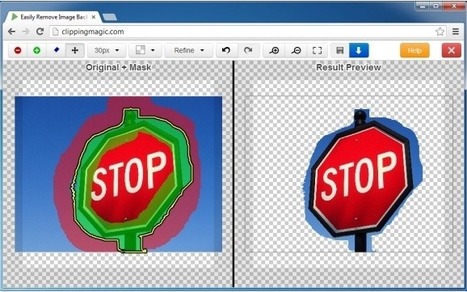
Clipping Magic is a free web app for quickly and easily removing image backgrounds. When using images for PowerPoint presentations, blog posts and other projects, one may require removing their background so that they may blend in with the colors of your presentation slide, blog or canvas. However, removing a background image isn’t easy and being a PRO at PhotoShop is not possible for everyone. Via Baiba Svenca 
Fernando Rodriguez's curator insight,
July 16, 2013 1:18 AM
Great tool!! can save a lot of time and effort. Too bad it does not yet work on Safari!!
Scoop.it!

Kingsoft free presentation 2013, with strong features and totally free PowerPoint replace software. Download the presentation freeware Via Baiba Svenca
Baiba Svenca's curator insight,
July 17, 2013 5:42 AM
Kingsoft Office Presentation 2013 with a new interface and a variety of slide effects including flash, sound, animation effects, etc. is a great alternative to Microsoft PowerPoint which can be downloaded for free. Besides creating a presentation, you can also convert your slides to PDF. There is a large choice of backgrounds and templates, you can also use multiple tabs, spelling and grammar checker and SmartArt graphics. 
lalita pradeep's curator insight,
July 17, 2013 10:37 PM
wow......an asset in free software range.... PPT is most common tool used frequently by one and all....
Scoop.it!
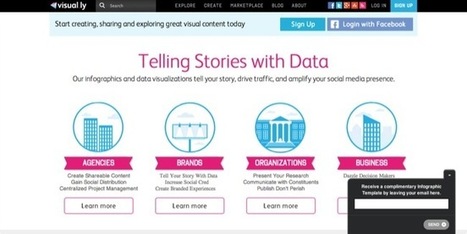
Infographics have become extremely popular online tools to create a compelling visualization by conveying a message much more effectively than a stand alone written article or photo. They must be well-designed and appealing to the eye; these 10 online tools below will aid you in creating infographics to champion your cause and convey a visual message... Via Lauren Moss
Scoop.it!
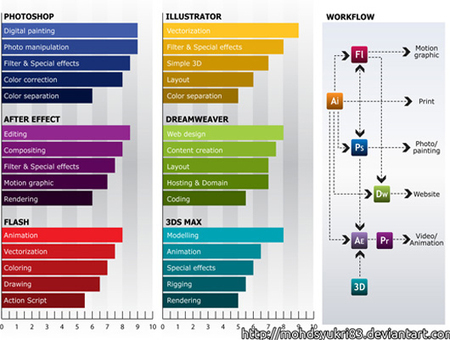
Infographics have become quite popular nowadays since they help people find the right path in the chaos of the crowded online world. So, it is understandable why designers appreciate this trend so much. However, it's always useful to learn a few tips and pieces of advice. In this infographic and related article, you will get more details about design, typography, content, color and more... Via Lauren Moss
Scoop.it!

Pascual Pérez-Paredes's curator insight,
July 3, 2013 1:29 AM
Through Text Analytics Linked In group
Scoop.it!

For our Virtual Identity edition, contributing editor Heather Ford (@hfordsa) explores the complications of attribution and identification in online research. Are members of online communities research subjects, research participants, amateur artists? When is online participation public, private, or something in between?
When I published one of my first studies of online communities as part of my master’s research, I came up against one of the most challenging aspects of online research: how to reflect the identity of one’s research participants. I had been observing an open educational content community and quoted one of the participants’ missives from the publicly available mailing list without referring to his name or username. I had thought that this was the right thing to do: to anonymize the data, thus protecting the subjects. But the “subject” was angry that he had been quoted “without attribution”. And he was right. If I was really interested in protecting the privacy of my subjects, why would I quote his sentence when anyone could probably Google it and find out who wrote it. Since then, my process has evolved a lot, but I still send my research participants a draft of my paper before it gets published so that they can choose whether I a) anonymize their statements b) attribute according to their usernames or c) attribute their full (“real”) names. But the process becomes unwieldy when doing detailed content analysis (or “trace ethnography” as per Geiger and Ribes) on Wikipedia where only some editors accept email and where other editors may have left the project. These are publicly available statements on a website that is explicitly open for copying and remixing, but I’m also taking those statements out of the context in which they are written. This is technically a “remix” but may make some editors uncomfortable. So, do I quote users and attribute their comments to their username on publicly accessible websites like Wikipedia? Or do I need to get their written permission where they choose whether they want me to attribute their name, username, both or neither? Via Andrea Naranjo
Scoop.it!

What if there was a way that you could have dozens or even hundreds of people who are so anxious to read your latest post, they're willing to be notified as soon as you share it? There is.
Scoop.it!

When it comes to business professionals, LinkedIn is probably one of the best platforms out there. Unfortunately, many people are still struggling to leverage it successfully. "Why can't I make it ... 
Dillon Thomas's curator insight,
July 8, 2013 8:55 PM
I have found Linked in to be a single source of connections to people I would NEVER in RL get to meet. So you got one shot .. GET IT RITE.
Dillon Thomas's curator insight,
July 8, 2013 9:47 PM
Linked IN is the Models best resource to meet relevent connections and find jobs. Be thoughtful, use good grammer, choose your links wisely, and always thank people who link to you. Just my Thoughts ...
Scoop.it!

Every week, I share my favorite social media articles from around the blogosphere on Creative Ramblings. Here is my list for July 1-7, 2013: Social Media Mistakes: Why Facebook Can Doom You by Ryan...
Scoop.it!

"How may I help you?" We hear this question everywhere. From stores to customer service, we cannot avoid it. As patrons, we know the deal. We know that the more details we are willing to give staff...
Scoop.it!

Social media is a very dangerous tool to have, especially at work. Here are the top social media fails to stop you doing the same! The over-eager tweeter: 
Tyler Rrokk's curator insight,
July 13, 2013 6:53 PM
Super advise for knowing when enough is enough.
Scoop.it!

A collection of 5 great tool and technology tips that you can action immediately. Check out this easy to follow and very useful article. |









A simple and useful tips-guide (infographic) for your students to present.
Great tips for kids and adults.
Everyone is afraid of getting up on stage and giving a speech or what ever they need to do in front of an audience. These kind of tips are helpful in every way possible especially when someone is nervous. Knowing that we need to just breathe is an important thing. These skills can allow us to get better in our presentations.