


Learn about the 5 most effective eLearning tracking techniques in eLearning that you can use to track your learners’ activity with or without having an LMS.

 Your new post is loading...
 Scoop.it! Learn about the 5 most effective eLearning tracking techniques in eLearning that you can use to track your learners’ activity with or without having an LMS. No comment yet.
Sign up to comment
Scoop.it!


Nik Peachey's curator insight,
December 18, 2014 7:36 AM
Great free HD video clips to use in class for generating discussion. 
jlkpodar's curator insight,
January 16, 2015 12:21 PM
Une collection de vidéos HD originales, qui peuvent servir comme déclencheurs d'écriture en français. 
Craig Van Ham's curator insight,
March 24, 2016 9:28 PM
Great free HD video clips to use in class for generating discussion.
Scoop.it!

Heyday is an automatic journal. It makes remembering effortless, beautiful & fun, so you never forget another day of your life. Via Jon Samuelson 
Nick Urban's curator insight,
July 17, 2015 4:05 PM
I found this one personally interesting because I tried to have my students journal at least once a week for world history class to summarize and connect the main learning ideas of the week or chapter to help them build knowledge. Some students enjoyed this process, but found the means of doing so very bland. This journal app would allow for students to individualize their learning and journals in a more meaningful way to them. I think it would also help to ensure that students remember when the information is due! I may just scoop this up for my class this upcoming year.
Scoop.it!

Last year, Edudemic published a list of the most essential and popular educational tools used in modern classrooms across the globe. While many of 2013′s contenders retain top spots for 2014, there are a few new and noteworthy tools that made it onto this year’s list, and some of last year’s mentions have shifted in the rankings. We highly recommend taking a look at these “battle-tested” teaching tools; some of them may be a perfect fit for your modern classroom. Via John Evans
Scoop.it!

As you might have noticed on big monitors in public places such as train stations or airports, PowerPoint presentations can run independently with an audio commentary without an active speaker. In the following description we will show you how you can easily do the same by adding an audio track to your presentation Via PresentationLoad, Baiba Svenca
Scoop.it!

Digital Student Portfolios are becoming more important now than ever! Students are creating and remixing information like never before – and where is all that amazing work going? At my old school it was wiped off the devices at the end of the year – a heart-wrenching idea that I was personally against. This is why we need to publish student work in one place and let it serve as a home of student reflection, and a become a destination to unleash student pride and curiosity. Via John Evans, Julio Hinojo Lopez, juandoming
Scoop.it!

Baiba Svenca's curator insight,
December 6, 2014 5:32 AM
The content of this slide presentation is actually an infographic with data about 15 most important things you need to know when you are getting your presentation ready. 
Willem Kuypers's curator insight,
December 7, 2014 2:02 AM
Quelques faits très intéressants sur les présentations. 
Jose Pietri's curator insight,
December 8, 2014 3:59 AM
Review all modules with these assertions in mind.
Scoop.it!
Willem Kuypers's curator insight,
December 16, 2014 10:47 AM
Clarification de deux types pensées, tous les deux aussi nécessaires l'un que l'autre. Puis le lien est fait avec l'apprentissage et le mobile. 
James Mackie's curator insight,
December 22, 2014 9:43 AM
Understanding the differences between critical thinking, creative thinking and the intersection of both 
Manú Iñaki's curator insight,
April 7, 2015 9:08 AM
Muchas personas piensan que el pensamiento crítico y el pensamiento creativo son similares o iguales, sin embargo aunque hay áreas comunes, existen diferencias sustanciales, en este post se analiza la diferencia y coincidencia entre estas formas de pensar
Scoop.it!

At CustomShow, we decided to list some alternatives to powerpoint that could help in solving your overall presentation problems. These programs serve many purposes. Via Baiba Svenca, GSeremetakis 
Lino's curator insight,
May 2, 2014 5:50 AM
24 Powerpoint Alternatives & Presentation Programs For 2014 
Alfredo Corell's curator insight,
May 5, 2014 5:18 AM
A new list of the most popular digital presentation tools available. And a very helpful list of advantages and disadvantages for any of the tools.
Scoop.it!

“ May 30, 2014 For those of you who use PowerPoint to create presentations the tips included in this post will definitely enhance your PowerPoint presentations. These tips are about how to record...” Via Javier Sánchez Bolado, Ernesto Cuadra, Farshad Iqbal, GSeremetakis
Scoop.it!

Free online background remover to remove the background from any image or photo. The fastest way to remove backgrounds online. Via Gust MEES, GSeremetakis
Scoop.it!

How many social networks do you use to keep yourself updated on what’s happening amongst your circle of friends and news from across the world? Everyday, with Via Dr. Tom D'Amico (@TDOttawa) , Timo Ilomäki, GSeremetakis 
Michelle Bish's curator insight,
August 17, 2014 1:24 PM
I need a social media feed aggregator but which one? Don't want to spend a lot of time trying each one out... 
Tony Guzman's curator insight,
August 18, 2014 9:34 AM
Howard Rheingold has coined the term, Infotention (http://www.rheingold.com/university/mini-courses/) and this article helps you make more efficient use of your time. 
Michel Müglich's curator insight,
August 19, 2014 3:35 PM
Social Media Plattformen aggregiert nutzen - Tools für mein PLE?
Scoop.it!
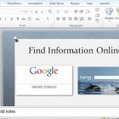
Have you ever wanted to demonstrate a live website during a PowerPoint presentation? Here’s how you can insert a live webpage into a PowerPoint presentation so you can show the exact content you’re talking about. Via Elizabeth E Charles, manueladlramos, GSeremetakis |
Scoop.it!

Tony Bates:
"In education, a ‘portfolio’ refers to a personal collection of information describing, documenting and recording a person’s achievements and learning. Portfolios are used for many different purposes such as a tool for evaluating leaning, for accreditation of prior experience, for continuing professional development, to assist a job application, or for a certification of competences acquired through a course or from work experience . An educational portfolio is mainly used to encourage personal reflection and involves the exchange of ideas and feedback. Many people have already used some kind of portfolio. Most of them have built a portfolio to collect evidence required to get certificates or to show what they have learned in a concrete situation or training. The development of information and learning technologies has led to the development of digital portfolios or electronic portfolios, commonly referred as e-Portfolios."
Scoop.it!

by Med Kharbach
"A few days ago we shared with you a set of useful tips to help you integrate Twitter in your instruction. Today, we have come across this wonderful rubric created by University of Wisconsin that can be a very good addition to the resources we have been featuring here on the educational use of Twitter." Via Jim Lerman
Scoop.it!

You may know TIME For Kids from their classroom magazine and now their Classroom App makes it easy to view this content on a tablet. Their app for iPads can help students build digital literacy skills while learning about current events and reading high quality informational text. Students can access multimedia including video, photos, maps, and other interactive features. Via John Evans
Scoop.it!

The best free sites and apps for teachers and students.
Scoop.it!

It was only yesterday that a colleague asked, "How do you record video on the Chromebook?" While I have always tested video recording with WeVideo, I found myself looking for an app that would record video locally. . .I just hadn't made the time to search. Via Jim Lerman
Scoop.it!
From the rise of visual communication to mobile optimization, top trends in presentations for communicators. Created by Catherine Carr, Haiku Deck's Chief Insp… Via Baiba Svenca 
LucaVanin's curator insight,
December 8, 2014 9:23 AM
Cosa ci aspetta per quanto riguarda le presentazioni del futuro? Ecco alcuni insights molto interessanti su cui riflettere e... lavorare! 
Gianfranco Marini's curator insight,
December 8, 2014 12:04 PM
Una presentazione realizzata con Haiku Deck in 12 slides in cui sono evidenziate le principali tendenze nella comunicazione e che disegnano il possibile futuro delle presentazioni. Molto utile per chi si occupa di comunicazione e, quindi, anche di formazione.
Interessante il fatto che, come sottolinea Baiba Svenca, le stesse slides costituiscano un ottimo esempio di come realizzare una presentazione in conformità con quelli che sono i trend in tale ambito 
MagneticSpeaking's curator insight,
December 9, 2014 1:32 AM
Great insight and advice for presenters looking to take things to the next level
Scoop.it!
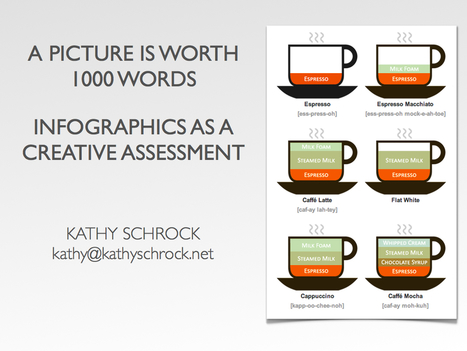
Infographics are a visual representation of data. When students create infographics, they are using information, visual, and technology literacies. This page includes links to help you develop formative or summative assessments that have students creating infographics to showcase their mastery of knowledge. Via John Evans
Scoop.it!

Episode presents players with dozens of animated stories where their choices matter. Episode also empowers writers to write and animate their own stories for our community. Via Nik Peachey, BookChook, GSeremetakis 
Marisol Araya Fonseca's curator insight,
July 30, 2014 12:51 PM
A great free app (iOS + Android) to help students learn conversational English.
Scoop.it!

If you are looking for impressive PowerPoint template designs which may be mind blowing, then it’s time you check out some of the awesome templates at Slide M Via FPPT, GSeremetakis
Scoop.it!

From
oedb

1) Hemingway Editor This is a free Web-based app that lets you paste in your writing to be analyzed and edited for optimal readability. The app quickly ide Via Ana Cristina Pratas, GSeremetakis 
Rosemary Tyrrell, Ed.D.'s curator insight,
August 17, 2014 11:29 AM
Not all are free, but there are some wonderful apps on this list. 
Maryalice Leister's curator insight,
August 17, 2014 8:48 PM
Some new ones listed I hadn't heard of or used. I am off to try them out and you'll have some great new tools if you do too. Easily learned and creates the impact you want. Not just for teachers either. Enjoy! 
Jennifer Lowton's curator insight,
August 24, 2014 7:49 AM
Nice list from Ana Cristina Pratas. I'll have to try Hemingway Editor, Zooburst and GIFBoom soon. |






