 Your new post is loading...
These tools can be very helpful for language teachers. Students can use them to impprove their pronunciation and develop their reading skills. All these tools are easy to use and above all free of charge. Most of these tools are extensions that you can install on your browser.
Via Gust MEES, aufaitLibrarian
Slidedocs help you spread your smart thinking by combining visual communications with short chunks of written copy. Their scannable nature makes them great pre-read, reference, and leave-behind materials. Their modularity makes it easy for people to incorporate your ideas into their own communications. And these features together make slidedocs the perfect companion to both written documents and presentations.
Via Baiba Svenca, aufaitLibrarian
Are you looking for free e-learning images, photos, cliparts or illustrations? In this post I will present you The Ultimate list of Free Stock Photos Sites for eLearning.
Via k3hamilton, aufaitLibrarian
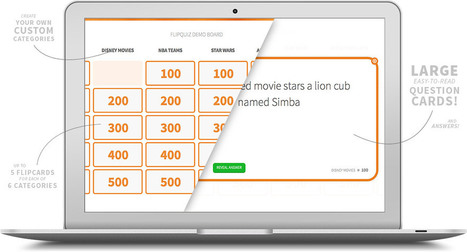
FlipQuiz™ was created to provide educators with a quick way to create gameshow-style boards for test reviews in the classroom. Traditionally, these are created (tediously) using posterboard, chalkboards, or dry-erase markers on an overhead slide. The review questions are usually even written on a separate sheet of paper.
Via Nik Peachey, aufaitLibrarian
Universal design concepts that are most relevant to eLearning design.
Via aufaitLibrarian
Mentimeter allows you to use mobile phones or tablets to vote on any question you specify. Our vision is to improve the meeting between a presenter and an audience.
Via Baiba Svenca, aufaitLibrarian
Google isn't the only game in town and isn't even the best alternative for many specific search tasks and needs. Here's how to escape Google's grip with Bing, Blekko, BuzzSumo, DuckDuckGo, SocialMention, Quantcast, Topsy, Wolfram|Alpha, and more. As concerns over the de facto monopoly status of Google continue to grow, I'm reminded of the great philosopher Herman Cain and his infamous line "blame yourself". As long as "Google" is a generic phrase for Internet search, their dominant position is assured. That said, you can do something about it.There are plenty of Google alternatives and many of these players offer a bettersearch experience, depending on your needs. Here are 12 alternatives to escape your reliance on Google for all things search...
Via Jeff Domansky, aufaitLibrarian
Episode presents players with dozens of animated stories where their choices matter. Episode also empowers writers to write and animate their own stories for our community.
Via Nik Peachey, aufaitLibrarian
Create interactive images with multiple soundbites using this free iOS app
Via aufaitLibrarian
Spundge is an end-to-end content platform for professionals that makes it easy to create, distribute, and monetize your content.
Via Baiba Svenca, aufaitLibrarian
|
"Through the Free Technology for Teachers Facebook page I recently received a request for some suggested online chart creation tools..."
Via Baiba Svenca, aufaitLibrarian
Exposure enables photographers to easily tell vibrant stories with their photos. Assemble a more complete narrative than you could with a feed or lonely photo on a permalink page.
Via Nik Peachey, aufaitLibrarian
Find the visual content you need with our complete list of free image sources, offering high-quality images for your blog posts and social media updates.
Via Jeff Domansky, aufaitLibrarian
On Friday, The Metropolitan Museum of Art announced that 'more than 400,000 high-resolution digital images of public domain works in the Museum’s world-renowned collection may be downloaded directly from the Museum’s website for non-commercial use.' Even better, the images can be used at no charge (and without getting permission from the museum). In making this announcement, the Met joined other world-class museums in putting put large troves of digital art online.
Via k3hamilton, aufaitLibrarian
Do you feel like you don't have enough time? Here's a list of web resources that will boost your productivity.
Via Marty Koenig, aufaitLibrarian
Organize links, articles, places, books or anything on the web into neat channels for personal or public use.
Via Nik Peachey, aufaitLibrarian
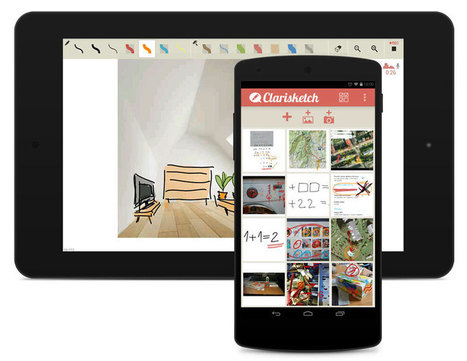
Through the narration and illustration of photos, Clarisketch saves time and improves the quality of messaging using a combination of photographs and annotated commentary. Clarisketch enables you to quickly comment and draw on diagrams, map routes, photos etc and share it with friends/colleagues via email, Facebook, Google+, Twitter or other social networks.
Via Nik Peachey, aufaitLibrarian
So, you need an image for your blog? We’ve spent some time categorizing our favorite sources for free images and organizing them in such a way as to help you find what you’re looking for. Here are ...
Via aufaitLibrarian
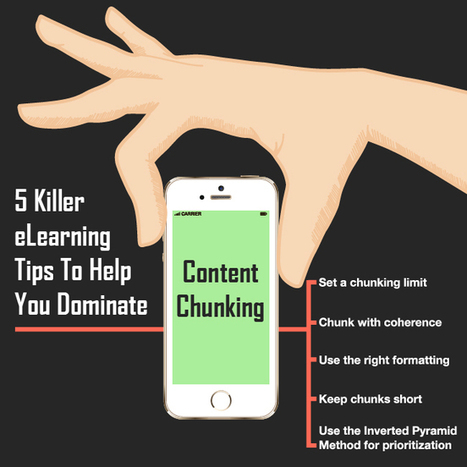
To create an effective eLearning design, developers need to understand the art of chunking by following these rules.
Via k3hamilton, aufaitLibrarian
The How to Stimulate Recall of Prior Learning Infographic refers to Gagné’s 3rd event of instruction and presents ways teachers can determine students' prior knowledge.
Via aufaitLibrarian
|




















Great for preparing for language assessments
10 Free Text to Speech Tools for Educators
10 Free Text to Speech Tools for Educators