Alongside the flagship Nokia Lumia 920 and midrange Nokia Lumia 820, the Nokia Lumia 620 adds more youthful appeal to our Windows Phone 8 range. Compact and fun, it takes advantage of a new ‘dual-shot’ technique to create a variety of interesting new colours and textures.
Dual Shot involves casting two layers of polycarbonate, a single base layer and a second colour, in a transparent or translucent layer, to produce depth effects and secondary colour blends. For example, yellow and cyan are combined to produce an exciting new lime green, our own favourite. What’s more, since the Nokia Lumia 620 uses exchangeable shells, you can change the colour as often as you change your mood with seven shells to choose from.
While this may be the most affordable of our three new Windows Phone 8 smartphones, it packs a punch. The 3.8-inch display has the same sunlight readability enhancements as the Nokia Lumia 920 and Nokia Lumia 820, so you should be able to see what’s on the screen however sunny your surroundings (not a problem for those of us in Finland right now).
It also takes advantage of the same Nokia exclusive camera lenses, like Cinemagraph and Smart Shoot, transforming the creative power of the 5-megapixel camera and front-facing VGA camera. Of course it also has the world’s best mapping and location experience, based on the Here platform, with Nokia Maps, Nokia Drive and Nokia City Lens all available.
Of course, with the emphasis on a younger audience, it also has Nokia Music, providing free streaming of ad-free tracks with no subscription or registration required and the ability to download playlists to listen offline. With NFC connectivity, you can easily pair the Nokia Lumia 620 with one of the great speakers from JBL, such as the JBL PlayUp Portable for Nokia, to set your music free. Or if you want to avoid upsetting everyone on the bus, try the Nokia Purity Pro Stereo Headset by Monster for professional audio sounds on the move. ...
The Windows Phone Store now has over 120,000 apps ranging from photo apps to those that help you stay in touch with friends across the globe. Simply put, there are apps for all uses and all Lumia owners. In fact, of the top 50 apps available for iPhone and Android, 46 of them are available for your Nokia Lumia.
If you’re considering a switch to Nokia Lumia (or just bought one), you might be wondering what apps are available that match up with your old phone. Well, App #Switch is here to show you the way.
The site, created by Xyo, is available now and serves a simple purpose: it allows Android and iPhone owners to select their current phone and current country and type in their favorite app. Then, the site gives suggestions on replacement apps for the source application, complete with QR Codes for easy install on your new Nokia Lumia. ...
Windows Phone 8 can identify a song you hear in a few seconds. Similar to apps like Shazam or SoundHound, but just by using Bing that's already in the OS.
How many times has a song been playing and you’re wondering the band or artist that sings it? Press the Search touch key on your Windows Phone 8 smartphone at the bottom of your device. This will open the Bing search screen.
One of the icons on this screen has a musical note on it. Press that icon and make sure your smartphone is close to the speaker the music. Your phone to be connected to the internet, of course. ...
Creating ringtones on Windows Phone isn't technically a difficult task, but it's not incredibly straight forward either. Nokia has taken steps to address this for its Lumia Windows Phone owners with a new app that's available in the Nokia Collection. Ringtone Maker is a simple app that does exactly what it says on the tin - it enables users to take tracks saved locally on the device and turn them into ringtones.
This eliminates the requirement to upload, edit and save files which is what's necessary to create ringtones in Windows Phone. The only problem with Nokia's ringtone app is that it doesn't appear to support tracks downloaded through Xbox Music (songs downloaded for offline usage, as well as purchased tracks) which is a shame. We attempted to purchase a track from the Store but it still didn't show up when using Ringtone Maker. ...
Want Bing Maps back in your WP8-powered Lumia? There's an app for that.
So you picked up a shiny new Nokia Lumia with Windows Phone 8 and you're happy as can be...until you get to maps. Nokia Maps is an excellent service, but compared to Bing Maps it's not quite up to snuff in terms of its speed and fluidity. Also, in recent weeks Nokia Maps has had a few issues generating detailed information for some areas where Bing originally worked just fine.
Well, it might surprise you to learn that Bing Maps is actually still ticking inside that new Lumia (just try searching for any Local results with Bing and it'll pop you right into the original Maps app). Nokia has simply chosen to hide Maps from the Lumia's app list.
For those who want the best of both worlds, there is now an ingenious solution: Mohammed Adenwala's Maps. Simply put, the app just functions as a shortcut to access the native Maps app that should have been there from the start. Just install it and you're good to go, plus there are no ads. Really, there's no 'app' — it just puts Maps back into your Lumia's app list so you can launch Bing Maps as you should. Kudos to Adenwala for the clever solution to Nokia users qualms.
Download Maps from the Windows Phone Store for free by clicking on the link below, or by scanning the QR code.
Google and Windows Phone haven’t always had the rosiest of relationships. Head to the Marketplace and you’ll find a whopping single app from the Mountain View tech giant. Whatever, we can do without them and their 1st party support when we have developers picking up the slack. However, a lot of you still rely on Gmail as your web email and have no plans to switch to Outlook anytime soon. So here is a super simple trick to make your experience a bit better on your new Lumia 920 or 8X.
No Search on Server for Gmail? Most likely you don’t want to keep your entire inbox on your phone, I personally have most accounts to only keep one week worth of content for any given account. What happens when you search for a term and the email you want is outside that timeframe? You’ll get no results. Some have reported that Microsoft removed the search-on-server feature from Windows Phone 8, though that's not entirely accurate.
The issue? How you initially set up that Gmail account. When selecting what content to sync did you chose email only or include contacts and calendar? Check out the image below and you’ll see where we’re going with this....
Click here Good News, Popular Twitter client glƏƏk! is now available for Nokia Lumia WP8 smartphones over Windows Phone Store. The new WP8 version brings new features like custom wallpapers, voice commands, lock screen features and more, check out the demo video after break.
NEW FOR Windows Phone 8! “Talk” to the app and tell it what to do, like “Compose”, “Reply” and “Quote”! …and use our awesome Today’s Pick wallpapers as your Lockscreen!
glƏƏk! is the not only the most fully featured Twitter client on the Marketplace, but is also the ONLY app that will bring you random tweets (pƏƏks) from users around the world!
With glƏƏk! you get everything you’d expect from a full featured Twitter client including:
View timelines, mentions, friends, favorites View trends, searches, lists and memberships Send tweets, mentions, messages, replies Manage multiple accounts View tweet conversations Full landscape support, including Orientation Lock! Add text effects to your tweets, including ⓑⓤⓑⓑⓛⓔ ⓣⓔⓧⓣ! Pin everything to Start, including accounts, friends and lists! Full Light Theme, Dark Theme, and Today’s Pick support! Easy tap view of videos, images, and locations! View all retweets in a “jump list” Other great added features:
Color coding for Tweeps! Extras, like Ringtones & SnƏƏk PƏƏps! Adjust your Font Size Mute Apps/Tweet Via Sources! Optionally view Media/Images Inline More Live Tile/Notification updates! Mute Users, and Clear Timelines! People Search! Integration with Local Scout! Pocket (Read it Later) Support! Added TwitLonger support! Create and share “tweet clouds” from your Timeline. Mentions, or any other Tweep’s Timeline!to edit the content...
In Windows 8 Secrets, Rafael Rivera and I documented a number of ways in which you can access Windows 8’s powerful new recovery tools: The aforementioned recovery media (USB or optical disk), from the Windows 8 Setup disc (or USB-based Setup disk), by interrupting the normal boot process (press F8 right after the BIOS/firmware screen, increasingly difficult), or from the Windows 8 boot menu (on dual-boot PCs).
But there is another way. And it’s possibly the easiest and fastest one of all.
Using the Power menu that’s available from the Settings pane (WINKEY + I) or the sign-in screen (after the lock screen), simply hold down the LEFT SHIFT key and then select Restart.
The PC will now restart, fairly immediately, into the recovery environment instead of restarting normally.
ccording to reader Allan R., who tipped me off to this method of accessing the recovery environment, this is one of the secrets Microsoft Support uses when helping customers. And, yes, it also works on Windows RT devices including the Microsoft Surface, like most of these Windows 8 tips.
Details on the Pro variety of Microsoft's Surface tablet have been hard to come by since the company first announced it back in June, but it's filled in some big ones today. It's confirmed in a blog post that the device will start at $899 for the 64GB model, with the 128GB version setting you back $999. Both of those are what's Microsoft's dubbing the "standalone" model, which means you'll get a Surface pen/stylus, but have to shell out extra for a Touch or Type Cover (each over $100). Both will be available in January, although there's no specific date or word on pre-orders yet.
As you can see, the device looks similar to the Surface RT, including the same "VaporMg" casing and built-in kickstand, and it also boasts a 10.6-inch display with a 16:9 aspect ratio. A key difference with that latter bit, though, is that the screen packs a full 1920 x 1080 resolution as opposed to the 1366 x 768 found on the RT model. You'll also get a third-gen Core i5 processor with Intel HD Graphics 4000 (no more specifics on that just yet), 4GB of RAM, a Mini DisplayPort that can output a 2560 x 1440 resolution, a full-size USB 3.0 port and, of course, Windows 8 Pro with support for all your traditional desktop applications. All that expectedly makes the tablet itself a bit heftier than its RT-based counterpart -- it's just over half-an-inch thick and weighs in at two pounds on the nose.
Update: The spec list confirmed that the Surface Pro will have a 42 W-h battery, but Microsoft has now also expanded on that in a tweet, saying that the device is expected to "have approximately half the battery life of Surface with Windows RT." Based on our testing of the RT version, that should translate to just over four-and-a-half hours.
Windows: If you're getting a little tired of the handful of low-resolution backgrounds for the Start screen in Windows 8, Stardock's Decor8 gives you all the tools you need to personalize it to your heart's content.
To sideload an app or game, you'll need to have an SD card that contains one or more Windows Phone app files, also known as .XAP files. You can download .XAP files to your PC, then move the files to the phone's SD card. ..
Select the apps you want, then tap Install.
Notes Apps that can be installed are listed under Compatible apps. You'll need to have the latest version of the .XAP file from the Store on your SD card before you can install it. If you don't have the latest version, it'll be listed under Incompatible apps. Installed apps appear in the App list and games appear in the Games Hub. Depending on the specific app or game, you'll be able to use them as follows:
Free apps and games can be used immediately. Paid apps and games that have a trial will be available as a trial version that you can purchase later. Paid apps and games without a trial must be purchased before you can use them. Tell us what you think...
If you’re like me — you can be a stickler for keeping your phone updated. I’ve had my Nokia Lumia 920 for about 3 weeks now and there’s been numerous updates from 3rd party ...
A big handful of apps for Windows Phone have been updated in the past few days so be sure to check the list to see if any apply to you.
Windows Phone app updates for 11/29/2012
Nokia Maps – v3.0.125.8 improves stability and performance. WordPress – save drafts locally, Windows Phone 8 compatibility, post formats. More here. Words With Friends – v1.0.0.1 addresses issues such as stability and crashes, performance and load times. myAT&T Updated yesterday:
Peregrine – v2.1 enhancements and bug fixes include Instagram preview image support, added infinite scrolling to all lists, minor bug fixes and stability improvements. Smart Shoot PayPal extras+info I’ll be trying to publish these app update articles ...
Well-known developer Matthew Garrett has just made it easier for Linux to boot on PCs locked down with Windows 8 Secure Boot.
Getting Linux to boot and install on PCs locked down with Windows 8's UEFI (Unified Extensible Firmware Interface) Secure Boot is still a major headache. However, Matthew Garrett, a well-known Linux developer who's been working on fixing the Secure Boot problem, has just released a working UEFI boot solution for Linux distributors. This should enable many more versions of Linux to run on Secure Boot-imprisoned PCs.
Garrett, formerly a Red Hat programmer and now a security developer at Nebula, an OpenStack private-cloud company, announced on November 30th that he was "pleased to say that a usable version of shim is now available for download. … This is intended for distributions that want to support secure boot but don't want to deal with Microsoft."
This approach is not the same as the one that Garrett devised for use with Fedora Linux. That approach uses a Fedora-specific key that's based on a Microsoft/Verisign-supplied Secure Boot key.
While that meant dealing with Microsoft, it was as Garrett had written earlier, "Easy enough for us [Red Hat] to do, but not necessarily practical for smaller distributions." It's also, as The Linux Foundation has found, in its so-far failed attempts to obtain a universal Secure Boot key for Linux distributions, really not that easy at all.
What Garrett has done with his shim approach is to create a signed boot-loader that can add keys to its own database. This is built on SUSE's bootloader design. In the SUSE design, the boot-loader has its own key database, besides the UEFI specification's key database. The SUSE boot-loader then executes any second-stage boot-loaders signed with a key in that database. Since the boot-loader is in charge of its own key enrollment, the boot-loader is free to impose its own policy, including enrolling new keys off a Linux distribution's installation file-system.
Garrett has added the a user-interface to the SUSE second-stage boot-loader. With this, instead of stopping when a here-to-fore untrusted key appears, the user can navigate the available file-systems, choose a key and indicate that they want to add it to the key database. From that time on, the boot-loader will trust binaries signed with that key.
What this means is that Linux, or other operating systems, can...
Dealing with conference calls is a daily fact of working life for many people. Indeed, they are also increasingly being used so that groups of friends can chat together on the same phone call. Your Nokia Lumia smartphone is the ideal device for setting up conference calls – with just a few taps on your screen you’ll be chatting away to two or more of your friends.
There are also several useful apps in the Windows Phone Marketplace that can help you manage your work conference calls, for example automatic dialling of PIN codes and syncing with your calendar.
Before we look at some of these apps, here’s a quick recap of how to make conference calls on your Lumia. Also, check with your operator if they allow conference calls on your line.
Making conference calls
To start you need to need to make a call to one person as normal. Either dial in their number or select them from your People hub.
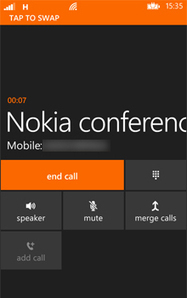
Once you have them on the line, you then need to press ‘Add Call’ to then start dialling up another person – again you can either manually dial their number or find them via your People hub.
At this stage you are only making two separate phone calls – to create the conference call so that all parties can hear and talk to one another you need to press ‘Merge calls.’ The word ‘Conference’ will then appear at the top of your screen.
You can add more than once person to the conference call although be advised that the maximum number varies by mobile operator.
A further nice feature of making conference calls on your Nokia Lumia is that you can still have a private conversation with someone on the call if necessary.
To do this, select ‘Private’ and a ‘choose call’ screen will appear with the names and numbers of everyone on the conference call. Select the person that you wish to speak to privately – no one else on the call will be able to hear your conversation.
To return back to the full conference call just select ‘Merge calls’ again. Once you’re finished then just press ‘End’ as normal.
Conference call apps
So actually making conference calls on your Nokia Lumia is pretty simple and straightforward. However, when making conference calls for work it can often involve entering conference IDs, PIN codes and the like.
Here are several apps in the Windows Marketplace that can help you with your work conference calls.
Want your app on multiple platforms without rewriting all the code? Here’s a summary of some of the tools, libraries and SDKs out there to support building multi-platform apps.
Every mobile developer struggles with the decision of which platforms to support, and most end up building for more than one platform. I am frequently asked what tools are out there to make it easier to build for multiple platforms. Well, there are lots of options out there for you, everything from professional paid tools to open source libraries. I decided to sit down and put together a list for you. Information is all based on what I could find on their websites at the time this blog was posted. For the most up-to-date information I recommend you visit the product sites themselves. Each product title is linked back to their website. There are some gaming and graphic specific tools listed as well.
Don't forget good design of your app also makes it easier to implement on multiple platforms. Using a Model View ViewModel architecture makes it easier to re-use your code. Check out this MVVM Light Toolkit or Okra (formerly Cocoon) to help you get started with the MVVM model pattern in XAML. This is great when combined with portable class libraries which allows you to share code between Windows Phone 8 and Windows 8 apps.
appDesigner
-Platform support: Windows 8, iOS -Price: Revenue from published apps is split 50/50 -Coding language: HTML5...
Fodor's, one of the best known names in the travel guide market, now has a series of apps available for Windows Phone (London, New York, Barcelona, Paris, Rome, and San Francisco).The Fodor's brand, as a division within the publisher Random House, is one of the biggest publishers of English travel and tourism information.
The Windows Phone apps draw on the rich content of the Fodor's guide book, with their expert reviews of restaurants, shops, sights, and hotels. They also include Fodor's signature neighbourhood guides and travel tips. As you would expect from a digital guidebook there are integrated mapping features, powerful search and filtering tools, and personalisation features.
The first page of the app's opening panorama is made up of tiles, each of which gives access to a certain type or category of content: Fodor's Choice (editor's picks of the best places in the city), Nearby (things close to your current location), sights (what to see), eat (where to eat), shop, arts (culture and theatre), night life (where to be seen), and stay (hotels and guest houses). Tapping on any of these tiles brings up a list of places that fits in that category. Swiping left, or right, from these list switches over to the next category. ...
With all the fancy things you can do with your Nokia Lumia, it’s easy to forget the handset’s core function: making phone calls. You might be thinking that there’s not much more to using the phone than launching the Lumia’s dialler or going through your contacts to call someone up.
In fact, there are apps in the Windows Phone Marketplace that can jazz up how you can make those phone calls and to change the look of your dialler altogether.
At this point you might very well be thinking, how could you possibly improve on a simple numerical keypad? Well, give these apps a try and you can see for yourself! ...
...The free version of RapDialer enjoys extremely high ratings in the Marketplace, and after using it for a short while it’s easy to see why.
It’s perhaps the first app here that could make a genuine case for replacing the native Windows Phone dialler. It’s packed full of features such as groups, speed dial, swipe gestures and is highly customisable.
My favourite feature is that once you’ve brought up your contact using the super-responsive T9 predictive text, you can send them a SMS just by swiping across their name.
RapDialer works really, really well and you will be rewarded by the effort spent getting used to it. ...
Reports are coming in that some Microsoft account users who use the company’s mail clients are receiving errors related to a device synchronization limit that they have reached. Depending on the device and software used, error messages may read “There are too many devices syncing with this account”, “There is an error syncing your mail account”, “You can’t connect this account to any more devices” or “We can’T add this account to your phone because you’ve already set it up on the maximum number of devices”.
The Hotmail/Outlook/Windows Live synchronization issues are caused by an active sync partnership limit that is account-based. One of the causes for the issue seems to be that reinstallations of the operating system seem to cause the creation of new sync partnerships while the old synchronization links remain active.
Once the limit is reached, device syncing errors are displayed instead. While some users may be able to remove devices from the account that they no longer need, other’s have received the error message with only one or two devices listed in their account.
What makes this problem particularly troublesome for the user is that there is no option to reset the sync partnerships client-side. According to some reports only specialized Microsoft tech support members can reset the sync partnerships to resolve the issue.
Most Microsoft support members on phone, forum or email are however not aware of the issue at all and won’t escalate the issue unless you are persistent about it and even then, it may not work at all. If you are lucky enough, you need them to “reset the sync relationships” of the account to resolve the issue. This resets the sync points basically so that devices that you actually use sync emails again.
List of error messages:
There are too many devices syncing with this account. To sync using Outlook, try removing another device that is connected with this account such as a phone or another computer.File: outlook\pstprx\storeas\utils\airsyncstatuscodes.h There is an error syncing your mail account, please contact Microsoft support to resolve this issue. Error: 3206.” Server user has maxed out their sync relationship quota You can’t connect this account to any more devices. Remove another device first with help from your system admin or Internet service provider. We can’t add this account to your phone because you’ve already set it up on the maximum number of devices. You can try removing devices from your account on the web, or contact support for your account. Error code: 86000C4C.
One of our must install apps, Reinstaller from WPfied recently showed an update in the WindowsPhone Store with a somewhat cryptic change history:
v1.8
Completely broken with no immediate chance of working again App will be removed soon after a few more tries
After seeing this we were worried that this signalled the end for the app, but after a quick chat with the developer we are happy to say there is still light at the end of the tunnel.
The issues are reportedly due to recent changes to the WindowsPhone Store back end relating to Windows Phone 8 support, but they should soon be solved at which point another update should appear at the WindowsPhone Store.
Liveside has discovered code and assets hidden on the SkyDrive website that indicate a new web-based music interface could be on its way. The code refers to a "MusicPlayer" function, while the while the assets clearly show controls in line with Microsoft's current aesthetic.
When we first reported that Microsoft was planning a new cloud-based music service, we heard that the company had bigger plans for it than have officially been announced. As well as revealing the now-confirmed iOS and Android clients and cloud music locker, sources told us that Xbox Music would be accessible from a browser without any additional plugins. This may not be that service, but with "archive" functionality coming to Outlook, and a newly-refreshed Office web app suite, Microsoft does seem to be stepping up the pace of updates to its online services.
According to The Verge, Microsoft will begin shipping cheap updates to Windows every year. The new approach, which is reportedly codenamed Windows Blue, would shift Microsoft away from its current strategy of introducing mammoth updates to the OS package after several years.
The Verge reports that the Blue approach will include both Windows and Windows Phone. The idea is to offer people using licensed versions of Windows a cheap or free incremental update with UI changes and tweaks instead of bombing them with the massive updates that take a while to catch on. The next version, which is supposedly coming next year, will still be called Windows 8.
While this is all still a rumor, Windows Blue makes a lot of sense strategically. It should look very familiar as it's more or less a mirror of what Apple has been doing for years with OS X. Big, sweeping changes can be hard to adapt to and leave companies with few options when something fails. Sticking to a more incremental update schedule allows Microsoft to test features before committing to them long term. As long as it prevents another Vista, we're on board.
Windows: If you're getting a little tired of the lock screen images in Windows 8, Chameleon is a free app that'll help you personalize it with new images or constantly-rotating images that change periodically.
Chameleon is available in the Windows App Store, and has built-in support for images from NASA's Astronomy Picture of The Day, National Geographic's photo of the day, Bing's picture of the day, and a number of other popular wallpaper sites. You can tell Chameleon to change the lock screen automatically after a given period of time in the options by itself, or you can browse the collections of images and add them to your own pool of images that Chameleon will choose from.
Windows 8 can automatically rotate wallpapers, so you don't need another app for that, but if you want a little something new and interesting every time you sit down to unlock your Windows 8 PC or tablet, Chameleon can do it for you. Plus, it's completely free.
With the arrival of the Nokia Lumia 920 and Lumia 820, you’re able to create great GIF-like images using an exclusive Nokia app called Cinemagraph. But what is a Cinemagraph? Isn’t it just a GIF? Well, yes, but there’s one thing that’s different. A GIF is an acronym for Graphic Interchange Format – a bitmap image format.
People have been using GIFs since the format was created in 1987 and its popularity is partly due the fact you can compress the image to make it much smaller in size without degrading the quality of the image. However, it only has a colour palette of 256 colours.
In addition to this, GIFs can be animated – quite unusual for an image. This was ideal many years ago when videos would’ve taken up much needed disk space and would’ve taken a long time to download or stream.
Using a GIF also makes it very easy to embed into a website. You just upload the image and people will see a moving image; albeit a relatively small, slightly grainy one.
To get content containing either thought or leadership enter:
To get content containing both thought and leadership enter:
To get content containing the expression thought leadership enter:
You can enter several keywords and you can refine them whenever you want. Our suggestion engine uses more signals but entering a few keywords here will rapidly give you great content to curate.


 Your new post is loading...