


Hipstamatic has come to Windows Phone 8 and, in particular, Nokia Lumia smartphones following a deal between the two companies. Coming in the form of Hipstamatic

 Your new post is loading...
 Scoop.it! Hipstamatic has come to Windows Phone 8 and, in particular, Nokia Lumia smartphones following a deal between the two companies. Coming in the form of Hipstamatic 
No comment yet.
Sign up to comment
Scoop.it!

Nokia's Beta Labs have released the first beta version of Nokia Chat for Windows Phone. The service, which is also available on Nokia's Asha, S40, and Symbian devices, allows users to reach out to each other for individual conversations, share their locations, and 'broadcast' messages to their circles of friends. The Lumia client also offers push notifications and live tile updates for Windows Phone users. Nokia Chat is mostly a self contained service, talking with only one other external chat service (Yahoo Messenger). This first beta, which as always comes with the caveats of it not being a full release version, features: Person to Person Messaging: Reach millions of Nokia Chat and Yahoo! Messenger users across different mobile and computer platforms. It also takes account of a number of Windows Phone OS features, including voice commands, speech dictation, and lock screen notifications. If you do start to use the application, your feedback to the Beta Labs page can help shape the application going forward, both with bugs and errors spotted, but also on what features could be implemented in future builds.
Scoop.it!

Vimeo was founded in 2004 by a group of filmmakers who wanted a space to showcase their work. There is really no such thing as a typical Vimeo video but I think it would be fair to say that the website attracts incredibly polished and interesting pieces of work.
For example, take the striking video above, which was produced using imagery from Nokia’s HERE Maps. If you spend a little time exploring its curated channels and groups (Staff Picks is a great place to start), you’ll come across some real gems that can be variously described as arty, beautiful, moving, funny or inspiring. More often than not, these engaging videos have been produced by aspiring filmmakers, or by amateurs who just want to share their creative endeavours. Many of them look fantastic. Vimeo on your Lumia Everything you can do on Vimeo’s website can now be achieved directly through the official app (free) on your Nokia Lumia. As well as browsing and watching videos, you can favourite them, save them to watch later, add comments, record them on your Lumia and upload them through the app. To make the most of these features then you’ll need to sign up for a Vimeo account.
There is also a great deal for Nokia Lumia smartphone owners: you can get a free 3-month trial of Vimeo Plus, which has benefits such as more storage space and express video conversion. You need to do this within the app – just swipe across and click on the promo offer. Above and beyond all the same functionality that you’d get on the Vimeo website, such as managing your videos and account, using the app on your Lumia has some further advantages. You can use NFC to send your Vimeo videos to another smartphone and share them via SMS, Facebook, Twitter or email; you can also pin your favourite videos or featured channels as a Live Tile on your Start Screen. Whether you want to watch videos or create and share them, the Vimeo app is a terrific app, and a fine source of inspira
Scoop.it!
Tumblr have finally released their official for WP8 (only; sorry WP7 users); the app brings all the functionality of Tumblr's GIF crazy world. As well as auto-updating images to the lockscreen and ...
Scoop.it!

Our top tablet, laptop, and desktop picks from the first generation of Windows 8 hardware are touch-friendly and ready to change your expectations of what a computer should be.
Scoop.it!

Nous vous présentons aujourd'hui un nouveau client YouTube sur la plateforme Windows Phone : myTube . Innovant et très réussi graphiquement, il propose quelques fonctionnalités ...
Scoop.it!

Ruzzle is a popular word game which arrived on Windows Phone recently. The app has just received an update to version 1.2.1 and while there is no changelog, it appears to address two very annoying ...
Scoop.it!

We’re not actually huge fans of Waze (www.waze.com) but we sure know a lot of you have been yearning for it on Windows Phone. The popular navigation-traffic-social app allows drivers to keep up to date on traffic conditions, detours and anything else worth self-reporting to others. We saw a sanctioned homebrew project for Windows Phone way back in 2011 that used Waze’s data, but it was far from perfect and quite clunky. Now, Calcalist.co.il is reporting that the an official app for Windows Phone 8 is not only planned but it’s ready to come out in June—no doubt part of the continuing wave of official and updated apps that we’ve been seeing over the last few weeks. So why the reconsideration? Waze is based in Israel and as it turns out, Windows Phone just wasn’t too popular there, leading the developers to put it on their long to-do list but hardly giving it priority. With Windows Phone 8 though, the tables have turned with the OS growing (and supporting right to left languages) allowing the company to reconsider. Personally, we were a bit peeved and shocked to find that the new BlackBerry 10 OS already has an official Waze app. Granted, the BB10 World store pales compared to Windows Phone as is, but it always rubbed us the wrong way seeing “official” apps for that nascent platform before ours. At least now we can take solace in knowing that Waze will soon come around to the Windows Phone camp, giving us one more feather in our cap.
Scoop.it!

This is a how-to on creating a playlist with Windows Explorer. I have a Nokia 920 running Windows 8 and using a laptop with Windows 7. First thing you will need to do is connect the device to your PC via the cable provided with your unit. Open windows explorer and get ready to finally be able to create a playlist without any third-party apps or headaches. Once in Windows Explorer make your way to the phones directory where you store your music then locate one song and right click on it. Once you right click you will be presented with an option to “create playlist”. ...
Scoop.it!

Download PassBox. It is a freeware that remembers all your passwords. You just have to remember one password for PassBox and you can save all other passwords in it.
Scoop.it!
While I don’t personally get the whole talking to your phone bit a lot of people love it and a good personal assistant app is really lacking on Windows Phone right now. (Sorry Ask Ziggy fans) Enter stage right Indigo a new personal assistant for both Windows Phone and Android that will coming out just few day from now on April 23rd. The folks over at Windows Phone Central got their hands on this app early and were kind enough to make this nice little demo. I couldn’t find any information on if this app will be free or not however I have a feeling it will be.
Scoop.it!

Head in to conference calls often? You might want to give Nokia Conference for Windows Phone a try. It's an app that's currently available as beta on Nokia's Beta Labs, enabling consumers to quickly join calls without having to jump in to the calendar app, remember ID / PIN numbers, switching to the phone app, dialling out the number and entering codes. What's interesting is for those who own a Windows Phone 8 handset, the ability to join via voice is present. Simply hold down the Windows button and say "conference join". The app will then automatically work out which meeting is desired, return it for confirmation and subsequently connect the user. Should the company use Lync, Nokia Conference would then launch the Lync app. ...
Scoop.it!

Having covered the premium and the entry-level segment, Nokia is paying due attention to the midrange and hoping that it will pay off handsomely. The Lumia 720 was the leader of the company's lineup at...
|
Scoop.it!

Microsoft plans to make its first update to Windows 8, codenamed Blue, free to existing Windows 8 users, company officials have confirmed.
As many expected and hoped, Microsoft is going to make the coming Windows Blue update to Windows 8 free for existing Windows 8 and Windows RT users.
Reller also acknowledged what those who've downloaded leaked builds of Blue have known for a while: Windows Blue is Windows 8.1. Windows 8 is currently available via a handful of SKUs -- Windows 8, Windows 8 Pro, Windows 8 Enterprise and Windows RT (not exactly Windows 8, but part of the family). She didn't provide more information about plans for the coming Blue SKUs. Reller also said today that Microsoft now has more than 70,000 Metro-Style/Windows Store apps in the Windows Store. She also noted that the final version of Windows Blue (both the Windows 8 and the RT flavors) will be made available to customers through the Windows Store once they are available. Last week, Reller acknowleged that Microsoft plans to have Windows Blue available by holiday 2013. (I continue to hear the release to manufacturing will be around August 2013.) Julie Larson-Green, the head of Windows engineering, also confirmed last week that Microsoft plans to make a public preview of Blue available by the end of June, 2013, around the time of the Microsoft Build 2013 conference. Reller reconfirmed the preview date today, noting the Blue preview will be out at Build, which kicks off on June 26. (I've asked Microsoft if Windows RT/Surface RT users will get the preview, too. The answer is yes, as a new Microsoft blog post mentions in its last line.) Last week, Reller wouldn't talk about Windows Blue's price. She said Microsoft planned to disclose more about pricing and the SKU line-up for Blue before the end of May -- which set off a chain of angry reactions among some Windows 8 users who thought the word "pricing" meant Microsoft definitely planned to charge for Blue. But a mention of Blue being a free upgrade by All Things D's Walt Mossberg in an article from late April made me believe free was the plan. Reller emphasized that Microsoft's strategy in using the Windows Store to deliver Blue is focused around giving users choice about when they deploy the coming update. "Windows 8.1 will be a packaged set of updates which customers can say when they are ready (to deploy)," she said. Reller also was asked during a Q&A session about what's behind her own and Larson-Green's recent emphasis on Microsoft being "principled but not stubborn" about expected coming interface changes with Blue. Among those rumored changes are inclusion of an optional Start Button and boot-to-desktop capability. Reller said that even though the Windows ecosystem needs to know where Microsoft is going so it can go with the company, the Windows team still needs to listen to its customers and partners about what they want.
Scoop.it!
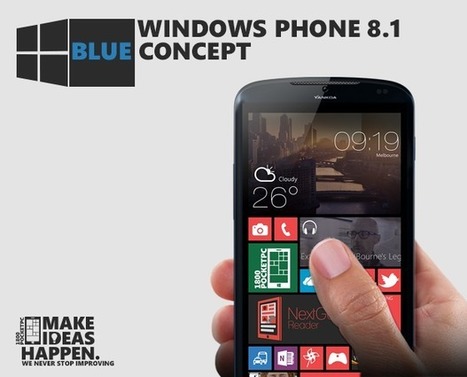
The next version of Windows is already on the way. Windows 8.1 builds recently leaked onto the web, and includes a lot of new things.
Scoop.it!
Ahhh! I just realized I forgot to trim the start of the video (after the intro)- Sorry guys :D Quick First look at the official tumblr app for WP8; free to d...
Scoop.it!

Navifirm is Nokia’s online storage/testing location for upcoming softwares for their devices (regardless of the OS); and its loved by many users as it gives us a glimpse into upcoming updates and fixes for our devices (plus it was a must have for Symbian flashers). Unfortunately as of today navifirm is no longer accessible by the general public; and instead requires an authorized Nokia login to gain access to them, this is of course an attempt to clamp down on early software leaks; or upcoming devices that appear under RM-XXX. Hopefully we’ll still be able to get our hands on those yummy updates oneway or another.
Scoop.it!

Microsoft CFO Peter Klein has confirmed that Windows 8 is coming to smaller devices. Yay.
Microsoft CFO Peter Klein confirmed during the company's Q313 earnings call that Windows 8 is coming to smaller devices. The news follows previous reports and rumors that the touchy new platform will be made available ontablet form factors ranging between 7-inches and 9-inches using ARM-based and Intel "Bay Trail"-based chips. In a Q&A session during the earnings call, Klein acknowledged that the transition to Windows 8 hasn't been easy, but the company remains excited about the opportunities that lay ahead. The new platform has prepared Microsoft for the transition from desktop to touch devices, but there's still a lot of work to be done. Despite that, Microsoft is extremely "comfortable" about where the Windows 8 path is leading the company. He also hinted to the Windows 8.1 "Blue" release, saying that Microsoft is working on "expanding and improving the experience." Not just for Surface, he said, but forWindows 8 devices at multiple price points including lower price points going forward. This backs up a statement made by Intel CEO Paul Otellini who previously said that many upcoming Windows 8 solutions will drop down into the $200 price point. "If you look at touch-enabled Intel-based notebooks that are ultrathin using [Bay Trail] processors, those prices are going to be down to as low as $200," he said. Microsoft's Klein first hinted to a move into the smaller tablet market in February during a Q&A session at the Goldman Sachs Technology & Internet Conference. When asked about Microsoft's plans for the 7- to 9-inch tablet market, he said that Microsoft has done a lot of hard work in the developer platform. "We are well set up to respond to demand as we see it [with different-sized form factors]", he answered. Windows CFO Tami Reller said something similar, confirming thatWindows 8 was designed from the start to run on smaller and bigger screens at different resolutions, enabled by an app-based platform/model. The smaller sizes will reportedly be pushed to ODMs in Microsoft's Windows Blue release later this summer which includes Windows 8.1, Windows Phone 8.1 and an updated Widows RT. Although Microsoft has confirmed the Windows Blue rollout, the company has yet to reveal actual details. Leaked builds have provided some clues including a possible Start screen bypass, the return of the Start menu on the desktop, and support for smaller screen sizes. Looking ahead, these smaller devices should help the Redmond company better penetrate the tablet market and possibly liven the current Windows 8 sales slump. Microsoft has already confirmed that the Surface brand was not done, that there will be more to come in the future despite a tepid reception to both models. That said, expect a large line of Windows 8 gadgets from ODMs and Microsoft to be introduced possibly at BUILD 2013 in June, if not shortly thereafter.
Scoop.it!

These days we all take Over The Air (OTA) firmware updates for granted. However, there was a time when firmware updates had to be done manually. It's a useful skill to have, especially when just sometimes even contemporary devices can find themselves left out in the cold when it comes to manufacturers spreading the firmware love. The course of DIY updates never run did smooth though, so not only do we discuss how to apply an upgrade, but we look at how you should approach restoring your device to its former state. This guide isn't for everyone – it's far better if you wait for the official OTA update for your Lumia device. If, for whatever reason (e.g. impatience or having bricked your device), you wish to go it alone and update your own firmware then this guide will help you. However, note that doing this will invalidate your warranty and might prevent you from receiving future updates. If these things are not enough to put you off, then the next section might be … Backing up and RestoringSorry to break it to you folks, but the guide I'll be taking you through here will entirely wipe your device. Windows Phone 8 does come with a built-in backup to the cloud feature. To access it, open the Settings app, and scroll down to (surprise surprise) the 'backup' option. There you'll find options to save your app list and settings, text messages, and automatic upload of your photos. However, asEwan wrote, the restoration of this data leaves a heck of a lot to be desired. In fact, the data restore implementation is all but useless. In my experience, the text message restore is strange as not all of my messages were restored (was my phone backing them up regularly enough?) and the restoration didn't happen until the following day! ...
Scoop.it!

When Microsoft announced its Hotmail replacement, Outlook.com, it was confirmed that existing Live.com users would be able to create an outlook.com alias.
Scoop.it!

Yesterday the latest build of Windows "Blue" leaked out onto the web in the form of build 9374. These build leaks have provided such publicity for the company over the years that I would honestly be shocked to find that Microsoft themselves was not behind them. The latest version did not bring a lot of new features and is still just as buggy as previous leaks, but there were a couple of interesting inclusions. The biggest of those is something called "Kiosk mode", which can be accessed via the Charms menu and then PC Settings. Kiosk mode is in the User section and it is certainly not fully formed. What it provides though, is intriguing. There are really two functions included -- one is the ability to lock down user accounts in order to only allows certain functionalities that you, as an administrator, explicitly allow. The other is the option to set an application to run upon startup. Parental Controls The first thing that comes to mind when viewing the new Kiosk mode is the ability to set parental controls. Locking down the ability to install apps and software would be handy for any parent. Locking users out of options to change computer settings would also be a good one to have for both children and guests. The latest build is certainly not ready to be your main OS, but if you run it on a test system or in virtual software then you can get a preview of what is to come.
Business and Retail Kiosk mode also seems geared towards public locations. For instance, a PC set up within a retail store can be set to boot straight to a dedicated app of the store's creation -- perhaps one that aids shoppers in finding a particular item. This has previously been the realm of Windows Embedded, but having it built into the standard Windows 8 could open the platform up even more. Conclusion Kiosk mode is not all that is new in build 9374. The search feature has been altered slightly and the new name "Windows 8.1" seems to be official, as the OS now ID's itself with that moniker. Neither search nor Kiosk seems to be fully formed, but simply early previews of what is to come when the OS gets a public beta later this year. Enjoyed the article?: Then sign-up for our free newsletter or RSS feed to kick off your day with the latest technology news and tips, or share the article with your friends and contacts on Facebook, Twitter or Google+ using the icons below.
Scoop.it!

How to save music to your windows phone from any youtube video using the FREE YouMusic Windows Phone App. Check out the Video guide for the YouMusic App
Do you want to quickly save the music that you just saw in a youtube video on to your phone ? Well thanks to the FREE YouMusic App you can. Now if you try this on commercial Music videos you are probably engaging in piracy of music but feel free to try this on royalty free music. According to the developer YouMusic is an app for converting YouTube videos into MP3 songs on your Windows Phone, the app will automatically save the music file to your phone.
When you launch the app you have a featured video section which is probably sourced from Youtube, you an swipe right from this screen to access the downloaded files section which will show you a list of all the downloaded music files you have. The app bar has 2 buttons a youtube explorer and an about us button. When you click on youtube explorer you are taken to a mobile version of youtube and here you can search for any video you want , when you pick any individual video you get a download button and when you click on that the app begins the download process. Once the app completes the download you presented with a notification which says the music is now saved to your phone. Now you can go to your Music hub and the song should be there. I really love the app, one feature I would love to see in future version would be the ability to trim the downloaded files so I can easily add that downloaded file as a ringtone.
Scoop.it!

Although the year got off to a rocky start with an extended Xbox game release drought, the Xbox Windows Phone gaming situation has actually been looking up since February. Gameloft’s highly anticipated Windows Phone 8 titles finally started rolling out, and some weeks saw two Xbox games released instead of just one. Don’t think we’re out of the thicket just yet. The Xbox Live certification process continues to cause games like Cut the Rope: Experiments to come out much later than on other platforms, and meaningful title updates come just as late or not at all – both Windows Phone Cut the Rope games are missing levels that iOS and Android already get to enjoy. Microsoft’s solution to this problem seems to be encouraging big games like Temple Run to release as indie titles in order to circumvent the Xbox Live certification process. Because why bother fixing a broken system? ...
Scoop.it!

Last night as I was loading up a few apps on my phone I hit an anomaly: I was asked to buy Amazing Weather HD. Why is that odd? Well, Amazing Weather (along with Weather Flow) is one of my top apps and I bought it the day it came out, months ago. As it turns out, it appears that this is becoming a widespread problem with the Windows Phone Store, a return of a similar glitch that hit Windows Phone 8 users last fall. That issue was much more frustrating though as it hit a lot of apps, depending on your purchase history. Today, we’ve come across at least three apps that are having problems with this: Amazing Weather HD, Cowlick! and Mehdoh. Indeed Mehdoh has been temporarily hidden due to that problem (and another when attempting to download the app,failure to install). Liquid Daffodil, the developers behind Cowlick!recently tweeted that users should contact @winphonesupport if they are being asked to re-buy their app. We’re not sure how many Accounts are affected nor how many apps, but it seems to be an unintended consequence of some of the backend changes Microsoft has been making to their services. For instance, we had sporadic reports of SkyDrive login issues yesterday. For now, we of course recommend that you don’t buy the app again and instead hold off until things get sorted by Microsoft. Also, you can spare any developers your wrath, as it’s not their fault—they’re not trying to double dip.
Scoop.it!

Here's a fun promo video from Windows Phone UK that follows the journey of the live tile in history. Whilst Live Tiles have become more active in the latest generation of WP, we hope to see more of...
|




