


Windows Phone Central App Roundup: Photo Editors
As someone who has spent a lot of time behind a camera, it's nice to see our Windows Phone cameras and photography apps improve over the years.

 Your new post is loading...
 Scoop.it! Windows Phone Central App Roundup: Photo Editors 
No comment yet.
Sign up to comment
Scoop.it!

One area that Windows Phone is equal to in regards to Android and iOS is the number of high quality Twitter applications. On all platforms there are a handful of excellent Twitter clients, both official and third-party for nearly anyone. ..
Scoop.it!

Another alleged device has popped up claiming to be running the latest WP update, Bittersweet Shimmer/GDR3. First off it appears that the third column of live tiles will be available for all device...
Scoop.it!

SysApp Pusher, the useful utility app for manually pushing the Nokia system app updates on Lumia WP8 smartphones is updated to v2.0. The latest version brings support for Wide tile and added 15 more Nokia application to the list.
Scoop.it!

Hipstamatic has been putting out frequent updates to their Oggl and Oggl Pro applications and that’s something we can get behind. The apps launched in June for Windows Phone, but was met with questionable performance and bugs.
Scoop.it!

It’s hard to believe it was a little over a week ago that Microsoft announced plans to buy Nokia’s devices and services unit for a cool $7.2 billion.
Scoop.it!

Sometimes an app comes along so simple and beautiful you can’t help but love it. TinyDO is one of those apps. We first covered it a little over two weeks ago when we looked all the apps from the developer.
Scoop.it!

It’s always a good day when a major app joins the Windows Phone platform. But for me personally, it’s more of a win for the platform when a smaller startup dedicates limited resources to develop for Windows Phone. ...
Scoop.it!

New screenshots reveal more on the Notification Center, actionable notifications and a Battery percentage option in Windows Phone 8.1
Scoop.it!

Microsoft has partnered with Indian governments’s IRCTC to create an app for both Windows Phone 8 and Windows 8/RT devices. This new IRCTC app provides booking facility of Railway tickets online and offers other services like checking reservation status, train schedules, train routes, availability of tickets, cancellation, booking history, recent history, favourites, add passengers as contacts and roaming the transactions between multiple devices.
Scoop.it!
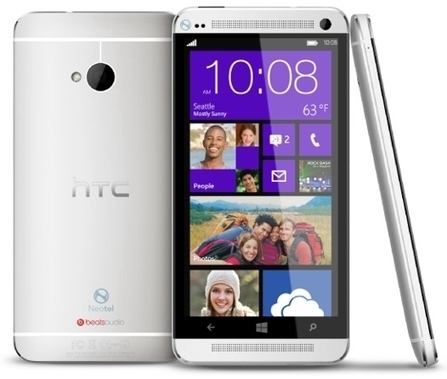
We have heard that a Windows Phone by HTC called the HTC Harmony was on its way this fall. Now website WindowsPhoneBlogging claims to have the inside track on this handset, reporting it will have a 4.7 inch Super LCD3 1080p display, 2 GB of memory, 32 GB of storage and Windows Phone 8 GDR3. It will also come with HTC’s usual Beats Audio tuning. The handsets is expected in the October-November timeframe, which is more usual than the rumoured September launch of the Nokia Lumia 1520. The handset will have one compelling feature over Nokia’s handset, being an actual pocketable size, and I wonder if this will make any of out readers opt for HTC’s Windows Superphone vs Nokia’s version.
Scoop.it!

Daily Dashboard is a Windows Phone 8 app that is part calendar and part daily assistant.
Scoop.it!

Yesterday I shared the news about my Lumia 720 getting the Amber, and after a full day with it, I'm ready for my initial assessment. The Lumia 920 update was a candy land with Nokia Smart Cam, Pro ...
|
Scoop.it!

Micro SD card are finicky little things that do so much for us tech geeks we can’t live without them however, being that they are finicky they tend to crash and become unreadable. When that happens you lose everything on them music, games, and most...
Scoop.it!

Quick piece giving my view on the Nokia Lumia 625 Windows Phone Intro I have been lucky enough to own, use or trial just about all the Nokia Lumia handsets that have been released so far and at the moment I am using the latest , the Lumia 625 , which falls into the "Budget Handset" category (full specs here) of Windows Phone along with the 520,620 and 720. As with the other budget phones, the main difference is less RAM and a removal of some services (Here maps is only licensed in the country you register the handset in and global navigation and mapping requires an additional licence to be purchased for example) but as all hardware and software has to be paid for the competitive sale price has to be reached one way or another and that is how it is achieved. This said NONE of the Lumia range actually looks or feels "Cheap" and the actual user experience is great on all of them, but as with anything in life, you get what you pay for, although in the case of the Lumias i think you maybe get a little more than you pay for when you compare them to cheap Android phones or feature phones, they are simply ridiculous value. WaffleNow the 625 has the largest screen that Nokia has ever used in a phone, which leads me to a bit of a quandary ! Veering off at a tangent and waffling as I normally do, I come from a candy bar 'T9' handset history (everyone over twenty five or so does) and when the large touch screen handsets started to come on the market, headed by the iPhone, I was extremely anti . But as is often the case, as fashions change you have to adapt (maybe Nokia didn't adapt quickly enough, but that's a different story) and I began to try the Nokia handsets that were sliding full physical qwerty keyboard ...
Scoop.it!

We reported a while ago that Microsoft and Nokia released a firmware for the Nokia Lumia 920 which removed Google as a default search provider. We do not know if it was intentional or not, but a new version of the firmware, version 3047.0000.1326.2009, has just popped up on Navifirm which restores the option of using Google instead of Bing by default. This is obviously a very important change in many places around the world, but we hope some forced exposure to Bing has caused some users to realize it is not actually as bad as they may have believed initially.
Scoop.it!

So, the iPhone event came and went, people argued on Apple’s innovation credentials, the Android vs. iOS debate reared its head again. Another week in this bubble we call ‘tech’. Given that the Android and iOS stranglehold on the smartphone market exceeds 90%, it’s understandable why they tend to dominate the headlines from a mobile perspective. And with BlackBerry looking set to go the way of the dodo – as a smartphone manufacturer, at least – that pretty much leaves Microsoft’s Windows Phone as the only real contender to the status quo out there (Firefox OS, yeah yeah), though admittedly it languishes far behind in third place. But a lot of change is afoot at Microsoft Towers: Ballmer is making way for a new CEO, and it finally caved in and snapped up Nokia’s Devices and Services division. One last big throw of the dice for Windows Phone, guided by a new visionary. Perhaps. However, the one giant stick in the mud is apps. Or ‘lack’ thereof. The issue has been a perennial pain in the posterior for Windows Phone, as it looks to play catch-up with iOS and Android. Windows Phone 8 StartScreen Windows Phone’s big problem isn’t a lack of appsFew people question the quality of the Windows Phone 8-hosting Nokia devices – its flagship Lumia handsets are solid and beautiful, offering arguably the best camera functionality of any smartphone. We called the Lumia 1020 a camera that makes calls. And Windows Phone 8 with its Live Tiles is a refreshing departure from the square-icon-laden interfaces of Android and iOS. There’s no question that Windows Phone is a compelling proposition, but it’s all about the apps, right? The state of play We took a quick peruse through some of the top Android and iOS apps, and checked which were available on Windows Phone, and which aren’t. And we’re talking ‘official’ here, meaning that it’s produced either by the company itself or by Microsoft/Nokia. As you’d expect, many are missing in action. What there isn’t There’s no Google Maps, but there is the home-grown Maps and Here Maps, and while there’s no official Gmail app there are some reasonable third-party efforts, plus you can set up native Google Sync support with your Windows Phone. There’s no Chrome either, though there is a bizarre pseudo-Chrome app that redirects to Internet Explorer. There’s no Instagram app yet, but there’s a decent third-party effort, plus there is an official Hipstamatic app. And because Google’s attention lies elsewhere, YouTube has arrived on the scene via Microsoft’s own developers…but due to a series of squabbles, Google is currently blocking access. They may be coming soon, but still no sign of Vine, Path or Flipboard. Dropbox is missing too, as is SoundCloud, RunKeeper and Yahoo Mail, though a reasonable third-party incarnation exists for that. Throw into the mix no Firefox, Airbnb, Snapchat, Uber, Wikipedia and Pinterest, and it’s clear that many companies have yet to embrace Windows Phone. The point to all this, of course, is that yes, there are many apps missing from Windows Phone. But you knew that already. On the flip side, however, there are probably more first-party native Windows Phone apps than you thought, and Microsoft has the financial clout to try and push for more. What there is tw 220x366 Windows Phone’s big problem isn’t a lack of appsThe likes of Skype (naturally), Twitter, WhatsApp, BBC iPlayer (UK), Amazon, Amazon Kindle, Angry Birds, TuneIn Radio, Shazam, Spotify, Netflix, Evernote, PayPal, LinkedIn, Tumblr, WordPress, Foursquare, LivingSocial, and Runtastic are all present and correct. So is eBay, though it’s lacking a little functionality. IMDb, too, has an app but it hasn’t had much in the way of updates for a while, similar to Google Search, while Rdio lacks some basic functionality compared to its iOS and Android bretherns. But there is a fully functional Words With Friends courtesy of Zynga, which will please many would-be defectors. The less said about Fart Machine, the better. What…no Facebook? Actually, there is – Microsoft has taken the trouble to develop an incarnation off its own steam, given that Zuck & Co. haven’t bothered. As for Groupon, well, Nokia sorted that one out. There are are many, many more little ditties on the Windows Phone Store too, from calculators to flight search engines. And when you consider that all you really need is an Internet connection and a mobile browser, there’s no real reason why Windows Phone shouldn’t appeal to large segments of the smartphone-buying population. So why doesn’t it? Self-fulfilling prophecy For me and many reading this, the lack of so many native apps is of course a problem. But I’d go as far to say that many – if not most – people don’t really care about a large percentage of these apps. My mum, girlfriend, buddies, postman… they would all get by absolutely fine on Windows Phone. They don’t use Vine, Uber or Snapchat on their iPhones and Androids. Working in the technology industry, be it as a programmer, marketer or journalist, this can blind us to what people actually want from their smartphones. “Windows Phone’s big problem is a lack of apps”… AAANND repeat. We seem to have repeated it so many times that it’s become a self-fulfilling prophecy. f9429b70 fd6c 4650 94e3 8c271407dc7a Windows Phone’s big problem isn’t a lack of appsI’d posit that a good browser, Facebook, Twitter, Kindle, YouTube, Spotify, email, maps and directions, camera and perhaps a few others are ample for many people. But the fact remains people aren’t ditching Android and iOS for Windows Phone, so I’m not convinced it’s entirely down to a lack of native apps. Not directly, at least. Word-of-mouth plays a big part in the gadgets that non-techies buy, and Microsoft can’t quite get that mindshare among the general smartphone-buying populace because the message that’s trickling down from those ‘in the know’ (developers, techies, journalists and so on) is that Android and iOS are the only worthwhile mobile platforms – because of their app-count. And thus, in a roundabout sort of way, a lack of apps does indeed become one of Windows Phone’s biggest problems. Just not for the reason everyone cites. It’s understandable why more developers don’t pay a lot of attention to Windows Phone – it doesn’t have the user base to justify it. But Microsoft could conceivably get all the ‘missing in action’ apps we mention above and it wouldn’t make a difference – what it has to really do is get inside the minds of the general public, and keeping things simple is key. Keep it simple, stupid Apps and Mobile 730x338 Windows Phone’s big problem isn’t a lack of apps Despite Android being the most dominant mobile operating system, it still plays second fiddle to iOS from an apps perspective. It’s very unusual for any app to hit Android before iOS, and some apps can take their time to make it to Android at all. Vine took six months to hit Android after iPhone, while Instagram took more than a year. Nike+ Fuelband? 18 months on, we’re still waiting. And there are many little non-big-brand independent apps that are fantastic, but will never see the light of day on Android. It’s also worth adding that Google is far less stringent on the quality of apps that pass through its gates compared to Apple. Yes, Android has app problems of its own. Much of this has been put down to the fragmentation of Android devices – a myriad of form factors and OS versions are difficult to cater for, with iOS there’s really just the iPhone and iPad. So why does Android flourish? The answer is simple – Google. The Internet giant had already emerged as a dominant online player while Microsoft was still resting on its Office and Windows laurels. As such, it was well-positioned to embrace the cloud, with Google Docs, Maps, Earth, Search and an innovative new email service called Gmail. It also saw the future of mobile and acquired Android way back in 2005. Throw everything together into a giant melting pot, make it open source so any OEM can use it, add a pinch of Google+, and you have one mighty mobile giant. Microsoft has elements of this too – it has taken Office to the cloud, given Hotmail the elbow for Outlook, introduced Bing Maps and Search and has Windows Phone. But it all just feels a little too late – Google had gained the mindshare of the mobile online masses establishing a firm foothold and, well, that’s difficult to budge. As for Apple, well, the quality of its hardware was ahead of the competition from the start, and it pretty much kickstarted the app ecosystem we all see today. But now that Microsoft owns Nokia’s mobile business, it has to start simplifying its device-range. I started losing track of the number of handsets Nokia sent to market this year alone, some featuring Windows Phone, some not. Under Microsoft’s stewardship, it should phase out many of these devices – at least from a marketing perspective. It should also lose the S40 operating system. It needs to keep things simple, focus on a handful of low-, mid- and high-end phones. If it can strike the right balance between the singularity of iOS and fragmentation of Android with 3 or 4 really notable devices, it can simplify its marketing message and hopefully see some growth. This may even mean restricting Windows Phone to Nokia devices, letting HTC, Huawei and Samsung put all their eggs in Android’s basket. Also, if there’s one thing Microsoft has, it’s money. Armed with a few flagship phones, it can strike more partnerships with high street retailers to position its handset(s) front-and-center when people walk in-store. So yes, Windows Phone needs to get more quality native apps, but that isn’t the root of its problems. It’s merely a symptom of the overarching problem, which is this perception that everybody needs tonnes of apps on their smartphone. If all those people who are content with just a few of the big-name apps, Internet Explorer and a good mobile camera got on board with Windows Phone, the native apps would take care of themselves in due course, once developers realized it was a viable platform. But over and above all this, there’s one thing Microsoft certainly should not do. It shouldn’t mock its competitors in such a crass manner, because it smacks of desperation and doesn’t reflect well on the company. Does it really believe that by bad-mouthing Apple it will tempt people on board with Windows Phone? It’s crazy, and whoever takes over the reins from Ballmer should put their foot down fast.
Scoop.it!

FB Pages Manager is a beautiful Windows Phone app that you can use to manage all your Facebook pages. The app allows you to post, delete or share your pages status, upload photos, send and receive messages from your pages, comment on your posts or reply to a comment. The app currently has more than 20,000 active users, and it is chosen by Microsoft as thebest alternative to the official Facebook Pages Manager app. The normal price of the app is $1.99 but currently the app is on sale for a limited time, so you can get it for $1.49 now. There is an ongoing beta program for version 1.2, if you are interested in joining as a beta tester please send a message to the Facebook page of the app mentioned below. Being an active beta tester you will get the latest full version of the app for free. Stay tuned on Facebook or Twitter for future updates. Version 1.2 will be released in September.

Business and Marketing's comment,
September 13, 2013 1:33 AM
Ha ha !!!!! This is one way of marketing...........
Scoop.it!

It's no secret that Microsoft has been working on a voice-recognition-based assistant to rival Apple's Siri and Google Now that will be included in Windows Phone 8.1 (aka, Blue).
Scoop.it!

A crop of 8- and 10-inch Windows 8.1 tablets and PCs are coming this fall, with several priced below $300, according to a new report.
Microsoft and its OEM partners have been doing a slow reveal of a number of the new Windows 8.1 tablets that are coming to market this holiday season. For months, Microsoft execs have been promising there would be a new crop of smaller-screen, cheaper Windows tablets and devices arriving this fall, many with touch screens. On September 12, Windows SuperSite editor Paul Thurrott sped things up and did a near-all-at-once reveal of a number of partially announced and still unannounced Windows 8.1 devices due out this fall. Thurrott's post doesn't mention how or where the details. When I asked, he told me the information came from "sources close to Microsoft." Thurrott posted to his site specs and screen shots of a number of Windows 8.1 tablets -- including still-unannounced devices from Nokia (the "Sirius" ARM-based Windows RT tablet -- a photo of which, courtesy of Thurrott, is embedded in this post above); Lenovo; and Dell. He also posted specs and a number of still-not-public pricing and battery-life details about some of the devices that Microsoft's partners showed at the IFA and Intel Developer Forum (IDF) shows this week. If Thurrott's information is accurate, here's what's coming this fall/holiday season: Acer: Updated version of 8-inch "Bay Trail" W3-810. Battery: 8 hours. Price: $349
He also included specs on the two new Microsoft Surfaces, the Haswell-based Surface 2 Pro and the Tegra-based Surface 2, which mirror what leaked over the past week. Thurrott added that the coming Surface Mini will also be ARM-based (Qualcomm Snapdragon), as some of us had expected, and will have an eigh-inch screen. Microsoft is not expected to unveil the Surface mini during its September 23 launch of the Surface 2 and Surface 2 Pro. It's unclear if Nokia is still planning to unveil the Sirius tablet on or around September 26, as was rumored recently. (However, word is, courtesy of renowned mobile-device leaker @evleaks, that Nokia is going to announce the Lumia 1520 phablet, codenamed "Bandit" on September 26, most likely in New York.) A reminder -- because no one should assume this is clear to all/most PC/tablet buyers -- the Intel-based Haswell- and Bay-Trail devices can run existing Win32 apps, alongside Metro-Style/Windows Store ones. The ARM (Qualcomm/NVIDIA)-based devices will support very few non-Metro-Style apps (primarily Microsoft Office and some Windows utilities). Haswell is the more powerful, fourth-generation Intel Core processor; Bay Trail is the latest of the less-powerful, but longer-battery-life Atom processor in Intel's family.
Scoop.it!

..s we shared on Reddit, we're happy to announce the immediate availability of IMAP (and OAuth) for Outlook.com. Outlook.com already supports the industry's best email connectivity with Exchange ActiveSync (EAS), which is available on the majority of smartphones and tablets, including Windows Phone, iOS, and Android devices, as well as the Windows 8 Mail app and Outlook 2013. With today's announcement, we now have a richer email experience across devices and apps, including those not using EAS, such as Mac Mail and Thunderbird on a Mac. Why IMAP? While we believe that EAS is the most robust protocol for connecting to your email, with syncing in near real time, and superior battery and network efficiency, there are still some devices and apps that haven't made the upgrade to EAS. As an older protocol, IMAP is widely supported on feature phones and other email clients such as those on a Mac. We heard your feedback loud and clear that this was important. In addition to offering more complete device connectivity, IMAP (along with OAuth) gives developers opportunities to build third-party clients and services that offer value-added scenarios on top of your Outlook.com email. We are excited to launch the first set of services today that integrate with Outlook.com, and look forward to sharing many more in the future. New and unique scenarios that build on your Outlook.com inbox TripIt, Sift, Slice, motley*bunch, Unroll.me, OtherInbox, and Context.IO have taken advantage of Outlook.com's new IMAP capability and are rolling out updates today that allow their apps and services to integrate with your Outlook.com email. We'll have many more to share in the near future. If you're building an app that wants to integrate with Outlook.com, we've provided more details at the end of this post on how to get started. Using email to improve your travel experience TripIt With TripIt, it's now even easier for Outlook.com customers to create mobile itineraries that organize travel plans in one place. TripIt can now detect emails with travel confirmations in ...
Scoop.it!

Windows RT is the locked-down version of Windows 8 for ARM computers, as seen on Microsoft’s Surface RT tablet and a few other Windows RT devices. Unlike the standard version of Windows 8, Windows RT doesn’t allow you to install your own desktop programs. You’re limited to the included desktop programs written by Microsoft or Modern apps from the Windows Store. However, there are ways to jailbreak your Windows RT device and run unapproved software on the desktop. Windows RT includes most of the standard Windows desktop programs that come with Windows. You can use Internet Explorer, File Explorer, Remote Desktop, Notepad, Paint, and other tools — but there’s no Windows Media Player. Windows RT also comes bundled with desktop versions of Word, Excel, PowerPoint, and OneNote. In Windows RT 8.1, you’ll also be able to use the popular Outlook mail client on the desktop. These Office apps are limited versions, without support for macros and plug-ins.
Like an iPad, a Surface RT or other Windows RT device can be jailbroken. This removes the protection against running any desktop program not specifically written by Microsoft. After jailbreaking, you can immediately run apps that have been specifically tweaked and compiled for Windows RT’s ARM architecture. As many popular tools are open-source, this means that you can run some popular desktop programs, including BitTorrent clients, text editors, VNC programs, older games, and other tools. Consult the Desktop apps ported to Windows RT thread on the XDA developers forum for a maintained list of desktop programs you can run. You’ll find common tools like 7-Zip, Notepad++, PuTTY, TightVNC, Keepass, Miranda IM, and Audacity in addition to game engines and emulators that can run old SNES and DOS games. One enterprising developer has created a tool named Win86emu that functions as an emulation layer, enabling standard x86 Windows desktop programs to run on Windows RT ARM tablets. It’s still in beta, so don’t expect to work with too many programs. There’s also a thread that lists compatible apps — you can use IrfanView, WinRAR, and the Windows 95 version of Pinball decently, but other programs will be too slow. Fallout 2, Might and Magic VI, Heroes of Might and Magic III, and Age of Empires 1 work okay, too. Microsoft says the limited desktop makes Windows RT devices more secure — no unapproved desktop programs means no viruses. After a jailbreak, a Windows RT device will behave more like a standard Windows 8 device, so security shouldn’t be an issue. Performance and battery life might be an issue — desktop programs running in the background might be a drain in the CPU as they can’t be managed by the system in the same way Modern apps are — but this will be no more of a problem than on standard Windows 8 systems.
Scoop.it!

I already mentioned the major changes of Windows 8.1, the next iteration of Microsoft's operating system that will be made available to the public on October 17th. One that deserves more coverage is the firm integration of other Microsoft services and products in the operating system. We know that Skype will be integrated natively in Windows 8.1, and the same is true for Microsoft's cloud synchronization service SkyDrive.
Anyway, you find your Skydrive folder and file structure there so that you do not need to install the SkyDrive application manually anymore on Windows 8.1 You may notice differences between the native SkyDrive implementation and SkyDrive that is installed as an application on the system. First of all, most files are not made available for offline use right away. This is very similar to how Google handles Google Drive contents. The availability column in File Explorer highlights if files are available offline, or only online. You can right-click folders or files here and select make available offline to transfer the files to the local system so that you can access them even without Internet connection. Files that are offline available can be changed to only online the same way. file explorer skydrive offline SkyDrive's default location on Windows 8.1 is C:\users\username\SkyDrive\. It is still possible to map the SkyDrive folder to another drive letter and path on the system, but it is not really necessary anymore, as you can now make use of a built-in solution that allows you to move the SkyDrive folder. Move the SkyDrive folder To move the folder, right-click on SkyDrive in File Explorer and select Properties from the context menu. Here you find the location tab among others. Click on it and you get to the following page: move skydrive location Files in the SkyDrive folder are stored in the target location below. You can change where files in this folder are stored to another place on this hard drive, another drive, or another computer on your network. To move the folder click on move and select the new target destination for all SkyDrive files that are available offline. That is for instance handy if the main drive is running out of space, or if you want the SkyDrive files to become available on a different drive for other reasons. You can restore the default location at any time with a click on the restore default button in the same interface. Closing Words A couple of things are noteworthy here. First, you can move the SkyDrive folder to a network share which can be useful if the PC you are working on has not enough space to hold the data that you want to make available offline. Second, it is really easy to move the SkyDrive folder now. You do not need to use virtual links anymore to do so, as it is now natively built-into the service. And users who do not want to use SkyDrive can disable the feature during setup.
Scoop.it!

The official Windows Phone and Nokia Twitter accounts took time to poke fun at Apple's iPhone 5s and 5c announcements today, touting Windows Phone products in the messages. Via Shabbir Jadliwala
Scoop.it!

Continuing our coverage of the forthcoming Windows Phone 8 GDR2 software update, in this mini-feature and video we look at the return of FM Radio, as demonstrated on the Nokia Lumia 925. FM Radio functionality, which remains an important feature...
|





