Your new post is loading...

|
Scooped by
Thomas Kalhauge
October 4, 2013 10:26 AM
|
Windows 8 included some basic ability to customize the lock screen with some personalization and adding app data. Now with Windows 8.1 there’s even more cool things you can do with the lock screen, including using the photo slide show feature. Here’s a look at how it works. Note: For this example I’m using a Surface RT, but the process is the same on any computer or device running Windows 8.1. So if you’re on a computer with a large monitor or an All-in-One you can get some cool results with high resolution photos you’ve taken. Windows 8.1 Lock Screen Photo Slide Show To create a slide show, bring up the Charms bar and select Settings > Change PC Settings. On the next screen select PC & Devices. ...
|
|
Scooped by
Thomas Kalhauge
October 4, 2013 10:15 AM
|
The SAS motto of ‘Who Dares Wins’ was famously rubbished by ex-SAS solider Andy McNab in his book ‘Bravo Two Zero’. McNab replaced the catchy gung-ho war cry with one that was far more pragmatic: ‘Check, check and check again’.
|
|
Scooped by
Thomas Kalhauge
October 3, 2013 3:41 PM
|
Windows Phone 8 GDR3 and Nokia Bittersweet shimmer will bring significant improvements to the Nokia Glance screen, including more detailed notifications there. Now Microsoft Norway has posted a picture on Instagram which shows exactly what the improved Glance screen will look like. The GDR3 update is expected to start rolling out late November/early December.
|
|
Scooped by
Thomas Kalhauge
October 3, 2013 1:38 PM
|
We've looked at Beem in the past, the unofficial DI.FM and SKY.FM clients for Windows Phone. while there certainly are more music services available than you can shake a microphone at, Beem has consistently been one of our favourites, especially after the developer made the project both open source for other developers, and free on the Windows Phone Store for consumers. We're now looking at Beem Plus (DI.FM edition) version 2.0, which is a massive update. So, what's new? The most notable change in version two-point-oh is the revamped UI. The main screen (the first menu that appears on launch) of Beem Plus is now arranged alphabetically. No longer will you have to scroll down and hope you find the station you're in the mood for. Got your lasers ready? Simply load up EuroDance from the list and you're good to go. While a seemingly small alteration, it has a huge impact. Beem Plus Favourites The same has occurred for favourite stations (see above image - comparing 1.9 on the left, version 2.0 on the right). As well as the new layout, the favourites system has received some welcomed changes. No longer are descriptions provided, since you should already know what the station streams as you've tuned in previously. Next up is the removal of the tap and hold option, due to it simply not being utilised enough. Fear not if you used this to pin that station to the Start screen, as it's all possible when in playback mode. Speaking of which, there are also some alterations applied to the "now playing" screen. Here's the comparison between version 1.9 and the new 2.0 (on the right): Beem Plus Playback
You can definitely see how the app is being streamlined, simplified and improved, while retaining much of the functionality. There's more focus on typography (something what would excite the folks at Microsoft) and less clutter with icons. The pinning option and more are still there, but they're neatly tucked away in the app bar. Hit the bar and up comes the hidden functionality. Neat. In addition to the new visual changes, Beem Plus also lets you share via NFC. By selecting any of the tracks listed on the "now playing" screen, you'll be presented by a handful of options: search and purchase on Xbox Music, Nokia Music (works on non-Nokia Windows Phones) or save the track in a personalised list. The NFC sharing enables you to send the track to another Windows Phone running Beem Plus 2.0. It will automatically be added to the bookmarks on that device. Beem version 2.0 If all this wasn't enough for you in version 2.0, the update also includes numerous bug fixes. If you've experienced issues with crashing during a stream in the past, this should now be a distant memory with improved stability.
|
|
Scooped by
Thomas Kalhauge
October 3, 2013 10:19 AM
|
Thursdays come so quickly don’t they? Maybe it is the anticipation of the latest Red Stripe Deals in the Windows Phone Store.
|
|
Scooped by
Thomas Kalhauge
October 3, 2013 3:32 AM
|
Different pieces of technology have different purposes. If you want to work on a spreadsheet, you need a computer. If you want to make a call, you need a phone. Right? It might once have been true, but not anymore. Technology has evolved to the point where your different devices don’t each have individual purposes in your technological ecosystem. With a smartphone and the right app (a Nokia Lumia and Microsoft Office, say) you can create, edit and share that spreadsheet on your phone. With Skype, you can make phone calls from your desktop. Always-on, available-everywhere Internet, the ubiquity of apps and the pervasiveness of the Cloud mean that a smartphone is far more than the mobile phone of old: now it’s a portable workstation, a games console, a camera, a notebook, a scrapbook, your whole music collection, a map and compass, and a lot more besides. In our Mobile Mastery ebook we argue that one of the keys to using tech like a pro is purpose. In the past, you had to work around the purpose your device was intended for. Your computer sat in one place on your desk, with a cable to connect it to the internet, so that was where you worked. (Read ‘The revolution and evolution of the office’ for more on this.) Now, you can think about your purpose, and customise your device to fit. When you start to explore the idea of your purpose, and what it is that you really want to achieve, rather than what your device will allow you to do, you can start to make huge gains in terms of productivity. If you’ve got a task that needs total focus and no interruptions, then is your office desktop really the best place to do it? Master technology, and you can work just as effectively from home, from a library, cafe or park bench. Sometimes you might need to take you work completely offline too. (Remember our article ‘Is it time to switch off?‘) If you’ve been brainstorming on a whiteboard or sketching out ideas on paper, your phone can come back into play later, taking photos to document your work. And if you’re travelling for a meeting, who says you need to lug a laptop along with you? You can edit your PowerPoint right on your phone, and share it with your audience rather than connecting to a projector. Here are a few apps that we think will help you use your device for any purpose: ...
|
|
Scooped by
Thomas Kalhauge
October 2, 2013 1:41 PM
|
Earlier in August, Netflix added profile support to their popular video streaming platform. The move was met with praise left and right.
|
|
Scooped by
Thomas Kalhauge
October 2, 2013 12:00 PM
|
HERE has always been innovating digital maps. We were the first to introduce vector maps on smartphones; we’re the only ones to offer a true offline location experience, and today we are reinventing offline maps with incremental updates.
|
|
Scooped by
Thomas Kalhauge
October 2, 2013 10:40 AM
|
Last night I wasted far too much of my time trying to debug an issue with Windows Phone URI associations and emails containing links using these URIs. Far too much time. URI associations, for those who haven’t used them, are the ability to register a URI prefix so that any links that use this prefix fire up your application. The possibilities for this are endless and are the basis of app to app communication within the current Windows Phone 8 release. For more information on the basics, there’s agreat MSDN article on how to register both URI and file type associations. I’m not going to talk about the basics because that article covers them all. Instead I’m going to concentrate on what caused me to lose hours. Over the last few evenings, I’ve been mocking up a Windows Phone user interface for an application that I use daily. This is just in a proof of concept state at the moment but I’ve been pulling in various functions available within Windows Phone that would be of use to this application. One of them, of course, was using URI and file type association to show the correct item. In testing the URI association, I sent myself an email to my Gmail address containing a link that used my prefix. The HTML for the link would have been something like <a href="my-prefix://{guid}">click me!</a>. I diligently added my Gmail account into the emulator’s email accounts, downloaded the email and clicked the link. The application popped up and was passed the GUID. Happy days. Check-in, compile, publish XAP to beta participants, email them to tell them of the wonderful functionality, celebratory curry. Everything is good in the world. Now, I’m going to ignore that I should have tested this on my device. Yes, I should have. No, I didn’t. I get an email that the beta’s been updated, I update and go to check it out. However opening the email on my phone didn’t show my link properly. Instead of being shown in blue and underlined, the link was shown black. Clicking it did nothing. This is the same email, on the same Gmail account, as I tested within the emulator. Even more bizarre is that I get emails from some people saying it works and others saying it doesn’t. To shorten the story significantly, after a lot of Googling and swearing, I posted onStack Exchange. It was Matt Lacey that came to the rescue. Because of the age of my device, my device communicates with Gmail via the Exchange protocol. When the emulator was pointed at Gmail, Google saw it as a new device and forced it down the IMAP route. On the phone, some Exchange policies were being applied, via IMAP they weren’t. I confirmed this by adding Gmail to my device a second time but only as an IMAP source. The links functioned perfectly as they did in the emulator. First finding: retrieving messages via "Exchange" may do funny things to links containing non-standard URI prefixes. What’s even more strange is that sending an email with the correct HTML from my work exchange account to my Gmail account, then receiving it via IMAP, also broke the link. The link appeared correctly but clicking it stated that the link didn’t work on the phone and copying the URL just copied the string “inbox”. Sending the same email to myself from my own Gmail account and the link worked. Second finding: even if Exchange isn’t directly involved in the send/receive, if it’s been involved somewhere then it may break links containing non-standard URI prefixes. An interesting footnote to add is that Windows Phone will automatically identify links within textual content and make them clickable for users. Most people will have seen this if they receive a text message with a web address or something similar. However, whatever Microsoft are using to identify that string doesn’t seem to work if the URI prefix contains a hyphen – geo:lat,lng will be converted, but my-prefix:abc won’t. Third finding: if you’re sending links to people containing your non-standard URI prefix then either avoid hyphens in the prefix name (note that several Nokia URI prefixes contain hyphens), or ensure you send HTML emails with the link correctly in the A element’s href attribute. I hope that helps someone! Published September 26, 2013 & Filed in Windows Phone
|
|
Scooped by
Thomas Kalhauge
October 2, 2013 9:54 AM
|
Android users looking for LOLs have a goto app – iFunny. Now, iFunny for Windows Phone contains all the LOLs you’re looking for from several picture blogs, including iFunny – making it the goto app for Windows Phone. iFunny has recently been re-released for Windows Phone 8, and now takes advantage of several new features like Wide tiles, integrated achievements, and third party app integration to provide a first class experience that’s hard to match on any phone platform. Download the app and get access to the following blogs (and more) all in one interface, with the ability to see what’s popular, save your favorites, and share any picture using SMS, Facebook, Twitter or email. iFunnyLOLCatsDamn You AutocorrectFAIL BlogDemotivationalGet Out of the MirrorLOLDogsNOT your best dayDamn Funny TextsParent FailsThe Worst Stuff EverEpic WTFsWork LOLs iFunny is available now for download on the marketplace, and is of course FREE. Or you can download iLOL’d Pro if you’d rather pay for an ad-free experience.
|
|
Scooped by
Thomas Kalhauge
October 2, 2013 9:47 AM
|
Playing Sync is an audio synchronization utility, which synchronizes Windows Media Player playlists to a Windows Phone 8 device using wireless network.
Application requires desktop component software to be installed first, which is transparent to the user, works in a background and does not require any additional configuration
as well as mobile app, which automatically configures connection with remote machine during first run. Key features:Configuration boils down to installing all required componentsSynchronization over WiFiSearch for specific playlists or songs in collectionSynchronization of whole playlist or selected songsRequirements:Minimum supported PC OS version: Windows 7Minimum supported Mobile OS version: Windows Phone 8PC and mobile device must be connected to the same wireless networkInstallation:Install PC componentInstall mobile application:
Price and trial limitations:
|
|
Scooped by
Thomas Kalhauge
October 1, 2013 5:36 PM
|
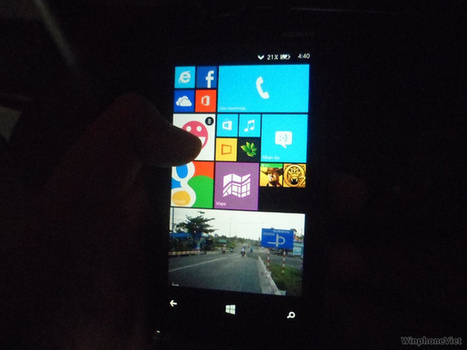
In these images you can allegedly see Nokia Lumia 920 GDR3 update running, with the Bittersweet shimmer Nokia software package.
|
|
Scooped by
Thomas Kalhauge
October 1, 2013 5:03 PM
|
Surface 2 is so much more than a tablet. See all you can do with Surface 2.
|
|
|
Scooped by
Thomas Kalhauge
October 4, 2013 10:17 AM
|
Adobe has updated their Adobe Reader app for Windows Phone 8 to version 10.3, adding support for annotating and commenting on PDF files. When viewing a PDF file it is now possible to highlight, underline and strikethrough text (annotations) and add comments as a sticky note. These edits can be saved to the PDF file and will be viewable in other Adobe Reader clients. Also new is support for storing, sharing, and accessing documents via the Acrobat.com cloud service. Once logged into your Acrobat.com account you can access PDF files stored on the cloud service. PDF files stored on your phone can also be uploaded to the service, making it easier to share files with other people. The service also allows you to synchronize PDF files across multiple device, with reading position, comments and annotations, automatically saved to the cloud. A number of Adobe Acrobat related services are available through an Acrobat.com subscription. The basic membership level is free and comes with 5GB of personal file storage, which should be more than enough for most users to get started. Additional storage space and services (e.g. online conversion and export tools) are available as part of a number of premium subscription packages. The latest update to Adobe Reader puts the app ahead of other third party PDF applications, including Microsoft's own PDF Reader app, in terms of features and functionality. The additions to app make it possible for common PDF workflow tasks to be carried out on a Windows Phone device, further burnishing the platforms credentials as an enterprise ready product. Adobe first released a Windows Phone 8 optimised version of their Adobe Reader app in June of this year. Windows Phone Store description: Adobe Reader is the free, trusted leader for reliably viewing and interacting with PDF documents across platforms and devices. Install the free Adobe Reader mobile app to work with PDF documents on your Windows Phone devices. Easily access a wide variety of PDF types, including password-protected documents. Annotate and comment on PDF documents
• Provide feedback using the highlight, strikethrough, and underline tools
• Add comments anywhere in your PDF with sticky notes
Store and access documents in the cloud with Acrobat.com
• Share files with anyone using Acrobat.com file sharing
• Share files across all of your desktop and mobile devices with Acrobat.com
• Automatically save changes back to the cloud
• Synchronize where you are reading across multiple devices via Acrobat.com Adobe Reader is a free download for Windows Phone 8 from the Windows Phone Store. The Windows Phone 7.5 version remains available for older devices.
|
|
Scooped by
Thomas Kalhauge
October 3, 2013 4:09 PM
|
If you have been thinking about preordering Microsoft’s Surface 2, you might want to hurry up and get your order in. According to Microsoft, the new device has been selling like “hotcakes” (yes, they were that cliché) and they expect the Surface 2 (64 GB) and Surface Pro 2 (256 GB and 512 GB) are “close to selling out.” Within the United States, Microsoft’s Arc Touch Mouse for Surface, Type 2 Cover (purple and black), and Touch Cover 2 have already sold out. The company’s General Manger for Surface, Brian Hall, stated that “pre-order stock of the Surface 2 (64 GB) and Surface Pro 2 (256 GB and 512 GB) are close to selling out.” Analysts have been much more positive about Microsoft’s latest product and expect the tablet to sell much better than its first generation brother. The new Surface 2 tackles many concerns and issues with the original Surface and creates a much more appealing experience for users. Every aspect of Surface 2 has been improved, from its weight, to its battery life, to its everyday operation. The new Surface has the typical specs bump that we expect to see from new tech items, but also new leaps of engineering for better user experience. The Surface keyboards, Touch Cover 2 and Think Cover 2, are now thinner and include backlit keys. Major improvements to the device itself include a new two angle kickstand for more comfortable use (especially on laps or surfaces that aren’t perfectly flat) and a battery that Microsoft claims has been improved by up to 75% efficiency. If you intend on picking the Surface 2 early and want your choice of keyboard color, now is the time to head to Microsoft’s online store and pre-order. If a product that you want is already out of stock, you can sign up for email notifications for when the item is available. Click here to visit the Microsoft Store online and preorder Surface 2.
|
|
Rescooped by
Thomas Kalhauge
from Windows 8 Apps
October 3, 2013 1:44 PM
|
Learn how to install and setup Firefox Metro (Modern UI) version in Windows 8 and Windows 8.1.
Via Allmyapps
|
|
Scooped by
Thomas Kalhauge
October 3, 2013 10:56 AM
|
Every smartphone is made up of compromises. Battery life against screen brightness is an obvious example in hardware, but there are many others. One of them is setting the price of the handset.
|
|
Scooped by
Thomas Kalhauge
October 3, 2013 10:10 AM
|
If you've been looking at my Lumia 1020 camera comparisons closely enough, you'll have seen that party/pub/event shots taken with Xenon flash end up not looking quite as crisp and 'frozen' as we're used to seeing with standalone cameras and even...
|
|
Scooped by
Thomas Kalhauge
October 3, 2013 3:23 AM
|
Nokia devices are jam packed with such an astounding array of features that it’s hardly surprising we sometimes need a helping hand to get the most out of them. Fortunately, there’s one place online where you can get all the advice you need and more. Take a bow,Nokia Support Discussions! This incredible web community is manned by a crack team of volunteers, the unsung super heroes of Nokia Care. Unsung, that is, until now. To shine a light on the amazing work the entire community does, we asked Community Manager Wayne Spillett to profile the five best mobile masterminds. Over to you, Wayne. In the beginning… I first joined Discussions as a moderator back in August 2007 when our English community was just under two years old, and spent four years running the moderator team before relocating to Nokia’s Finnish homeland and becoming Community Manager in 2011. It has been a fun-packed six years so far, it is a wonderful community with its daily dose of drama and intrigue, and in that time I’ve met and got to know literally hundreds of great characters. A community of super heroes When Nokia Connects asked me to pick the top stars that have made super contributions to community over the years, narrowing down the list of potential candidates from three digits to just five was a real challenge. Honourable mentions go to Sapporobaby, our resident agent from the U.S. State Dept., imprisoned these many years in Helsinki and desperately trying to escape to warmer climes, everybody’s favourite school headmistress Patriciaanne3 who was the real heart and soul of the community during her time with us and who is now enjoying her retirement, and Radical24 – the hip Illinois chick with a real passion for all things mobile. And with only a little further ado to give a proud salute to all those who are not here but who are nonetheless fantastic, here go the BIG FIVE… Psychomania
Mobile Overlord Psychomania is the undisputed top-man of Discussions, since joining the community a few months before I arrived on the scene he has racked up an incredible 27,000 posts, been awarded kudos by our members more than 6700 times and authored more than 1500 accepted solutions. Twice already we have had to introduce extra ranks in our community because he had so far surpassed the requirements for the top rank of the time! Psychomania lives in northern England with his wife and his cats Robbie and Kylie; and when not sharing his incredible expertise on all things Nokia with our Discussions community he works as a graphic designer. CJLim
Mobile Overlord Our resident global businessman, also with us since 2007, is originally from Malaysia but lives and works in Ireland where he enjoys the country’s famous “Black Stuff” almost as much as he loves Nokia’s award-winning “Yellow Stuff”! When not jet-setting around the world, structural engineer and IT manager CJLim is a great mobile all-rounder, and long-time expert on Nokia’s award-winning smartphones and, as you might expect from somebody who spends so much time travelling, all things maps and navigation. Adrianhughes
Mobile Sensei A truly global guy, Adrianhughes is an Australian whose family tree has roots in both Europe and Asia-Pacific. A member of Discussions since September 2008, Adrian has an impressive back-catalogue of phones, mainly (we are happy and proud to say) Nokias. Like the others here, self-employed Adrian is pretty prolific when it comes to helping Nokia Customers get the most of their phones, and he has been one of the top Discussions members when it comes to Supporting or fantastic new Lumia range. Adrian became a father earlier this year, so I’m sure everyone will join me in wishing him the heartiest congratulations! Scoobyman
Mobile Sensei Another of our superstars who has been with us some a number of years is Scoobyman, a carer from Wales who cares for Nokia Customers at Discussions with immense attention to detail and a keen knowledge of all Nokia products large and small. Scoobyman is also one of our top-rated experts in the field of maps and navigation. Ceroberts75
Mobile Guru Californian businessman ceroberts75 joined Discussions back in the mists of time in 2006, and has worked his way through Nokia’s history of smartphones from the earliest Symbians, through our Linux-based N900 and N9, finally arriving at our award-winning Lumia range. We’re happy to say that Ceroberts75, whilst initially sceptical about our Lumia products, is now a top Lumia evangelist – we’ve even heard stories of him visiting retailers and operator stores in the Sunshine State and teaching them a thing or two about Lumia! If you’d like to get to know these five amazing guys better or simply want to make use of their amazing mobile knowledge, why not head over to Nokia Support Discussions now. Alternatively, share your thoughts of their heroic endeavours down below.
|
|
Scooped by
Thomas Kalhauge
October 2, 2013 1:39 PM
|
Collaboration, expertise produce enhanced sensing in Xbox One2 Oct 2013 9:00 AM A Silicon Valley-based hardware team collaborated with Microsoft Research to overcome technological hurdles with the new time-of-flight sensing camera in Xbox One. Cyrus Bamji had encountered a challenge. Luckily for him, Microsoft Research had just the solution. Bamji, Microsoft partner hardware architect for Microsoft’s Silicon Valley-based Architecture and Silicon Management group, and members of his team were trying to incorporate a time-of-flight camera into Xbox One, the successor to the wildly popular Xbox 360. A time-of-flight camera emits light signals and then measures how long it takes them to return. That needs to be accurate to 1/10,000,000,000 of a second—remember, we’re talking the speed of light here. With such measurements, the camera is able to differentiate light reflecting from objects in a room and the surrounding environment. That provides an accurate depth estimation that enables the shape of those objects to be computed. That speed-of-light capability would be a major advancement for the Kinect sensor portion of Xbox One, being released to 13 launch markets next month. The new Kinect, a key differentiator for Xbox One against its competition, needed to capture a larger field of view with greater accuracy and higher resolution. An infrared sensor will enable object identification requiring little to no light, and improved hand-pose recognition, giving gamers and more casual users the ability to control the console with their hands. But Cyrus Bamji had a challenge. The sensor was great, but it also left those working on it eager to do even more with it. “When we take a relatively new technology, such as time-of-flight, and put it into a commercial product, there are a whole bunch of things that happen,” he says. “There are things that we didn’t know how important they were until the product was made. For example, we know theoretically that motion blur in time of flight is a big problem, but just how important is only discoverable when you’re building a product with it and that product needs to deliver an excellent experience.” Accurate depth measurement in diverse scenes with the new camera’s high resolution and a wider field of view also pose user-experience issues, making it difficult to keep small objects, such as a finger, from fading into the background, for instance. While ....
|
|
Scooped by
Thomas Kalhauge
October 2, 2013 10:46 AM
|
Microsoft has put up the first major update to its latest OS, WIndows 8.1, up for pre-order ahead of the official October 18 launch.
|
|
Scooped by
Thomas Kalhauge
October 2, 2013 10:03 AM
|
They have just released the CBeebies Playtime app for Windows Phone. Designed for children, the app is filled with games and other interactive features to keep the little ones busy and educated them on the sly. The app features:cbqr Creating Profiles: add your child’s name
Rewards and Achievements: fun, energetic and bouncy interaction with the CBeebies bugs
Learning benefits: engaging and entertaining games that develop children’s reading and writing skills with the Alphablocks, listening and observation skills with the Octonauts, movement development with Tree Fu Tom as well as having fun and developing confidence for all children, including those with special needs with Mr Tumble and his friends
Special Message: Surprise your child with a special message from a CBeebies Presenter or record a personal message from you, using the voice recorder
Parents tips and links to useful information from CBeebies Grown Ups
Link to more free, fun games to enjoy from CBeebies on your mobile and tablet
Keypad lock for any external links
|
|
Scooped by
Thomas Kalhauge
October 2, 2013 9:48 AM
|
LEGO video games have provided countless hours of light-hearted gameplay, yet we're seeing more releases come to light with different themes and genres.
|
|
Scooped by
Thomas Kalhauge
October 1, 2013 5:36 PM
|
Skype pushes out another minor update with a small but handy feature. In a promising trend, Skype has delivered yet another update to its Windows Phone 8 app today since adding Video Messaging a few weeks ago. The update is minor, responding to feedback about how conversations work in the app.
The big change here is that conversations can now be hidden from view. A user simply needs to tap and hold on a conversation in the Recent pivot, and then select 'Remove'. Performance and stability have also been tuned up once again in this app update.
In related news, Skype has announced that they are discontinuing support for Windows Phone 7. So the version available in the Store to those devices right now is the last version you'll likely see.
For Windows Phone 8 users, you can download the latest Skype update for free from the Store by clicking on the link below or scanning the QR code.
|
|
Scooped by
Thomas Kalhauge
October 1, 2013 5:24 PM
|
Welcome to the second half of Windows Phone Central’s Sims FreePlay Achievement guide! In this installment, you’ll learn how to bust ghosts and feel good, make babies, and get your kids’ grades up on high.
|