#1 Attachment Preview : Instead of a long file list, attachment preview can be seen for both emails which come with attachment or when you attach a file. They are listed horizontally instead of vertically and you can scroll left or right to see the preview. This is very handy for images and also vertical …
Windows Phone 8.1 introduces a handful of new features like Cortana, Notification Center and Wi-Fi Sense, but also improves on older features like Data Sense. We’ll be going into detail over the next few days about all the various features. We figured we’d make ‘sense’ of Windows Phone 8.1 by spending quality time with Data Sense, Storage Sense and Wi-Fi Sense. Here’s the page you...
We're excited to announce another patch to our official Windows Phone app today, which you can download right now here in the marketplace (Windows Phone 8 and Windows Phone 7). Whilst this version 4.4.18 is not the biggest update we've ever announced we suspect a fair few people will be quite happy. Following a flood of e-mails and messages complaining about our live tile's...
In Windows Phone 8.1, the Xbox Games Hub is now a separate app that can be updated independently from the OS itself. It can’t be uninstalled, but the freedom to update separately should allow Microsoft to make changes to the app much more quickly than before. In fact, the app received its first update earlier today. Like many aspects of the Windows Phone 8.1 update, the Xbox Games app...
The evil Dr. Genius has built a robot army, and he's trying to use it to steal Cottontail Rabbit's eggs. Launch an assortment of egg attacks against the robot horde. 30 levels of egg flinging mayhe...
We’ve been covering the app Today’s Word for a handful of months now. It’s a great app that will help you grow your vocabulary every single day. You don’t even need to launch the app since its Live tile will just teach you a new word daily. The app has been updated to version 2.0 that brings a host of new features. Let’s check it out. Head into the Windows Phone Store and you’ll see...
If you have Windows Phone 8.1 and have been dying to try out the Project my Screen feature today is your lucky day. The download is currently available on Microsoft’s servers here, and it se...
As Windows Phone gets closer to the PC- and tablet-based Windows OSes, we're starting to see some neat integration bits. Key among those are the new settings sync features inWindows Phone 8.1, which let you sync key settings between your handset and your Windows 8.1-based PCs and tablets.
Settings sync has been available on the PC/tablet side since Windows 8, but Microsoft greatly enhanced this feature in Windows 8.1. Cross-platform settings sync is new to Windows Phone 8.1, but since it works between device types for the first time, it's not just new, it's also quite useful.
Note: To be clear, this article only describes features that sync between Windows Phone 8.1 and Windows 8.1. Both of these systems provide many other items that sync from device to device, but not from OS to OS.
The following features can be synced between Windows Phone 8.1 and Windows 8.1 devices:
Since I’ve already shared with you my favorite wallpaper for Windows Phone 8.1 and some of my apps on my Start screen, I figured I’d finish the week up with something on my Lock screen. Granted, I’ve been known to change this often, depending on which app adds support for that feature. But today I’m back to an oldy but goody: The blurred Start screen. As you can see in the above photo...
It’s been awhile since we’ve seen updates for 6tag (Instagram client) and 6sec (Vine client) from developer Rudy Huyn. Today, we’re getting updates for both, including a 2.0 release for 6sec. 6tag has received CloudSix integration, which is Huyn’s other pet project. CloudSix offers an unparalleled experience for cloud hosting companies on Windows Phone, including Dropbox (Huyn...
On the Windows Blog Microsoft announced the EA Mobile Spring Sale which is offering up to 60% off some great titles until the 24th April. The titles include: 1. FIFA 14 - 50% off Jumbo Gold Pack vi...
Cat Story is an odd little Windows Phone 8 game that sends you to an imaginary world filled with a wide range of interesting characters you must help build a new life. Game play is a mixture of time management, puzzle and scavenger hunt styles. The cast of characters in Cat Story have been shipwrecked on an uncharted island and a collection of quests to find all the survivors along...
So far, the Preview for Developers program with Windows Phone 8.1 is going very well for Microsoft and those interested in getting an early look at the next OS. The preview, however, is not completely optimized for individual devices, and they still need new firmware to be complete. Once “official” updates rollout with OEM firmware, we expect things to be even better for consumers....
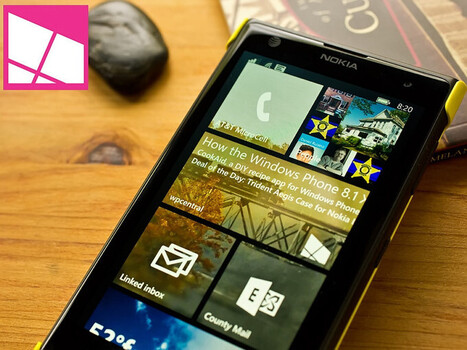
CookAid isn’t your run of the mill cooking app for Windows Phone 8. It falls in line with a “do-it-yourself” app in that you create your own recipes. Once created, you can generate shopping lists based on the ingredients needed for any of the culinary delights you’ve documented. Another feature that helps set CookAid apart from just creating a Word document for your recipes is the...
Nokia MixRadio lets you share your favourite mixes with your friends, through Facebook, Twitter, email or SMS. Find out more at http://www.nokia.com/nokia-mi...
Life can be like a monkey slap to the side of the head
One of the common questions I’ve been getting over the past week from folks has been how to take advantage of this semi-obscure ‘Project my Screen’ entry that was added to the settings collection with Windows Phone 8.1.
This entry is enabled in one of two ways: by using Miracast capabilities delivered in 8.1, and by using the Project my Screen app on a PC and connecting your phone to your PC using a USB cable (sorry – no WiFi yet).
I believe the ‘Project my Screen’ app has been one of the more eagerly awaited features by developers and technical enthusiasts alike. Since we launched Windows Phone 7.0, I’ve received at least a 2-3 mails/questions a month on how they can do demos like Microsoft presenters. With this enabled, anyone can fire up their phone and project a demo of their app or their phone. So, let me lay out how you can demo your app and phone.
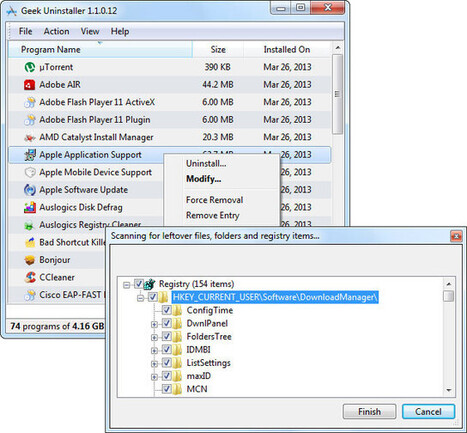
Standard removal program leaves tons of leftovers on your PC. GeekUninstaller performs deep and fast scanning afterwards and removes all leftovers. Keep your PC clean!
We have heard earlier that more than 50% of Windows Phone users use Bing to search, and it seems Microsoft is looking to increase that number even more. On WP8.1, if you type www.google.com in the ...
Phileas Fogg famously did it in 80 days, subsidized by a substantial fortune. Now, three British music students have gone one better than the literary icon. They traveled around the world in just 14 days and without a penny in their pockets.
For those looking for a portable tablet gaming experience, Windows tablets can sure hit the mark like no other platform. Whether you are looking at the fully equipped Razer Edge with an Nvidia GeForce GPU and dual joysticks, or you are looking at a Surface 2 – experiences are ready to be had. The power of a full Windows 8 tablet allows gamers to experience their favorite titles like...
Auto Witness is an interesting Windows Phone 8 app that could come in handy should you find yourself in a traffic accident. Auto Witness is a video recording app that sets up on a loop and saves your video automatically if a rapid acceleration or deceleration is detected. The app can also automatically save the videos to your OneDrive account. The Windows Phone 8 app was chosen as...
To get content containing either thought or leadership enter:
To get content containing both thought and leadership enter:
To get content containing the expression thought leadership enter:
You can enter several keywords and you can refine them whenever you want. Our suggestion engine uses more signals but entering a few keywords here will rapidly give you great content to curate.


 Your new post is loading...