The authors of this excellent article on how UDL can benefit all types of learners present a universal design lesson for educators:
"If we think about and plan the best way to deliver the information for all students, not only will our instruction improve but it will also be accessible to everyone in the classroom.
For UDL to be both effective and properly implemented, the practitioner needs to know the difference between accommodating and modifying learning." They illustrate this distinction through a fishing tale.
They go on to describe 5 effective UDL Tips for Teachers that when used effectively as accomodations will cultivate a group of learners capable of experienceing success beyond the classroom.
1. Provide digital notes
2. Use screen readers/audio books
3. Allow extra time
4. Use noise-reducing technology
5. Differentiate assessments
Thank you Jason Rogers and Keith van der Meer for your insight and inspiring lesson!
Susan Goding, a School Board Director in Washington State writes why UDL is the lens they need to be looking through when thinking about improving student achievement.
"UDL is a framework, based in the cognitive neurosciences, for designing learning experiences that work across a wide spectrum of learners. Its main purpose is to make sure everybody is a successful learner and reaches what we call an expert learner. That is, they know a lot, they know how to do a lot, and the love learning and they want to do it more.
The key to Universal Design for Learning is that we are designing learning experiences which, from the beginning, are designed to be universal and to make sure everybody learns. And that design is primarily based on the power to be very flexible in allowing choices, in allowing different paths, in allowing for things to be presented in different ways. So that we reach those other two things, universal and everybody learns...”
I had the honor of interviewing Stephen Petrucci who is the first British Columbia administrator that discussed UDL in relation to a personalized learning environment. Stephen shares his vision of personalized learning and what steps have been taken in his schools where he is the Director of Instruction in School District 60 - Fort St. John, BC.
"What is your vision of personalizing learning?
Personalizing learning is education through the eyes and brain of the individual learner. This entails building a relationship with the learner and creating a profile that reveals personal interests, strengths and prior learning, as well as academic needs. It involves determining and getting a learner’s input on how they learn best, using a framework such as UDL to collaboratively design instruction and finally, employing the vehicles of technology and the arts to drive that personal learning forward."
Thank you Stephen, a BC thought leader, for your vision and insight into persoanlized learning!
> Read&Write Web – With the Read&Write Web toolbar you can access and interact with web content using Text-to-Speech with dual color highlighting. This app includes a Dictionary and Picture Dictionary to look up unfamiliar words, Translator to translate selected words into multiple languages, Study Skills to highlight and extract important pieces of information, and Fact Finder to research on the web.
> eBook Reader – Allows a user to log into Bookshare, search for, open or save a Bookshare eBook, and read the book aloud with dual color highlighting. You can also personalize speech and reading options.
> Speech – Designed for smaller mobile devices and smartphones, Speech allows users to read aloud any typed or pasted text with color highlighting.
> Dictionary – Another App meant for smaller mobile devices, Dictionary allows users to look up get both definitions and images and read aloud text definitions.
Universal Design for Learning: Reaching All Learners at the Harvard Graduate School of Education - July 9-13, 2012
"Program Objectives
> Study the latest brain research on diverse learners. Consider how scientific discoveries are reshaping our understanding of how individuals learn and what motivates them
> Acquire practical, classroom-based and school-based applications to implement differentiated instruction. Address the diversity of students in the classroom
> Customize teaching and learning using new technologies. Understand how flexible technology compares with traditional print media as a learning tool
> Explore new frontiers in the delivery of curricular content and how these advances will change the way classroom materials are developed and utilized
> Consider national and local policies that affect teaching and learning for all students.Understand how government policies address the educational needs of children with disabilities and how the UDL approach can meet those needs
> Learn how to apply and implement the institute’s framework in educational settings"
"Today we’re sharing the first of several posts drawn from work shared at the 4 April 2012 Academic Technology Showcase, which brought 70-some projects by UMinn faculty, staff and students making use of technology to provoke, further, extend, make possible a range of innovations in Teaching, Learning, and Research."
Two projects that incorporate UDL principles are showcased here. Universal design means "creating more ways into the learning experiences for all students". Take a closer look at these to projects:
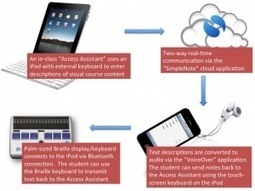
"1. The Media Description Project – Real-Time Access to Images for Blind & Visually Impaired Students: write up by Tim Kamenar; Disability Services, student services coordinator.
2. Podcasting: Learning on-the-go: write up by Susan Aase; Disability Services, outreach coordinator.
Course objectives include
> increasing engagement with the learning process through direct involvement with producing and sharing new information related to the course;
> stimulating learning through use of emerging technology-based learning venues;
> building a sense of community by involving students in teaching one another;
> empowering students to become co-producers of the learning process and the outcomes;
> and increasing measurable student outcomes, such as lower rates of course withdrawal and higher final course grades."
What an excellent introduction on how to Clear the Path with UDL. Kit Hard presents practical and effective UDL strategies that can engage learners and remove barriers to learning . He also introduces a number of easy to use Web 2.0 tools and apps that can help all learners express what they know.
"Universal Design for Learning (UDL) provides a lens that educators can use to make content accessible for all students. See how Kit Hard from the St. Clair County RESA uses technology to clear the path for all learners."
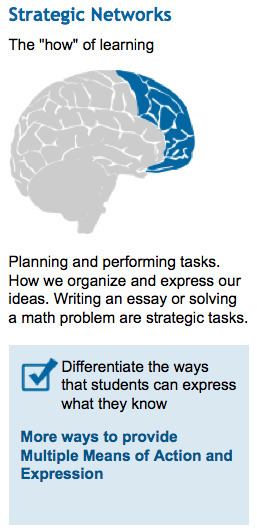
How can Web 2.0 tools help support UDL Principle 2: the "how" of learning? Here are just a few example on how wikis, podcasts and blogs can provide "muliple means of expression".
How can wikis help?
> "Educators can post hyperlinks to demonstrations of multiple models of skilled performance
> Educators and students alike can offer ongoing relevant feedback to student contributions; students can contribute/alter content anonymously and still receive relevant feedback"
How can podcasts help?
> "Students can use podcasting and vodcasting to share what they know; these can be used as informal assessments (to guide educators in determining what to teach in the future) as well as for formal assessment"
How can blogs help?
> "Students can use text, graphics, video, voice/sound files, and other easy-to-create electronic tools to interact with the material and “show what they know”"
- From the course, SPED 210 (6210)|TRED 210 (6110): Universal Design for Learning - Implications for Career Assessment and Transition at The George Washington University
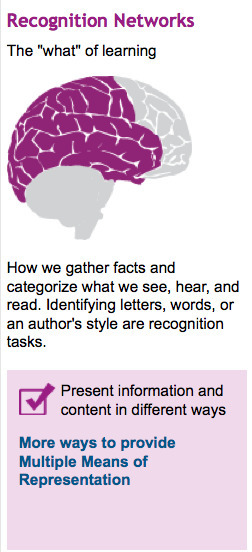
How can Web 2.0 tools help support UDL Principle 1: the "what" of learning? Here are just a few example on how wikis, podcasts and blogs can provide "muliple means of representation".
How can wikis help?
> Educators can post text, graphics, video, voice/sound files, and interactive applications to show concepts, skills, and facts in different ways
> Students can use posted and in-class examples as a springboard to creating and posting their own examples to clarify information for themselves and their peers
How can podcasts help?
> Video (vodcast) and voice (podcast) recordings can provide anecdotes and stories related to essential skills and knowledge that would be unwieldy to type
How can blogs help?
> Educators can offer information in most of the same diverse ways as indicated above in the section on wikis (text, graphics, video, voice/sound files, and links to interactive applications)
> Easy, responsive method of addressing prior knowledge issues that arise during each day and might be addressed online at night
- From the course, SPED 210 (6210)|TRED 210 (6110): Universal Design for Learning - Implications for Career Assessment and Transition at The George Washington University
In designing online environments, consideration for the diversity of learners should be included. In this blog, a PDF resource is included titled: Design Considerations for Online Courses
"Universal design principles for online learning environments are based on the idea that a broad range of human ability exists. The creation of content needs to be made as usable as possible by as many people as possible regardless of age, ability, or situation.
Usable content accommodates people with disabilities, older people, children, novice technology users and others in ways that benefit all users. Designing for a wide range of users from the beginning of the building process can increase usability without significantly increasing the time it takes to build. The results benefit everyone and reduce modifications later when students, instructors, or content change."
We realize that moving to a personalized learning environment where learners drive their learning takes time over several phases. The first phase is starting with the teacher so they understand Universal Design for Learning (UDL) and how to teach and support all learners in their class.
We are introducing the Personal Learner Profile, a tool to help each learner understand how they learn best. Each learner is unique and we need for students to be proactive in they way they learn. We have also included a scenario and how three learners could meet a CCSS ELA standard and how a classroom could be redesigned to support a personalized learning environment.
"To meet the standard ELA-RL.3.1, the teacher presents a story and offers multiple ways to read, listen, and respond to the story. To personalize the classroom, it can be set up with multiple stations so learners have choices how to learn and demonstrate understanding of a concept:
> Station 1: laptop computers
> Station 2: 2-3 tables grouped for collaborative work
> Station 3: teacher area with places for students to sit (rug or bean bag chairs)
> Station 4: individual area for privacy or journalling with mobile devices
> Station 5: standing or pacing area (desks could be high without chairs)"
A new publication, Curricular Opportunities in the Digital Age, from the Students at the Center was recently released that focuses on creating an "ecology of learning" where new student-centered pathways can benefit ALL students with the use of digital technologies. UDL can be the framework fto make that happen.
"David H. Rose and Jenna W. Gravel consider how advances in teaching technologies enable new curricular designs that offer exciting ways to create classrooms that are student centered.
Given the myriad ways students differ, how can educators determine the essential components of curricula that use new technologies to support student-centered approaches to learning—for all students, not just a few? Universal design for learning is a promising framework for doing that. UDL provides a structure and guidelines for making decisions about instructional designs that meet the challenge of diversity. Many options are built into UDL, based on research and practice from multiple domains within the learning sciences—education, developmental psychology, cognitive science, and cognitive neuroscience."
Dr. Rose is speaking at the Equinox in Manchester, Vermont. Sponsored by the Vermont Council of Special Ed Administrators 11/21. Very excited to be brining him here
Steven Christopher, ACC Director of Special Populations at Austin Community Colleges explains universal design and offers tips to faculty on how to incorporate Universal Design in their instruction.
> "Use delivery methods that recognize a range of abilities, backgrounds, and previous experiences. Don’t rely solely on lecture; incorporate, discussion, hands-on activities, case studies, and projects.
> Use a consistent, intuitive format for all print and electronic materials. Print materials should be available in electronic format; webpages should include text descriptions of graphics. Presentation materials should be legible with sufficient spacing. Videos should be closed-captioned.
> Promote different types of interaction with your students – not just face-to-face, in-class discussion, but also online interaction.
> Offer frequent and flexible options for students to demonstrate knowledge – not only tests, but also group work, portfolios, and presentations. Make sure feedback is uniform and frequent.
> Ensure that classroom, labs, and fieldwork are accessible for a range of physical abilities. Minimize the need for unnecessary physical travel by making materials available online or allowing work to be submitted electronically."
On May 18th, authors and educators Kathleen C. Sadao, Ed.D. of the Sacramento County Office of Education and Nancy B. Robinson, Ph.D., CCC-SLP of San Francisco State University will address concerns of special education directors, early childhood interventionists and other administrators related to the implementation, uses and benefits of UDL and AT.
"By attending the webinar, participants will learn the basics of UDL implementation and how to incorporate AT tools from the initial phases of classroom design. In addition, presenters will discuss how to apply the AT toolkit concept to specific school and classroom needs, provide examples of how AT tools can provide access to the general education curriculum for students, and help attendees understand the roles of the special educator in promoting the application of AT toolkits for curriculum support."
Universal Design for Learning (UDL) and RTI are gaining traction as more states and school districts are looking for ideal tools to implement the Common Core State Standards.
"To us, it makes perfect sense. With UDL, you really do start with addressing goals that are applicable for all learners," said Patti Ralabate, the director of implementation for CAST (www.cast.org) which developed UDL.
"Broadly, universal design for learning is an instructional method that involves creating lessons and classroom materials flexible enough to accommodate different learning styles. And response to intervention is an approach intended to provide early identification of students' learning problems paired with the use of focused lessons—interventions—to address those problems before it's too late."
"Districts already using either or both approaches say there is no question about their benefits for implementing the common-core standards."
This chart outlines the UID Principles and the online distance education and m-learning recommendations for inclusive m-learning.
"UID principles have been developed to build flexibility of use into both the instructional design and operating systems of educational materials so that they will be appropriate to the widest range of students (Connell et al., 1997; Scott, McGuire, & Shaw, 2003; Burgstahler, 2007). Elias (2010) extracted eight UID principles that are particularly useful in distance education (DE):
Lisa Parisi will be presenting on UDL in the Classroom at the 2012 Social Learning Summit. Here is a description of the presentation that will be filled with great strategies in using social media in a UDL classroom.
"Short Session Description: Participants will learn how to use Web 2.0 tools, social media, and cloud technology to reach all students.
Full Session Description: We, as educators, are faced with many different challenges. We have a large amount of curriculum to cover, tests our students must do well on, and a public who believes one size fits all works in the classroom. Our students are getting burned out quickly. And one size fits all does not take into account the learning disabled child, the ADHD child, the hearing impaired child, the bored child, the struggling reader, the math phobic child, the artistic child, the leader, the follower, or any other "out of the norm" student (whatever that might be). Web 2.0 tools afford us the opportunity to help all students meet the curricular requirements, demonstrate knowledge, learn, and enjoy school. Learn how to use collaborative tools such as Google docs, presentation tools like Glogster, and research tools such as Discovery Streaming to enliven your classroom. Today, there is no excuse for not reaching all children. Come hear how easy it is."
Friday, April 13th Podcast: National Library Service, David Dikter, Adding accessibility to the mainstream, Hunger Games and Universal Design for Learning, Apple iPad's textbooks don't go far enough, social media and disability, Hadley School for the Blind Podcasts
How can Web 2.0 tools help support UDL Principle 3: the "why" of learning? Here are just a few example on how wikis, podcasts and blogs can provide "muliple means of expression".
How can wikis help?
> Hyperlinks can be used to make meaningful connections between current content and its “real life” uses
> Hyperlinks can be used to connect to news reports and other information that validates the time spent in class on a topic
> Educators can offer students option to work together in an online format on group projects
> Educators can offer students the option to share work product online (either with or without comments and changes available to viewers)
How can podcasts help?
> Educators can offer multiple podcasts or vodcasts that explain content from different angles
> Educators can allow students to use podcasting (such as songs, radio shows, and news reports) and vodcasting (such as music videos, documentaries, and performing arts) technologies alone or as a group to create projects
How can blogs help?
> Educators can use daily and weekly blog postings to clarify choices and communicate to students and parents which parts are choice and which parts are required
> Educators can use blog postings to frequently make connections between the current content and real-life applications
A special education teacher reflects on Book Creator and how it motivates students who are resistant writers. Here is her story:
"As a Special Education teacher of upper elementary grades, I have several students who are resistant writers. This app has amazing potential to motivate them to write more since the finished product is beautiful, accessible, intuitive, and reflective of their efforts.
I have been using this app with one of my students with intellectual disabilities and what an incredible tool! We took pictures of this student making various emotional faces and then helped her draft a repetition book. She loved being able to record herself reading the pages and willingly practiced and practiced her Frye words and her fluency, without even realizing that she was doing it. She is also happily practicing pronunciation and sentence structure, skills that she would sometimes prefer to ignore!"
"Learn how social media websites, including Pinterest, Symbaloo, Diigo, and LiveBinders support diverse learners,, including students with disabilities, English Language Learners, and the disengaged learner. Examine how the principles of Universal Design for Learning (multiple and flexible means of representation, presentation, and expression) can be applied to the features of these websites."
Brian Kuhn has shared his experiences at an elementary school where Universal Design for Learning is being implemented. Included are videos on how students are using the tools to write a speech. The principal of the school shared her thoughts and how UDL makes a difference:
> “increase ‘access’ to general curriculum materials and, at the same time, provide support for the learner’s particular challenges”
> “‘text-to-speech’ technology can be a powerful tool for visually and processing speed impaired students to keep pace and comprehend what they are reading”
> “technology is used to ‘even the playing field’ and allow the child independent access to the curriculum”
Kevin McLaughlin has shared a video on how he has redesigned his classroom to support a personalized learning environment. In an interview with him, he made these comments about how this redesign was key for the learners in his classroom:
"The classroom layout allows my class the freedom to explore their learning in a way that would not be possible if they were grouped by ability and had specified seating arranged for them."
Thank you Kevin in showing us what the first steps can be in personalizing the learning environment and what the benefits are. Read Kevin's blog at www.ictsteps.com
Paul Hamilton writes about Speak Selection, a new feature in iOS5 that offers a TTS tool that can be used by learners who struggle with text. He also includes how to use the Define within Speak Selection.
"This will read aloud any selected text — in a web article, a text editor, an email, in Twitter, in text messages, or just about anywhere. It isn’t perfect. For example, Speak Selection won’t read in Facebook.
It is worth noting that Define is another helpful feature that is new in iOS5. This is available whether Speak Selection is turned on or not. Both features, however, are made available in exactly the same way. When a single word is selected, you are offered a Define button. When Speak Selection is turned on, ‘Define’ is offered at the same time as ‘Speak’"
Paul Hamilton has offered an excellent review of vBookz PDF Voice Reader for the iPad, iPhone and iPod Touch. The key app features:
•16 languages aloud.
•Open any PDF directly from the mail, dropbox or iTunes sync.
•Read almost any PDF aloud.
•Reading orientation tools.
•Auto text follower mechanism.
•High quality male and female voices.
Here are some of Paul's comments:
"It could hardly be easier to bring PDF files into vBookz PDF Voice Reader! Simply open a PDF email attachment, or a PDF file in your DropBox account. Then click on the forward icon to be given the option of opening the file in vBookz PDF Voice Reader. Once a PDF file has been opened, it remains on a book shelf in the “Library” for future reference. The process seems to work well with both short files and those that are book-length."
There is also a version of vBookz PDF Voice Reader for Mac computers.
To get content containing either thought or leadership enter:
To get content containing both thought and leadership enter:
To get content containing the expression thought leadership enter:
You can enter several keywords and you can refine them whenever you want. Our suggestion engine uses more signals but entering a few keywords here will rapidly give you great content to curate.


 Your new post is loading...