Shahi is a visual dictionary that combines Wiktionary content with Flickr, Google or Yahoo images. This is an excellent tool to help all learners make visual connections to any vocabulary in any content area.
Why UDL?
Shahi's visual dictionary supports the UDL principle of multiple means of representation by illustrating words and concepts non-linguistically.
AppWriter by LingApps is the first text editor for the iPad to offer users of all ages with reading and writing disabilities. It includes a set of integrated tools that include TTS, word prediction and a Mobile OCR Kit. What does this mean? Convert any printed text to a readable format from your iPad!
Here are the features:
> No WiFi or 3G needed; everything is embedded and runs directly on the iPad
> High quality TTS with highlighting as text is being read
> OCR - "Any paper document or image becomes accessible. Through the integration of Mobile OCRKit, textbooks, photocopies and handouts are easily converted into text documents. The text can be spoken out loud by AppWriter with color highlighting or edited. AppWriter OCR is the simplest and most affordable way to get any textbook or handout converted for everyone to read and listen to on an iPad. AppWriter OCR comes in more than 12 different languages."
> Word Prediction with the ability to hear each word before selection.
> File Management - emailed, copied to clipboard or export to DropBox.
This will level the playing field for millions of students worldwide!
Todd Rose, from CAST at the Cyberlearning Research Summit on January 18, 2012, discusses why variability in learning matters. There is the myth of the average learner that currently exists. We need to understand the variability in learning and how to design new learning environments for the full range of learners in the classroom.
He ends his talk with this question: "What do we want cyberlearning to be? First we need to understand variability and how we design for it."
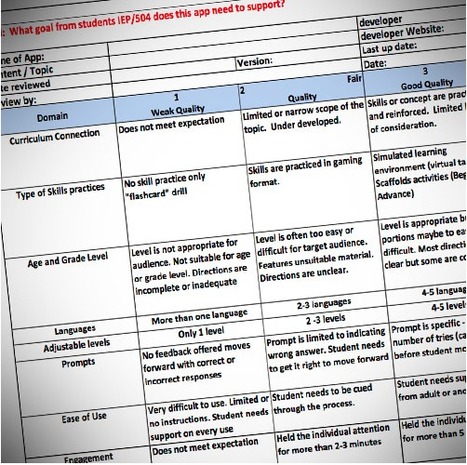
"AT Specialist Jeannette Van Houten has shared her up-dated rubric for evaluating which app to select for a student. The rubric considers 12 different charateristics that can be rated, including connection to the curriculum, the type of skill to be practiced, age level, ease of use, and alternative access."
You can download the Excel spreadsheet from this site. Jeannette's contact information is located here to request alternative formats.
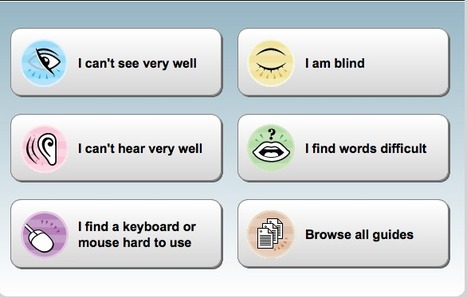
My Web My Way explains the many ways you can change your browser, computer, keyboard and mouse settings to make the web more accessible for the diversity of learners.
"How to" Guides are included on the following topics:
"Our brain's Strategic network helps students answer the "how" of learning through organizing, evaluating, planning and performing tasks. When our students have the opportunity to express their learning in different ways, they are finding different ways of action and expression. For example, students could write an essay, give a PowerPoint, or create a podcast about a particular concept."
Matt Bergman includes online resources that support UDL Principle 2 with alignment to the specific guidelines under this principle.
"At the International Conference on Assistive Technology and Persons with Disabilities, Microsoft is hosting a panel to discuss a report released by UNESCO entitled "Consultative Accessible ICTs and Personalized Learning for Students with Disabilities."
The UNESCO report outlines practical solutions, such as:
1. Maximize use of accessibility features in current school technology.
2. Support teachers with training, curriculum resources, and accessibility contacts.
3. Consider students’ accessibility needs early in curriculum development.
4. Facilitate students to learn the life skill of personalizing technology.
5. Consider accessibility when planning school technology.
6. Make accessible technology a key consideration for national and regional policies."
Aaron Puley provides a set of links to a wealth of resources that can support assessment, differentiated instruction and the principles of Univeral Design for Learning.
The Illinois Computer Educators organization (an affiliate of ISTE) has created a comprehensive resource to support the principles of Universal Design for Learning. There are hundreds of links in the following categories: Wikis, Blogs, Websites, Mobile Learning Info, Web 2.0 and Apps- Academic and Functional.
Thank you to ICE for producing an incredible resource!
Learn where UDL is being successfully implemented in Postsecondary Education!
"Universal Design for Learning (UDL)is an important educational framework to consider for postsecondary education. Thoughtful planning through the lens of UDL can offer important options for learners as they navigate a range of college or career postsecondary opportunites.We know that students are incredibly diverse in their learning needs, preparation, and approaches. UDL offers a practical instructional method to anticipate this learner variability and provide every student with equal opportunities to learn.
UDL is also an effective means for shaping learning experiences outside the classroom, such as online instruction, hands-on learning, or work-study experiences."
Here is a great way to see UDL in practice sponsored by SETSIG!
"This webinar will discuss the Universal Design for Learning supports that are available in the newly upgraded i21 Classrooms in San Diego Unified School District. Examples using Kurzweil 3000 and ActivInspire flipcharts to present accessible and engaging lessons will be demonstrated."
San Francisco State University - The Center for Teaching and Faculty Development has provided a set of best teaching practices and video case stories for Universal Design for Learning. From their perspective "Universal Design for Learning is a process of making course concepts accessible and skills attainable regardless of learning style, physical or sensory abilities."
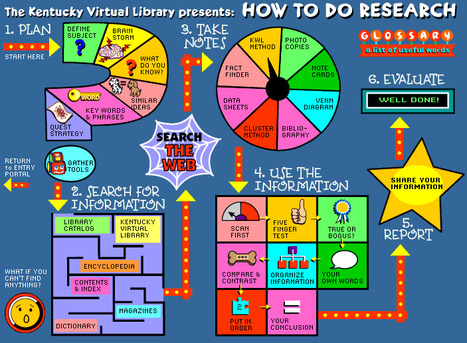
Kentucky Virtual Library has created a visual tool to help students do research. This is an excellent model of how to present a step by step approach in a visual way that includes a set of tasks that students can follow in conducting research. The basic steps are:
Alex Dunn, a Speech-Language Pathologist for the Upper Canada District School Board (UCDSB), located in Oxford Mills, Ontario presented at the 10th Annual CESA 5 School-Based Speech-Language Pathology Institute. She explains how she uses SMART boards, iPads, Apple TV, Dropbox, software and a set of apps to support the principles of UDL in her practice. Here are some of the questions from the audience where she provided answers:
> How can my iPad work with my SMART Board?
> I noticed you using tricks like the Magnifying Glass to reveal information that looked hidden on your pages. How did you do that?
> As SMART Notebook collaborative learning software is not switch accessible, how can students who can’t access the SMART Board directly participate with their peers in lessons?
> How can SMART products help my students who have visual impairments as bigger is not necessarily better?
"Alex has been devoted over the last 16 years to exploring creative service delivery models to ensure ALL students, including those with severe communication challenges achieve the goal of meaningful educational and social participation. Most recently Alex has spearheaded the creation of Smart Inclusion, an initiative that combines assistive technology with emerging technology and pedagogy to support inclusion – making the impossible, possible for ALL students."
Disclaimer: This is not a personal endorsement of SMART technologies but a demonstration on how a combination of tools can be used to empower instruction and student learning. - Kathleen McClaskey
What is the difference between Universal Design for Learning (UDL) and Differentiated Instruction (DI)? In this explanation it appears that UDL often empowers the learner than relying on the modifications by the teacher.
"The significant differences between UDL and DI tend to dwell within the world of the how and when in addressing the diversity of the student and classroom. DI is the modification of the curriculum in order to properly educate the student with his/her specific learning needs or preferences. UDL contrasts this because it addresses the diversity of the student at the construction of the curriculum. UDL also integrates the methods for DI within the lesson or curriculum allowing the student the ability to become more educationally aware so that they are in command of their own education rather than having to rely on the possible crutch of the modifications made by the educator."
"Starting March 20th, 2012 (1 week from Tuesday), PATINS will begin a new online video series on Accessible Instructional Materials (AIM), Assistive Technology (AT), UDL and other collaborations with Indiana service providers. Many of these videos will be LIVE broadcasts and they’ll always be during lunch at 11:45am EST! They will all be short (15-minutes) and practical/applicable to your districts, schools, and classrooms right away."
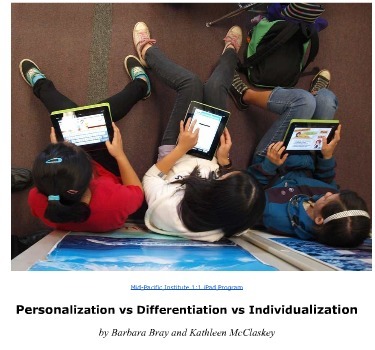
A report by Barbara Bray and Kathleen McClaskey explaining the elements of the Personalization vs Differentiation vs Individualization chart. In the explanation, UDL will play an important role in the learner understanding how they learn best.
The chart on Personalization vs Differentiation vs Individualization that we created brought an enormous interest from people and organizations around the world. This report was developed from many questions we received about the chart elements in comparing these terms. In responding to these questions, we have included specific references and links in explaining these elements related to Personalization vs Differentiation vs Individualization.
Please download the free chart and report! Your feedback would be appreciated.
"Our brain's recognition system helps us gather information and categorize it through what we see, hear, and read. When we recognize letters, words, or a particular writing style, we are using this part of our brain. So how do we help students learn with this part of our brain? When we present information in different ways, we stimulate our student's senses and their learning experience."
Matt Bergman includes a set of online tools that supports UDL Principle 1 that aligns to the related guidelines.
Thank you Matt for this great resource on multiple means of representation!
"PowerUp is a free website for school leaders and Grade 4-6 teachers who want to know how to use technology to help all students excel. It features current research and guides Leadership Teams in using data-driven decision-making to help teachers create PowerUp Classrooms."
Become a part of a field test and learn how to transform your classroom through UDL-based approached for students with disabilities and their classmates.
Jason Gibson makes some important points about how to meet the need of ALL learners. First and foremost, know your learners before you decide on an instructional strategy and the technology you may use. How do you do this? Use the UDL Class Learning Profile.
"I wanted to share a foundational principle for meeting the needs of ALL learners. Before you select the technology, you must identify the strategy. Before you select the strategy, you have to know where your learners are in regards to the content/skill you are teaching! Knowing this will allow you to make the best instructional (including when, what, and how with technology) decision for each learner. Haring, et al., 1978 was one of the earliest to dive into these stages and it has moved forward with a few minor changes through the years. Here they are (drumroll please!): Acquisition, Fluency, Maintenance, and Generalization."
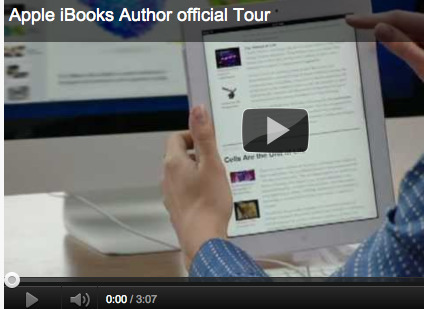
The iBooks Author app for the Mac offers several features in creating books that can support the principles of Universal Design for Learning:
> "Text, audio, video and image together, providing multiple options for representation and engagement; > Enlarge pictures and text so we can get up close; > Re-play videos so we can repeat and revisit ideas; > Listen to the text read aloud by Apple's built-in screen reader, Voice Over."
Go to the Apple help page "How to make your ibooks accessible" (support.apple.com/kb/HT5073?viewlocale=en_US&locale=en_US) to learn how to create a book that is accessible!
This excellent brief includes evidenced-based instructional strategies to engage students with learning disabilities. Consider sharing this with teachers across all content areas.
"This InfoBrief identifies and explains selected classroom-based strategies within the Universal Design for Learning (UDL) model. General and special educators can implement the following strategies to engage students with disabilities (particularly those with learning disabilities) in order to prepare students to transition from secondary to post-secondary and workplace settings. The aim of this brief is to provide teachers with background knowledge and skills so that they can integrate evidence-based practices into the classroom to aid student learning."
"Universal Design for Learning (UDL) promotes a framework to make course instruction, materials, and content accessible and engaging for students of all learning styles. Incorporating UDL into the general education curriculum means offering multiple, flexible ways for students to receive information and demonstrate their skills. These strategies provide both physical and cognitive access to the curriculum while maintaining high achievement standards for all students".
George Van Horn, Special Education Director at the Bartholomew Consolidated School Corporation (BCSC) in Colombus, Indiana and current Indiana CEC President implemented a Universal Design for Learning (UDL) framework across his district. This month he was able to share his successes in a Senate hearing titled "The Promise of Accessible Technology: Challenges and Opportunities".
The Superintendent of BCSC, Dr. John Quick explained that UDL is a set of principles for curriculum development that give all individuals equal opportunities to learn. Dr. Quick described how his district worked for years to implement UDL and how it incorporated technology into its student’s lives. "Moreover, he emphasized the point that although UDL specifically benefits students with disabilities, it benefits all students in the district and is used to help everyone better access knowledge and demonstrate learning growth. Training for professionals working in the schools is essential and in BCBS all teachers undergo a three day UDL workshop at the beginning of the year to ensure they can fully integrate UDL throughout their practice."
This map represents information about state level Universal Design for Learning (UDL) and Universal Design (UD) activities across the country. The information was gathered from state and federal website searches and includes state level documents and information shared by higher education institutions.
To get content containing either thought or leadership enter:
To get content containing both thought and leadership enter:
To get content containing the expression thought leadership enter:
You can enter several keywords and you can refine them whenever you want. Our suggestion engine uses more signals but entering a few keywords here will rapidly give you great content to curate.


 Your new post is loading...