Find resources at http://bit.ly/ELTLINKs...
Via APIBA e-TL SIG, the Special Interest Group on Learning Technologies

 Your new post is loading...
 Scoop.it! No comment yet.
Sign up to comment
Scoop.it!

This site has a large collection of videos with interactive scripts. Just click on th words in the script and you will hear the part of the clip where they are spoken. Via Nik Peachey, Let's Learn IT 
Luciana Viter's comment August 13, 2012 11:19 PM
Great resource, Thanks!

Wad. Moha's curator insight,
December 11, 2012 5:33 PM
this helps a lot. why don't you just give it a try
Scoop.it!
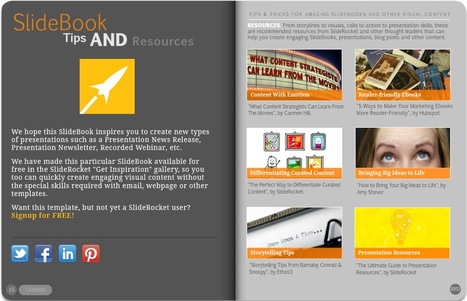
Robin Good: SlideBook is a presentation template available to SlideRocket users, which allows the creation of beautiful looking flipbooks.
You can copy this full SlideBook with all its contents and edit it from start to finish with your own stuff.
SlideRocket is a paid, web-based presentation software with many great features (I have been a paying user in the past) but you need not pay to try out this new template and the possibilities it offers. Just sign up for a free account and check inside the Inspiration link.
All of the templates inside the Get Inspiration area are of the highest quality and offer a great opportunity to create some visually stunning material.
Slidebook template: http://portal.sliderocket.com/sliderocket/SlideBook
SlideRocket: http://sliderocket.com
Via Robin Good, Luísa Lima
Scoop.it!

As an instructional designer and professor that has designed, developed, and taught both online and traditional face to face courses discussions are an important factor to building community. Learn... Via Kathleen Cercone
Scoop.it!

Glogster.com - Poster yourself - Make your interactive poster easily and share it with friends. Mix Images, Text, Music and Video. It is fantastic! Via tom jackson, Juergen Wagner, Louise Robinson-Lay
Scoop.it!
Glogster.com - Poster yourself - Make your interactive poster easily and share it with friends. Mix Images, Text, Music and Video. It is fantastic! Via tom jackson
Scoop.it!

Dropbox is more a mega-utility than a simple tool. It begs you to think up new ways to use it, in & out of the classroom. Great for school. Via Teresa Torné, Mariano Fernandez S. |
Scoop.it!

8 Typing Tips for iPad and iPhone That Everyone Should Know and Use...
Scoop.it!

Teachers and students can use Gooru to search for rich collections of multimedia resources, digital textbooks, videos ,games and quizzes created by educators in the Gooru community. Gooru is free (of cost and ads) and developed by a 501(c)(3) non-profit organization whose mission is to honor the human right to education. Via Kathleen Cercone, Anne Whaits, Marion Bohse
Scoop.it!

Useful site for studying idioms. It gives simple and accurate definitions to a good range of idioms. Via Nik Peachey, Renee Maufroid
Scoop.it!

Voice of America's site for learning English with news and information. Free reading and listening comprehension materials in Special English, captioned videos, interactive activities and more. Via Ferreras Menéndez Maria de los Reyes
Scoop.it!
"Wondering what BYOD means or if your school is ready for it? In this 8-minute Pedagogical Quickie, I present some of the many advantages and limitations of this concept for education." Via EDTECH@UTRGV
Scoop.it!
Teacher's Desk is the educational resource area for lesson plans, educational links, educational discussion groups, discussion, discussion groups, jobs, educational jobs, educational news, abundant source for educators, lessons, lesson plans, plans,... Via Esther
Scoop.it!

Convert your favourite videos with one tap into touch-sensitive flipbooks, share your flipbooks with friends as FlipFilm. Via Baiba Svenca
Scoop.it!

I became a huge fan of Edmodo a couple years ago. I tried it out with my 5th and 6th graders a couple years back and it was an immediate hit. I probably use it quite differently than most teachers. In the past, I have not really used it for students to hand in assignments or grades but more for social networking, practicing internet safety/ netiquette, sharing finished projects and simply getting to know my students better. Via Evdokia Roka
Scoop.it!
|