


Via Timo Ilomäki

 Your new post is loading...
 Scoop.it! No comment yet.
Sign up to comment
Scoop.it!

Sketching and annotation app Skitch is now available for Mac, iPad and – for the first time ever – iPhone and iPod touch. However the new version released today is not available on Android or PC. Version two of the app has ...
Scoop.it!

Microsoft today announced a new Recycle Bin feature on SkyDrive and revealed that an “Excel surveys” feature will be coming in the next few weeks. The software giant says the additions are a result of students giving feedback about using SkyDrive, which the company tried to convince them is their new “cloud backpack.” Anyway, let’s look at the new Recycle Bin, since that feature is actually out. You may not see it yet, as Microsoft says it may take up to 24 hours to appear in your SkyDrive account. Via Frédéric DEBAILLEUL
Scoop.it!

Answer Garden is a new minimalistic feedback tool. Use it as a tool for online brainstorming or embed it on your website or blog as a poll or guestbook. Pose a topic or question then share the link or embed in your blog and students type in words about the topic. You can limit the number of responses allowed per IP address and you can also moderate the answers. When finished you can also create the responses into a QR code that can be scanned via a smartphone to take you to the “garden” once it is finished. Via Mark Rounds
Scoop.it!

Flickr:Flickingerbrad By Matt Levinson For schools that are about to deploy the iPad as their main mobile learning device, there's wisdom to be lear...
Scoop.it!
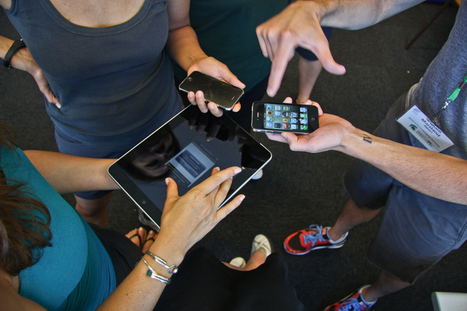
Even Luddites have to admit the iPhone definitely altered the way humanity interacts with its own devices, making Douglas Adams’ cheeky The Hitchhiker’s Guide to the…... Via David Miller, Petra Pollum
Scoop.it!

Dropbox, the popular cloud-based storage service, updated its iOS app last night, bringing the software to version 1.5.5. The update includes AirPrint support.
Scoop.it!

Smoothboard Air is an interactive whiteboard software that turns multiple mobile devices such as iPads and Android Tablets into collaborative interactive surfaces for classrooms. Via Heath Sawyer
Scoop.it!
It's school Jim, but not as we know it.
Wondering what BYOD means or if your school is ready for it? In this 8-minute Pedagogical Quickie, I present some of the many advantages and limitations of this concept for education. Via Richard Jones
Scoop.it!

Last year, with a fearless group of 10th graders in Katrina Kennett’s English class at Plymouth South High School, we attempted to transform the traditional research process to a completely paperless one using a fresh new cart of iPads.
Scoop.it!
Tech News- Tech Dune is a site with gadgets, humor, tech reviews, videos, and even more content capturing the technology that everyone wants. Via Ana Cristina Pratas, Mª Jesús García S.M.
Scoop.it!

Total Recorder is a multi-purpose audio and video recording program with a wide range of editing and conversion capabilities. Via Kathleen Cercone
Scoop.it!
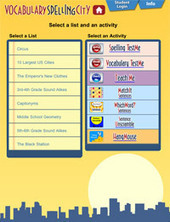
The VocabularySpellingCity app has word games, vocabulary games, and spelling games from the popular SpellingCity website. This is a great free app for lower levels to develop their spelling and vocabulary. Lots of audio support and interactive games. Via Nik Peachey, Petra Pollum |
Scoop.it!

I am investigating this currently.Richard Byrne provides good info in this article. Via Nancy Jones, Inge Stocker
Scoop.it!

Esto de hacer posts con las aplicaciones indispensables para Android es un tema que ya se ha tratado anteriormente, cierto. Via Mariano Fernandez S.
Scoop.it!
Presentation by Jackie Gerstein for integrating the flipped classroom approach in higher education with a focus on experiential learning with videos and other content supporting not driving the instruction.
Read all the details of the experiential learning cycle and design using digital media on Jackie's blog here: http://usergeneratededucation.wordpress.com/2012/05/15/flipped-classroom-the-full-picture-for-higher-education/
And a video illustration in which she explains the design and cycle of learning can be viewed here: http://usergeneratededucation.wordpress.com/2012/07/
Via Anne Whaits, Ana Rodera, Paulo Castro Verbena
Scoop.it!

When creating a timeline for a project or important event, it is best to use helpful tools or templates so that the timeline can be created accurately without any kind of miscalculations or flaws... Via Baiba Svenca, Timo Ilomäki 
Susan's curator insight,
June 18, 2013 2:57 AM
Timelines are a fantastic way to get language students to express themselves without the need to write long and laborious sentences or paragraphs. Short, simple and precise! 
Linda Kaiser, PhD's curator insight,
June 19, 2013 3:55 PM
Need to develop timelines for your technology-infused lessons? Here are a few resources you might want to try out.
Scoop.it!

"Marc Prensky has written a number of books about the integration of technology and education. In his latest, Brain Gain: Technology and the Quest for Digital Wisdom, Prensky argues that technology can be used to enhance the human brain and improve the way we process information. In a recent interview, Prensky spoke about what teachers and education leaders can do to get more out of technology." Via EDTECH@UTRGV
Scoop.it!

Imation has relaunched the Stealth Zone embedded Windows on USB stick product it acquired when buying Canadian firm MXI Technology last June. Now called Stealth Zone Microsoft Windows Embedded Standard (MWES), the system remains a way of carrying the Windows OS around on a USB stick, booting into a secure Windows 7 or XP shell from a host PC. The key innovation is the Stealth Zone's cold booting approach which dispenses with the need for virtualization, ideal for remote workers who need to wall off their home and work use of Windows. The technology can configure device drivers automatically and, unlike virtualized alternatives, imposes no memory or resource limitations while encrypting user data and the OS itself using 256-bit AES. Via Charles Tiayon
Scoop.it!
Free Technology for Teachers: Symbaloo Mobile - Share & Access Your Favorite Resources On Any Device
Back in July when Google announced the closure of iGoogle I recommended trying Symbaloo as an alternative. Since then I have heard from many readers who are happy with Symbaloo. Last week Symbaloo launched a new iPad-friendly version. The iPad-friendly version gives you access to all of your favorite Symabaloo bookmarking and sharing options in a format optimized for tablet display. Via Evdokia Roka
Scoop.it!

Technology and education are pretty intertwined these days and nearly every teacher has a few favorite tech tools that make doing his or her job…...
Scoop.it!

Review: Note Taker HD for iPadMacworldSoftware Garden's Note Taker HD is an application for your iPad designed to help you quickly capture notes using your finger, a stylus, or keyboard. Via Jon Samuelson
Scoop.it!

Flipbook! is an application that allows people to draw simple frame by frame animations, view them, save them, export them to PDF and share them with others via e-mail. Via Baiba Svenca, Renee Maufroid 
K Gaffrey's curator insight,
March 22, 2013 2:10 PM
Create simple animations with your very own simple drawings with Flipbook! Even share you animations with others through e-mail! 
Mrs. Hardin's curator insight,
March 24, 2013 9:20 PM
Use Flipbook to create an animated 'slide show' & share them.
Scoop.it!
Tips on using Evernote in a 1 to 1 iPad classroom setting.
Scoop.it!

Explore and listen to the 100 songs that changed the world and listen to exclusive music free. Via David M |






