


That sounds about right! Create short, beautiful, looping videos in a simple and fun way and share on Twitter. Available for iPhone and iPod touch. You can download it here. This short video from T...
Via SHIFT eLearning

 Your new post is loading...
 Scoop.it! That sounds about right! Create short, beautiful, looping videos in a simple and fun way and share on Twitter. Available for iPhone and iPod touch. You can download it here. This short video from T... Via SHIFT eLearning No comment yet.
Sign up to comment
Scoop.it!

If you're short on time but looking to learn about some of the coolest and most engaging web 2.0 tools, you're in luck! From Today's Meet to Socrative, there's plenty here for a teacher on the go but in the know. Via Paksorn Runlert 
Casey Smith's curator insight,
February 28, 2013 12:29 AM
Website for teachers looking to incorporate Web 2.0 into their classrooms. This website has a wide range of webpages and online resources to keep up with the growing use of technology within the classroom. This website consists of Web 2.0 tools from creating videos through to Newseum which shows hundreds of front pages of newspapers from all over the world.
Scoop.it!

There's a whole galaxy of terminology that you should know about when it comes to education technology. From PLNs to Blended Learning to Synchronous Online Learning... it can get overwhelming. Via Gust MEES, R.Conrath, Ed.D. 
Patricia Christian's curator insight,
February 3, 2013 8:14 PM
This is a nice visual summary of terms in education technology. 
Roberto Ivan Ramirez's curator insight,
May 7, 2013 8:10 PM
Implementos tecnológicos móviles y mezcla de entornos presenciales y virtuales para potencializar el aprendizaje, van a requerir de estrategias eficaces pedagógicas variadas y diversas para cada caso y situación concreta educativa.
Scoop.it!

Gilles Le Page's curator insight,
January 25, 2013 12:13 AM
Un document superbe sur un thème utile (en englais) 
Louise Robinson-Lay's curator insight,
January 25, 2013 11:23 PM
Overview of social bookmarking and annotation soft ware. 
Terri Rice's curator insight,
July 27, 2014 7:07 PM
good table of contents for those of us still learning all of the social media sites.
Scoop.it!

Minna Kilpeläinen's curator insight,
January 26, 2013 5:49 PM
Watch the tutorial! This Collaborative Visual Board seems to be a great tool for virtual and face-to-face classrooms and meetings. Really worth trying.
Robin Good´s insight tells you more. 
Lauren Kelly's curator insight,
February 20, 2013 12:54 AM
This is another interesting platform that allows for visual collaboration. These sorts of posts make me want to narrow down my topic to just online visual collaboration and information sharing!
Scoop.it!

Le code QR, cette variante du code-barre qui peut être lu par la plupart des smartphones sera sans aucun l’un des outils de marketing mobile le plus utilisé en 2011. Via Audrey Bardon, Jimi Paradise, michel verstrepen, Mary Dantes 
Laurence Bernard's comment,
April 3, 2013 11:31 PM
un exemple+ un outil ici http://zepad.absolutenglish.org/?p=239
Scoop.it!

See the Glog! Presentation Feature: features, glogster edu, présentation, presentation | Glogster EDU - 21st century multimedia tool for educators, teachers and students Via Baiba Svenca, R.Conrath, Ed.D., Rui Guimarães Lima 
Baiba Svenca's curator insight,
January 20, 2013 12:04 PM
Deena Kelly has put together a great glog about how to use Glogster for creating presentations. You'll find a tip for every step you should take to produce your own glog and use it as a presentation. 
Christine Bushong's curator insight,
January 28, 2013 12:49 PM
I used Glogster EDU for the school wiki home page with the graphics used as links to wiki pages. It's easy and effective. This looks like an interesting way to use their graphics and link together glogs in a series to create a presentation. Worth trying. 
Rebecca Jay's curator insight,
November 28, 2015 8:14 AM
I can see how this is a user friendly way to organize and have all material in one place. I would love to have students make their own for a project, even recording their own video content to embed.
Scoop.it!

Mind8 is an easy to use Mind Map Application for Windows 8. You can use Mind8 for your thoughts, ideas, for taking notes, for your studies or as an organizer for your business tasks. It's an all-inclusive companion that helps you manage your daily life in every situation. The integrated synchronizing feature keeps your Mind8's updated across all your computers. Via Baiba Svenca
Baiba Svenca's curator insight,
January 19, 2013 2:46 PM
If you have Windows 8 on your PC, you may try using Mind8 app for creating mind maps, organizing your ideas and notes. Free application.
Scoop.it!

"The influx of technology has brought the problem of classroom cheating front and center as we all discuss how much technology is enough for classrooms... Paper “cheat sheets” once concealed in a student’s back pocket are being replaced by digital cheat sheets stored on a smartphone." Via EDTECH@UTRGV 
Julian S's curator insight,
November 3, 2014 6:46 PM
During my time teaching high school students, there was a quick learning curve as to the use of technology in the classroom, and how incredibly talented our students can be when they have a device accessible during work or test time.
Scoop.it!

Learning in Hand Podcast Episode #25: QR Codes is all about those two-dimensional bar codes that ... Via Katharina Kulle
Scoop.it!
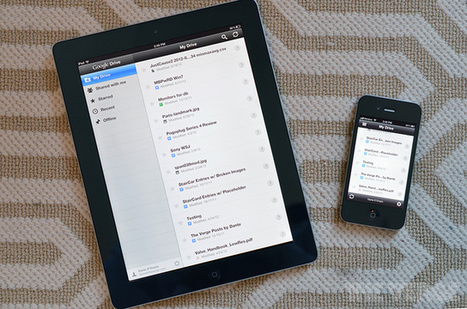
As iPads proliferate in schools around the world, and students as well as teachers create more and more content, questions about what to do with all of those learning objects have arisen. Via Bmw |
Scoop.it!
...a selection of videos I have done over the years, focusing on the educational uses of Second Life.... Via Dr. Doris Molero, juandoming
Scoop.it!
French Lesson 1. Learn French with Fun French lessons! The first in a fun animated Learn French lesson series. Full Playlist: http://www.youtube.com/playlist... Via BilingualStudyGuides 
BilingualStudyGuides's curator insight,
January 25, 2013 6:17 PM
Useful vocab/phrases for the classroom
Scoop.it!

McDonalds VS Starbucks comparison infographic. Ray Kroc and Howard Schultz origins, original locations, number of locations and more. Via Kath Lok
Scoop.it!

Le créateur de Wikipedia fait le point sur ses projets après avoir récolté 25 millions de dollars de dons pour continuer à développer l'encyclopédie en ligne.
Scoop.it!
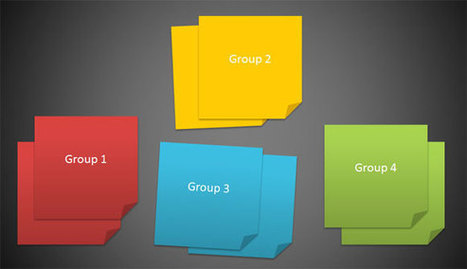
Post its were designed for temporarily attaching notes to documents and other surfaces but nowadays this concept has been spread among many different sectors, topics and interests. In computers and IT, post its can also be represented as images and using shapes in PowerPoint is a good way to represent post it in a slide and then save them as picture. Via Baiba Svenca
Baiba Svenca's curator insight,
January 22, 2013 3:50 PM
An easy and effective way to use your favourite sticky notes - in presentations! Sort your information, organize your content, bring order to your slides.
Scoop.it!

Every unnecessary feature has been kept out without exception. Click on the button or push the “Print Screen” key on your keyboard and the screen will be directly saved as an image — Done! Via Baiba Svenca
Baiba Svenca's curator insight,
January 22, 2013 12:34 PM
Screenshoter has 2 great features - it is free and it supports eight languages.
Scoop.it!
A simple guide on how to use this great animation tool for the participants of the 2013 TESOL EVO Workshop on Digital Storytelling for Children Via Luísa Lima
Scoop.it!

BYOD (Bring Your Own Device) can Work Well When Approached Properly. Since I wrote the controversial post, 5 Reasons Why BYOD is a Bad Idea over the summer, Via Timo Ilomäki
Scoop.it!
Does your learners prefer acquiring and processing information via images, pictures, maps, graphs, charts, illustrations, and other visual aids? Since they are Via Christopher Pappas, Maritza Pérez Hdez , juandoming
Scoop.it!

phrase.it is a free online image editor which lets you add cartoon style speech and thought bubbles to your images. It's extremely easy to use and you will have great looking results within minutes. Via John Dalziel, William Machado, Kathleen Cercone, Jim Lerman, michel verstrepen 
Krešimir TOMAS's curator insight,
January 13, 2013 6:57 AM
On line program za delat strip oblačke na slikah 
Nancy Jones's curator insight,
January 19, 2013 10:09 AM
This would be enthusiastically received by students, know doubt, who could then extend their visual literacy as well.
Scoop.it!

The Trading Card tool gives students an alternative way to demonstrate their literacy knowledge and skill when writing about popular culture texts or real world examples. This interactive allows students to create their own trading card about a real or fictional person, place, object, event, or abstract concept.
Via Nik Peachey, sarspri 
Margareta's curator insight,
January 8, 2013 5:29 PM
I think this is a great idea for encouraging game-based learning.
Scoop.it!

A good summary/overview of CC licenses and use for photos. Via C.Rathsack, Ana Rodera, Juergen Wagner, Gisele Brugger 
Sarah johnstone's curator insight,
May 19, 2015 4:57 AM
Great infographic - clear and helpful rules for CC Licences for photo sharing on the net. �� Check it out! |






