


Via Robin Good

 Your new post is loading...
 Scoop.it! Here some basic features in Audacity to record your speeches, seminars and other texts. Via AgileBelma
Scoop.it!

eHabilis, la plataforma de e-learning en la nube. Una solución llave en mano para tu proyecto de formación virtual. Via Mariano Fernandez S. 
Maite Martin G.'s curator insight,
October 27, 2013 8:20 AM
eXe (eLearning XHTML editor), es una potente herramienta e-learning de código abierto (Open Source) que permite a los docentes la creación de contenidos web educativos sin la necesidad de ser expertos en programación HTML o XML. Además, les facilita el diseño, desarrollo y publicación de esos contenidos de forma didáctica, simple y sencilla.
Scoop.it!

Gayleen jackson's curator insight,
October 29, 2013 3:16 AM
Like the options available as a LMS with students
Scoop.it!

Il existe de nombreux services en ligne gratuits sur le Web pour créer des nuages de mots-clés multiples et variés. Via Christine Berthilier, Geemik Maria Açucena Da Silva, Bhushan Thapliyal
Scoop.it!

In a Moodle course, the resources and activities can create a long course home page. If a course has many resources and activities, the user will scroll endlessly to find content. This problem is referred to as the “scroll of death.” The scroll of death is inefficient screen navigation, leading to user frustration as they have a difficult time finding resources and activities. While a course builder will never be able to get away from using a plethora of resources and activities within a Moodle course, there are ways to make finding course content easier. In this post, I will show you two tricks to defeat the “scroll of death,” making your course easier to navigate, more attractive, and better organized. Via Miloš Bajčetić
Scoop.it!

If you like Choose your Own Adventure stories then this version of the Moodle Tool Guide, originally created by Joyce Seitzinger is a great way to explore different pedagogical scenarios to discove... Via Raju Patel
Scoop.it!

Tweet Tweet Upon hearing that they will have to read another book students usually roll their eyes and moan in disagreement. So to make the reading process more fun for them we let them chose their... Via Ana Cristina Pratas
Scoop.it!

10 Google Drive Tips & Tricks For Students Via Ana Cristina Pratas, Roxane Harrison, Marylin Alvarez 
Josh Harris's curator insight,
October 9, 2013 2:29 PM
Esepcially good for folks who are in newly converted #GAFE districts, and in 1:1 settings. 
Alfredo Corell's curator insight,
October 12, 2013 8:09 AM
Like the tractor beam on the Death Star, the nebulous world of networked online storage is slowly pulling in all digital information. If you haven’t yet gotten on board, 2013′s Google Drive would be a perfect place for a college student to start, whether for educational purposes like collaborating on class projects, or storing all those Instagrams of your food. What follows are some of the coolest tips and tricks Drive users have found in the last few months and shared with the rest of us.
Scoop.it!

Profdoc's curator insight,
October 28, 2013 5:16 AM
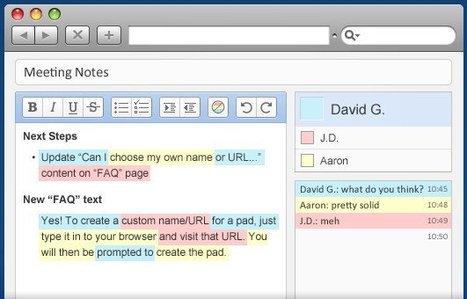
Je vous recommande aussi Framapad, un très bon éditeur de texte collaboratif en ligne : https://framapad.org/ 
Odile Dupont's curator insight,
October 28, 2013 3:25 PM
une autre déclinaison de Etherpad depuis son rachat par Google. Un autre Framapad ... 
carldowse's curator insight,
January 18, 2014 5:06 AM
Can be used in the classroom for 'live' collaborative writing with the updates projected onto a screen for the group to see as the contribute
Scoop.it!
Videotutorial que indica el proceso para la Instalación de eXeLearning en Mac, y la generación de un Objeto de Aprendizaje en forma de SCORM. Se muestra también cómo agregar dicho paquete SCORM en Moodle. Via Gumersindo Fernández, mertxejbadiola, juandoming, Ramon Aragon
Scoop.it!

Twice in the last two days at the WLMA 2013 conference I demonstrated how to create audio slideshows on YouTube. Creating audio slideshows in YouTube is a good alternative to using Animoto... Via Baiba Svenca 
Tony Gough's curator insight,
November 4, 2013 3:53 AM
If you have a YouTube channel, you might want to check this out! |
Scoop.it!

Para los que no son nativos digitales, es fundamental estudiar cuáles son los riesgos de Internet, para así poder educar a nuestros hijos en su prevención
Via JAG 
Maria Claudia Londoño D.'s curator insight,
November 6, 2013 9:09 PM
Debemos informarnos para orientarles en el uso apropiado y brindarles elementos de juicio frente a los riesgos.
Scoop.it!

We've compiled a list of mind mapping tools to help you organize, summarize and visualize information. Via Rhondda Powling 
Rhondda Powling's curator insight,
October 27, 2013 9:34 PM
Brainstorming and mind mapping offer a powerful ways to connect students. If they are writing collaboratively, pre-writing activities still apply and should be collaborative as well. The tools mentioned are currently among the best to create mind maps online or on your desktop. They offer collaborative options. There is a list at the end of the post of many iOS and Android mind mapping apps that may be interesting for these devices.
Scoop.it!
Profdoc's curator insight,
October 28, 2013 5:16 AM
Je vous recommande aussi Framapad, un très bon éditeur de texte collaboratif en ligne : https://framapad.org/
Odile Dupont's curator insight,
October 28, 2013 3:25 PM
une autre déclinaison de Etherpad depuis son rachat par Google. Un autre Framapad ...
carldowse's curator insight,
January 18, 2014 5:06 AM
Can be used in the classroom for 'live' collaborative writing with the updates projected onto a screen for the group to see as the contribute
Scoop.it!
This session will provide you with the foundation you need to get started in mobile gaming development. We'll look at the major environments for delivery, selec Via ThePinkSalmon, Javier Sánchez Bolado
Scoop.it!

Jannely Medina's curator insight,
October 31, 2013 11:15 AM
Muy interesante, ya que se evidencia el avance de la tecnología.. Es especial para todas aquellas personas que estudian a distancia y que necesitan comunicarse con compañeros de grupo.. 
Moses B. Tambason's curator insight,
November 9, 2013 2:41 PM
More people are running to charity tube to post free videos and watch free videos than posting on you tube. Try posting at charity tube and you will never leave. http://www.africatube.net/ More visitors and more video views. Don't take our word for it, try it. Post one same video on youtube and put it on http://www.africatube.net/ and return ater five hours and compare the viewers rate and decide for yourself. Create your very own group or forum and control who watch it and invite everyone to watch the video. Above all, post video in English or in any language and viewers can watch video description in their own language. Try it and let us know your experience. Above all it is absolutely free like youtube 
Mrs. Amstutz's curator insight,
November 11, 2013 4:26 PM
Could be a powerful way for students and educators collaborate globally
Scoop.it!

With Moodle being voted the best Course Management System in Top 100 Tools for Learning 2012*, we’ve put our heads together to come up with 10 reasons to love Moodle.1. It’s free! Via Rafael Scapin, Ph.D., Juergen Wagner, Gisele Brugger
Scoop.it!
"Linda Dougherty's insight: If you are a teacher hesitate to use Google Docs, this will take you step by step with templates and ideas. Online webinar recording sponsored by EasyBib. Of course, check out Susan Oxnevad's website Cool Tools for 21st Century Learners - Google Docs http://d97cooltools.blogspot.com/p/google-docs.html" Via Susan Oxnevad, John Purificati 
Susan Oxnevad's curator insight,
October 20, 2013 4:06 PM
Thanks for digging this up and sharing @ljdougherty!
Scoop.it!

A teacher called my attention to the filters when she reported that the automatic linking of references to chapter/topic activities in the chapter/topic text stopped working for her with the upgrad... |









A useful guide to the art of digital archiving.
Be sure to check out Robin Good's comments below.
Interesting post about archieving digital documents in a realiable way